



- What is a GST Invoice?
- What are the key fields a GST-compliant invoice should have?
- TallyPrime’s GST Invoicing Software features
- Who should issue a GST Invoice?
- Creating invoices in a GST Invoicing Software
- Printing invoices in a GST Invoicing Software
- Frequently asked questions
GST invoicing software helps businesses create, manage, and file GST‑compliant invoices automatically, ensuring correct tax calculation, e‑invoice generation, and seamless integration with accounting records. TallyPrime’s GST invoicing solution does all this in seconds, with built‑in intelligence to prevent errors.
What is a GST Invoice?
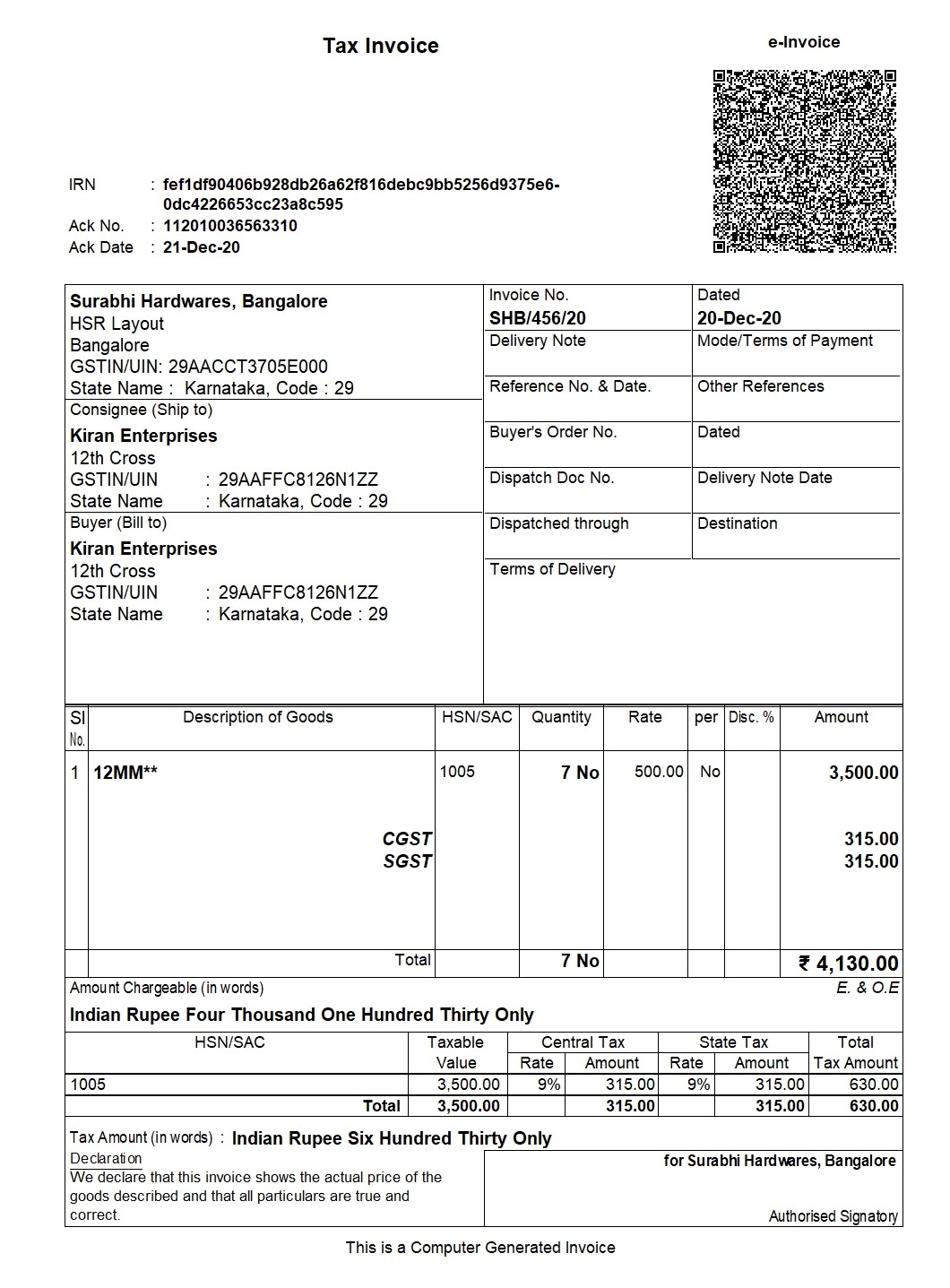
Tax invoice or GST Invoice is required to be issued by a registered taxable business showing the description of goods and/or services, value and tax, at the time of supply. It acts as the evidence of the existence of a transaction of supply of goods and/or services. Such invoices issued by the registered taxable person is an essential document to establish a time of supply and for the recipient of goods and/or services to avail input tax credit.
Key Features of TallyPrime's GST Invoicing Software
- Compliant tax invoice: Creating GST-compliant invoices is one of the critical components for any business. TallyPrime helps you create accurate and GST-compliant invoices in few seconds
- Generate different types of invoices –: As a business owner, you might be making different types supplies such as exempt supply, exports, SEZ supplies etc. which requires different invoice treatment. With TallyPrime software, you can create different invoices like tax invoices, bill of supply, SEZ invoices, and much more. TallyPrime, a complete GST software, has in-built intelligence to generate the right type of invoice for the transaction you are recording
- Connected e-invoicing and e-way bill solution: Being a completely connected solution generating e-invoices and e-way bills is a seamless process. All you need to do is record an invoice in your usual way, and TallyPrime will automatically generate the e-invoice and e-way bill and captures details such as IRN. e-way bill number and QR code on the invoice
- Auto-calculate GST: With TallyPrime, the GST calculations are auto-calculated so that the bills your produce are error-free.
- Prefill GST details for faster data entry: With TallyPrime, you can pre-define the voucher template so that while billing, you can choose the product details, and the rest of the details will be pre-captured, thereby making the entire billing faster
- Personalize invoice: With multiple invoice configurations and options in TallyPrime, you can personalize the invoice according to your preference, add company logo, and much more as per your requirement
- Price list: With TallyPrime, you can easily manage multiple product price lists. So, whether you are billing to a retailer, distributor, or wholeseller, you can easily maintain different price levels, thereby ensuring error-free and faster billing
- Built-in capabilities to Prevent errors: TallyPrime's built-in intelligence to understand the nature of supply, , rate of tax, on what value it has to calculate etc. to eliminate complexities and ensure error-free invoicing
- Supports all types of GST transactions: Depending on your business requirement, TallyPrime supports different types of transactions like intra-state, inter-state, exports, imports, reverse charge, etc. Additionally, the GST applicable in all these types of transactions is also auto-calculated
- Accurate return filing: With TallyPrime's prevention - detection - correction capability, filing accurate GST returns is a seamless task
- Integrated way of managing books of accounts:. Tally Prime is a business management software that integrates the accounting, inventory and compliance needs of the business. Thus, your invoicing, accounting, inventory, and compliance are always in sync with each other. When this happens, you can be assured that your financial reports give you a wholesome view of your business
- Multiple Business Modules: Being a comprehensive software, TallyPrime comes with multiple business modules such as accounting, inventory, banking, taxation, payroll, user management etc to ensure seamless business operations
- Online Reports: With digitization being the need of the hour, having access to your business is crucial. With TallyPrime, you can access business reports from mobile or any device at any point of time, from anywhere.
What are the key fields a GST-compliant invoice should have?
- Invoice number and date
- Name of the customer
- Shipping and billing details
- Customer and taxpayer’s GSTIN (in case registered)
- Place of supply
- HSN code/SAC code
- Item details like description, quantity, unit, the cumulative value
- Taxable value and discounts
- Rate and amount of taxes i.e. CGST/ SGST/ IGST
- Whether GST is payable on reverse charge basis
- Supplier signature
- The word “Revised Invoice” or “Supplementary Invoice” indicated prominently, where applicable along with the date and invoice number of the original invoic
Who should issue a GST Invoice?
As per GST Act, a registered taxable person supplying taxable goods shall issue, at the time of supply, a tax invoice showing the description, quantity and value of goods, the tax charged thereon as prescribed.
Thus, the government has also provisioned free e-invoicing software for small businesses to help them be GST compliant.
How to Create a GST Invoice in TallyPrime
Any invoice generator software should help businesses to create invoices as per the GST rules. Sales under GST can be of two types:
- Local Sales on which CGST and SGST are applicable.
- Interstate Sales on which IGST is applicable.
Before passing a sales entry in TallyPrime, we should first create ledgers relating to sales. Let’s first understand the creation of Ledgers.
One is required to first create the following types of sales ledger in their respective free invoice software and fill in the related information required to create these ledgers:
- Sales related ledgers
- Local sales
- Tax ledgers
- Stock related ledgers
-
- Stock Item name and
- Stock grouping
- Party related ledger
- Sundry debtor/ party Account
Note: Under Party account, you must also mention whether the party is composite dealer, consumer, registered or unregistered dealer.
Creation of GST Invoice in TallyPrime
|
Step 1 |
Gateway of Tally > Vouchers > F8 (Sales). Alternatively, press Alt+G (Go To) > Create Voucher > press F8 (Sales). |
|
Step 2 |
In Party A/c name, select the customer ledger or the cash ledger |
|
Step 3 |
Select common sales ledger wherein the GST rate is not defined |
|
Step 4 |
Now, select the stock items defined with different GST rates, and specify the quantities and rates |
|
Step 5 |
Select the central and state tax ledgers. The GST will be calculated basis the GST rates mentioned in the stock items |
|
Step 6 |
Press Ctrl+O (Related Reports) > type or select GST – Tax Analysis to view the tax details. Press Alt+F5 (Detailed) to view the detailed break-up of tax |
|
Step 7 |
Press Alt+P (Print) > press Enter on Current > and press P (Print) to print |
If you operating on TallyPrime 1.1.3 or earlier, follow the step:
Press Ctrl+I (More Details) > type or select GST – Tax Analysis to view the tax details. Press Alt+F5 (Detailed) to view the detailed break-up of tax.
To create multiple copies:
- Press Alt+P (Print) > press Enter on Current > press C (Configure) > type or select Number of Copies > and press Enter
- Provide the Number of Copies and select the Type of Copy
- Press Esc to return to the Voucher Printing screen
- Press P (Print) to print
How to Print a GST Invoice in TallyPrime
Any invoice maker software will have the provision to print invoices as per the GST rules.
In GST invoicing software, such as TallyPrime an invoice can be printed by just clicking Alt + P in the sales voucher screen. One can even customize the print configuration by pressing F 12.
To configure the printing of your sales invoice:
- Gateway of Tally >Accounting Vouchers > F8: Sales
- In the sales voucher screen, press Alt + P to print the invoice
- If required, press F12 to configure the printing of GST invoice
Businesses will need to adopt invoicing software. Be it a free online invoice software or the best free invoice software, you need to ensure that the invoicing software you use is GST compliant and helps you to carry on your business seamlessly.
TallyPrime’s GST Invoicing Software Features
- Compliant tax invoice creation – Generates GST‑compliant invoices in seconds.
- Multiple invoice types – Tax invoice, Bill of Supply, SEZ invoice, Export invoice, etc.
- Connected e‑invoicing & e‑Way Bill – Automatic IRN, QR code, and e‑Way Bill generation.
- Auto‑calculation of GST – Real‑time tax computation as per GSTN rates.
- Prefill GST details – Voucher templates speed up data entry.
- Personalized invoice design – Add logo, custom footers, and branding.
- Multiple price lists – Manage retailer, distributor, and wholesale pricing.
- Error‑prevention intelligence – Detects supply type, tax rate, and value mismatches.
- Supports all GST transaction types – Intra‑state, inter‑state, export, import, reverse charge, etc.
- Accurate GST return filing – Prevention‑detection‑correction workflow.
- Integrated accounting & inventory – Seamless sync across books of accounts.
- Multi‑business modules – Handles multiple entities under one TallyPrime license.
Additional Capabilities Not Covered Earlier
- Reverse charge handling – Auto‑applies reverse charge tax where applicable.
- Composite supply invoicing – Generates a single invoice for mixed supplies.
- Security & data protection – Role‑based access, audit trail, and encrypted backups.
- Mobile invoicing – Create and view GST invoices on the TallyPrime mobile app.
- Pricing – Flexible subscription plans with a 30‑day free trial.
- Support – 24/7 chat, phone, and email support with dedicated GST experts.
How TallyPrime Stacks Up Against Competitors
| Feature | TallyPrime | Zoho Books | ClearTax |
|---|---|---|---|
| Automatic IRN & QR code generation | Yes | No (manual upload) | Yes (via API) |
| Integrated e‑Way Bill | Yes | No | Yes |
| Multi‑price list support | Yes | Limited | No |
| Reverse charge handling | Yes | Partial | Yes |
| Mobile invoicing app | Yes | Yes | Yes |
| Built‑in accounting & inventory sync | Yes | Separate modules | API‑based only |
Conclusion
TallyPrime’s GST invoicing software delivers a complete, error‑free solution for businesses of all sizes. From automatic tax calculation and e‑invoice generation to seamless integration with accounting and inventory, it removes the complexities of GST compliance. Start your free trial today and experience hassle‑free GST billing.
What is the format of GST invoice?
Watch Video on GST Compliant Invoices – TallyPrime GST Invoicing Software
Read More on GST
GST Software, GST Software for CAs, GST Software for Traders, GST Calculator, GST on Freight, GST on Ecommerce, GST Impact on TCS, GST Impact on TDS, GST Exempted Goods & Services, Reverse Charge Mechanism in GST, GST Declaration
GST Rates & Charges
GST Rates, GST Rate Finder, GST Rate on Labour Charges, HSN Codes, SAC Codes, GST State Codes
Types of GST
CGST, SGST, IGST, UTGST, Difference between CGST, SGST & IGST
GST Returns
GST Returns, Types of GST Returns, New GST Returns & Forms, Sahaj GST Returns, Sugam GST Returns, GSTR 1, GSTR 2, GSTR 3B, GSTR 4, GSTR 5, GSTR 5A, GSTR 6, GSTR 7, GSTR 8, GSTR 9, GSTR 10, GSTR 11














