TRN (Tax Registration Number) is the identification number given to every person registered under UAE VAT. It is mandatory that only persons having a valid TRN should charge VAT on supplies. In such a scenario, it is helpful for registered businesses to ensure that they receive supplies from a registered person, so that they can recover the input tax on the supply fearlessly.
For unregistered persons and consumers also, it is essential to ensure that only a genuine registered person charges VAT on supplies to them. To assist this, the FTA has given the provision to verify whether the TRN mentioned on an invoice or quoted by a supplier is valid. Any person can use this tool to ensure that the TRN quoted by their supplier is genuine.
Why is it necessary to verify TRN in the UAE?
Verifying a Tax Registration Number (TRN) in the UAE is a critical step for businesses to ensure VAT compliance, accuracy in transactions, and protection against fraud. It helps confirm that the supplier or customer is legitimately registered with the Federal Tax Authority (FTA).
- Ensure VAT compliance
Verifying TRNs helps businesses meet regulatory requirements and avoid non-compliance penalties. - Prevent fraud and fake invoices
Confirms the authenticity of trading partners and reduces the risk of dealing with fraudulent entities. - Accurate VAT filing
Ensures correct reporting of input and output VAT, minimizing errors in VAT returns. - Eligibility for Input Tax Credit
Input VAT can only be claimed on invoices issued by valid TRN holders. - Avoid financial and legal risks
Using invalid TRNs can lead to penalties, rejected invoices, and audit issues. - Build trust with business partners
Demonstrates due diligence and enhances credibility in business transactions.
Steps to check whether a TRN is valid
- Visit the FTA Portal.
- Click 'Getting help'. Select TRN Verification from the options available
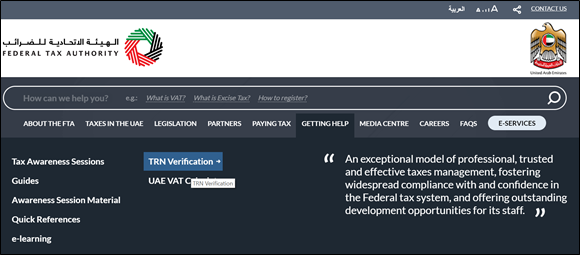
- Enter the TRN you want to check. Enter the security code displayed on the page.
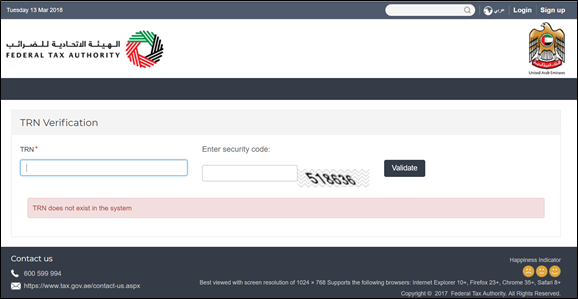
- If the TRN is not valid, you will get the message shown below:
- If the TRN is valid, you will get the message shown below, with the legal name of the entity in English as well as Arabic:
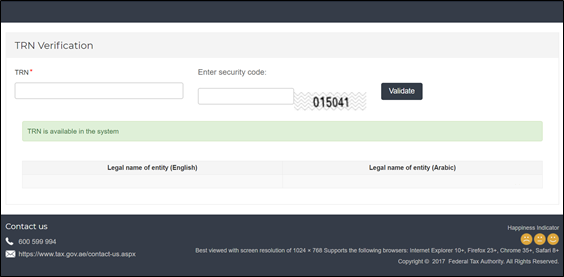
Hence, this tool can be used by all persons in UAE to ensure that they pay VAT only to persons registered under VAT. Previously, only registered users on the FTA website were able to use this tool. However, the FTA has enhanced this tool recently, to ensure that even persons not registered on the FTA website can use this tool to easily verify a TRN.
What to do if TRN verification fails?
If a Tax Registration Number (TRN) fails verification in the UAE, it is important to take immediate steps to avoid compliance risks and potential penalties. A failed verification may indicate incorrect details, an inactive TRN, or possible fraud. Here are the steps to take when TRN verification fails
- Recheck the TRN details
Ensure the TRN has been entered correctly without any typographical errors. - Confirm with the supplier or customer
Reach out to the concerned party to verify and obtain the correct TRN details. - Request supporting documents
Ask for a copy of the VAT registration certificate to validate the TRN. - Avoid processing the transaction
Do not proceed with invoicing or payments until the TRN is confirmed as valid. - Verify again on the FTA portal
Cross-check the TRN using the official Federal Tax Authority (FTA) verification tool. - Maintain proper documentation
Keep records of verification attempts and communications for audit purposes. - Seek professional advice if needed
Consult a tax advisor if discrepancies persist or if there are compliance concerns.
Read more about VAT Registration
VAT Registration in UAE, How to Apply for VAT Registration in UAE, Online Amendment or Change in Registration Details in UAE VAT, Tax Registration Number (TRN), VAT Registration Deadlines in UAE, Who Should Register under VAT, How to de-register or amend a Tax Group under VAT in UAE, How to de-register under VAT in UAE, How to Register as a Tax Agent under UAE VAT, How to register as Tax Agency
UAE VAT
UAE VAT Return, VAT in UAE, How Does VAT System Works, VAT Exempt Supplies in UAE, VAT Return Form 201, Tax Audit under VAT in UAE, Supply under UAE VAT, Supply of Goods and Services in UAE VAT, Input Tax Recovery under VAT in UAE, VAT Return Filing in UAE, VAT Return Filing Period in UAE, Tax Agent under UAE VAT
VAT Payment
VAT Payment in UAE, How to Make VAT Payment using GIBAN, How to make VAT Payment to FTA in UAE, VAT Payment on Import of Goods in UAE, VAT Payment through e-guarantee in UAE, VAT payment on commercial property in FTA Portal, VAT payment on import in FTA portal