










Managing the finances of a fast-growing D2C brand can quickly become a nightmare when you have to match thousands of monthly marketplace orders with actual bank payouts. I’ve seen dozens of online brands lose significant percentages of their margins simply because they couldn't accurately track customer returns or verify if Amazon, Flipkart, or Shopify paid them the correct amounts.
The fix isn't hiring an army of data entry clerks; it's setting up a structured system. By using TallyPrime as your core financial engine, you can fully automate your multi-channel sales sync, match complex platform settlements, and completely eliminate the stress of manual GST compliance.
How do you track thousands of daily orders without losing your mind?
When you sell across multiple channels, your order log grows exponentially. Relying on daily Excel dumps to track these sales usually leads to missing data, duplicated entries, and incorrect inventory numbers.
In my experience, the cleanest way to handle this volume is by integrating your e-commerce platforms directly with TallyPrime via automated connectors or simple bulk imports. Instead of creating a separate ledger for every single retail customer, you can group your daily sales by marketplace or channel (e.g., "Amazon Sales Ledger").
TallyPrime’s real-time dashboard lets you monitor these sales trends, cash inflows, and outstanding receivables across your entire operation at a single glance.
Read more on How TallyPrime Dashboard Helps Business Owners Make Decisions Without Accounting Knowledge
What is the secret to managing e-commerce returns and cancellations?
Returns are an unavoidable reality of the online retail world. The real headache begins when a customer returns an item, but your accounts still show it as a completed sale—meaning you risk overpaying your taxes.
The Golden Rule of E-Commerce Accounting: Never account for a return as a deleted invoice. Always issue a formal Credit Note to maintain a clear audit trail.
When a product comes back to your warehouse, logging a Credit Note in TallyPrime instantly balances your books by:
- Reducing your total taxable sales turnover for the month.
- Automatically adding the item back into your digital warehouse inventory.
- Ensuring you don't pay unnecessary GST on money you've already refunded.
How do you handle marketplace reconciliation and hidden platform fees?
When a marketplace sends you a payout, they don’t send the full retail amount. They deduct their cut first—referral fees, shipping charges, storage costs, and closing fees—before depositing the remaining balance into your bank account.
I once worked with a D2C footwear brand that assumed their bank deposits matched their sales numbers. When we did a deep dive into their platform settlements, we discovered they were losing roughly 8% of their expected revenue to unverified platform fees and phantom returns.
To prevent this asset leak, you can use TallyPrime to perform Marketplace Payout Reconciliation:
- Record the full invoice value when an item sells.
- When the settlement sheet arrives, record the platform charges under a dedicated expense ledger (e.g., "Marketplace Fees").
- Match the net remaining balance against the actual amount deposited into your bank account.
How do you track TCS deducted by platforms?
Under the Indian GST framework, e-commerce marketplaces are required to deduct 1% TCS (Tax Collected at Source) on your net taxable sales before releasing your funds. This money is sent directly to the government under GSTIN.
To ensure you don't lose track of this cash, you need to create a specific ledger in TallyPrime called "GST TCS Receivable." When you log your marketplace payouts, route the 1% deducted amount into this ledger. When it's time to file your taxes, you can easily claim this accumulated balance as a direct credit against your final cash liability on the GST portal.
You can file GST accurately without manual calculations
If your accounting records don't match the data on the GST portal, you'll likely receive a tax notice. For online sellers, the biggest point of failure is mismatching the B2C sales break-ups required by state.
TallyPrime handles this by automatically categorizing your sales based on the customer’s delivery location. It flags any missing details—such as an invalid state code or a missing HSN number—long before you export your data.
The built-in GSTR-1 Reconciliation features allow you to look at your internal books side-by-side with your portal values, making it easy to spot and fix discrepancies before submitting your return.
Read more on TallyPrime Connected GST Returns: Simplifying GST Filing & Compliance
Real-World Example
Let’s look at a fashion startup we'll call Brand X. They were scaling rapidly, processing over 3,000 monthly orders across their Shopify store and Myntra. However, their accounting team was falling weeks behind trying to sort through conflicting spreadsheets. They were manually typing entries, regularly missing returns, and accidentally overpaying their monthly GST by failing to account for platform TCS.
We helped them transition to a structured workflow using TallyPrime. We automated their multi-channel sales imports, created a strict system for tracking returns via credit notes, and set up automated ledger categories for marketplace fees. Within two months, Brand X cut their monthly tax prep time from five days down to just a few hours, while successfully reclaiming over ₹45,000 in monthly TCS credits they had previously been overlooking.
How to record e-commerce sales and marketplace deductions in TallyPrime
Step: 01 Create Masters
Create E-commerce operator Ledgers (Amazon, Myntra, etc) under Sundry Debtors, Registration Type: E-commerce operator, and add GSTIN/GSTUIN. And apply the same process for party ledgers who order through E-commerce platforms.
Step: 02 Pass Sales Voucher Entry
Press F12 in sales voucher and say yes to provide separate Buyer and Consignee details
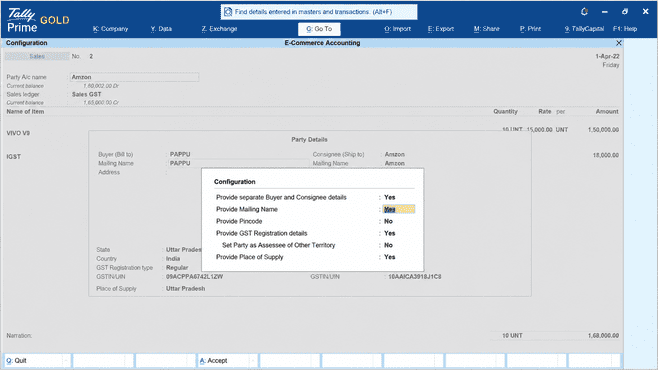
Select the party details in this way.
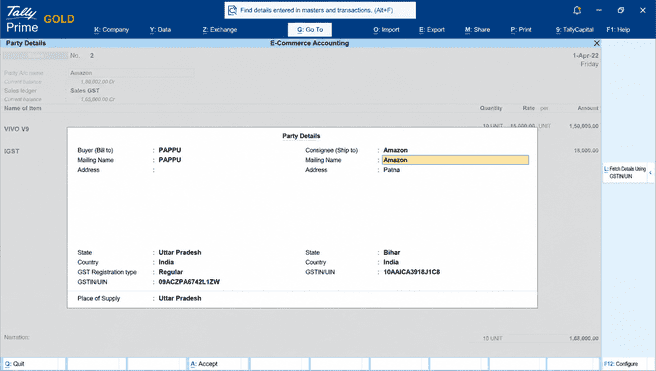
and save the voucher.
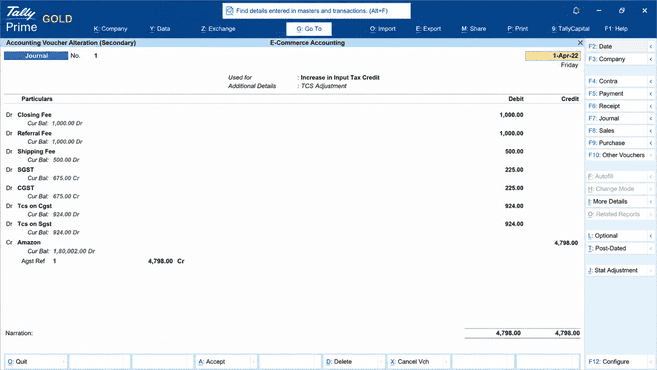
Step: 03 Pass Adjustment entry in Journal Voucher while receiving the payment after deductions.
When participants receive the payment after the deductions as per the E-commerce platform charges, TallyPrime helps to pass adjustment entries in Journal Voucher.
Gateway of Tally - Vouchers - Journal (F7) - Stat Adjustment
Summary Checklist for E-Commerce Sellers
Before you close your books each month, make sure your team completes this quick four-step financial checklist:
- Check Credit Notes: Verify that every customer return matches an official Credit Note to keep your inventory and sales tax metrics accurate.
- Reconcile Payouts: Ensure your marketplace fee invoices match the actual deductions shown on your platform settlement sheets.
- Verify TCS Ledgers: Match your "GST TCS Receivable" ledger balance against the electronic cash ledger on the official GST portal.
- Run Triangulation Reports: Use TallyPrime's internal tax verification report to spot and fix any data errors before generating your final GSTR-1 JSON file.
Conclusion
As e-commerce and D2C businesses grow, managing accounting manually becomes increasingly difficult. From handling thousands of orders and customer returns to tracking marketplace fees, TCS deductions, and GST compliance, even small errors can impact profitability and tax reporting.
TallyPrime helps simplify these challenges by bringing sales, inventory, accounting, GST, and marketplace reconciliation into a single system. With proper recording of orders, returns, platform charges, and TCS deductions, businesses can maintain accurate books, reconcile settlements efficiently, and file GST returns with confidence.














