










For business owners and Chartered Accountants (CAs), handling Inter-Company Transactions and Group Consolidation involves two main challenges: accurately tracking cross-entity sales, purchases, or fund transfers to prevent data duplication, and seamlessly combining individual company records into a single, cohesive Group Company.
When I was working as an Accountant at Jawad Sultan Group LLC in Muscat, Oman, the Jawad group had five subsidiary companies. At that time, the Jawad Group was utilizing Timics Software, which was oracle-based accounting software and made it impossible to generate company-wise Balance Sheet and Profit & Loss Account reports in Jawad Group Balance Sheet. And this was quite a headache for us.
However, TallyPrime provided a comprehensive solution to all these issues and enabled a seamless generation of inter-company transactions and consolidated group reports. As a result, significant time was saved, and errors were reduced to a negligible level.
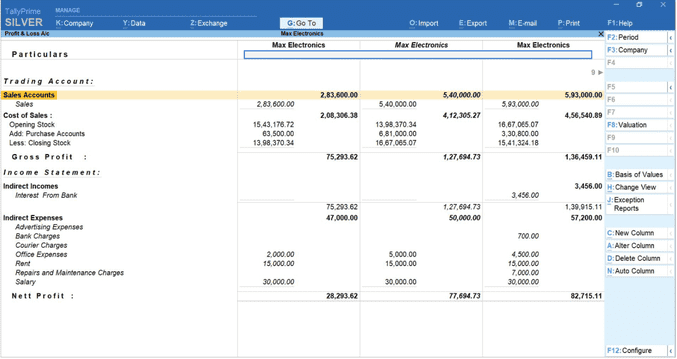
What is a consolidated Profit & Loss statement
A Consolidated Profit & Loss (P&L) Statement provides a complete picture of the financial performance of all companies within a business group. Instead of reviewing each company separately, management can analyze the combined revenue, expenses, and profitability of the entire group from a single report.
Read more about Consolidated Financial Statements – Meaning, Example and Format
How TallyPrime helps
Using the Group Company feature in TallyPrime, businesses can consolidate financial data from multiple companies without manually merging records. Once companies are grouped, TallyPrime automatically combines Profit & Loss figures and presents a consolidated view.
Why do companies need TallyPrime for inter-company transactions and group consolidation?
Managing multiple companies within a group can become challenging when transactions occur between subsidiaries, sister concerns, branches, or associate companies. Without a proper system, businesses often face reconciliation issues, duplicate entries, reporting delays, and consolidation errors.
Eliminating the inter-company reconciliation nightmare
When Company A sells to Company B within the same group, tracking those matching vouchers can easily turn into a manual nightmare. TallyPrime simplifies inter-company transactions by allowing you to maintain distinct ledgers for different units while keeping everything perfectly mapped. This results in:
- Reduced errors: It minimizes manual data entry discrepancies between sister concerns.
- Clear audit trails: Every internal transaction is transparent, making life significantly easier for your auditors when it’s time to review cross-company trade.
One-click group financial consolidation
Creating a consolidated financial statement shouldn't require complex spreadsheet gymnastics. TallyPrime lets you create a 'Group Company' entity in a matter of seconds, instantly merging the financial data of all subsidiary units. This leads to:
- Accurate reporting: It helps you easily identify and eliminate inter-company balances (like internal sales or loans) so your group-level Balance Sheet and P&L statements show the true financial health of your empire.
- Dynamic updates: If you pass a voucher in a subsidiary company, the consolidated group data updates automatically. No tedious manual syncing required.
Unified insights without the toggling chaos
As a business leader, you need a bird's-eye view of your operations without getting lost in the weeds. TallyPrime provides robust multi-company reporting that gives management instant clarity.
- Side-by-side comparison: You can view comparative reports of different companies on a single screen to see which unit is driving growth and which needs a strategy pivot.
- Secure access control: You can easily define user permissions, ensuring branch managers only see their local data while the leadership team retains access to the grand, consolidated picture.
The bottom line: TallyPrime takes the heavy lifting out of multi-entity accounting. Instead of drowning in disconnected spreadsheets, you get a clean, compliant, and consolidated view of your business group with just a few clicks.
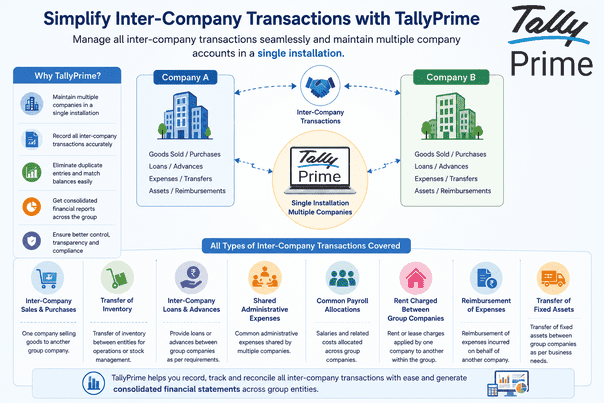
For statutory reporting, each company maintains separate books. However, for management reporting, these transactions often need to be identified and eliminated during consolidation.
How TallyPrime supports multi-company management
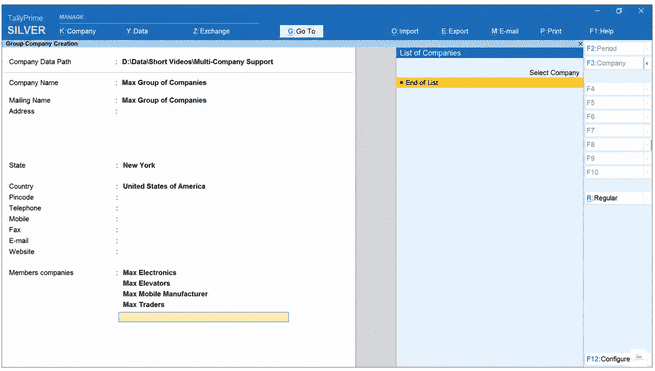
TallyPrime allows multiple companies to be created and managed from a single installation.
This means users can:
- Open multiple companies simultaneously
- Switch between companies instantly
- Access reports across companies
- Maintain independent books for each entity
- Generate company-wise and consolidated reports
This centralized approach significantly improves operational efficiency for business groups.
Recording inter-company transactions in TallyPrime:
Processing inter-company transactions:
Inter-company transactions occur when legal entities under the same parent umbrella exchange goods, services, funds, or assets. In TallyPrime, these transactions must follow strict double-entry ledger principles across both corporate data files.
Inter-company loans and advances:
When Company A advances operational capital to Company B, the transaction requires dual entries across both companies' books to ensure balanced inter-company books.
|
Entity Name |
Voucher Type |
Debit Ledger |
Credit Ledger |
Financial Impact |
|
Company A (Lender) |
Payment (F5) |
Advance to Company B (Group: Loans & Advances - Asset) |
Bank Account |
Creates a current asset representing funds due from Company B. |
|
Company B (Borrower) |
Receipt (F6) |
Bank Account |
Loan from Company A (Group: Unsecured Loans - Liability) |
Creates a current liability representing funds owed to Company A. |
Inter-company sales and purchases:
Suppose: Company A sells goods worth ₹5,00,000 to Company B.
In Company A record:
Company B Account Dr.
Sales Account Cr.
In Company B record:
Purchase Account Dr.
Company A Account Cr.
Both entities maintain independent accounting records while preserving transaction linkage.
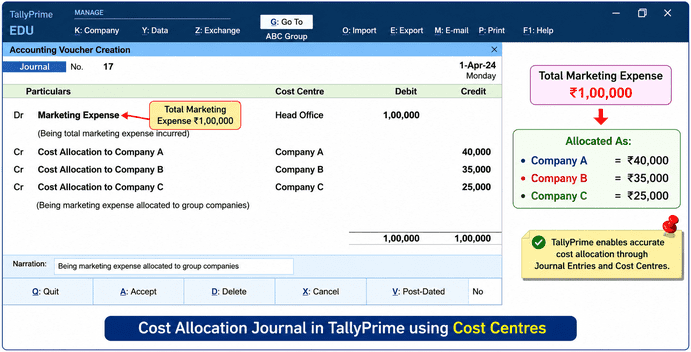
One company may initially bear the expense and later allocate costs to group companies.
Example:
Total marketing expense = ₹1,00,000
Allocated as:
- Company A = ₹40,000
- Company B = ₹35,000
- Company C = ₹25,000
TallyPrime enables accurate cost allocation through journal entries and cost centers.
Inter-Company Asset Transfers
Groups often transfer: Computers, Machinery, Vehicles & Furniture
TallyPrime allows proper accounting for:
- Asset disposal in one company
- Asset acquisition in another company
- Depreciation tracking
- Audit compliance
Managing Inter-Company Balances
One of the most important aspects of group accounting is ensuring balances match between entities.
For example:
|
Company A |
Company B |
|
Receivable ₹10,00,000 |
Payable ₹10,00,000 |
Group company reporting in TallyPrime
Group Company Reporting in TallyPrime fixes this completely. It lets you link your sister companies together so you can see your total financial health in real time—without messing up your individual company books.
Here is a simple guide on how it works and how to set it up.
How to set it up (In less than a minute)
Setting up a Group Company is a one-time process. Once it's done, Tally does all the heavy lifting automatically.
Step 1. Open your companies
Open TallyPrime and load all the individual sister companies you want to group together.
Step 2. Go to Company Creation
Press Alt + K (Company menu) at the top of your screen, then select Create.
Step 3. Switch to Group Mode
On the creation screen, look at the right-hand menu or press Alt + R to select Group Company.
Step 4. Name your group
Type in the name of your parent group (e.g., "ABC Holdings Group") and fill in the basic details.
Step 5. Add the members
Scroll down to Member Companies. Select your loaded companies one by one from the list, then press Ctrl + A to save.
Your Group Company name will now show up in bold on your main screen. You're ready to view your reports!
How to view your group reports
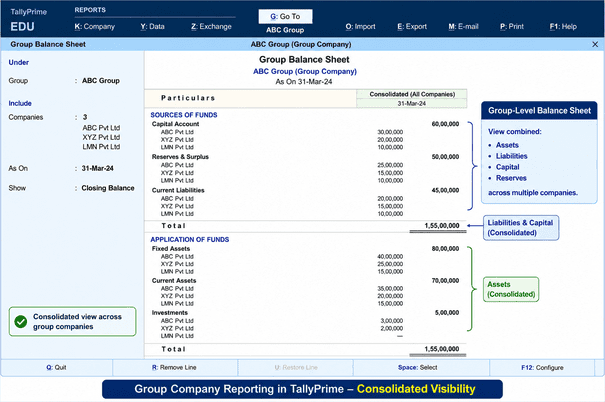
Now for the magic part. Whenever you want to see how your entire business empire is doing, just select your Group Company and use these tools:
- Instant consolidated view: Open the Balance Sheet or Profit & Loss A/c. TallyPrime automatically sums up all the numbers from your branches into one clean report.
- Side-by-side comparison: Want to see who is making the most money? While looking at a report, click the Auto Column button (or press Alt + N). Tally will display each company's numbers side-by-side next to the group total.
- Easy drill-down: If a number in the group report looks weird, just press Enter on it. TallyPrime will instantly show you exactly which subsidiary that amount came from.
The benefit: Because TallyPrime does this virtually, your individual companies stay completely separate for tax and daily operations, but you get the master bird's-eye view whenever you need it. No Excel formulas required!
Watch this video to learn how to view and analyse accounting reports in TallyPrime:
Consolidated Profit & Loss statement
Analyze:
Total revenue, Total expenses and Group profitability
Conclusion
As Indian business groups expand, managing multiple entities efficiently becomes increasingly important. Inter-company transactions, shared expenses, internal funding, and group reporting can quickly become complex when handled manually.
TallyPrime simplifies multi-company accounting by enabling organizations to manage multiple entities from a single installation, accurately record inter-company transactions, monitor outstanding balances, and generate consolidated financial reports. This gives business owners, CFOs, and Chartered Accountants a clear, reliable, and timely view of the entire group's financial performance while improving control, transparency, and decision-making.
Actionable Tips for Better Inter-Company Accounting
- Create a standardized Chart of Accounts across all group companies.
- Use clear naming conventions for inter-company ledgers and transactions. Reconcile inter-company balances on a monthly basis.
- Verify that sales, purchases, loans, and expense allocations are properly matched between companies.
- Review outstanding receivables and payables before generating consolidated reports.
- Maintain supporting documents and approval records for all inter-company transactions.
Inter-Company Transaction Checklist
- Inter-company ledgers created in all relevant companies.
- Transactions recorded in both sender and receiver companies.
- Expense allocations verified and approved.
- Inter-company balances reconciled.
- Duplicate entries identified and corrected.
- Consolidated Balance Sheet reviewed.
- Consolidated Profit & Loss report verified.
- Management reports generated for decision-making.














