










In my experience working with fast-growing businesses, one pattern repeats itself with painful frequency: companies hit a growth milestone, outgrow their basic software, and stall operations for months while migrating to a "bigger" ERP system.
It doesn't have to be this way. TallyPrime handles every stage of your growth without ever requiring a system switch.
Whether you are a 5-person team relying on quick, simple GST billing, a 50-person company managing multi-branch stock and automated payroll, or an enterprise-scale firm with 200+ employees needing deep cost-centre analytics, multi-GSTIN compliance, and group consolidation; TallyPrime expands alongside you. Instead of replacing your accounting platform and forcing your team to start from scratch, you simply unlock advanced capabilities within the exact same system you already rely on every day.
Stage 1: How Does TallyPrime Keep Things Simple for a 5-Person Team?
When you are starting small with 5 staff members, typically a founder, a couple of sales executives, and an accountant, your primary focus is speed, accurate billing, and steady cash flow.
In my work with early-stage firms, the biggest bottleneck is usually getting invoices out on time while staying compliant with local tax laws. TallyPrime keeps the operational footprint minimal at this stage.
TallyPrime’s Key Capabilities at Stage 1:
- Instant GST Invoicing: Generate professional tax invoices, handle e-way bills, and apply correct tax rates within seconds.
- Cash Flow Visibility: Track unpaid customer bills immediately through aging reports to keep working capital flowing.
- Zero-Learning Curve Entry: Sales staff or founders can record vouchers with simple keyboard shortcuts without needing deep accounting expertise.
Here’s a step-by-step guide to generate GST e-invoices in TallyPrime
Real-World Example:
Apex Hardware, a local trading firm, started in 2021 with just four employees. They primarily used TallyPrime for counter sales and basic GST filings. The setup took less than an hour, allowing them to focus entirely on acquiring new customers without worrying about backend software maintenance.
Today, the company has a workforce of over 350 employees, and TallyPrime seamlessly handles everything from payroll to GST compliance. There has been no need to switch to any other platform.
Stage 2: What Happens When You Expand to 50 Staff Across Multiple Branches?
As your business grows to 50 employees, operational complexity spikes. You might open a second warehouse, hire a dedicated sales team, and set up a structured HR and payroll department.
At this stage, many software tools force you to buy third-party add-ons or upgrade to expensive tier structures. TallyPrime handles this expansion seamlessly inside the core system.
TallyPrime’s Key Capabilities at Stage 2:
- Multi-Godown Inventory Management: Track stock across central warehouses, retail outlets, and transit locations in real time.
- In-House Payroll: Manage salary processing, attendance, tax deductions (PF, ESI, PT), and payslip generation directly from your accounting vouchers.
- User-Level Security: Assign role-based access so warehouse managers only see stock, while accountants handle financial ledgers.
Read more on how TallyPrime works for multi-location inventory with batch and expiry tracking
Real-World Example:
Verda Logistics grew from 8 to 45 staff members in three years, adding three distribution centres. Instead of buying a separate inventory management tool and HR software, they simply enabled TallyPrime’s Godown Management and Payroll features. Their HR lead automated monthly salary runs for 45 employees in a single afternoon.
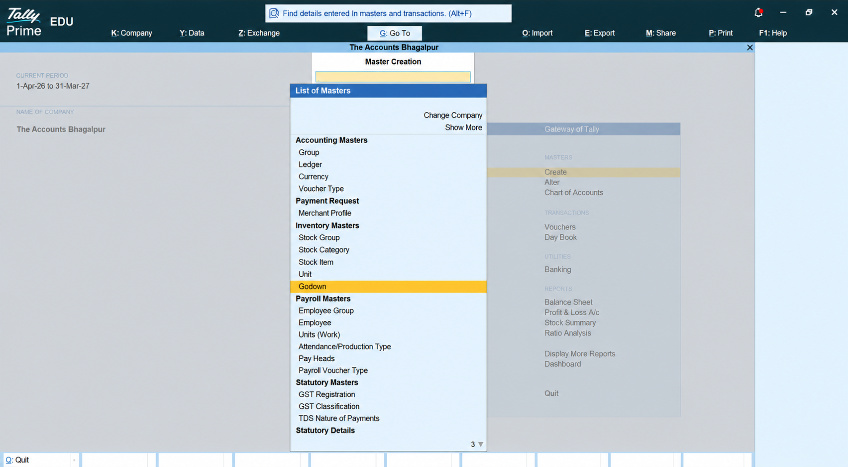
Create Godown in TallyPrime: Gateway of TallyPrime →Create→Godown
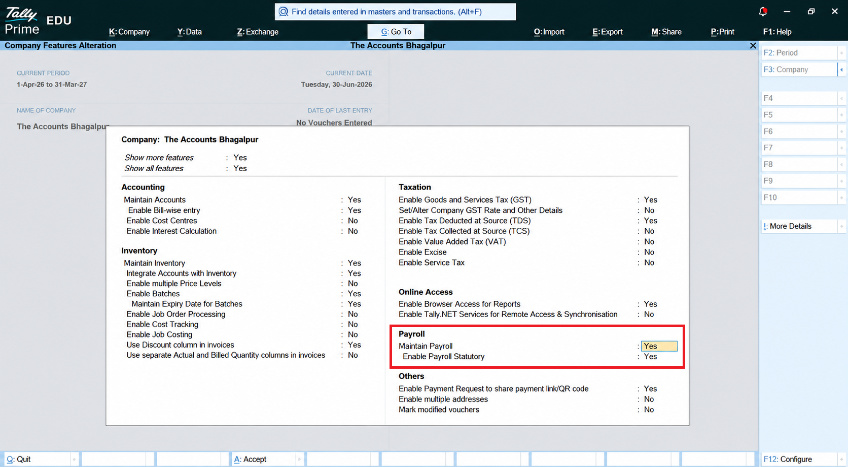
Enable Payroll in TallyPrime: Gateway of TallyPrime →Company (Alt+K)→Features (F11)→Payroll, Set Yes, Maintain Payroll & Enable Payroll Statutory
Stage 3: Can TallyPrime Support Enterprise Needs for 200+ Employees?
When your organization reaches 200+ employees, you are operating at enterprise scale: managing multiple legal units, regional offices, multi-state GSTIN registrations, and strict board-level financial reporting.
This is the phase where enterprise consultants often push for full ERP migrations. However, TallyPrime offers advanced corporate governance and multi-entity control built right in.
|
Enterprise Requirement |
TallyPrime Capability |
Business Outcome |
|
Multi-state tax filings |
Single-company multi-GSTIN return generation |
File GSTR-1 & GSTR-3B for every state branch independently without duplicate software setups |
|
Cost centre analysis |
Project and department profit/loss tracking |
Monitor exact revenue vs. expense for individual projects sales teams, or branches |
|
Consolidated financials |
Group company aggregation |
Instantly combine books across multiple parent and subsidiary entities for board reporting |
|
Audit compliance |
Audit trail (Edit Log) support |
Complete traceability for every transaction change to meet statutory audit demands |
TallyPrime’s Advanced Capabilities at Stage 3:
- Multi-GSTIN Management: Record vouchers for multiple state registrations within a single company file and generate branch-wise or combined GST reports.
- Cost-Centre Profiling: Allocate expenses to specific projects, business heads, or regional teams to identify profit drivers.
- Remote & Cloud Access: Allow field staff, regional branch managers, and external auditors to securely log in via TallyPrime Cloud Access.
Practical Checklist: How to Scale TallyPrime at Your Own Pace
If you are currently expanding your business, use this simple framework to unlock capabilities step-by-step:
- Audit Your Current Usage: Identify which built-in features (e.g., Godowns, Cost Centres, Payroll) are turned off in your F11: Features menu.
- Standardize Master Data: Ensure ledger names, tax heads, and stock categories are clean and standardized across branches before enabling multi-branch reporting.
- Configure User Security Roles: Restrict data entry rights based on employee designations as your head-count expands.
- Leverage Group Companies: Create a consolidated Group Company structure once you add independent legal entities or sister firms.
Conclusion
Scaling a business is challenging enough without the added headache of replacing software systems midway through your journey. In my work across various sectors, the businesses that scale most efficiently are those that maximize their existing tools. By leveraging TallyPrime's modular growth capabilities—from basic billing to multi-GSTIN consolidation and cost-centre analytics—you get an enterprise-grade backbone that stays consistent, reliable, and familiar at every milestone.














