










Why stock management feels like a headache
Managing inventory is hard when stock is spread across different locations or goes bad quickly. Many businesses lose a lot of money because they count stock by hand. When you do it manually, it is easy to lose track of items or miss products that have expired.
TallyPrime fixes these problems in two main ways:
- Multi-location tracking: It shows you exactly where your stock is stored across all your warehouses.
- Automated batch alerts: It warns you before products expire so you can sell them in time.
Switching to TallyPrime gives you a clear, real-time view of your inventory. This ensures you don't waste money and that every single item is accounted for from the day you buy it to the day you sell it.
What are godowns and why do I need them?
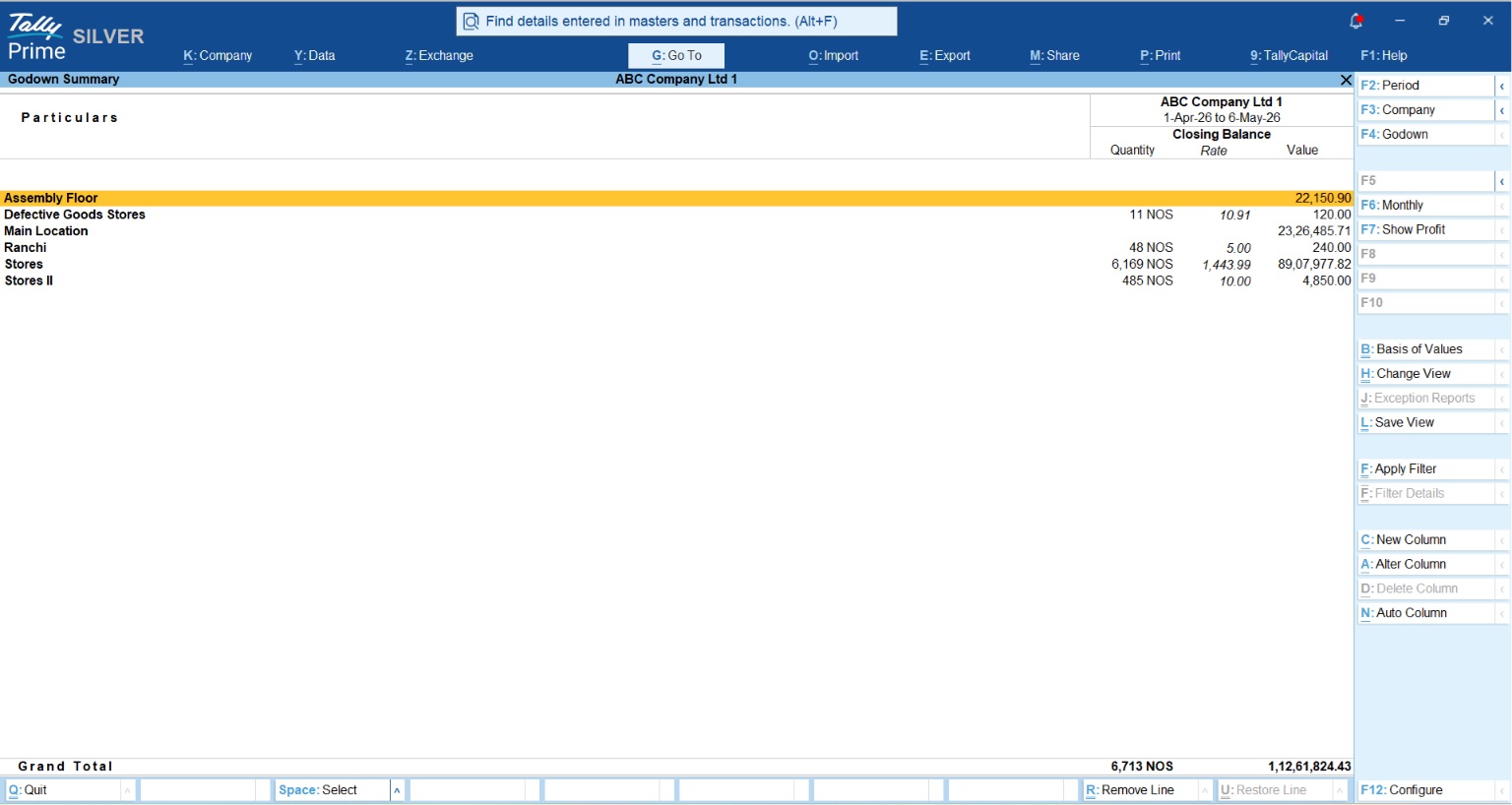
In TallyPrime, a 'Godown' is simply any physical location where your stock resides—be it a central warehouse, a retail shop floor, a specific rack, or even a cold storage unit. Beyond simple storage, using the Godown feature is the only way to ensure proper Inventory/Accounting integration, allowing your financial statements to reflect the true physical state of your business.
Key benefits of multi-location tracking include:
- Branch-wise Reporting: Instantly view stock levels for specific sites like "Mumbai Warehouse" or "Delhi Retail."
- Internal Control: Tally allows you to print Godown addresses directly on Stock Journal vouchers, providing a clear paper trail for movement.
- Audit Compliance: Provide auditors with precise, location-based evidence of stock holdings.
- Shortage Detection: Identify exactly which branch is running low to optimize replenishment cycles.
How do I move my items from the warehouse to the shop?
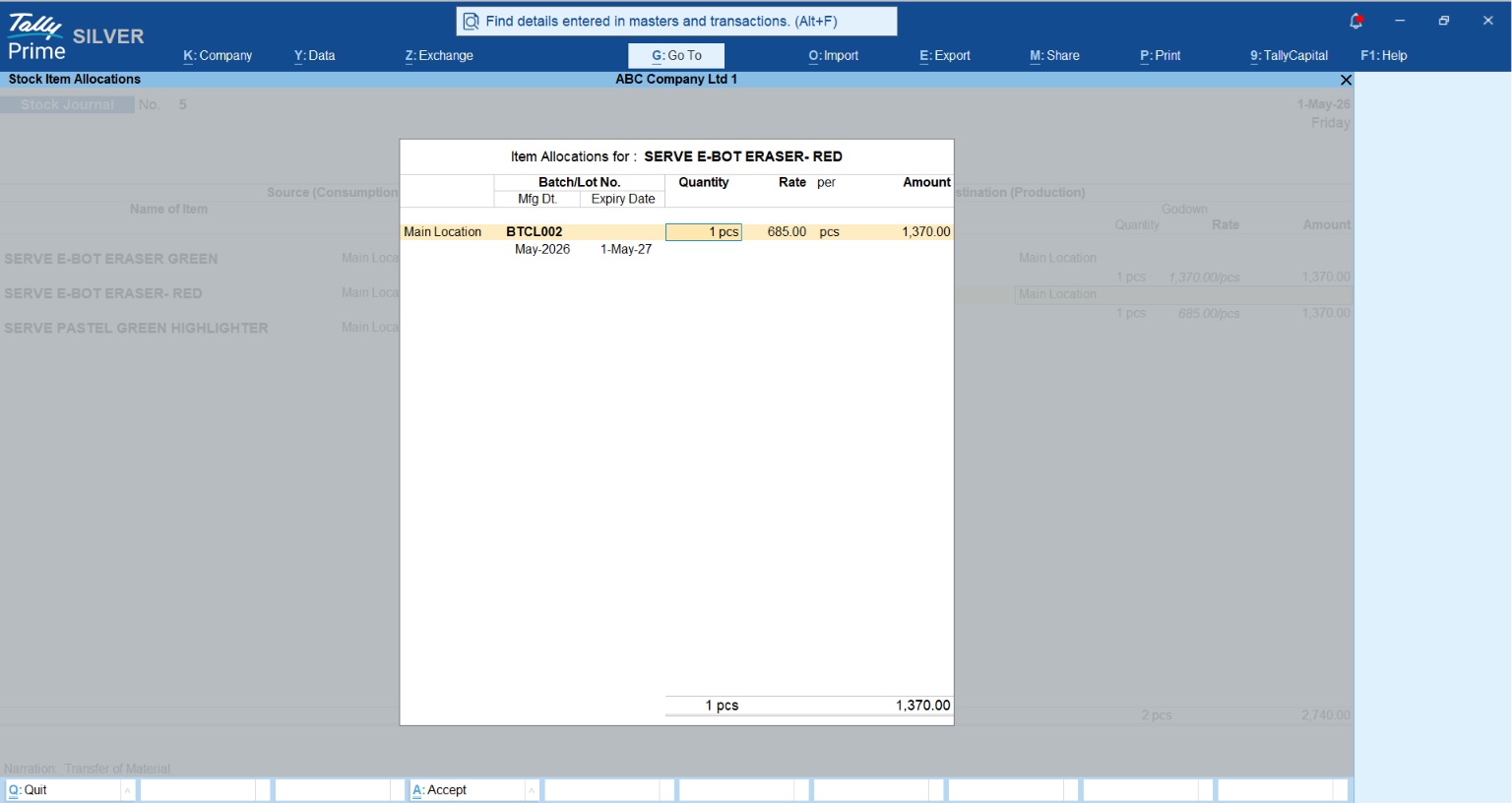
To move items internally without affecting your sales or purchase accounts, you use an Inter-Godown Transfer. In TallyPrime, this is recorded via the Stock Journal (Alt + F7).
To reach this screen, go to the Gateway of Tally > Vouchers > press Alt + F7. The screen is divided into two halves: Source (Consumption) and Destination (Production).
|
UI Field |
Source (Consumption) |
Destination (Production) |
|
Name of Item |
Select the item leaving the location |
Select the same item arriving at the new location |
|
Godown/Location |
Specify the source warehouse |
Specify the destination warehouse |
|
Quantity |
Enter quantity to be moved |
Enter quantity to be received |
|
Rate & Amount |
Can Fill Rate and Amount Details |
Can Fill Rate and Amount Details |
Can I track items that have an expiry date?
Yes, TallyPrime’s "Batch" management is essential for the pharmaceutical, food, and electronics industries. Unlike global settings, Tally allows you to enable this on a per-item basis, ensuring you only track what is necessary.
Step 1: Global Activation
- Go to F11 (Features).
- Set Show more features to Yes (Prerequisite).
- Set Enable Inventory, Maintain Batches, and Maintain Expiry Date to Yes.
Step 2: Per-Item Configuration
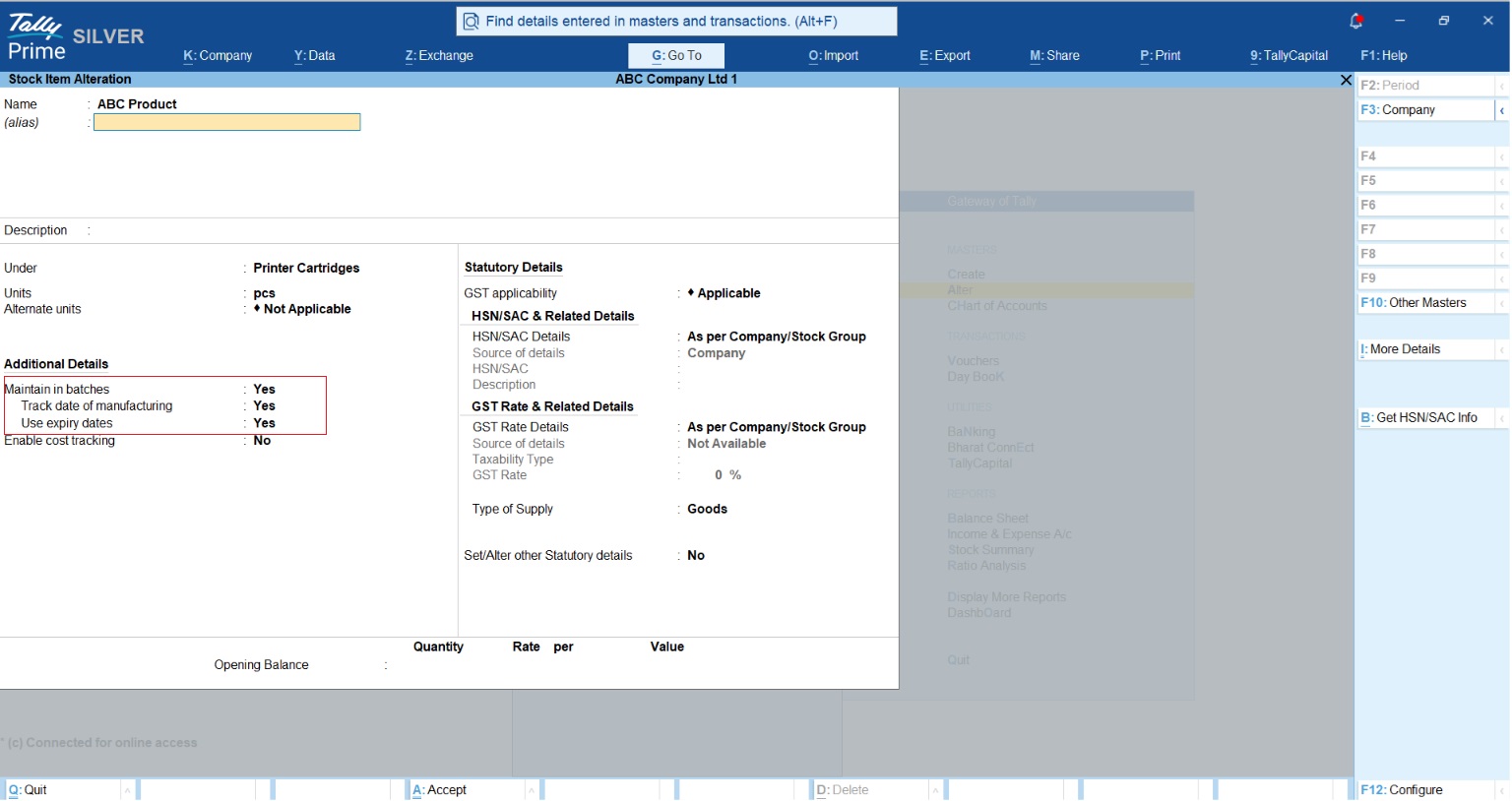
You must manually enable tracking for specific products. Go to Gateway of Tally > Alter > Stock Item, select your item (e.g., "ABC Product"), and set:
- Maintain Batches: Yes
- Track date of manufacturing: Yes
- Use expiry dates: Yes
Practical example: The 'Milk Carton' scenario
Imagine you purchase 100 cartons of milk. During the purchase entry, TallyPrime will open the Item Allocation Screen. Here, you assign a Batch No. (e.g., MKA-102) and an expiry of March 2026.
When a customer buys 10 cartons later, TallyPrime prompts you in the same Item Allocation Screen to pick a batch. By selecting the batch closest to its expiry first, you maintain a FIFO (First-In, First-Out) workflow. This "Aha!" moment ensures you never accidentally sell fresh stock while older stock sits in the back of the cooler expiring.
Watch this video to learn how to manage batches in TallyPrime:
Actionable Tips: My Personal Checklist for Success
As a Tally expert, I recommend this checklist to keep your warehouse data bulletproof:
- Restrict Negative Stock: Go to F12 Configuration in vouchers and ensure "Warn on negative stock Balance" is enabled. Professional accountants never allow negative stock, as it leads to inaccurate valuation and data corruption.
- Maintain Correct Opening Stock: Ensure quantities and rates are reconciled before the start of the financial year.
- Use Stock Categories: Categorize by brand or size (e.g., "Organic" vs "Synthetic") to get cross-location reporting.
- Take Regular Backups: Always use Tally’s auto-backup or manual backup (Data > Backup) before making large stock adjustments.














