










The "Invisible" cash flow killer
The fastest way to stabilize your business income is to track your receivables at the individual invoice level and implement a structured, automated reminder system. In my 20 years of working with manufacturers and automobile dealerships, I’ve seen how chasing overdue payments manually becomes an "invisible" killer of cash flow.
When you rely on manual follow-ups or just look at total balances, payments often go unnoticed until they are weeks overdue. This puts immediate pressure on your ability to pay your own suppliers or cover daily overheads. TallyPrime provides the tools to move you from reactive "debt chasing" to a proactive, organized collection process that ensures you get paid for the work you’ve already done.
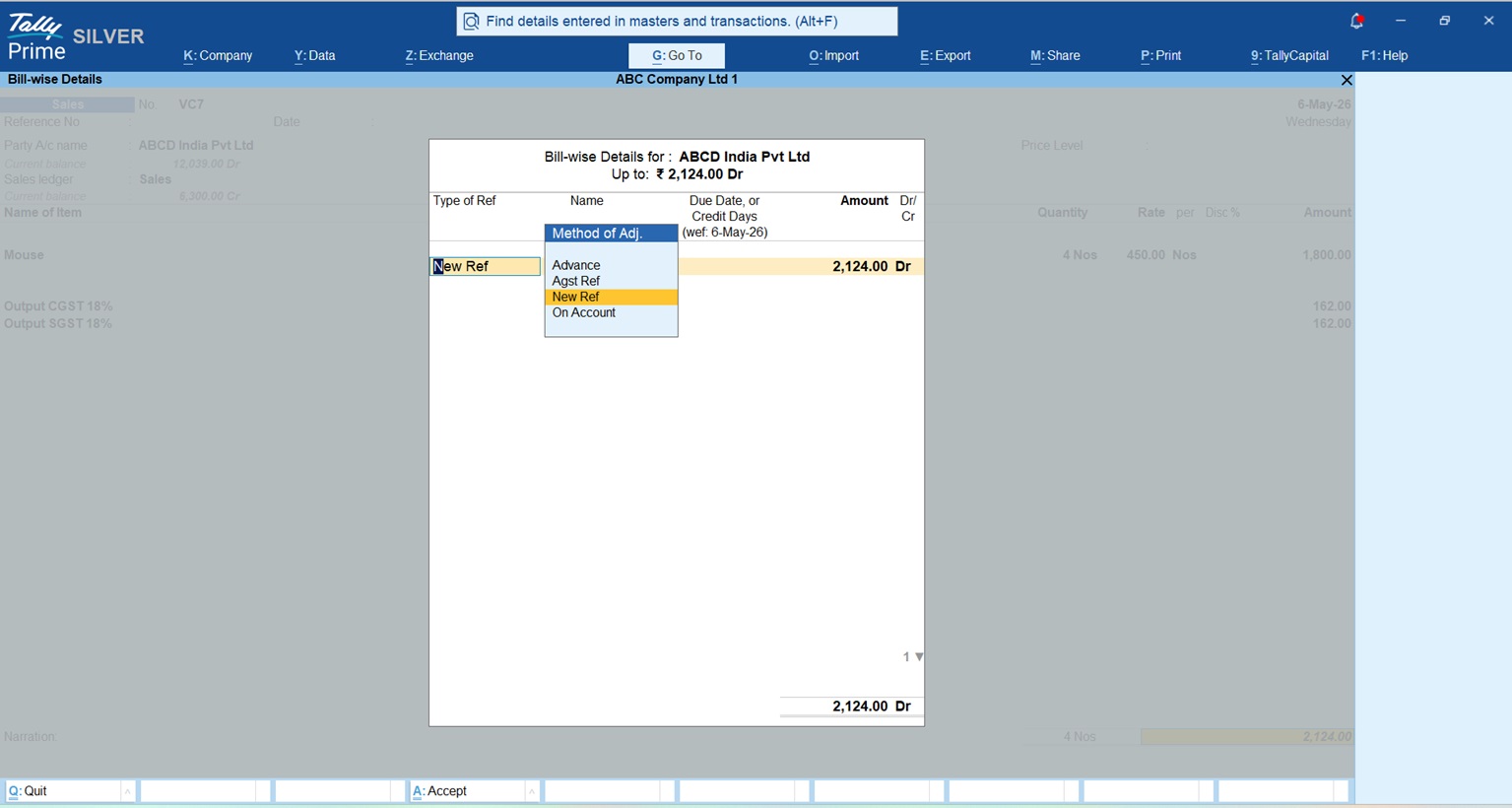
Why is bill-wise tracking better than just looking at ledger balances?
Traditional accounting often focuses on the "Ledger Balance", the total amount a customer owes. However, bill-wise tracking allows you to monitor every transaction invoice-by-invoice. This granular view ensures you know exactly which specific bills are unpaid, partially settled, or overdue.
Key benefits of bill-wise tracking:
- Precision Follow-ups: You can identify the exact invoice causing a delay rather than asking for a generic "total amount."
- Reduced Reconciliation Errors: Minimize mistakes by linking every receipt or credit note to its specific bill reference.
- Better Payables Control: Apply the same logic to your vendors to ensure you aren't paying bills twice or missing early-payment discounts.
- Advance Management: Accurately track advances and adjust them against the final invoice once it’s raised.
Pro-Tip: Beware the "On Account" Entry TallyPrime allows you to keep receipts "on account" if you aren't sure which bill they belong to. While flexible, an expert consultant will warn you: "On account" entries are the primary cause of mismatches between bill-wise reports and ledger balances. Always try to link payments to specific references to keep your books clean.
How does aging analysis help you prioritize collections?
Aging Analysis is a diagnostic tool that categorizes your outstanding bills and even your inventory based on how long they have been sitting. While our focus is on getting paid, remember that slow-moving stock is also "locked cash." These aging principles apply to both to keep your capital fluid.
Default and custom slabs
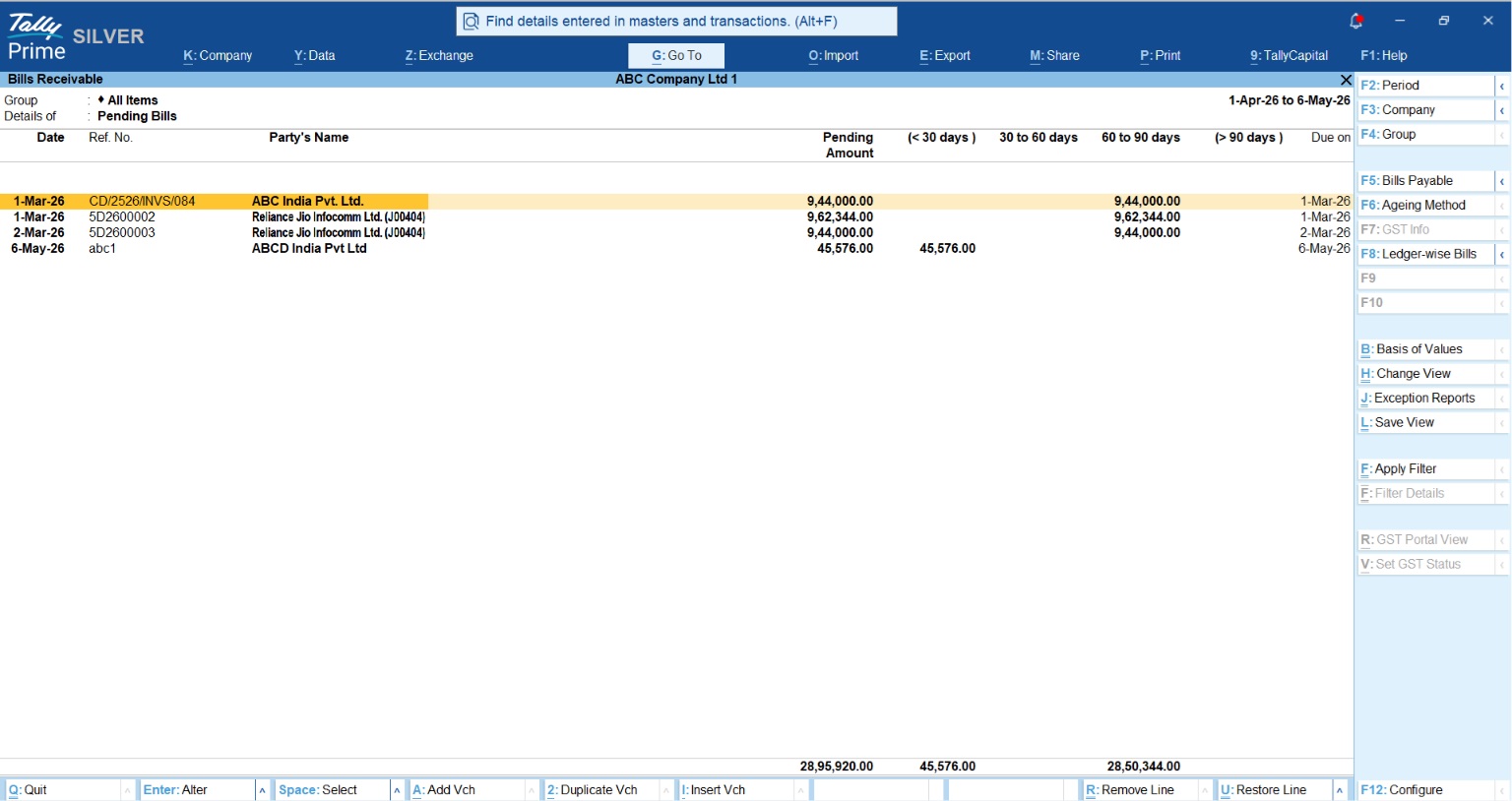
TallyPrime provides default slabs (e.g., <45, 45-90, 90-180, and >180 days). However, you should use the F6 (Ageing Periods) key to define slabs that match your credit policy, such as 0–30 or 31–60 days.
Aging styles: fairness vs. strictness
You can analyze your receivables using two primary methods:
- Aging by bill date: This is a "strict" view, calculating age from the day the invoice was created. It shows exactly how long that money has been out of your hands.
- Aging by due date: This is a more "fair" view that respects the credit days you granted the customer. A bill only starts "aging" once the grace period expires.
Example: The Automobile Dealer
One dealership I worked with managed hundreds of spare part invoices. By using the "Overdue Days" column in Tally, they identified customers who had crossed their 15-day grace period. Instead of calling every client, they focused only on those in the "31-60 days" slab, preventing "bad debts" from becoming unrecoverable losses.
How to enable bill-wise details in TallyPrime
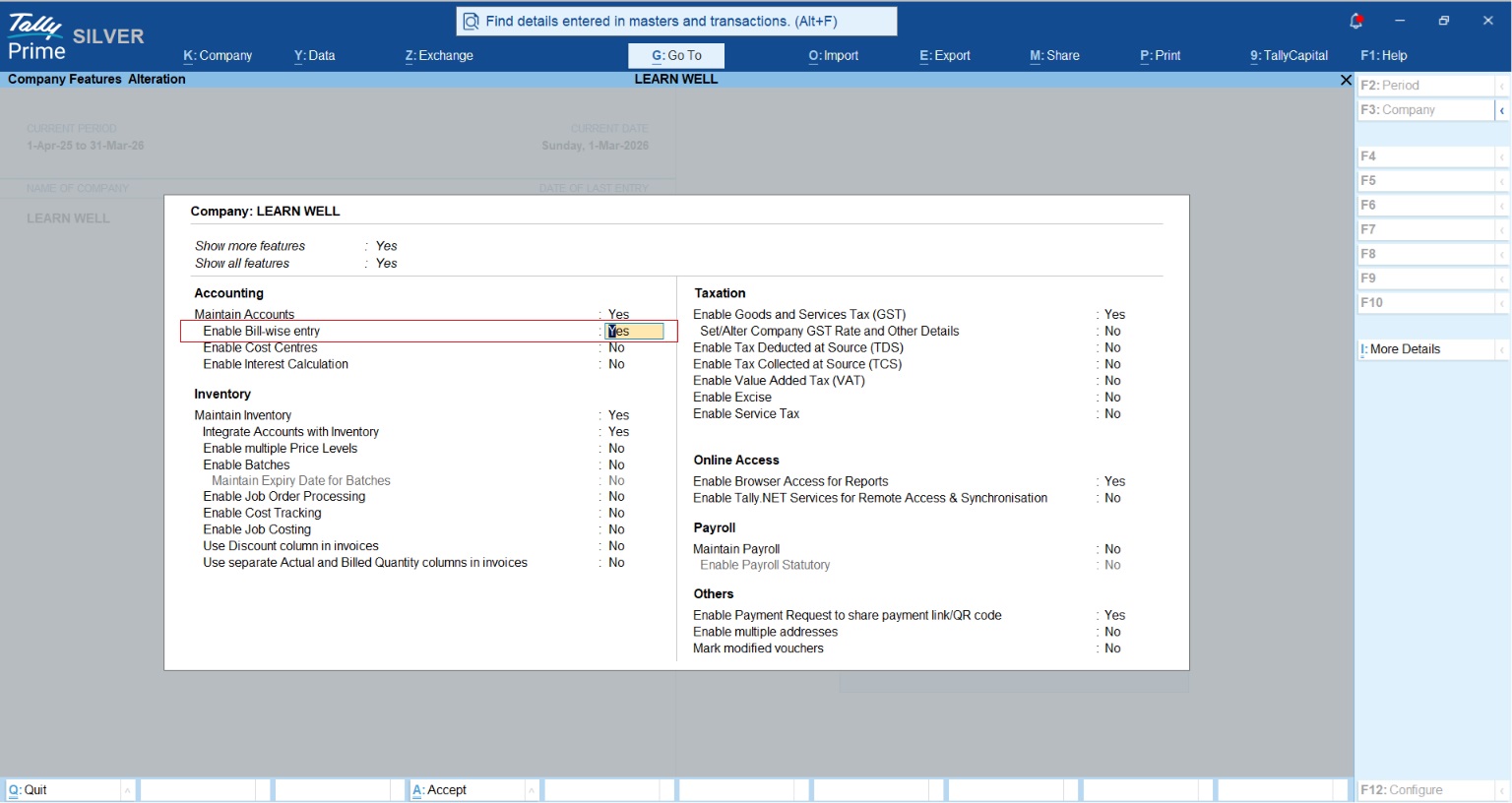
To move away from total balance tracking, you must activate the bill-by-bill feature in your company features.
- Open features: From the Gateway of Tally, press F11 (Features).
- Enable accounting details: Under the Accounting column, look for "Maintain balances bill-by-bill."
- Activate: Set this option to Yes.
- Save: Press Ctrl+A to save.
- Verify: Record a test sales invoice. The system should now prompt you for a "Bill-wise Details" reference (e.g., New Ref).
Can you send payment reminders via WhatsApp and email?
Yes, and it’s a game-changer. Clients are often 40% more responsive on WhatsApp than they are to emails or cold calls.
WhatsApp integration
Using the Official WhatsApp Business API (not your personal phone app), TallyPrime allows you to send invoices, ledgers, and reminder letters as PDFs or Excel files. This creates a secure, professional, and auditable trail of all communications.
Read more about Whatsapp Integration with TallyPrime
Mass e-mailing and security
For businesses with hundreds of debtors, the "Mass E-mailing" feature allows you to send reminders to an entire "Group of Accounts" (like Sundry Debtors) at once.
- The OAuth 2.0 Digital Key: TallyPrime uses the OAuth 2.0 protocol for Gmail and Yahoo. Think of this as a secure "digital key"—Tally connects to your mail server to send the message, but it never sees or stores your actual password.
Real-world context: From a manufacturing client’s perspective
I recently consulted for a manufacturer who spent 10 hours a week manually exporting PDFs and drafting emails for overdue payments. They were constantly reactively "fighting fires" when cash ran low.
By enabling automated reminders and using the WhatsApp integration, they moved to a system where alerts are triggered the moment a bill becomes overdue. The result? A 35% reduction in manual administrative effort and 25% faster collection cycles. They stopped chasing debt and started focusing on production.
How to send your first reminder letter
Formal reminder letters carry more weight than a casual text. Here is how to generate one:
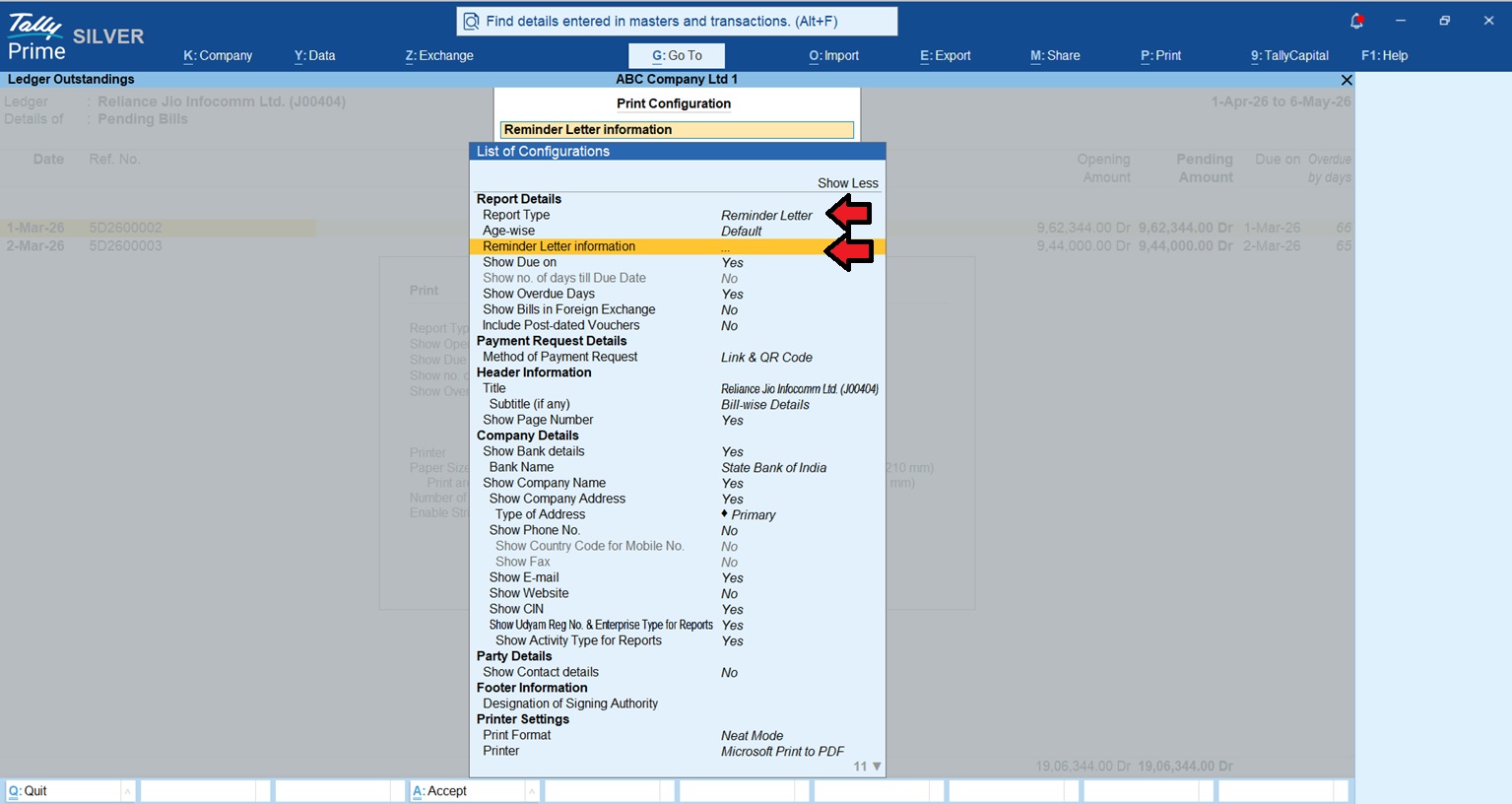
- Navigate to Gateway of Tally > Display > Statement of Accounts > Outstandings > Ledger.
- Select the customer’s Ledger and press Alt+P.
- In Setting > Report Details>Report Type -Reminder Letter and Set Reminder Letter Information.
- The Company Ageing Alteration screen will then appear. Define your ageing periods (e.g., 0-30, 31-60) and press Enter.
- Customization: Press F12 (Configure) in the printing menu to change the subject line or the tone of the letter's paragraphs to suit your relationship with the client.
Conclusion: Your collection checklist
Use this checklist to ensure your collection system is watertight:
- Enable bill-wise details for every party ledger in F11.
- Set up 30-60-90 day aging slabs using the F6 key to match your credit terms.
- Verify customer contact data (Email and WhatsApp numbers) in the Ledger Masters.
- Schedule a weekly "Outstanding Review" using the Bills Receivable report.
- Analyze stock ageing monthly to identify cash stuck in slow-moving inventory.
Focusing on these steps lets you spend less time worrying about debt and more time growing your business.
“The goal isn't just to make a sale; it's to ensure the cash actually hits your bank account.”














