










I’ve seen so many business owners and accountants spend the first few days of every month hunched over a keyboard, manually typing in the same rent invoices, the same loan EMIs, and the same software subscriptions. If you feel like you’re stuck in a data entry, I have good news: you can stop today.
As someone who has managed books for industrial units and dealerships for over 20 years, I always tell my clients that accounting isn't about typing, it's about using your data to grow. TallyPrime has built-in tools that act like a "memory" for your business. By scheduling your routine tasks, you can clear your desk and focus on the big picture.
Can TallyPrime Really "Remember" My Monthly Rent?
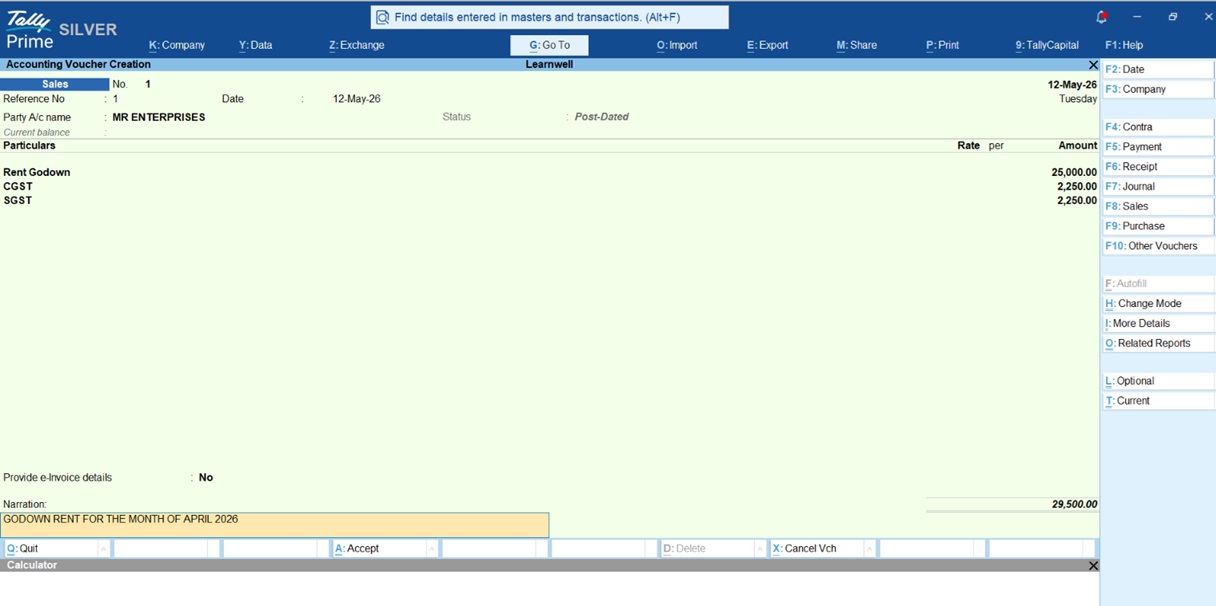
If your shop or godown rent is a consistent amount every month, there is no reason to create a new invoice from scratch every time. In TallyPrime, we "automate" this by creating your vouchers in advance and marking them as Post-Dated.
Once you’ve got the basics in the system, you’ve done the hard part. Here is my simple 3-step checklist for setting up your Masters:
- Create the Tenant Ledger: Set up the account for the party paying you.
- Create the Rent Income Ledger: This is where you'll track your earnings.
- Create Utility Items: If you charge for rent or maintenance, set these up as inventory items or separate ledgers.
After these are ready, you can record a Sales voucher (F8) and use the Ctrl+T shortcut to schedule it for the months ahead. This "recurring" logic ensures your monthly billing is ready before the month even begins.
|
Feature |
Regular Voucher |
Post-Dated Voucher (PDC) |
|
Keyboard Shortcut |
Varies (F5, F6, etc.) |
Ctrl+T within the voucher |
|
Impact on Accounts |
Immediate |
Only on the voucher date |
|
Best Used For |
Daily transactions |
EMIs, rent, advance payments |
|
Cash Flow View |
Shows current balance |
Shows "Projected Balance" |
How to Create an "Expense Template" using Memorandum Vouchers?
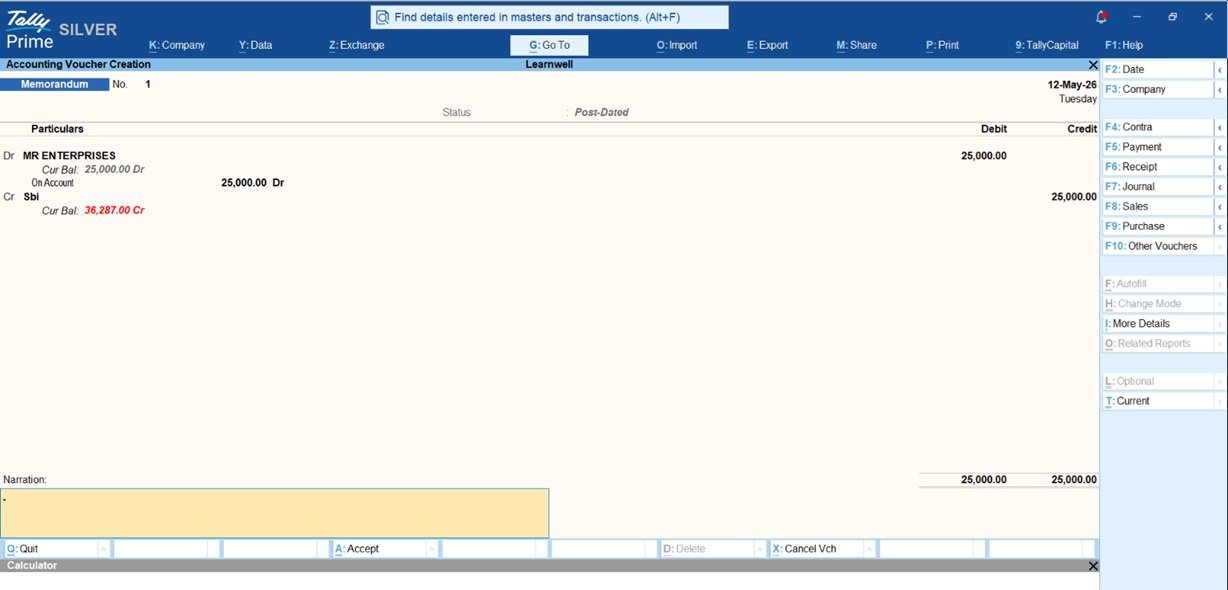
Think of a Memorandum Voucher as a "Notebook." It doesn't affect your Balance Sheet until you tell it to.
- The Setup: Go to Vouchers > F10 (Other Vouchers) > select Memorandum Voucher.
- The Entry: Create your standard entry (e.g., Rent A/c Dr to Landlord A/c). Don't worry about the date yet.
- The Automation: Next month, go to Display More Reports > Exception Reports > Memorandum Register.
The "Super-Fast" Way: Using Duplicate Vouchers
If your recurring invoice is almost identical to last month's, this is the method I personally use every day.
- Step 1: Go to the Day Book or the specific Ledger (e.g., your Internet Provider's ledger).
- Step 2: Highlight last month’s entry and press Alt+2 (Duplicate).
- Step 3: Tally opens a fresh voucher with all the details already filled in.
- Step 4: Change the Date (F2) and the Invoice Number, then save.
Read about TallyPrime Shortcut Keys
Real-World Example: The Monthly Retainer Fees
Imagine you provide a monthly service to 20 clients for ₹10,000 each. Instead of creating 20 new sales invoices:
- Go to the previous month's Sales Register.
- Use Alt+2 on each entry.
- Because the items, GST rates, and descriptions are already there, you only spend 5 seconds per invoice.
- Pro Tip: Use Alt+D to delete any temporary lines you don't need for the new month.
My Professional Checklist for a Tension-Free Month-End
"Accounting isn't about typing data; it's about using data to grow your business."
To keep your accounts running like a well-oiled machine, follow this routine:
- Audit Fixed Costs: Once a quarter, identify all fixed costs like Rent, EMI, and Subscriptions.
- Monitor the Summary: Check your Post-Dated Summary report weekly (Alt+G > Post-Dated Summary) to see what is coming due.
- Automate Taxes: Use Alt+J (Stat Adjustment) in Journal vouchers to schedule your GST adjustments.
- Template: Create one "Master" entry for each using the Memorandum method.
- Review: At the start of every month, spend 10 minutes "Posting" these templates to your main books.














