










The "Profit vs. Revenue" Problem
In my years of working with Indian industrial units and dealerships, I’ve noticed a common trap: business owners often celebrate a "big sales month" only to realize their bank balance hasn’t moved. The truth is, selling more is not the same as earning more.
I often tell my clients that revenue is vanity, but profit is sanity. If you are selling a high volume of products but your margins are paper-thin or if your biggest customer takes six months to pay, you aren’t growing; you’re just staying busy. To run a healthy business, you need to move away from gut feelings and start using data to drive your pricing and credit decisions. TallyPrime Software makes this transition simple, even if you don't have a finance background.
How do I find my most profitable items?
Most traders and wholesalers I advise think they know their best products, but the Stock Summary combined with the Profitability view often tells a different story. These reports turn your transaction data into a clear map of exactly where your margins are coming from.
In my experience, the most efficient way to access this is by using Stock Summary:
- Press Alt+G, type 'Stock Summary' or Choose Stock Summary from Gateway of Tally, and hit Enter.
- Once the report opens, simply press F7 (Show Profit).
This instantly transforms your stock list into a detailed profitability sheet, showing the Cost Price, Sales Value, and Gross Profit percentage for every single item. To make these long data sets even easier to digest, I always recommend my clients enable 'Stripe View' (under F12: Configuration or via the Display shortcut). It highlights alternate rows, preventing 'line fatigue' and making your analysis much sharper."
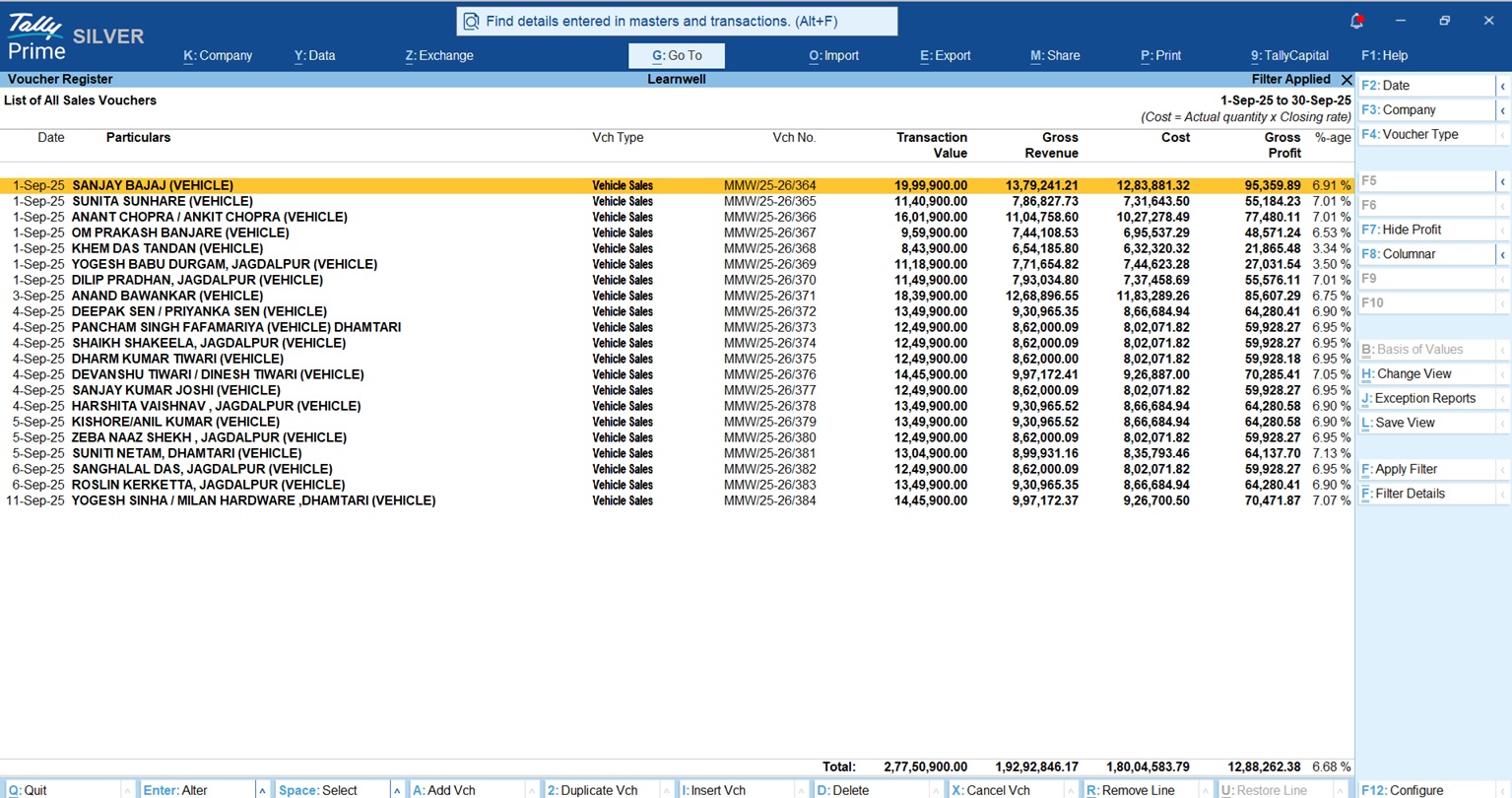
Also you can use Sales Register and toggle the "Show Profit" (F7) button, TallyPrime generates four specific columns that every owner should study:
- Transaction Value: The total invoice value (including taxes).
- Gross Revenue: Your actual sale value minus taxes.
- Cost: This is your "Book Cost" based on your valuation method.
- Gross Profit: The actual amount of profit or loss on that sale.
One of the best parts is that you don’t have to worry about complex math. TallyPrime handles the Costing Method (such as FIFO or Average Cost) in the background. It’s important to remember that "Cost" here isn't just what you last paid; it’s a calculated figure based on your stock valuation, giving you a real-time look at your actual margins.
Are My "Big" Customers Actually Costing Me Money?
How do I spot loss-making customers?
Sometimes, your "biggest" customer is actually your most expensive one. If a client demands a 10% discount and then takes 90 days to pay, they are eating your profit and killing your cash flow.
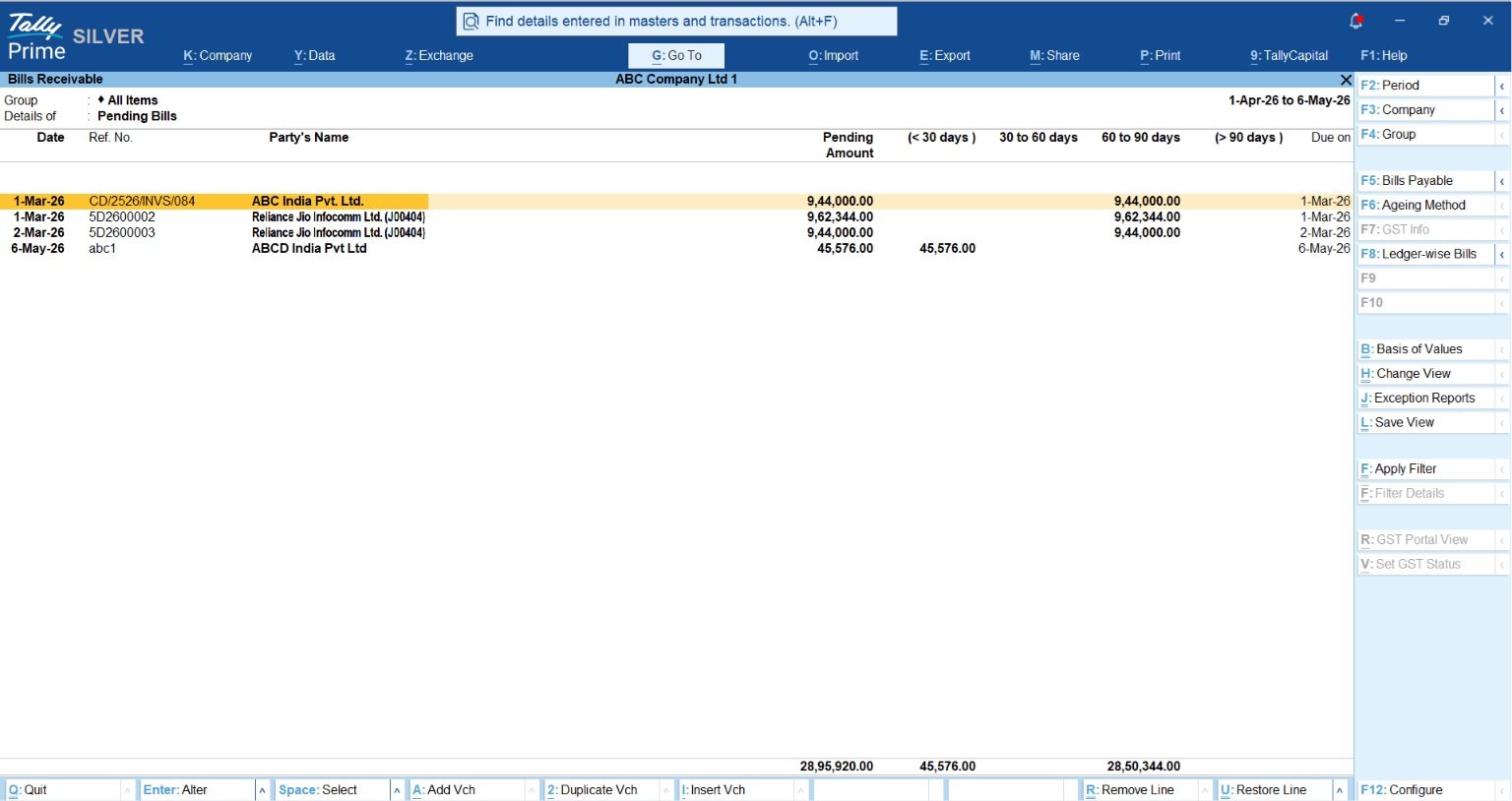
I use Ledger Analysis and Party-wise Outstanding to help business owners spot these leaks:
- Ageing Analysis: This is my favorite tool. It breaks down your receivables by time (e.g., 0-30 days, 31-60 days). It shows you exactly who is sitting on your cash.
- Invoice-wise Profitability: Remember that F7 "Show Profit" button? It's a toggle. You can turn it on to see the "secret" numbers behind an invoice and turn it off instantly if someone walks into the room. If the discounts you gave a "big" customer pushed the margin below your operating costs, you are effectively paying them to buy from you.
Specialist's Tip: Dealerships often use these reports to manage sub-dealers, while industrial units use them to track if the high cost of raw materials is being properly recovered in the final sale price to major clients.
Real-World Example: The Garment Trader's Surprise
I recently worked with a garment trader who was convinced that his high-end silk sarees were his most profitable line because of the high price tag. We sat down and looked at his MIS Reports.
Using the Stock Ageing Analysis and Movement Analysis reports, we found that while the silk sarees had a high "per-piece" profit, they stayed in the godown for an average of 180 days. Meanwhile, his "budget" cotton line sold out every 15 days. Because he could reinvest the cotton-line cash 12 times a year while the silk cash was locked up, the "smaller" item was actually making him four times more money. He adjusted his stock levels that same afternoon.
"Revenue is vanity, Profit is sanity, TallyPrime helps you stay sane by showing you the real numbers."
Your "Profit First" Checklist
I've seen businesses transform just by looking at these reports once a month. To stay in control, follow this simple weekly routine:
- Check the Stock Summary weekly: Use the "Stock Summary" feature to spot slow-moving items before they become "dead" stock.
- Review Overdue Receivables every Monday: Use the Ageing Analysis to plan your collection calls for the week.
- Set Credit Limits for all new customers: Protect your cash flow from day one.
- Use the "Show Profit" (F7) Toggle: Regularly check your Sales Register to ensure discounts aren't eating your margins.
By staying on top of these numbers, you ensure that every sale you make is actually putting money in your pocket.














