










I’ve seen many factory owners struggle with the complexities of moving semi-finished goods between their units and job workers. Often, they believe that since no "sale" has occurred, the paperwork is less critical. From an audit perspective, this is a dangerous assumption.
You need an E-Way Bill for any job work movement that crosses state lines (regardless of value) or meets state-specific intrastate thresholds. TallyPrime handles the data push to the NIC portal automatically, ensuring your inventory and compliance stay perfectly synced.
As a Senior Industrial Accountant working with manufacturing units, I know that your production line shouldn't stop because of a documentation error. This guide provides the strategic setup and technical steps to ensure your "Material Out" and "Material In" vouchers are always compliant.
What are the "Rules of the Road" for job work?
Job work compliance is governed by Section 68 of the CGST Act and Rule 138. Understanding the specific triggers for job work is essential for audit-proofing your logistics.
The Interstate Rule: Per the first provision to Rule 138(1), when a principal manufacturer in one state sends goods to a job worker in another state, an E-Way Bill is mandatory.
Accurate Consignment Value Calculation Per Rule 138(1) Explanation 2, you must calculate the value as:
- Transaction Value (Section 15) + GST (CGST, SGST/UTGST, IGST, and Cess).
- Note: If an invoice contains both taxable and exempt goods, you must exclude the exempt supply value from the threshold calculation.
Threshold Comparison Table
|
Movement Type |
Threshold Limit |
Statutory Provision |
|
General Interstate Supply |
> ₹50,000 |
Rule 138(1) |
|
Interstate Job Work |
₹0 (Mandatory) |
Rule 138(1) Proviso |
|
General Intrastate Movement |
> ₹50,000 (Standard) |
Rule 138 |
|
Handicraft Goods (Interstate) |
₹0 (Mandatory) |
Rule 138(1) 2nd Proviso |
The 180-Day "Aging" Rule Effective January 1, 2025, the portal restricts EWB generation for documents (Delivery Challans/Invoices) older than 180 days. For manufacturers with long processing cycles (e.g., heavy machining or specialized coating), you must reconcile or issue fresh documentation if the return journey exceeds six months.
How do I set up TallyPrime for one-click e-way bill generation?
To transition from manual portal entry to expert-level automation in TallyPrime, follow this configuration:
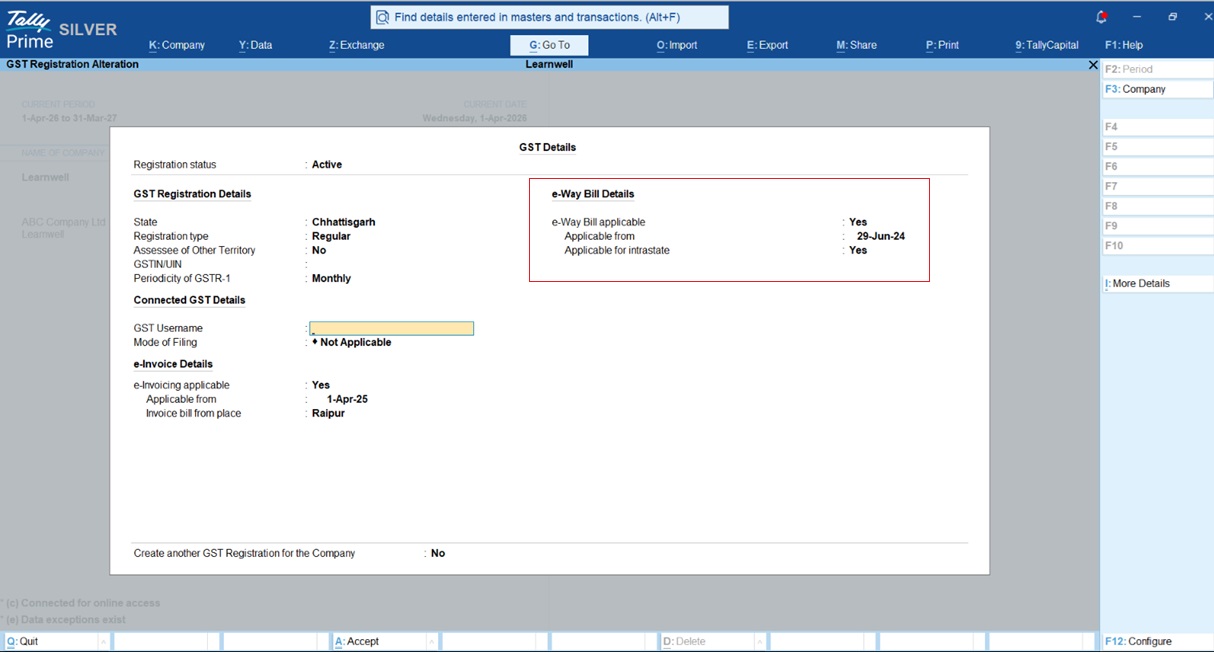
- F11 Company Features: Press F11, select your company, and set Enable GST to 'Yes'.
- GST Details: Set e-Way Bill applicable to 'Yes'. Enter your state's intrastate threshold and ensure the "Threshold limit includes" setting matches your compliance needs (typically "Taxable and Exempt goods value").
- API User Profile Setup:
- Log into the NIC E-Way Bill portal.
- Navigate to Registration > E-Way Bill Registration, After Login Register for GSP.
- Navigate to Registration > For GSP
- Select Add/New and choose Tally (India) Private Limited as your GSP.
- Create a unique API username and password (separate from your portal login).
Step-by-step: Sending goods to a job worker (material out)
In a professional manufacturing workflow, we use the "Material Out" voucher as a legal Delivery Challan (Rule 55).
- Navigation: Go to Gateway of Tally > Vouchers > F10 (Other Vouchers) > Material Out.
- Order Linking: Select the Job Worker’s ledger. In the "Order Details" screen, link the Job Work Out Order. This allows Tally to auto-fill items based on your Bill of Materials (BOM).
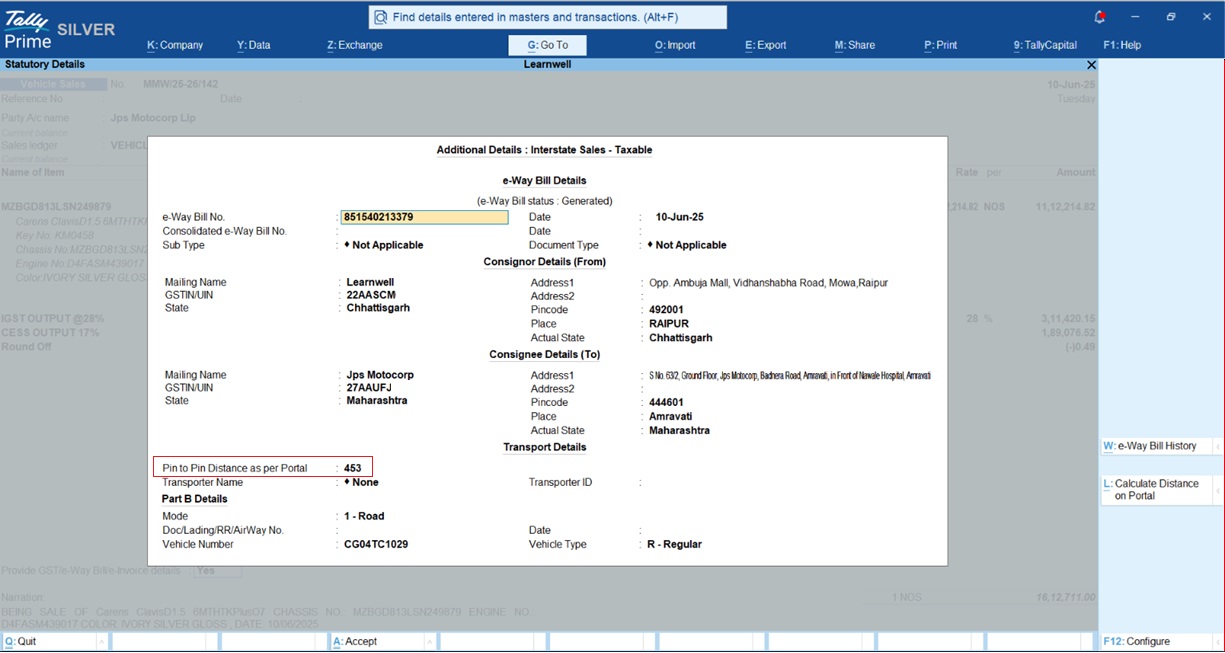
- The Sub-Type Trigger: In the E-Way Bill sub-screen, you must select Job Work as the Sub-type. This informs the portal that the movement is not a sale and validates the "Delivery Challan" document type.
- Distance Automation: For TallyPrime Release 5.1 and later, if you leave the Distance (km) field blank, the system will automatically calculate the pin-to-pin distance from the portal during generation. Alternatively, use Alt+L to verify the distance manually.
For more detail read this : How to record job work out order in TallyPrime
What about distance and validity?
Validity is strictly mathematical. If your cargo is delayed, you must extend the EWB within the legal window.
- Normal Cargo: 1 day for every 200 km (or part thereof).
- Over Dimensional Cargo (ODC): 1 day for every 20 km.
How do I handle goods coming back? (material in)
Tracking material reconciliation is the heart of industrial accounting. When goods return, use the Material In voucher.
Expert Godown Logic: To maintain a clear audit trail, set the "Destination Godown" to a location enabled with "Our Stock with Third Party." This keeps the inventory on your Balance Sheet while correctly showing it is physically at the job worker’s site.
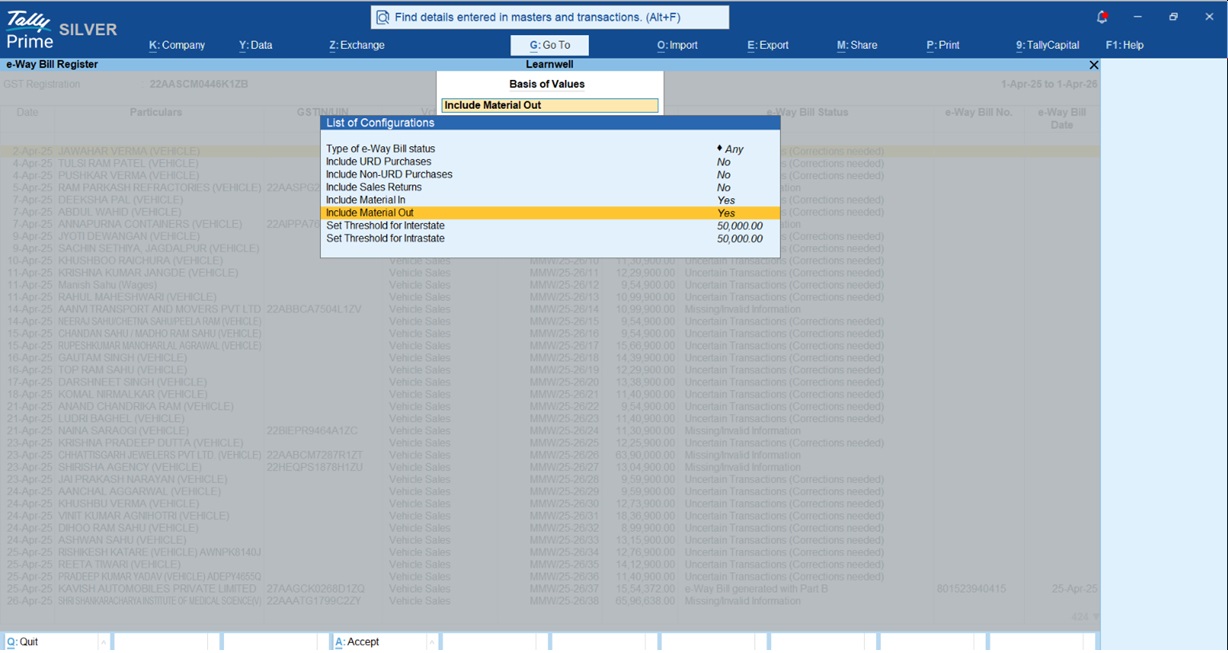
Reporting Configuration: To see these return movements in your compliance dashboard:
- Open the e-Way Bill Register (Alt+G).
- Press Ctrl+B (Basis of Values).
- Set Include Material In and Include Material Out to Yes.
Real-world example: The "Heat Treatment" scenario
A manufacturer sends 500 kg of steel for heat treatment to a job worker in a neighboring state.
- The Document: The accountant records a "Material Out" voucher in TallyPrime.
- The Trigger: Because it's interstate, the threshold is ₹0.
- The Action: The "Job Work" sub-type is selected. The distance field is left blank for auto-calculation.
- The Result: TallyPrime pushes the data, fetches the 12-digit EBN, and prints the QR code directly on the Delivery Challan. The inventory moves to the "Job Worker Godown" for tracking.
Why did my e-way bill get rejected?
If your transaction moves to "Uncertain Transactions," check this specialist checklist:
- HSN Code Precision: As of Feb 2024, if your AATO is >₹5 Crore, you must use 6-digit HSN codes. For ≤₹5 Crore, 4 digits are mandatory for B2B.
- Blocked GSTIN: The portal will reject generation if either the principal or job worker has failed to file GSTR-3B for two consecutive months.
- MFA Phasing: Ensure your credentials support Multi-Factor Authentication based on your turnover:
- >₹20Cr: Jan 2025
- >₹5Cr: Feb 2025
- All taxpayers: April 2025
- Minor Errors Reassurance: Per Circular 64/38/2018, minor errors (spelling mistakes in address or 2-digit HSN errors) attract a penalty of ₹500 each (CGST/SGST) but are generally not grounds for vehicle detention.
Final tips for a smooth audit
- Master Verification: Use TallyPrime’s "Verify GSTIN" feature in the ledger master to ensure the Job Worker’s portal status is active before shipping.
- BOM Consistency: Always use the Bill of Materials (BOM) to auto-fill quantities; discrepancies between material sent and components used are major audit red flags.
- Stay Updated: Tally (India) Pvt Ltd is an ISO 27001 certified GSP; keep your TSS active to ensure MFA and new JSON schema updates are handled automatically.
"In the world of manufacturing, an E-Way Bill isn't just a document; it's the green light that keeps your production line moving and your audit trail clean."














