



Your accounting software should handle everything that follows a GST invoice, not just the invoice itself. That includes recording the payment when it arrives, reconciling it against the outstanding balance, matching purchases in GSTR-2B, checking ITC eligibility and keeping every entry ready for your CA's year-end audit. TallyPrime connects all of these steps in one system, so a single invoice moves from billing to audit without being re-entered anywhere else.
For small and medium businesses, every GST invoice creates follow-up work from the very first sale. Payments have to be recorded, dues tracked, purchase credit verified in GSTR-2B and records kept ready for the CA. When these steps sit outside the business management software, in a notebook, a spreadsheet or the bank portal, the books are incomplete from the first month. Starting on software that covers the full chain means your records stay complete from day one, and you never have to migrate data or rebuild your books later.
Here's what your accounting software should handle beyond GST and invoicing, how each step connects to the next, which TallyPrime features cover each one, and how to judge whether the price difference is worth it for your business.
Why is a GST invoice only step one of the accounting cycle?
A GST invoice records a sale, but it doesn't complete one. Every invoice sets off a chain of five further steps, and each depends on the one before it. If the software stops after billing, every later step becomes manual work, and errors compound down the chain.
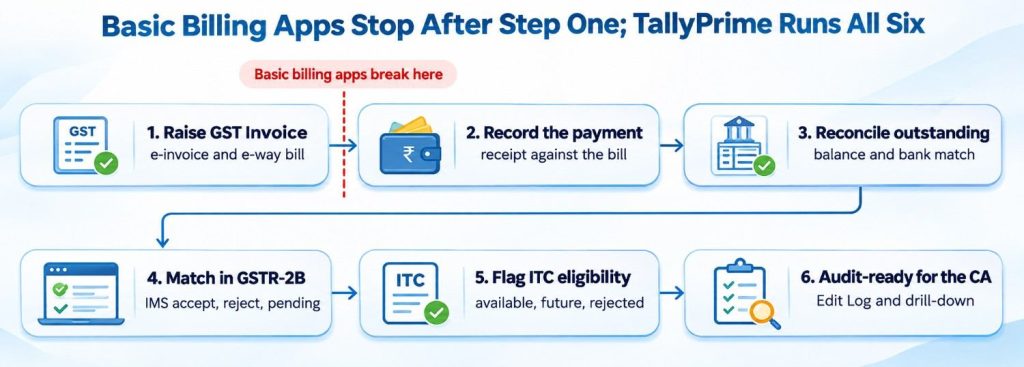
The chain runs the same way for every business, whatever its size:
|
Step |
What must happen |
TallyPrime |
Basic billing app |
|
Raise the GST invoice |
Correct tax, IRN, and e-way bill where required |
Auto GST, connected e-invoice and e-way bill |
Usually covered |
|
Record the payment |
Match the receipt to the exact invoice |
Bill-wise Receipt (F6) settles the invoice |
Often a separate note, or not tracked |
|
Reconcile the outstanding balance |
Know what is still due and confirm the bank credit |
Bills Receivable, ageing, connected banking |
Exported to a spreadsheet |
|
Match purchases in GSTR-2B |
Confirm suppliers have reported their invoices |
GSTR-2A and 2B reconciliation, IMS |
Not covered |
|
Flag ITC eligibility |
Claim only credit that is available |
IMS action status and ITC Summary |
Not covered |
|
Make it audit-ready |
Every change traceable for the CA |
Edit Log, drill-down from reports to vouchers |
Not covered |
The break at step two is where most of the hidden cost begins. Once payments live outside the billing app, outstanding balances, bank matching, and audit evidence have to be rebuilt by hand.
How should accounting software track payments and outstanding balances after invoicing?
Your accounting software should link every payment to the invoice it settles, so outstanding balances update without anyone keeping a separate list. In TallyPrime, a Receipt (F6) is recorded against a specific bill. Partial payments, advances, and on-account amounts are tracked separately, so the remaining balance on each invoice is always clear.
Features that keep receivables under control
- Bill-wise tracking: every invoice carries its own reference, due date, and pending amount.
- Ageing analysis: Bills Receivable groups dues by how long they have been pending, so the oldest are chased first.
- Credit limits: set a limit for each customer and get a warning before billing beyond it.
- Interest calculation: calculate interest on overdue bills where agreed terms allow it.
- WhatsApp reminders: send ledger statements and payment reminders in bulk from inside TallyPrime.
- Dashboard view: the Receivables tile shows total and overdue amounts at a glance.
The same logic works for payables. Each Payment (F5) settles a supplier bill, so a business always knows what it owes and when. Accurate payables also matter for MSME suppliers, where TallyPrime 6.1 added MSME Form 1 Annexure reporting.
How does accounting software reconcile customer payments with the bank?
Bank reconciliation confirms that the money recorded in the books actually reached the bank. Without it, a receipt entered by mistake, a bounced cheque, or an unrecorded bank charge stays hidden until the CA finds it at year end. Basic billing apps rarely touch the bank at all.
TallyPrime handles this inside the same system that raised the invoice:
- Connected Banking: view live bank balances, fetch statements, and auto-reconcile entries inside TallyPrime, introduced in Release 6.0.
- Bank statement import: import statements in CSV or Excel format for 145+ supported banks and match them against recorded vouchers.
- Docs by Ira: upload supplier bills and PDF bank statements, and get draft vouchers to review before they post. Docs by Ira is in a phased rollout for eligible TallyPrime serial numbers.
When receipts are already linked to invoices, a bank match closes the loop. The invoice is billed, paid, and confirmed in the bank, all in one record.
How does TallyPrime match invoices in GSTR-2B and flag ITC eligibility?
TallyPrime downloads GSTR-2A and GSTR-2B from the GST portal and reconciles them against recorded purchases, highlighting mismatches and ITC at risk. Under Section 16(2)(aa) of the CGST Act, 2017, ITC is generally available only when the supplier's invoice appears in the buyer's GSTR-2B. A purchase that never reaches GSTR-2B is credit the business may not be able to claim.
The Invoice Management System (IMS) in TallyPrime
IMS in TallyPrime lets a business download supplier-uploaded invoices, set an action status, upload it back, and manage ITC from one workspace.
|
IMS action |
What it means |
Effect in ITC |
|
Accept |
The invoice is correct and the goods or services were received |
ITC is included in GSTR-2B |
|
Reject |
The invoice is wrong or not recognised |
ITC is excluded from GSTR-2B |
|
Pending |
The invoice needs checking or the goods are still in transit |
ITC is held for a later period |
|
No action |
Nothing is chosen |
The invoice is treated as accepted |
How TallyPrime flags ITC eligibility
- ITC Summary: shows Available, Future, and Rejected ITC, so the impact of each action is clear before filing.
- Recompute GSTR-2B: refresh GSTR-2B when actions change ITC availability.
- Party GST status: check whether a supplier is filing returns before relying on their credit.
- ITC at risk: the GSTR-2A and 2B reconciliation report highlights credit at risk and suggests the balance to pay.
A basic billing app sees only the sales side. ITC lives on the purchase side, which is where most GST money is won or lost.
What makes accounting records audit-ready for the CA at year end?
Audit-ready books are complete, traceable, and unchanged without a record. The CA should be able to start at a total in the balance sheet and reach the invoice behind it, and see every alteration made along the way. When sales sit in a billing app and payments sit in spreadsheets, the CA spends audit time rebuilding the books instead of reviewing them.
TallyPrime keeps every step of the chain in one record:
- Edit Log: tracks every change to vouchers and masters, with the date and time of each alteration.
- Audit trail compliance: the Companies (Accounts) Amendment Rules, 2021 require companies to use accounting software that records an edit log of each transaction, effective from 1 April 2023. TallyPrime Edit Log is built for this requirement.
- Drill-down from any report: move from the balance sheet or GST return to the ledger and the voucher in a few keystrokes.
- User roles and permissions: decide who can create, alter, or delete entries, so control is built in rather than added later.
For proprietors and partnerships, the audit trail rule does not apply in the same way, but traceable books still shorten the CA's review and reduce queries.
Which GST compliance tasks should accounting software handle besides invoicing?
GST compliance goes well beyond printing a tax invoice. A business also has to report, reconcile, and correct its returns every month or quarter. Software that only bills leaves these tasks to the GST portal, a spreadsheet, or the CA.
|
GST task |
What TallyPrime does |
|
e-Invoicing |
Generates IRNs from the saved invoice, singly or in bulk |
|
e-Way bills |
Generates, extends, cancels, or updates e-way bills inside TallyPrime |
|
GSTR-1 |
Built from recorded sales; filed directly using DSC or EVC |
|
GSTR-3B |
Prepared from books and uploaded from TallyPrime |
|
CMP-08 |
Prepared and uploaded for composition dealers |
|
GSTR-1 vs GSTR-3B |
Reconciled to catch differences before filing |
|
GSTR-2A and 2B |
Downloaded and reconciled against purchases |
|
Party details |
Customer and supplier ledgers created from GSTIN |
|
Offline filing |
Returns exported in JSON or Excel format |
Because every return is built from the same vouchers, a correction made once in the books flows into every report. There is no second copy of the data to keep in sync.
Here’s how much complete GST compliance costs a small business
What business operations should accounting software cover beyond GST and invoicing?
A growing business needs its accounting software to handle stock, people, cash, and control, not just tax. Each of these connects back to the invoice: a sale reduces stock, a salary is a payment, and cash flow depends on collections.
- Inventory: multi-location stock, batches, reorder levels, and bill of materials for manufacturing, all updated by every sale and purchase.
- Payroll: salary processing and statutory deductions in the same books as the rest of the business.
- TDS: deduction and reporting handled alongside GST.
- Cash flow and dashboards: sales trends, cash and bank balances, and receivables on one screen.
- Multi-user access: billing, accounts, and stock staff working on the same data, with role-based permissions.
- Data safety: TallyDrive cloud backup, introduced in Release 7.0, alongside local-first data storage.
Basic billing app vs TallyPrime
|
Capability |
TallyPrime |
Basic billing app |
|
GST invoice |
Yes with auto tax calculation |
Yes |
|
e-Invoice and e-way bill |
Yes, singly or in bulk |
Sometimes |
|
Receipts linked to invoices |
Yes, bill wise |
Limited |
|
Outstanding ageing and reminders |
Yes, with Whatsapp sharing |
Limited |
|
Bank reconciliation |
Yes, with Connected banking |
Rarely |
|
GSTR-2 direct filing |
Yes, using DSC or EVC |
Rarely |
|
GSTR-2A and 2B reconciliation |
Yes |
No |
|
IMS and ITC summary |
Yes |
No |
|
Edit Log and audit trail |
Yes |
Rarely |
|
Inventory beyond item lists |
Batches, godowns, reorder levels, BOM |
Limited |
|
Payroll and TDS |
Yes |
No |
|
Books ready for the CA |
Complete, with drill-down capability |
Exports to rebuild |
Is TallyPrime worth the price difference if a business only needs invoicing and GST?
TallyPrime is worth the price difference even if a business only needs invoicing and GST. This when the business counts the cost of the whole chain, not just the price of billing. A basic billing app looks cheaper because it prices only step one. Steps two to six still happen, but outside the software, paid for in staff hours, CA time, and missed ITC.
- Software price: The initial software price is visible in both. A basic billing app’s initial cost is usually lower, while TallyPrime is matched to the plan you need.
- Matching payments and dues: The cost is usually hidden in a basic billing app as staff hours on spreadsheets. In TallyPrime, this is built into the software, bill-wise, and therefore there is not additional cost involved.
- ITC on purchases missing from GSTR-2B: The cost is hidden in a basic billing app, and found late or not at all. In TallyPrime, missing details and mismatches are flagged through reconciliation and IMS, saving you from costly notices.
- CA time at year end: In a basic billing app, the CA spends time rebuilding books, which adds to the cost. With TallyPrime, CA spends time reviewing complete books.
- Outgrowing the software: For a basic billing app, the cost is paid later in migration and re-entry. This cost is avoided with TallyPrime, because the same system scales efficiently.
TallyPrime is priced for fitment
TallyPrime is priced so that a business pays for exactly the capability it needs. Editions are matched to how a business works, such as a single-user Silver licence or a multi-user Gold licence. Every edition carries the full functionality and features offered by TallyPrime including invoicing, GST reconciliation, banking, inventory, and audit trail.
That makes TallyPrime a system a business can build on for years. It scales in data, users, and complexity, so a business that starts with invoicing does not have to switch software when it adds staff, stock, or a second location.
Conclusion
Generating a GST invoice is step one of a chain. The payment has to be recorded when it arrives and reconciled against the outstanding balance. Purchases have to be matched in GSTR-2B, ITC eligibility has to be flagged, and everything has to be ready for the CA's year-end audit. Basic billing apps break this chain at step two.
TallyPrime keeps all six steps in one system, from e-invoice to Edit Log. That is what a business is really paying for: fewer manual hours, safer ITC, faster audits, and no forced switch as it grows.













