Finding it challenging to identify the invoices that are not uploaded by the supplier? Hard to trace the invoices that do not match with GSTR-2B/2A? Facing a tough time tracking invoices uploaded in different return periods? The list of GST reconciliation troubles can go on forever. But what if we told you all these issues could be solved with a single click? Introducing TallyPrime’s ‘One-Click’ GST reconciliation.
All it takes it takes is a one click to download and auto-reconcile your invoices and books, making the GST compliance effortless.
| 5 New Capabilities of TallyPrime that Simplifies GST Compliance for Your Business |
One click GST reconciliation in TallyPrime
With TallyPrime’s connected GST solution, download and reconcile GSTR-2A /2B, GSTR-1 and GSTR-3B automatically. With just a click, TallyPrime downloads and performs the reconciliation automatically, giving you a quick and detailed summary of reconciled transactions and the mismatches. The unreconciled transactions are clearly flagged in different categories, helping you know the reason for mismatches and take suitable action to resolve them.
TallyPrime’s GST reconciliation features
Experience greater ease in the reconciliation process, along with the ability to reconcile data for different return periods.
Let’s look at how TallyPrime makes GST reconciliation easier.
Ease of GSTR-2B and GSTR-2A reconciliation
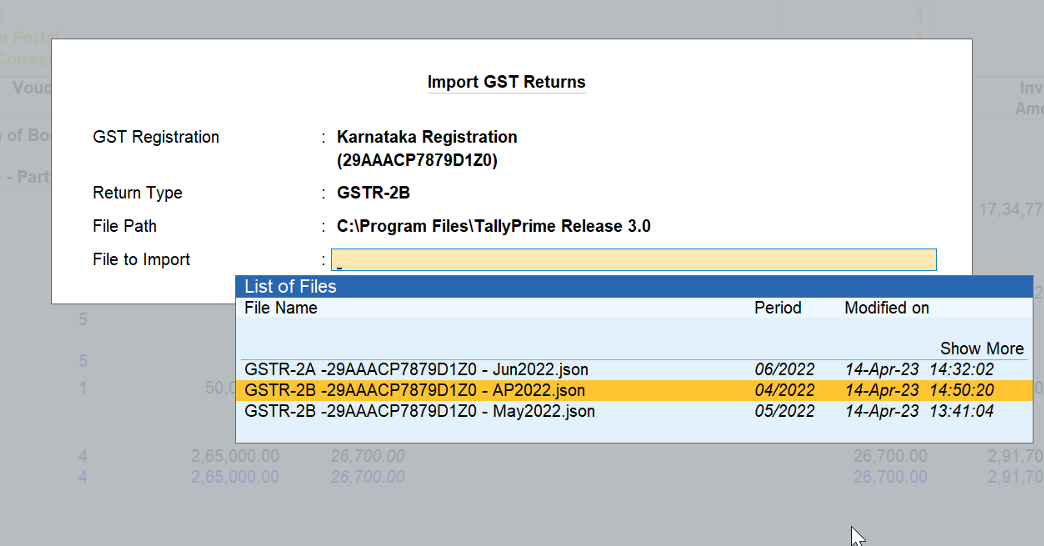
GST reconciliation in TallyPrime is so simple that with one click, the GSTR-2A and 2B statements are downloaded, and the books’ data is automatically reconciled. Thus, helping you with a quick & comprehensive summary of the reconciled transactions and the mismatches. It’s so instant that with a click, you will be on top of the reconciled invoices and the ones that are not matching.
GSTR-1 and GSTR-3B reconciliation
GSTR-1 and GSTR-3B reconciliation helps you quickly verify the portal data with the company books and identify any discrepancies. This practice keep your books and returns in sync. This practice ensures that your books and GST returns remain accurately aligned and helping you stay compliant.
Reconcile multiple returns for multiple periods and GSTINS
With the power of connected GST solution, you can download multiple returns for multiple periods and GSTINs, all together in a click and reconcile the returns instantly. This means, you can download and reconcile GSTR-1, GSTR2A/2B, GSTR-3B, all together with a flexibility to reconcile separately, as it your business needs.
Recognize the unreconciled transactions
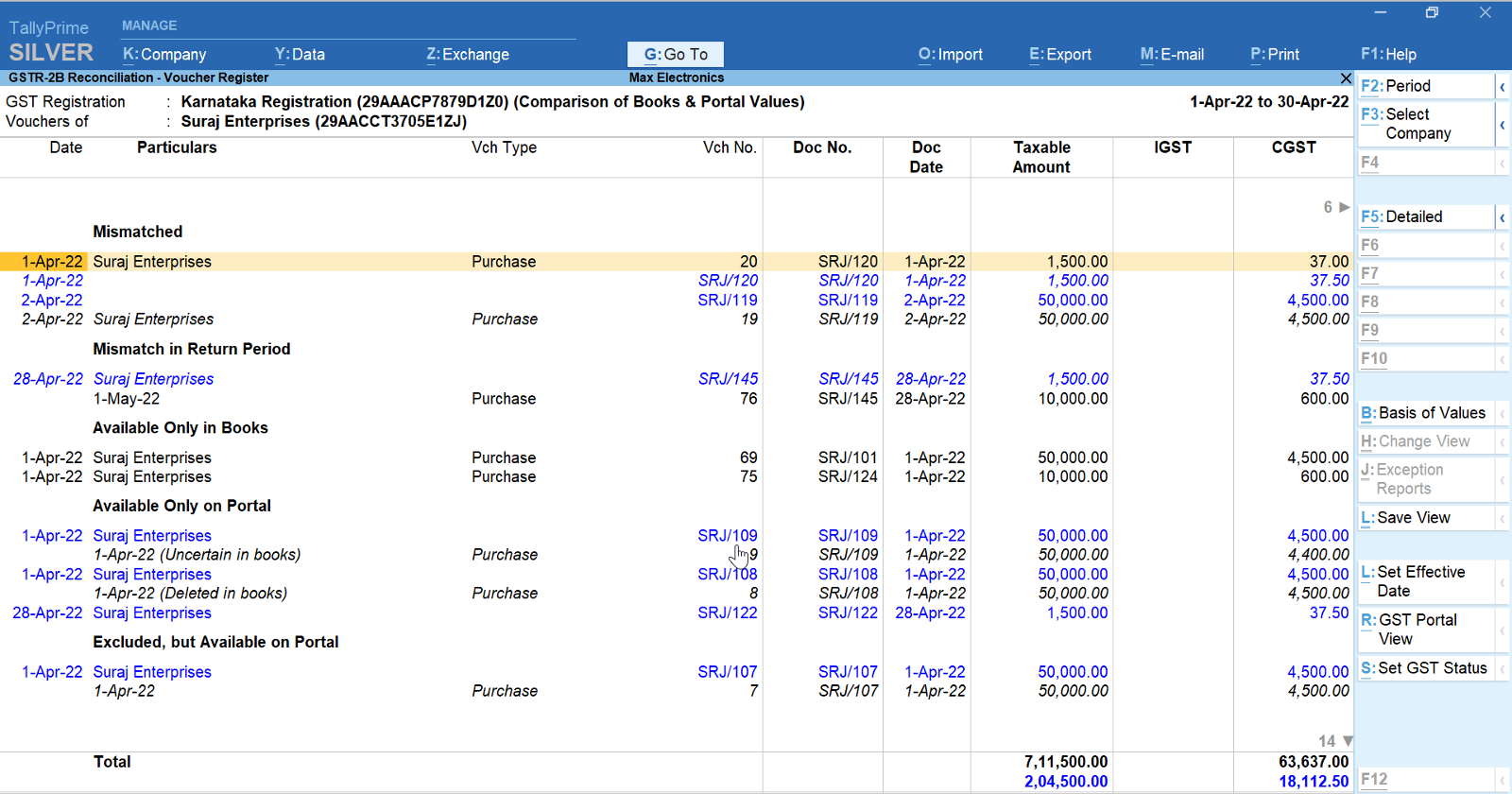
All the unreconciled transactions are flagged in different categories, which helps in identifying the reason for mismatches and allows the user to take suitable actions to resolve them.
Identify invoices not uploaded by your supplier
Get to know the invoices that---are not uploaded by your suppliers, are not accounted in books, have a mismatch in return period, and all such instances of unreconciled invoices, helping with the input tax credit.
Track invoices with mismatches in the return period
Sometimes, there might be a mismatch in the date of the transaction, due to which it might appear in different return periods for you and your party. For such transactions, you can simply update the ‘GST Return Effective Date’ in your books so that it reflects in the respective return period.
Reconciliation status summary
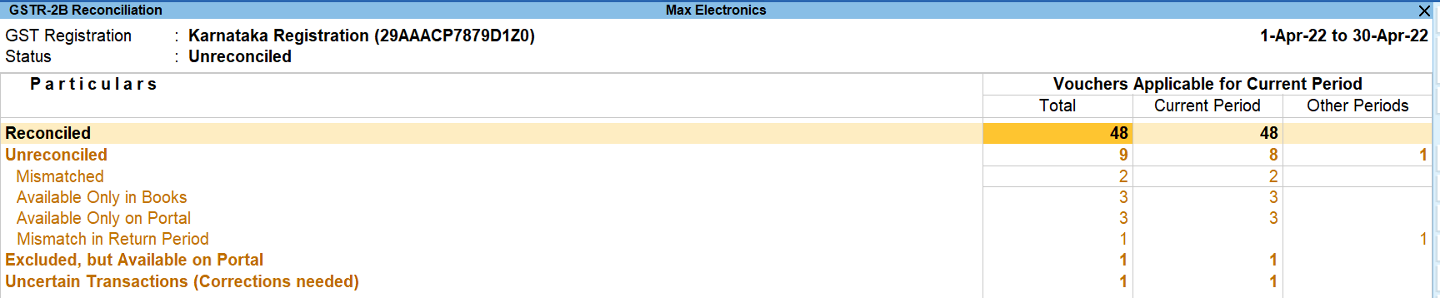
The reconciliation statistics section gives you a bird's eye view of the number of reconciled, unreconciled, and uncertain transactions. You can drill down from each of these sub-sections to take a closer look at the transaction details.
Probable matches
Even when you take all precautions while recording your GST details, sometimes your transactions may not be reconciled due to minor differences in details such as Section, GSTIN, or Doc No. TallyPrime’s reconciliation solution is intelligent enough to identify such positional mismatches and are grouped separately, allowing you to take necessary action to reconcile transactions.
Multi-GSTIN Support
If you have multiple GST registrations/GSTINs, the GSTR-2A/2B reconciliation report provides an amazing view of your combined GST details and activities across registrations. You have the flexibility to view GSTR-2A/2B reconciliation for individual registration from any of your companies/branches. You can view and resolve your uncertain transactions for all GSTINs combined or for one GSTIN at a time, based on your business needs.
Easy, and intuitive design of reconciliation report
The GSTR-2B and GSTR-2A reconciliation report is so simple that you will get a complete view of the reconciliation activities by spending a few minutes. All pending activities or ones that need action are highlighted in amber color, while the portal values are presented in blue for easy identification. Also, the report structure is designed to mimic the portal view, so it becomes easy to relate and read.
How to reconcile GSTR-2B and GSTR-2A in TallyPrime?
Have a look at the steps to reconcile GSTR-2A and GSTR-2B in TallyPrime:
- Click on ‘Exchange’ and Select ‘Download GST returns’
- Click on Download
That’s it! TallyPrime will automatically download the GSTR-2A/2B and other returns and instantly the reconciled summary highlighting the mismatches is made available.
Reconciliation is made simpler in TallyPrime not only with automatic reconciliation but the way the reconciliation is done. TallyPrime can identify perfect matches and potential matches, allows users to confirm potential matches and find matches even when there seem to be differences like round-off differences, difference in formatting of voucher number, etc.
Read More:
- Multiple GSTIN support in a single company
- All new powerful report filter
- Flexible voucher numbering and voucher series
- Integration with payment gateways
Videos to check out
Simplified & Powerful Report Filters | TallyPrime Walkthrough
Payment Gateway Integration | TallyPrime Walkthrough
Voucher Numbering Behaviour in TallyPrime
How to Use Multiple GST Registrations Feature in TallyPrime