










TallyPrime allows you to monitor and manage your entire business from any smartphone browser. In my 20 years of consulting for manufacturers and retailers, the biggest "prison" for an owner has always been the office desk. Traditionally, if you weren't in that chair, you were flying blind.
I often tell my clients to think of the mobile capabilities in two ways. Browser Reports are like looking through a window, you get a clear, read-only view of your numbers. Cloud Access is like walking through the door and sitting at your desk; it gives you the full power to "do" rather than just "view."
What can I check while away from the office?
If you just need to check the pulse of your business, TallyPrime Reports in Browser (TRiB) provides instant visibility. The interface is completely mobile-responsive, meaning it automatically adjusts for a natural experience on your phone. You don't need to zoom or scroll horizontally to find the data that matters most.
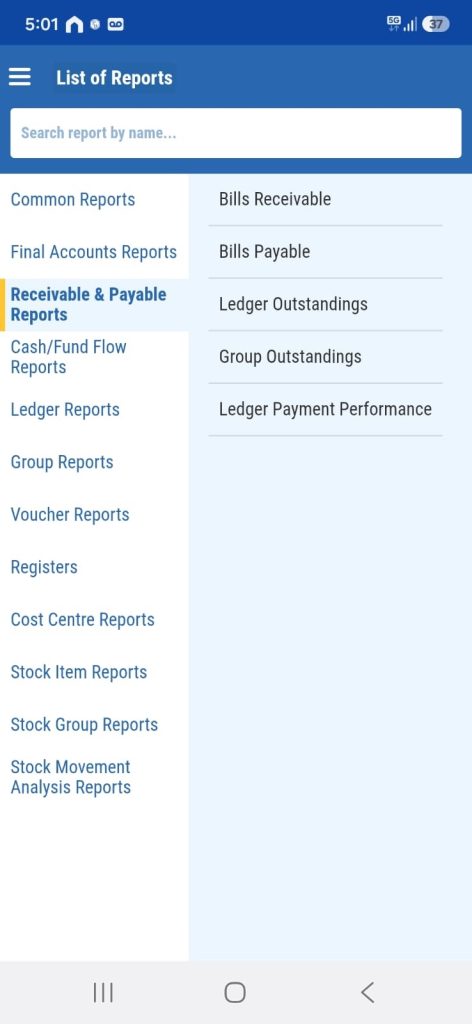
View reports:
- Common reports: Get instant access to your most frequently used financial and inventory statements, like the Balance Sheet, Profit & Loss, and Day Book, all in one place.
- Final accounts reports: Review your company's core financial health and overall profitability through comprehensive end-of-term statements.
- Receivable & payable reports: Track exactly who owes you money and whom you need to pay, helping you prevent cash flow bottlenecks.
- Cash/Fund flow reports: Monitor the inward and outward movement of liquid funds to ensure you have enough cash for daily operations and emergencies.
- Ledger reports: Dive deep into specific account ledgers to review individual transactions and keep tabs on particular parties or expenses.
- Group reports: Analyze financial data consolidated by account groups (like all your Sundry Debtors together) for a broader view of your outstandings.
- Voucher reports: Access detailed lists of recorded vouchers on the go to verify entries and maintain accurate bookkeeping.
- Registers: Keep track of chronological transaction logs, such as Sales or Purchase registers, which are highly useful for periodic reviews.
- Cost centre reports: Evaluate the expenses and profitability of specific departments, ongoing projects, or branches within your business.
- Stock item reports: Check real-time inventory levels and item-wise details before committing to a client deal on-site, saving you from over-promising.
- Stock group reports: View consolidated stock balances categorized by specific inventory groups to manage bulk stock effectively.
- Stock movement analysis reports: Understand the flow of your inventory to easily identify your fast-moving and slow-moving items.
Note: From any of these reports, you can drill down to the voucher level and download invoices as PDF or Excel files directly to your phone.
Can I do more than just "view" my data?
Here is what you can do beyond just viewing reports:
- Seamless Approval Workflows: Use Tally's built-in security features like "Optional Vouchers" to establish a strict hierarchy. Your staff can create pending transactions (drafts), and you can remotely review and approve them to update your live office books in real-time.
- Automated Document Processing: Leverage tools like Docs by Ira, an AI-powered invoice processor, to automate data entry and manage documents directly from your mobile device.
- Role-Based Access Control: Manage your team's security on the go by setting up user roles. You can dictate exactly who can view, enter, or alter specific data within your company.
For owners who need to be active participants in the workflow, TallyPrime on Cloud is a game-changer. It provides you with full capabilities similar to working offline, but entirely accessible through a web browser on any device
Real-world example: The "emergency stock" scenario
I recently worked with an automobile dealership owner who spent most of his time at auctions or client sites. During a high-stakes negotiation, he needed to know if a specific high-value engine component was in stock across any of his three locations.
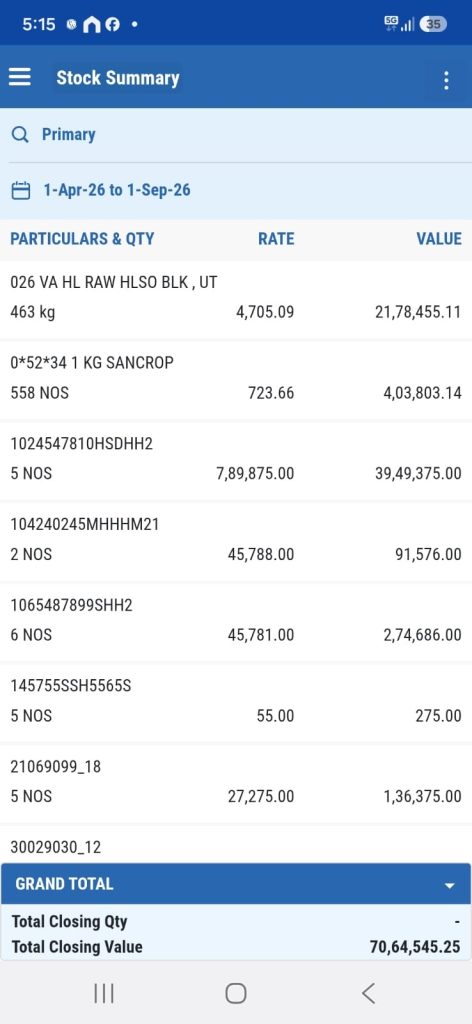
Instead of calling his warehouse manager and waiting ten minutes for a manual check, he used his smartphone. He logged in, checked the Stock Summary in seconds, and approved a purchase order for a replenishment part right there on the spot. That speed allowed him to close a deal that he otherwise would have lost to a competitor.
Read more about Tally’s Technology to Get Secure Browser Access of Your Data
Conclusion: Your "on-the-go" action plan
The shift to mobile management isn't just about convenience; it is about maintaining a competitive edge through faster decisions. You no longer need to wait until Monday morning to know where your business stands. Your office is now wherever you happen to be.
3-step get started checklist:
- Enable "Browser Access" in the F11 Features menu under the Online Access section.
- Connect your company from Alt+K (Company) to Tally.NET and set up your Secure PIN for a safe, secondary layer of authentication.
- Open a web browser on your mobile device, log in to the Tally Solutions portal with your Tally.NET ID, and in the Report Access section select a company and instantly start viewing your reports.
"You no longer need to be at your desk to be in control; your business now lives in your pocket."














