










Businesses that grow beyond a single legal entity, sister concerns, branches, or subsidiaries, eventually face the same question: how do we see the group's financial position as a whole, not just company by company?
Manually combining Balance Sheets and P&L statements in spreadsheets is slow, error-prone, and hard to trust at closing time.
TallyPrime addresses this directly with its Group Company feature, purpose-built for multi-company financial consolidation. It lets a business owner, CFO, or CA combine the accounts of multiple companies into a single consolidated view in a matter of seconds, while every member company continues to maintain its own independent books.
This guide will walk you through exactly how multi-company financial consolidation works in TallyPrime, step-by-step.
What multi-company consolidation means in TallyPrime
Multi-company consolidation in TallyPrime is the process of combining the ledgers, Trial Balances, and final accounts of two or more related companies into one unified set of financial statements. It gives a consolidated view of Balance Sheet, Profit & Loss Account, and Trial Balance, while each entity's own transactions and books remain fully intact and unaffected.
This is commonly needed by:
- Holding companies with multiple subsidiaries
- Retail or trading businesses with branches across cities or states
- Family businesses with sister concerns in related lines of trade
- Any group that reports combined performance to management, investors, or auditors
Group entities can be consolidated even when they operate under different GSTINs, and companies transacting in different currencies can be consolidated with automatic currency conversion so the group-level statements present one consistent picture.
Prerequisites before you consolidate
A clean consolidation depends on a few basic checks before you create the Group Company:
- Uniform chart of accounts: Corresponding ledgers and masters should carry the same names across all member companies. If the sales ledger is named "Sales" in one company and "Sale" in another, TallyPrime will treat them as separate line items in the consolidated report instead of combining them.
- Same base currency: Member companies should share the same base currency symbol and formal name for the consolidation to combine figures correctly.
- Companies already created individually: Each member company must exist and have its data entered in TallyPrime before it can be added to a group.
Step-by-step: Setting up multi-company consolidation in TallyPrime
Step 1: Load the member companies
Press Alt+F3 (Select Company) from the Gateway of Tally and load all the individual companies you want to include in the consolidation.
Step 2: Create the group company
From the Select Company screen, choose the option to create a Group Company and add the companies you just loaded as its member companies. For example, a textile business headquartered in Bengaluru with sister concerns in Chennai and Hyderabad can group all three units under one Group Company, even though each deals in a different product line.
Step 3: Name and save the group company
Give the Group Company a name that represents the overall business (for instance, the parent brand name). Once saved, this Group Company will appear alongside your individual companies in the List of Companies the next time you open TallyPrime.
Step 4: Open the group company to view consolidated reports
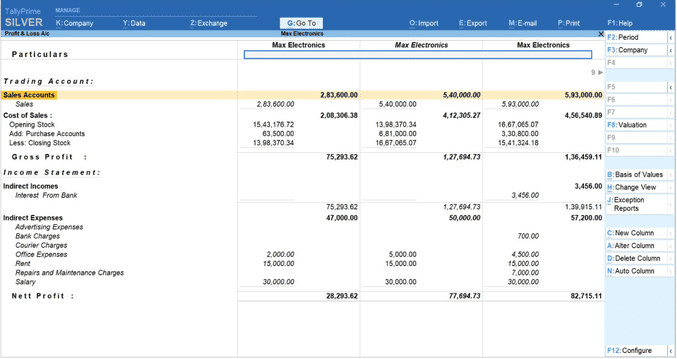
From the Gateway of Tally, go to the Balance Sheet to instantly see the consolidated Balance Sheet across all member companies. The same applies to the Profit & Loss Account and Trial Balance.
Step 5: Compare individual companies within the group
To see how each member company is performing on its own, press Alt+N on the consolidated report and select Member Companies. TallyPrime will break down the same report by individual company, letting you compare performance across all companies side by side without leaving the consolidated view.
Step 6: Handle inter-company transactions
When companies within a group transact with each other, one selling to another, TallyPrime lets you maintain distinct ledgers for each unit while keeping the entries properly mapped. This reduces manual reconciliation work and helps ensure inter-company sales, purchases, receivables, and payables are represented accurately at the group level, so the consolidated numbers reflect the group's real financial position rather than inflated internal transactions.
Step 7: Use consolidated reports for reporting and decision-making
Once set up, the consolidated Balance Sheet and P&L can be shared with internal stakeholders (management, investors) and external stakeholders (auditors) as a single source of truth for the group's financial health. They are useful for both frequent internal management reviews and periodic statutory reporting.
Watch this video to manage multiple companies with ease in TallyPrime:
Key benefits of TallyPrime's multi-company consolidation
- Centralized visibility: You can see the entire group's financial position without switching between companies or building manual spreadsheets.
- No disruption to individual books: Each member company's own transactions, vouchers, and records remain completely unaffected by consolidation.
- Multi-currency and multi-GSTIN ready: Group companies with different currencies or different GSTINs can still be consolidated accurately.
- Fast comparison across entities: Instantly toggle between the consolidated view and individual member company figures to benchmark performance.
- Update or dissolve anytime: Group company details can be updated at any time, and the group company itself can be deleted without affecting the underlying member companies' data.
Who this feature is built for
- Business owners: Business owners running sister concerns or branches get a single, centralized view of the group's financial health without waiting on manual roll-ups from each unit.
- CFOs and finance managers overseeing multiple entities: Move faster at reporting time, with consolidated Balance Sheets and P&L statements ready in seconds instead of days of spreadsheet work.
- CAs managing group audits: Simplify group accounting and cross-entity comparison, with the ability to drill down from consolidated figures to individual member companies during audit checks.
Across all three, the feature replaces what used to be a multi-day, spreadsheet-driven exercise with a task that takes seconds once the Group Company is set up.
Conclusion
Multi-company financial consolidation is often treated as a complex, spreadsheet-heavy exercise. But in TallyPrime, it's built directly into the product as the Group Company feature. With a few prerequisite checks and a handful of steps, businesses of any size running multiple companies can move from fragmented, entity-by-entity reporting to a single, consolidated view, while keeping each company's own books fully intact.
Whether you're a business owner tracking different branches, a CFO closing the books across entities, or a CA reviewing a group during audit, the same Group Company setup applies: load the member companies, group them once, and every consolidated report is ready on demand from there. It's a one-time setup that keeps paying off at every reporting cycle.














