










In my experience working with growing businesses, the biggest bottleneck isn't getting customers, it's managing the paperwork that comes after. I’ve seen countless owners spend late nights staring at stacks of bills, manually punching numbers into spreadsheets or software.
If you feel like your team spends more time feeding data into your system than actually understanding what those numbers mean, you are not alone. Manual data entry is slow, prone to human error, and keeps you reacting to the past instead of planning for tomorrow.
This is where TallyPrime’s AI-powered invoice processing saves the day. The AI-powered Docs by Ira app, instantly converts bulk invoices into draft vouchers, ready to be approved by you.
Why is manual invoice entry holding your business back?
When your day starts with a pile of vendor bills and customer invoices, entering them one by one feels like a necessary evil. But let's look at what this routine actually costs you.
Every time someone manually types a vendor name, item code, or tax amount, there is a chance for a typo. A misplaced decimal or a swapped digit can throw off your entire stock report or tax filing. Beyond mistakes, it steals your most valuable resource: time. While your team is busy playing human scanner, they aren't helping customers, following up on payments, or looking at ways to cut costs.
How "Docs by Ira" changes the game
In my work helping businesses streamline their daily operations, I always look for tools that remove friction. This is where "Docs by Ira" inside TallyPrime comes in to simplify things.
Instead of typing out every line item from a scanned bill or PDF, this feature acts as an intelligent assistant. It reads your everyday invoices—whether they are digital PDFs, handwritten bills, or scanned copies—and converts them into ready-to-use business data inside your trusted accounting software. You no longer have to build your records from scratch; the system does the heavy lifting of capturing the details accurately.
How is 'Docs by Ira' used in TallyPrime?
Docs by Ira is an AI-powered document-processing app for TallyPrime designed to eliminate manual data entry. It reads digital invoices and bills (PDFs, images, or mobile scans), extracts key data fields, and converts them into accounting-ready draft vouchers for your review.
How It Works
- Register and enable the plug-in: Register your TallyPrime serial number through the Tally Solutions portal, enter the OTP sent to your admin email/mobile, and update your license (F1 > Settings > License > Manage License > F5: Update) to load the plug-in.
- Capture or import invoices: Single or Bulk. Upload documents from your desktop system (PDFs, scanned images) or use the TallyIra app to snap photos of vendor bills on the go. You can process single files or upload entire folders/ZIP batches.
- AI extraction & smart mapping: Automation. The tool automatically reads critical fields like the supplier name, invoice number, date, total amount, line items, and GST details. It maps them to your existing ledger masters or flags missing data and potential duplicates.
- Review draft transactions: Human Control. Instead of posting directly to your books, the data sits in a Draft Transactions report. Review the extracted details; if there is an error, Ira highlights it in red so it can be corrected, whereas if there are no errors, Ira indicates "Ready to Convert."
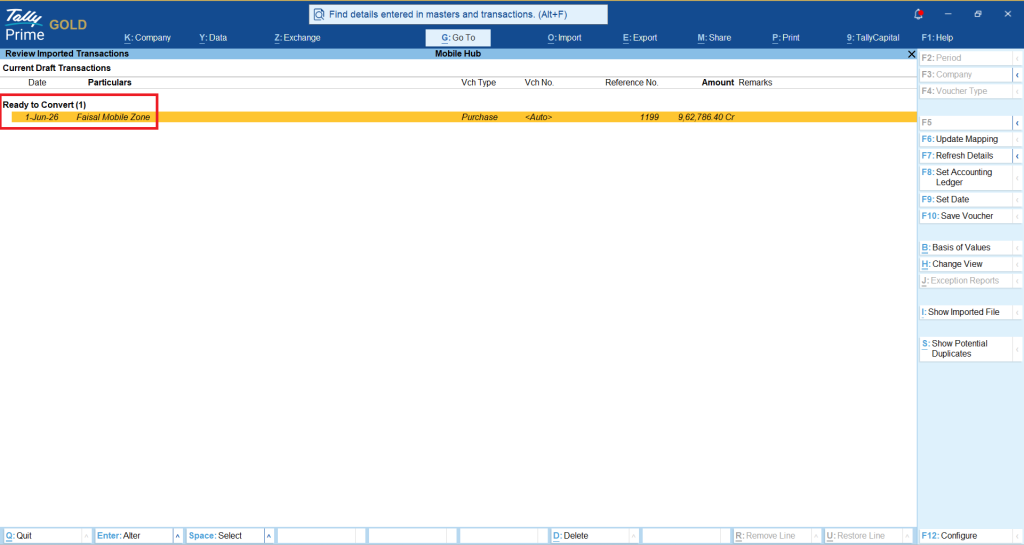
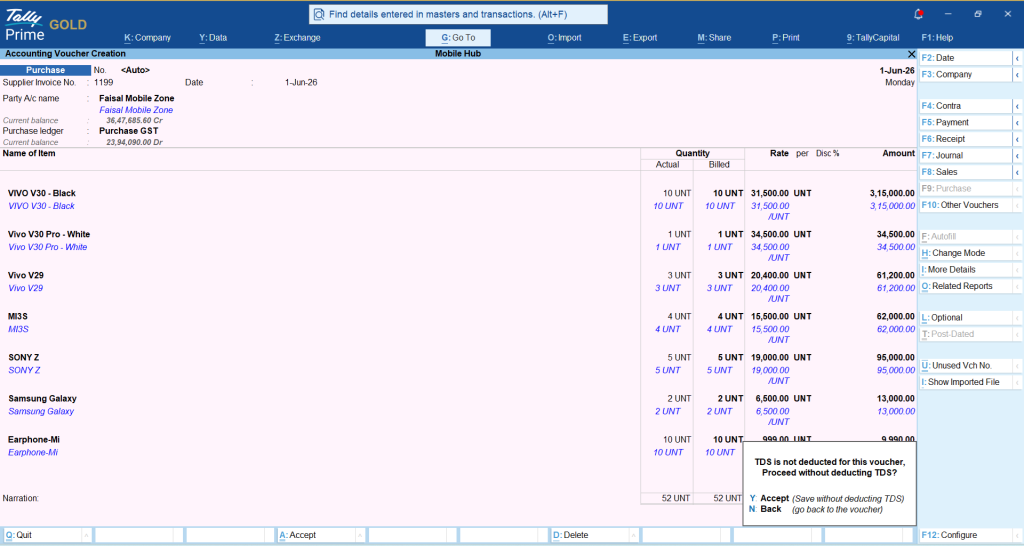
- Finalize and post: Completion. Once validated, the draft turns into a formal, regular voucher inside TallyPrime with a single click.
Know more about Docs by Ira: Tally Ira’s AI-Powered Invoice Processor That Keeps You in Control
What happens when your invoices turn into smart insights?
Once your bills and invoices flow smoothly into TallyPrime without the manual typing delay, the whole game shifts from data entry to data use.
- Instant visibility: You immediately know who you owe and who owes you without waiting for a data entry backlog to clear.
- Better cash flow control: With up-to-date numbers at your fingertips, you can spot spending trends early.
- Fewer mistakes: Automated data capture means your stock levels and ledger balances match reality much closer.
Real-world example: How Rajesh stopped drowning in paperwork
Rajesh runs a mid-sized hardware distribution business. His team used to receive dozens of supplier invoices every single day. By late afternoon, two staff members were glued to their desks just typing those bills into TallyPrime.
Mistakes happened often, leading to frustrated vendors and mismatched ledgers. When Rajesh started using the document automation capabilities through Docs by Ira, the change was night and day. Instead of spending hours keying in data, his team simply processed the incoming documents swiftly. They cut their data entry time down drastically, leaving them free to manage inventory better and dispatch orders faster.
"Automating our invoice flow didn't just save us hours of typing. It gave us peace of mind knowing our daily reports actually reflect where our money is going right now."














