










In my experience working with growing business owners, the end of every month brings a familiar wave of panic: sorting through piles of invoices, matching purchase registers with supplier data, and praying that the GSTR-1 and GSTR-3B numbers line up without a mismatch.
Manual data entry turns GST filing into a stressful chore rather than a simple routine. TallyPrime takes a different approach. Your sales and purchase transactions become the starting point for GST reporting, helping reduce duplicate data entry and making it easier to review your return information before filing
Getting your taxes right shouldn't feel like a monthly puzzle. Let's look at how automating this workflow can save you time, eliminate stress, and keep your business completely compliant.
How does TallyPrime help with GSTR-1 and GSTR-3B filing?
Filing Goods and Services Tax (GST) returns used to be a tedious, error-prone chore that involved endless data matching, manual calculations, and frantic last-minute portal uploads. For businesses and tax professionals managing high volumes of invoices, navigating mismatches between books and government portals could consume days of valuable time.
Fortunately, modern accounting software has fundamentally changed the game. TallyPrime streamlines and automates the entire GST compliance lifecycle, transforming how businesses prepare, review, and file GSTR-1 and GSTR-3B.
Understanding the Pillars of GST Returns
Before looking at the automation features, it is helpful to recall what each return accomplishes:
- GSTR-1: A detailed statement of all outward supplies (sales, debit/credit notes, exports) that reports invoice-wise data to help your buyers claim their Input Tax Credit (ITC).
- GSTR-3B: A summary-level return used to declare your total tax liabilities, eligible ITC, and net tax payable to the government.
When handled manually, discrepancies between these two returns can lead to automated mismatch notices or delayed ITC claims. TallyPrime bridges this gap by drawing data from the same master ledger.
Key Ways TallyPrime Automates GSTR-1 and GSTR-3B
1. Intelligent Error Detection and Exception Handling
One of TallyPrime's most powerful capabilities is its "Incomplete/Uncertain Transactions" filter. As you record everyday sales and purchase vouchers, TallyPrime checks them against GST rules.
- If a GSTIN is invalid, an HSN code is missing, or tax types (CGST, SGST, IGST) are mismatched, TallyPrime flags the voucher immediately.
- Instead of letting your return get rejected on the GST portal, TallyPrime isolates these exceptions, allowing you to drill down, correct them at the source, and ensure only fully compliant data goes into your returns.
What does this look like in the real world?
Last year, I worked with Rajesh, who runs a mid-sized electronics distribution firm. His team used to spend the first week of every month manually compiling thousands of B2B and B2C invoices into Excel sheets. Mistakes were common, and matching input tax credit with suppliers felt like finding a needle in a haystack.
After switching to TallyPrime’s automated GST workflows, his accountant stopped doing data entry twice. Invoices recorded during sales automatically populated GSTR-1 and automatically reflected in GSTR-3B, and purchase reconciliations became a matter of reviewing pre-filtered exception reports.
Rajesh cut his monthly filing time from five days down to just a few hours, with zero mismatch penalties.
Use TallyPrime’s built-in error check feature every Friday to catch missing tax details early.
Learn how to file GSTR-1 step by step
2. Seamless GSTR-1 & GSTR-3B Preparation and Direct Filing
Generating and filing GSTR-1 no longer requires jumping back and forth between your books and the portal:
- Enable connected GST details: Gateway of Tally > F11> Enable Goods & Services Tax, Set ‘Yes’, Put User Name and select Mode of Filing: EVC/DSC
- Automated Summary: Go to Display More Reports > GST Reports > GSTR-1 to view your B2B, B2C, and export data neatly categorized. If you get any transaction in uncertain transactions, it is just a correction needed.
- Direct Integration: Using TallyPrime's connected capabilities, you can press Alt + E (Export) and select GST Return.
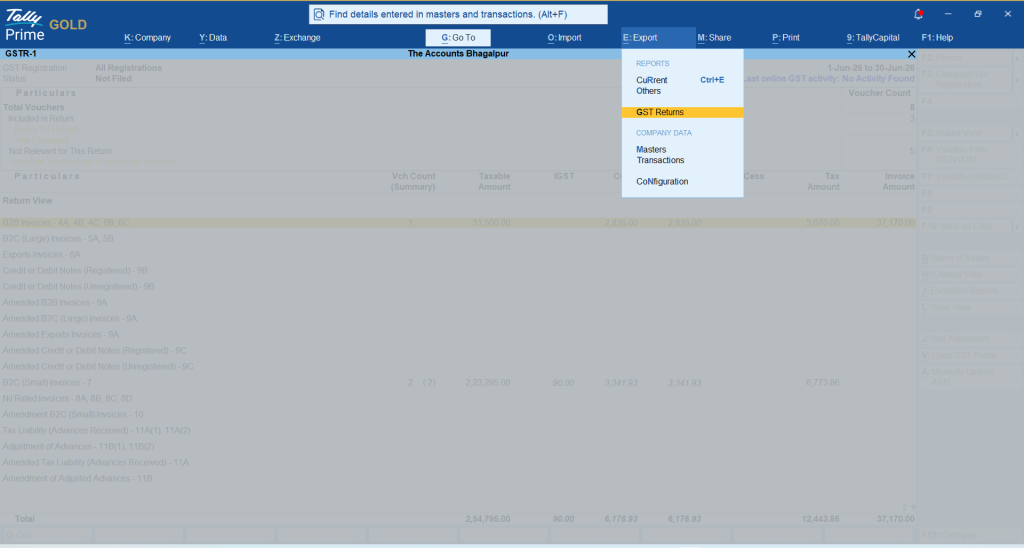
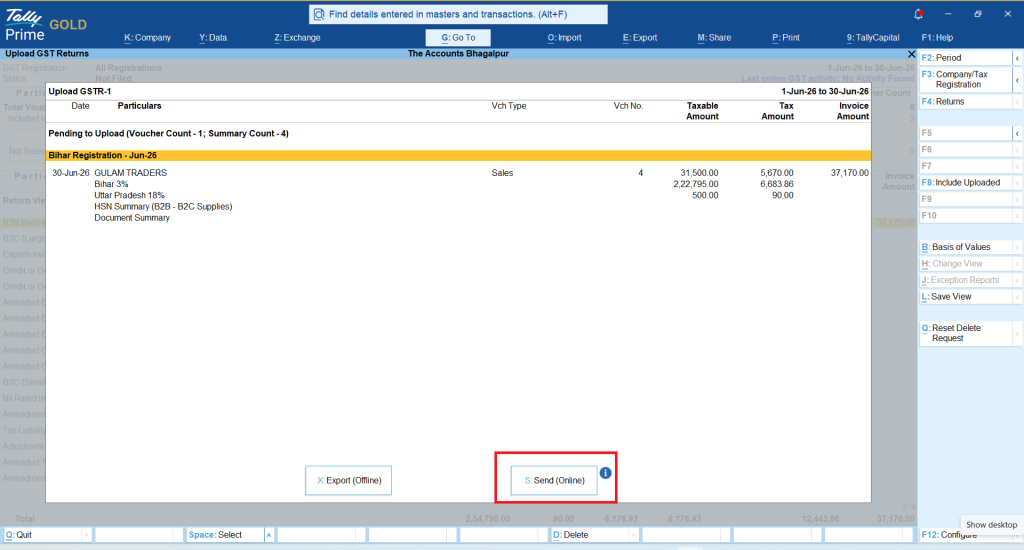
You will get all the data, just click on Send or Press Alt+S
And after that click on “Send (Online)”, you will receive the OTP on your registered mobile and email, just put your OTP and File the return.
- Authentication Options: You can authenticate directly using an Electronic Verification Code (EVC) or Digital Signature Certificate (DSC) without manually logging into the GST portal browser session.
Once successful, an ARN (Application Reference Number) is generated right inside TallyPrime.
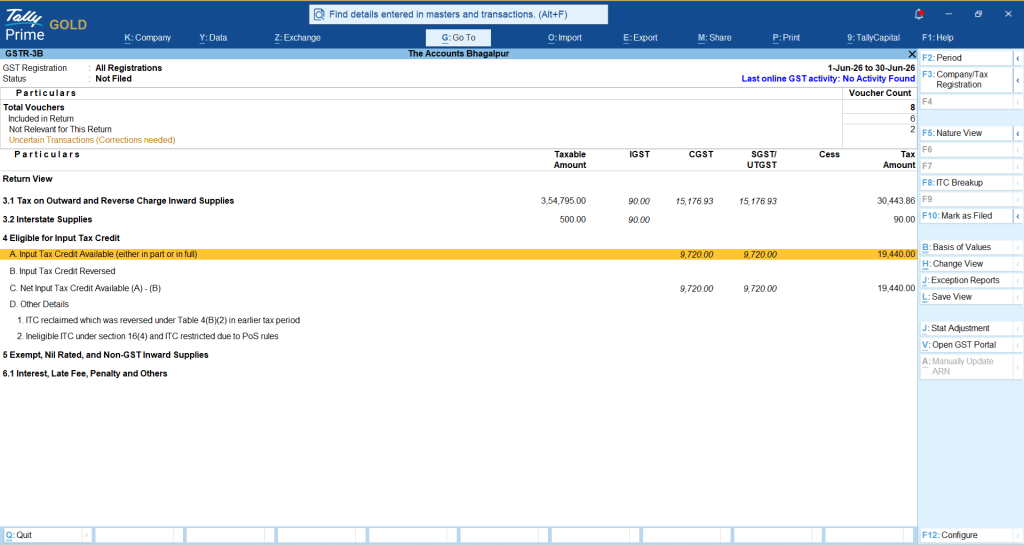
Just as we filed a GSTR-1 return similarly we can file GSTR-3B.
You can also read this Guide to filing GSTR-3B: Rules, Process, & Declaring Supplies
In TallyPrime, Go to (Alt+G), click on GSTR-3B
Best Practices for Frictionless Filing
To make the most of TallyPrime's automation features, keep these best practices in mind:
- Maintain Real-Time Vouchers: Do not wait until the month-end. Recording day-to-day transactions with correct HSN/SAC codes prevents bulk error corrections later.
- Leverage Marked Vouchers: If you collaborate with a tax consultant, TallyPrime's "Marked Vouchers" feature lets you share only modified entries, preventing any overwriting or data loss.
- File in Sequence: Always file GSTR-1 first so your buyers get timely ITC, followed immediately by GSTR-3B to settle your tax liability.
Conclusion
Automating your GSTR-1 and GSTR-3B filing with TallyPrime eliminates repetitive manual calculations, reduces human error, and gives you total visibility over your tax health. By leveraging integrated error checks, direct e-filing (via EVC/DSC), and automated reconciliations, you can turn a stressful compliance deadline into a smooth, routine workflow.














