



Every business that processes vendor invoices at scale eventually runs into the same problem: a GST number gets mistyped, an invoice gets entered twice, or a rate gets applied incorrectly. None of it is obvious until weeks later, when it shows up as a mismatch during reconciliation or, worse, a notice from the GST department.
TallyPrime's AI is built to catch these problems much earlier, at two points instead of one.
The first checkpoint is at entry. When an invoice comes in through Docs by Ira, TallyPrime's AI-powered invoice processing feature, it extracts the data and checks it against your existing records before anything gets posted. If a GST field looks off or an invoice number has already been used, TallyPrime flags the entry so you can take a second look.
The second checkpoint comes later, right before you file GST. TallyPrime compares your books against your GST returns, GSTR-2A/2B, and GSTR-1 against GSTR-3B, so any gap between what you've recorded and what's been reported shows up while you can still correct it, not after you've already filed.
When do small errors usually creep into your books?
Most bookkeeping errors aren't the result of carelessness. They're just what happens when a business is moving fast:
- a bookkeeper is entering invoices from three different vendors in one sitting
- an accounts team member is filling in for someone on leave
- or an invoice arrives twice because two people in the supply chain both forwarded it.
On their own, these look like small slips. But if you add them up across a filing period, they turn into input tax credit mismatches, return discrepancies, and hours spent during month-end reconciliation trying to figure out where things went sideways.
The old way of dealing with this was to catch errors during reconciliation, or to find out about them only when a GST notice landed.
TallyPrime's AI moves that catch point much earlier, right to the moment the data is entered, so a lot of these errors never make it into the books in the first place.
How does TallyPrime’s AI-assisted invoice processing validate data at entry?
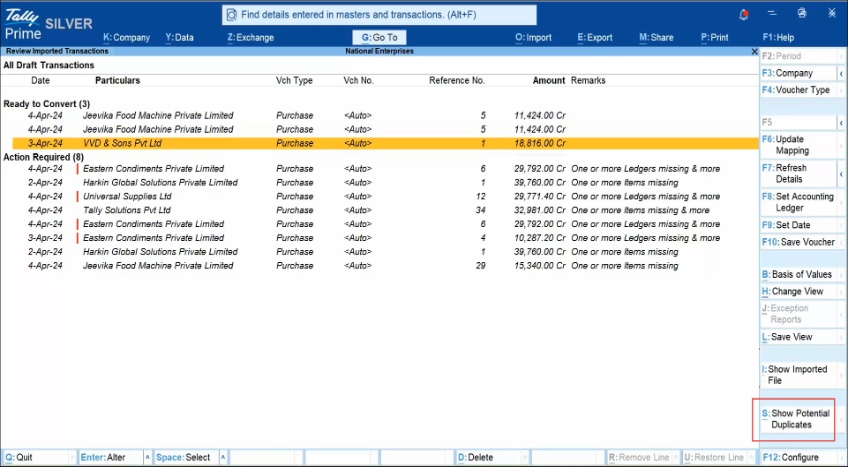
Think of Docs by Ira as a second pair of eyes that checks an invoice against everything TallyPrime already knows before letting it become a ledger entry. A couple of examples make this concrete:
A GST field doesn't add up
If a vendor's invoice shows a GSTIN with a formatting error, or applies a tax rate that doesn't match the HSN/SAC code for that item. Rather than posting the entry as-is, TallyPrime flags it. A GST mismatch that goes unnoticed at entry is exactly the kind of thing that turns into an input tax credit problem down the line.
The invoice number has already been used
This happens more often than most businesses expect. An invoice gets processed once by the person who received it and again by someone in finance who didn't realise it had already been logged. TallyPrime checks the invoice number against what's already on record and flags the duplicate before it's posted, so the same expense doesn't get counted twice.
In both cases, TallyPrime isn't making the final call on its own. It's surfacing the issue so you can review and decide what to do about it. That's the whole point: catch what looks off, but leave the judgment with the people who understand the context.
Read more about Tally Ira’s AI-Powered Invoice Processor That Keeps You in Control
How TallyPrime catches mismatches between books and GST returns before filing
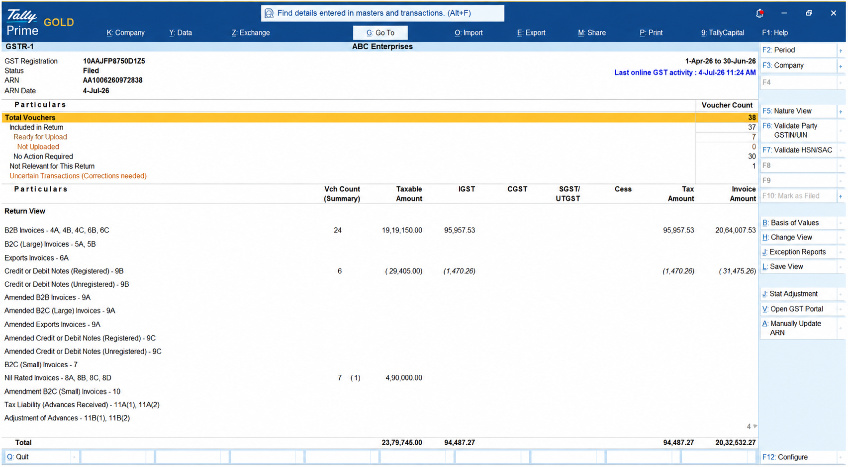
Getting the entry right is only half the job. The other half shows up at filing time, when your books need to line up with what's actually been reported by your vendors, and by you in earlier returns. This is where TallyPrime's second layer of checks comes in, and it works in two directions:
Against your vendors' filings
TallyPrime reconciles your purchase entries with GSTR-2A and GSTR-2B — the data auto-populated from what your vendors have filed. If a vendor hasn't filed yet, has reported different figures, or the tax amounts simply don't match, TallyPrime flags it so you can chase it up or correct your own entry before it affects your input tax credit claim.
Between your own returns
TallyPrime also checks that your GSTR-1 (what you've reported as outward supplies) is consistent with your GSTR-3B (your summary return). A gap between the two is one of the more common reasons businesses end up fielding questions from the GST department, and catching it before filing means it gets fixed quietly instead of being explained later.
Read more on How to Fix a Mismatch Between GSTR-1 and GSTR-3B
Why Does Catching Errors at Both Stages Matter?
TallyPrime catches errors in two places rather than just one, because each stage is solving a different problem.
- Entry-stage checks stop an error before it ever becomes part of your books. It's the cheapest point in the whole process to fix something, since nothing has been built on top of that entry yet
- Pre-filing checks act as the safety net for whatever entry-stage validation couldn't catch on its own, like a discrepancy that only becomes visible once a vendor's own filing data comes through
Put together, an error has to get past two separate checkpoints before it has any real chance of reaching a filed return. And by the time it would have shown up as a notice from the GST department, it's already had two chances to be caught and quietly corrected on your terms.
What's the Payoff of Catching Errors Early?
This is where the two-stage approach actually pays off in practice: fewer corrections needed once a return is filed, and a lot less time spent during month-end finalisation or annual audit trying to trace where a discrepancy came from.
When invoices are checked as they're entered and books are checked against returns before submission, most of the "finding the error" work has already happened in the background, long before anyone sits down to reconcile.
For a business handling a steady stream of vendor invoices, that's real time back — time that would otherwise go into tracing a mismatched GST number through weeks of entries, or explaining a GSTR-1/GSTR-3B gap after the fact. TallyPrime's AI is built to move that work earlier, when it's easy, instead of later, when it's expensive.
The Bottom Line
Catching an error is really a question of timing. Catch it the moment an invoice is entered, and it's a two-second fix. Catch it three months later inside a filed return, and it's a notice, a paper trail, and an explanation you'd rather not have to give.
TallyPrime's AI is built around that difference. Checking invoice data at entry through Docs by Ira, and checking your books against your GST returns again before you file, so the same category of mistake gets two chances to be caught quietly instead of one chance to become a problem.
None of this replaces the person doing the work. It just means less of your time goes into finding mistakes, and more of it goes into everything else running a business actually requires.














