










Small retailers use TallyPrime to run billing and stock management as one connected system: every sale recorded at the counter updates inventory instantly, applies the correct GST rate, and feeds straight into stock and sales reports. All this without any separate POS software or manual reconciliation between a billing register and a stock register.
For a retail store, kirana outlet, pharmacy, or apparel shop, this means the person billing a customer and the person tracking stock are looking at the same live numbers, all inside one product.
This combination of a fast, GST-ready billing counter paired with real-time inventory control, is one of the most common ways small and micro retail businesses in India put TallyPrime to work day-to-day.
Here's how the pieces fit together.
Why inventory and billing need to work as one system for retailers
A retail counter runs on speed and accuracy at the same time. A customer is waiting, so billing has to be quick. But every one of those bills also changes what's on the shelf, so stock has to update immediately, not at the end of the day. When billing and inventory live in separate systems, retailers end up doing the reconciliation themselves: checking whether the POS software and the stock register agree, fixing mismatches, and hoping nothing was missed during a busy hour.
TallyPrime removes that gap by design.
Because vouchers, ledgers, and stock masters sit in the same data structure, a single sales entry does three things at once:
- Generates the customer's invoice
- Reduces the quantity in the relevant stock item
- Updates the ledgers used for GST and accounting
There's no export-import step and no second system to keep in sync.
What does billing look like at the counter: TallyPrime's POS-style invoicing
For retail counters, TallyPrime supports a Point of Sale voucher type designed to look and behave like a typical retail bill rather than a formal tax invoice. This is useful for high-volume, low-value transactions like a general store or pharmacy counter. Retailers commonly use this alongside standard sales vouchers for larger or credit transactions.
Practical features retailers rely on at billing time include:
- Barcode scanning to pull up an item and its price instantly, cutting down manual item search during rush hours.
- Multiple price levels, so the same item can be billed at different rates for retail customers, wholesale buyers, or loyalty segments, without maintaining separate item masters.
- Quick item search and function-key shortcuts (such as the standard F-key navigation retailers get used to within a day or two), which keep billing fast even for staff who aren't trained accountants.
- Discounts and schemes at the line-item or invoice level, applied automatically during billing rather than calculated separately.
- Multiple payment modes in a single invoice, like cash, card, UPI, or a split between them, reflecting how retail customers actually pay.
- Automatic, correct GST application on every bill, calculated item-wise at the applicable rate the moment it's billed, so staff at the counter don't need to work out tax rates manually or bill items incorrectly.
You can also get industry-specific invoice formats in TallyPrime.
How inventory management is built for how retailers actually stock
Behind the billing counter, TallyPrime gives small retailers the inventory controls that used to require a separate stock management tool:
- Stock groups and categories: to organise items the way a store actually thinks about them, by brand, size, department, or product line, making both billing and reporting easier to navigate
- Multiple godowns: so a retailer with a backroom store, a second outlet, or a warehouse can track stock location-wise, and still see one combined view when needed
- Batch and expiry tracking: which matters for categories like pharmacy, FMCG, and grocery retail, where selling from the correct batch and monitoring nearing-expiry stock directly affects both compliance and wastage
- Reorder levels and stock ageing: so a retailer can see what needs restocking before shelves actually run empty, rather than finding out from a customer
- Unit of measure conversions: useful for retailers who buy in bulk units (cartons, boxes) but sell in smaller retail units (pieces, kg, litres).
Because these inventory masters are the same ones used at billing, there's no separate "stock module" to update. Therefore, every purchase entry, transfer between godowns, or sale automatically keeps the inventory picture current.
Here’s how TallyPrime works for multi-location inventory with batch and expiry tracking
GST-compliant billing
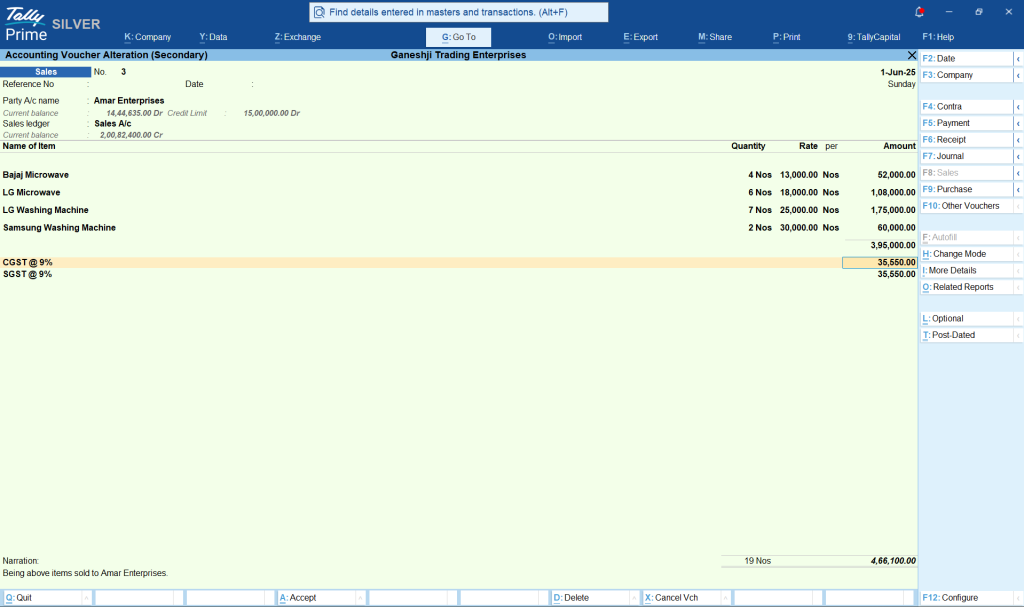
Every invoice generated through TallyPrime, whether a formal tax invoice or a POS-style retail bill, applies GST automatically. GST is based on the item and the applicable rate, and is reflected correctly in the retailer's GST returns.
For a retailer selling a mix of items across GST slabs, this removes the need to manually check or apply rates at billing time, and keeps sales data audit-ready without extra reconciliation work at filing time.
Real-time reports retailers check on TallyPrime
Because billing and inventory are part of one system, reports are available the moment a sale happens, not after a batch update. All of this is accessible from the Gateway of Tally without exporting data elsewhere.
For quicker reports, you can click on “Go To” and type in the report you want to see. This is particularly useful for a small retail business where the owner is often the one checking numbers between customers.
Retailers commonly check:
- Stock summary: for a live, item-wise view of what's in hand, across one or all godowns
- Sales register and item-wise sales analysis: to see what's moving and what isn't, by day, item, or category
- Godown-wise stock movement: useful for retailers managing more than one location
- Reorder status reports: flagging items approaching minimum stock levels.
What this looks like for a small retail business
Consider a general store or a small pharmacy running a single counter with occasional rush hours.
Instead of a standalone billing machine accompanied by a manual stock diary or spreadsheet, the owner bills customers directly in TallyPrime using barcode scanning and the POS invoice format. With TallyPrime:
- Every bill instantly reduces stock
- Applies GST correctly
- Updates the day's sales register
So, by closing time, the owner already has an accurate stock position and sales total without a manual end-of-day count. If the store adds a second outlet or a small warehouse later, the same setup extends to multiple godowns without changing how billing works at the counter.
How retailers get started with TallyPrime
Retailers new to TallyPrime typically start by setting up their stock items, groups, and godowns, configuring GST rates against items or stock groups, and then enabling the POS voucher type for counter billing.
Because the interface is designed for non-accountants as much as for accounting teams, most retail staff are comfortable running day-to-day billing within a short time.
Businesses evaluating TallyPrime for the first time can also try an Instant Demo to see the inventory and billing flow before setting it up for their own store.
Conclusion
For small retailers, the value of TallyPrime's inventory and POS combination isn't any single feature, it's that billing, stock, and GST all run off the same data, in real time, inside one product. A sale at the counter is also a stock update and a GST-compliant entry, without extra software or manual reconciliation.
That's what makes it practical for a small or micro retail business to run day-to-day operations confidently, whether from a single counter or across multiple outlets.














