










You can manage a mix of GST and non-GST units in TallyPrime without creating a compliance nightmare.
In my 20 years of implementing ERPs for pharmacies, construction firms, and retail groups, I’ve seen owners live in fear that a single shared ledger will accidentally trigger a tax liability for an exempt unit. It doesn't have to be that way. From April 2023, under CARO 2020, an audit trail (edit log) is mandatory for companies. By isolating your entities into their own files and "folding" them into a Group Company, you satisfy the law for your registered units while keeping your non-GST units simple and clean.
Let’s understand how you can manage both units in TallyPrime.
Why keep GST and non-GST units in separate company files?
Think of separate company files as firewalls. Keeping the GST and non-GST units isolated ensures that Tally’s tax engine only calculates tax for the units that legally require it.
|
GST-registered unit needs |
Non-GST unit needs |
|
Statutory compliance: GSTR-1, 3B, and GSTR-2B reconciliation |
Cash-flow tracking: Focused on simple money-in/money-out |
|
E-invoicing: Instant generation of IRN and QR codes |
Minimal overhead: No tax-ledger maintenance or HSN requirements |
|
Audit readiness: Mandatory voucher logs under CARO 2020 |
Simple P&L: Focused purely on operational profitability |
|
E-way bills: Automated generation for goods movement |
Data integrity: No risk of accidental tax calculation on invoices |
How to manage GST and non-GST business units under one group in TallyPrime
Configuring TallyPrime for this mixed setup is easy. Follow the below steps to set up and manage GST and non-GST business units under a single group:
Create individual companies
Establish a separate company file for each legal entity. Ensure the 'Company Name' matches your legal PAN/GSTIN registration character-for-character.
Enable GST strategically
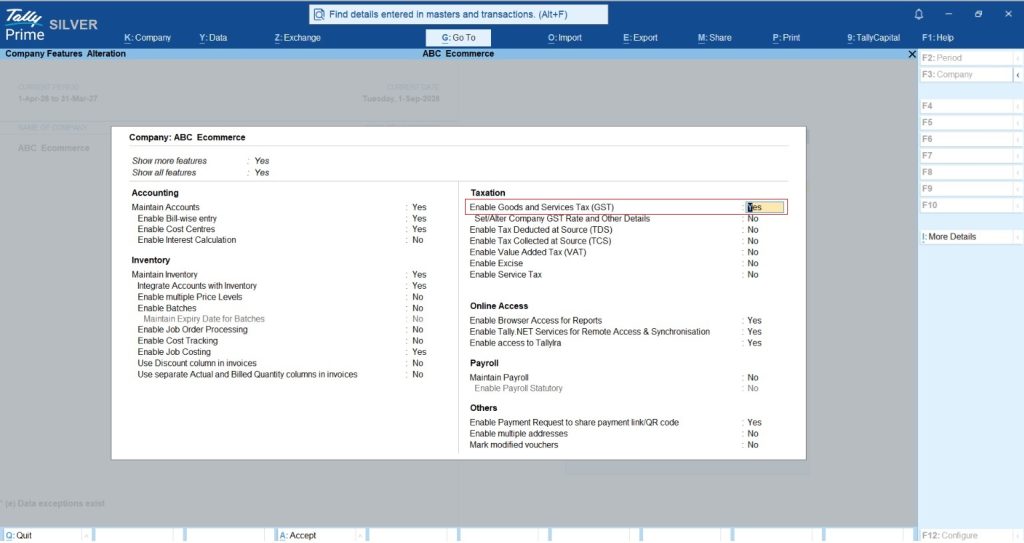
In the GST-registered unit, press F11 (Features) and enable "Goods and Services Tax (GST)." In your non-GST unit, keep this toggled to "No."
Establish the group company
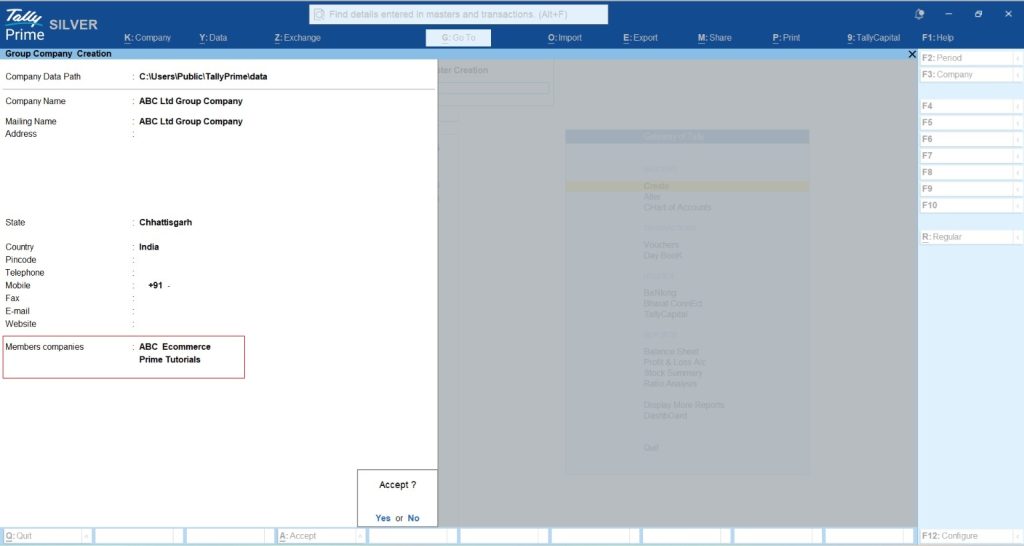
Press Alt+K (Company) > Create and choose "Create Group Company - Alt+R." Select your individual units as members. This creates a view-only virtual layer that pulls data in real-time without merging the actual databases.
View consolidated reports
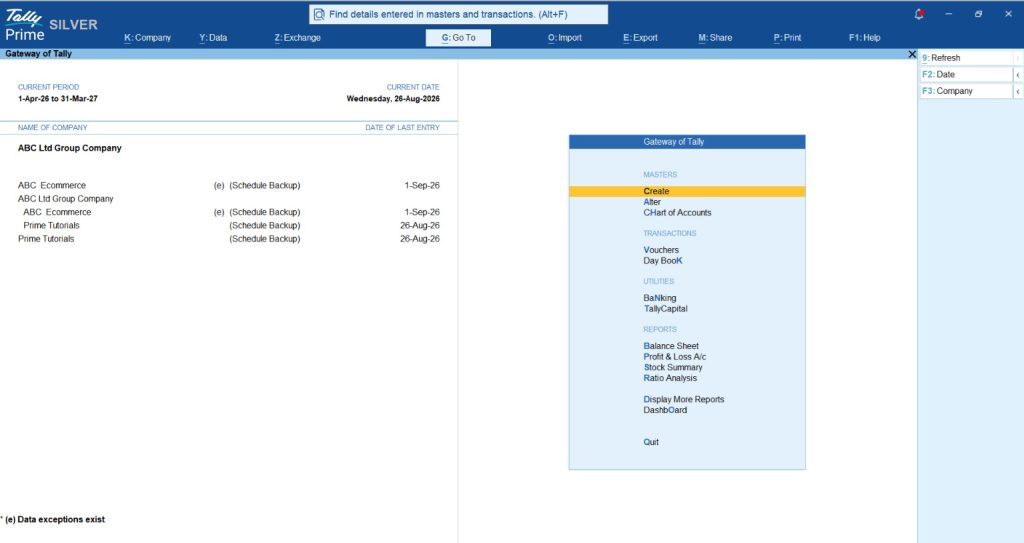
Once your group company is created, simply open the Balance Sheet or Profit & Loss A/c from the Gateway of Tally. You will directly see the combined financial reports of both your GST and non-GST units.
Note: Record transactions in individual companies. Pass your entries directly in the individual companies, not through the group company. Consolidated reports will update automatically.
Pro tip: The reporting clock for GST-registered units, the 7-day IRP rule is your hard deadline for e-invoicing. However, take note that for larger entities with an Annual Aggregate Turnover (AATO) > ₹10cr, a 30-day reporting window becomes effective starting April 1, 2025.
How does consolidation give you the complete picture?
The magic of the Group Company is that it provides a unified Balance Sheet or Profit & Loss statement without affecting your individual legal filings. This consolidated view allows you to assess the overall financial health of your entire business at a single glance. Instead of manually combining data from multiple units, you get real-time insights into total revenue, expenses, and overall profitability, making decision-making much faster and more accurate.
This unified view helps you easily spot cross-entity trends and identify which units are driving growth. It also builds stakeholder trust by instantly providing consolidated financial reports for business loans. Plus, TallyPrime’s powerful drill-down feature lets you click on any high-level figure and trace it directly back to the specific unit's original transaction.
The implementation secret: For consolidation to work perfectly, your Ledger Names must be identical across all companies. If one company uses "HDFC Bank" and the other uses "HDFC Bank Ltd," the Group Company will show them as two separate lines. Standardize your Chart of Accounts to get a truly "fused" view of your cash flow.
The pharmacy & general store scenario
Imagine a group with two distinct units:
- Unit A (Pharmacy): High turnover (>₹5cr), handles complex HSN codes, and requires instant e-invoicing.
- Unit B (General store): A small neighborhood unit below the GST registration threshold.
The workflow: When the owner records a sale in the Pharmacy company, Tally instantly validates the GSTIN and generates the IRN. In the General Store company, the owner records a bulk purchase with zero tax entries, Tally doesn't even ask for a GST ledger.
At day's end, the owner opens the Group Company to see their "Total Group Cash." They can see exactly how much liquidity is available across both businesses to fund the Pharmacy’s next inventory purchase, all without manual spreadsheets.
You can also learn How to Manage Inter-Company Transactions and Group Consolidation in TallyPrime
Technical visual guidance
- Path to taxation settings: Go to Gateway of Tally > F11: Features. This is where you toggle GST 'Yes' for the Pharmacy and 'No' for the General Store.
- Path to consolidation: From the Select Company screen, choose "Create Group Company." You will see a list of available companies to nest under this header.
Actionable takeaways for your business
Managing mixed units is about having a clear "lens" for your data. Follow this Founder’s Checklist for a stable setup:
- Monitor PAN-level thresholds: Under GST law, your "Aggregate Turnover" includes all business units operating under a single PAN. If your combined turnover crosses the GST threshold (e.g., ₹40 Lakhs/₹20 Lakhs), your non-GST unit may legally need to register, unless it deals entirely in exempt goods.
- Cost-effective licensing: You do not need two licenses. A single TallyPrime Silver or Gold license allows you to manage unlimited companies on the same computer.
- Remote auditing: TallyPrime allows secure remote access, enabling your CA to audit the GST-registered unit (with its mandatory CARO 2020 edit log) and the non-GST unit simultaneously.
TallyPrime handles the statutory complexity so you can focus on the growth of the whole group.














