










In my experience working with growing retail businesses, the biggest blind spot for any owner is visibility. When you have three, five, or ten stores scattered across different neighborhoods or cities, running the business often feels like driving blindfolded with the windows fogged up.
You usually have to wait until closing time, or even the next morning, just to find out which branch sold what, which items are gathering dust, and who still owes money. But what if you could see every store's numbers update live from your head office desk, right as the billing counter prints a receipt?
Let's look at how retail chain owners are using TallyPrime to keep a finger on the pulse of every single branch without breaking a sweat.
What does the Branch Performance dashboard show you in TallyPrime?
The Dashboard feature in TallyPrime provides a visual, tile-based overview of your business health, allowing you to analyze branch performance and business segments side-by-side on a single screen. Users can also customize it according to their specific needs. For example,
-
- Change View: This option allows the dashboard to be viewed in either vertical or horizontal mode
- Expand Title: Users can use this option for any title they wish to view on a large screen
- Add Title: Multiple titles can be added according to users' needs, such as 'Inventory', etc
- Configure Title: Any title can be placed at any desired position within the entire dashboard (Position of Title-1 of 10)

Learn how to create a Dashboard in TallyPrime with this demo.
How can you track every store’s sales and gross margins instantly?
When you manage multiple locations, comparing branch performance is usually a headache. One manager calls you saying sales are booming, while another sends a messy WhatsApp photo of a handwritten ledger.
With TallyPrime’s data synchronization features, your head office gets automatic updates from all locations. The moment a cashier bills a customer at Branch A or Branch B, that data flows back to your central system. Within TallyPrime, you can view reports for all your branches.
- Live sales tracking: You can instantly check hourly or daily sales figures side-by-side for all stores.
- Gross margin clarity: It’s not just about top-line revenue. You get to see the actual gross profit margins for each store, helping you spot if a particular branch is giving away too many discounts or selling low-margin items.
"Growth doesn't mean much if you only find out a store was losing money three days after it happened."

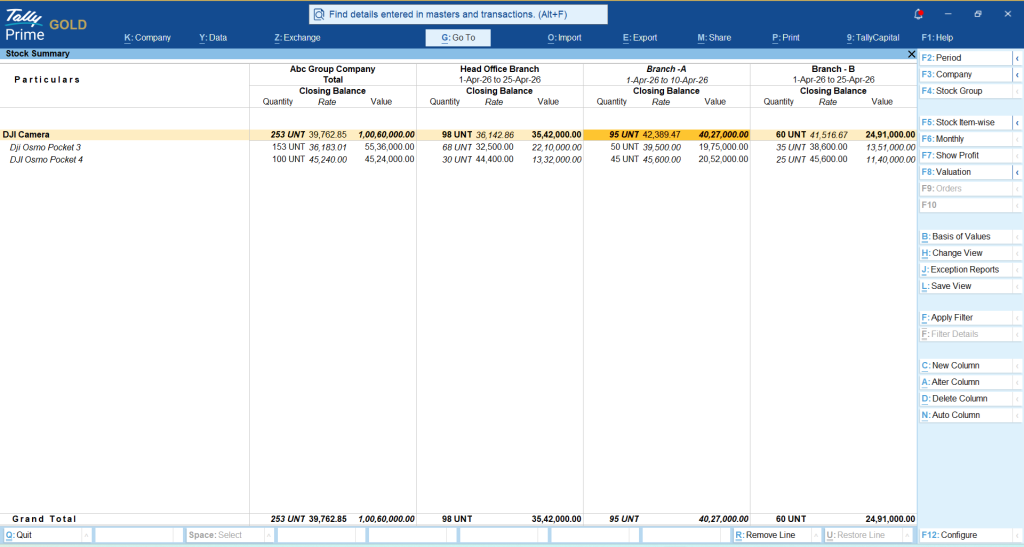
Where is your stock hiding, and how can you stop dead inventory?
One of my retail clients, let’s call him Rajesh, runs a chain of four apparel stores. Rajesh used to face a recurring nightmare: a customer at his downtown store wanted a specific size, but it was sitting unsold on a shelf across town at his suburban outlet. Worse, he wouldn’t find out until he did a physical stock count at the end of the month.
Once he started using TallyPrime, he had real-time stock visibility,:
- Branch-wise Inventory: He can view item-wise stock levels across every warehouse and store instantly.
- Faster Transfers: If an item is flying off the shelves in one store but sitting idle in another, he can arrange an internal stock transfer before losing a sale.
- Shrinkage Control: Real-time tracking makes it much harder for inventory discrepancies or unaccounted stock movements to slip through the cracks.
How to keep customer dues and outstanding collections under control?
Retail credit can quietly choke your cash flow if left unchecked. Store managers often let regular customers buy on credit, but tracking those dues across multiple outlets from a central office can turn into a logistical mess.
Using TallyPrime’s consolidated receivable reports, you can:
- See a live breakdown of outstanding payments branch by branch.
- Track aging reports to instantly identify which store has the highest overdue customer balances.
- Send targeted payment reminders or restrict further credit sales for overdue accounts directly from the management level.
How does the branch-wise P&L update automatically?
The magic of a well-set-up multi-branch accounting system is automation. You don't need a massive accounts team spending hours consolidating separate Excel sheets at the end of every week.
As store staff record sales, purchase expenses, and local operational costs (like utility bills or local cartage) in their respective TallyPrime software environment, everything rolls up into clean, branch-wise Profit and Loss statements.

Real-World Example:
Anita runs a chain of organic food outlets. Earlier, her accountant took up to five days after month-end just to compile individual store statements. By shifting her branches to synchronized Tally profiles, she can now pull up a comparative P&L report for all five stores over her morning coffee. She immediately noticed that Store C had unexpectedly high electricity expenses relative to its sales, a small leak she plugged within hours instead of weeks.
Practical takeaways: How to set up your retail dashboard for success
If you want to move away from delayed reporting and take charge of your retail chain, keep these simple steps in mind:
- Standardize your item masters: Ensure that item names, codes, and pricing groups are identical across all branches so your reports match.
- Set up regular data syncs: Configure your system to sync data at regular intervals throughout the day, ensuring your head office dashboard is always fresh
- Define user roles: Give store staff access only to their specific branch data, while keeping the consolidated multi-branch view restricted to management
- Review margins, not just sales: Make it a habit to check gross profit alongside total turnover during your weekly reviews
By letting technology handle the math in the background, you get to focus on what truly matters: growing your retail footprint and keeping your customers happy.














