










TallyPrime handles bulk invoice uploads through Docs by Ira, its AI-powered invoice processing capability. You can scan or import a whole batch of vendor invoices, from the TallyIra mobile app or directly from your system, and Docs by Ira reads each one, extracts the key details and creates draft vouchers inside TallyPrime. You then review the drafts and approve them, and only approved entries become regular voucher entries in TallyPrime..
For small and medium businesses, invoices rarely arrive in a neat and clear format. Some may be in the form of handwritten bills, while others may be printed invoices, whatsapp forwards, images, etc. A festive-season rush, a busy quarter-end, a change of bookkeeper or a few weeks on the road can leave a stack of bills waiting to be recorded. Bulk upload is designed for exactly these moments, so that a month's worth of invoices becomes a manageable review task.
Here’s how bulk upload works in TallyPrime, what the AI reads from each invoice, which file formats are supported, how smart mapping and exception highlighting guide your review, and how to get the most from a large batch.
What is bulk invoice upload in TallyPrime?
Bulk invoice upload is the ability to process multiple invoices together in one go rather than one at a time. In TallyPrime, Docs by Ira reads invoices and bills, whether they are digital PDFs, scanned copies, handwritten bills, images or mobile captures, and prepares accounting-ready draft vouchers for your review.
You can use Docs by Ira in two ways:
- import documents directly from TallyPrime on your desktop
- or use the TallyIra app on your phone to scan and upload on the go
Both support single and bulk modes, and you can upload entire folders or ZIP batches in one step.
Why bulk processing suits SMEs catching up on invoices
While it’s wise to upload the invoices in TallyPrime at the earliest to always keep the numbers and reports updated, for many SMEs bulk processing is the usual approach. Few common situations when SMEs use bulk processing include:
- Post-festive-season or peak-season catch-up: purchase bills collected over a busy few weeks can be uploaded together.
- Month-end and quarter-end closing: pending supplier invoices get recorded in one pass, ready for reports and GST filings.
- Handover to a new accountant or bookkeeper: a backlog of earlier invoices can be brought into TallyPrime quickly.
- Seasonal or project-based businesses: invoices that build up between work cycles can be processed together.
- Accounting firms handling client documents: a client's folder of invoices can be uploaded as one batch.
In each case, the work shifts from typing every invoice to reviewing draft vouchers that are already prepared.
How to handle bulk uploads through Docs by Ira on TallyPrime
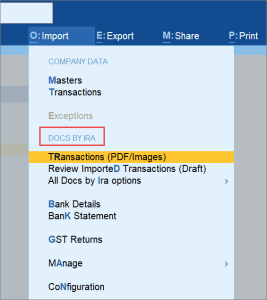
- Gather the invoices: Collect PDFs, JPEG or JPG images, or a ZIP folder of the month's bills. Scanned and handwritten invoices are supported too
- Scan or import: Use the TallyIra app on your phone, or import directly from your system within TallyPrime.
- Choose bulk mode: Upload the full set of files or a ZIP folder together
- Let the AI extract the details: Docs by Ira uses OCR and AI to read each invoice and capture the party name, invoice number, date, amounts, GST and line items
- Map to your masters: Parties and items are matched to your existing masters, and new masters are created when needed
- Review the draft vouchers: Exceptions are highlighted so you can go straight to the entries that need attention
- Approve: Once you are satisfied, the draft becomes a regular voucher in TallyPrime
Watch this video to learn how to use Docs by Ira in TallyPrime
What Docs by Ira reads from every invoice
|
Invoice detail |
What Docs by Ira does |
|
Party name |
Extracts it and maps it to an existing party master, or creates a new one |
|
Invoice number and date |
Extracts both for the draft voucher and uses them to detect duplicate invoices |
|
Amounts |
Captures invoice values for the draft entry |
|
GST details |
Extracts GST information so the draft carries tax details |
|
Line items |
Reads item lines and maps them to existing stock or item master |
Smart mapping
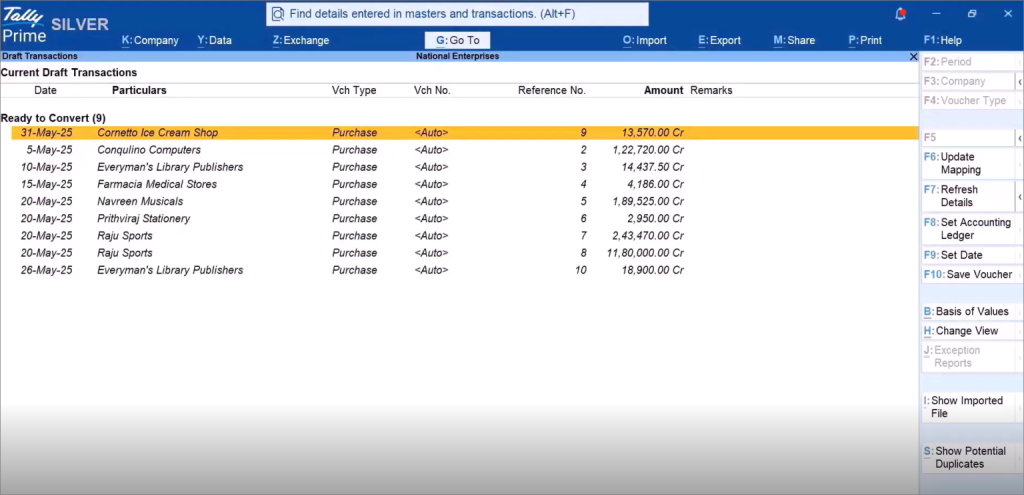
In a large batch, the same suppliers and items tend to appear again and again. Docs by Ira's smart mapping automatically matches parties and items to your existing masters and creates new masters when a supplier or item is new to your books. If you correct a mapping manually, Docs by Ira remembers it for next time, so the same correction does not need to be repeated on later invoices.
Exception highlighting and duplicate detection
Reviewing a month of drafts does not mean checking every field of every voucher with equal effort. Docs by Ira highlights mismatches and missing details instantly, so you can correct what needs correcting and move through the rest quickly. It also detects duplicate invoices, which is helpful when the same bill reaches you by email, WhatsApp and a paper copy. The final confirmation always rests with the reviewer.
Here's everything you need to know about Docs by Ira: Tally Ira’s AI-Powered Invoice Processor
Supported formats and upload options
|
Option |
Details |
|
File formats |
PDF, JPEG, JPG and ZIP |
|
Input types |
Digital invoices, scanned copies, images, mobile scans and handwritten invoices |
|
Upload modes |
Single or bulk, including folders and ZIP batches |
|
Where to |
TallyIra mobile app, or import directly within TallyPrime on your system |
|
Output |
Draft vouchers for review and approval |
Single upload vs bulk upload
The right mode depends on how your invoices arrive.
- When you receive one invoice during the day, single upload is the simplest choice, since you can scan or import it and review the draft voucher straight away.
- If bills reach you as a daily or weekly trickle, single uploads or small bulk uploads both work well, so you can pick whichever fits your routine.
- For a month-end or quarter-end backlog, bulk upload is the natural fit, because the whole set of invoices can be processed together and reviewed in one sitting.
- When you are handing over to a new accountant or catching up after a busy period, bulk uploading with a ZIP folder lets you bring in a large set of invoices in a single step.
|
Situation |
Suggested mode |
|
One invoice received during the day |
Single upload |
|
Daily or weekly trickle of bills |
Single or small bulk uploads |
|
Month-end or quarter-end backlog |
Bulk upload |
|
Handover or catch-up after a busy period |
Bulk upload with a ZIP folder |
You can also try a Docs by Ira demo to get hands on understanding of how it works.
Tips for getting the most from a bulk upload
- Organise before you upload: Group invoices into ZIP folders by month or supplier so the review follows a natural order
- Use clear scans: Well-lit, straight images makes it easier for the AI to read accurately
- Review exceptions first: Start with the highlighted drafts, then move through the clean ones.
- Check new masters: Glance at any newly created party or item masters to confirm names are the way you want them in your books.
- Approve in sets: Approve the reviewed drafts together so your vouchers and reports stay up to date.
How to get Docs by Ira in TallyPrime
- To use Docs by Ira in TallyPrime, download the TallyIra app on your phone or visit the TallyIra page
- Enter your TallyPrime serial number on the TallyIra page to register for TallyIra
- You can also start a free trial with 100 free pages
- After entering the serial number, verify with OTP and enable Docs by Ira
- Docs by Ira will be enabled and you will receive a confirmation email
- Ensure you have an active TSS subscription to use Docs by Ira
Conclusion
A month's worth of invoices no longer has to mean a month's worth of data entry. With the bulk upload capability facilitated by Docs by Ira, TallyPrime reads the invoices, extracts the details, maps parties and items to your masters and brings exceptions to your attention, all while keeping the final approval with you. For SMEs catching up after a busy period, Docs by Ira helps turn a backlog into a single review session and keeps the books ready for reports and GST filings.














