










The AI Promise vs. Data Reality
AI tools don't fix dirty data, they amplify it. Before you attempt to automate your invoice processing or document workflows, you must clean your core accounting masters. Feeding unstructured master data into an automated system will only generate errors faster and at scale.
In my 20 years of working with growing businesses across manufacturing, retail, pharmacy, construction, dealerships, and e-commerce, I have seen hundreds of owners eagerly adopt cutting-edge automation, only to be hindered by mismatched inventory units or duplicate vendor accounts. When evaluating business management software, technology is only as effective as the underlying data it reads.
Preparing your books for artificial intelligence is not an expensive or overwhelming IT overhaul. It is straightforward, non-technical financial housekeeping that any business owner can oversee starting today. By standardizing your master records now, you create a reliable foundation for AI-powered invoice processing, intelligent transaction mapping, and supported PDF bank statement import within your existing accounting workflow.
Checkpoint 1: Are Your Ledger and Party Names Consistent?
When an AI document reader scans an incoming bill, it extracts the vendor or customer name and matches it against your chart of accounts. If your party list contains duplicate records, auto-mapping fails or posts to the wrong account.
A frequent mistake in SME accounting is creating separate ledgers for the same entity, such as maintaining "A & Co - S/Dr" under Sundry Debtors and "A & Co - S/Cr" under Sundry Creditors.
For instance, in a construction project where a subcontractor provides structural work but also purchases raw materials from you, or in an e-commerce setup with buyer-seller offsets, creating dual ledgers splits party balances and hides the true net position.
In my past consulting work with a multi-branch distributor, having triplicate ledgers for a single party forced accountants to spend minutes guessing which account to pick per bill, distorting vendor statements.
TallyPrime handles obverse balances naturally within a single account, permitting both debit and credit entries under Sundry Debtors or Sundry Creditors. Instead of splitting accounts, Tally’s sub-grouping best practices organize parties under functional or geographical sub-groups like Domestic Debtors or Trader Creditors (Tax Registered).
Clean party masters help Docs by Ira's intelligent mapping capability align AI-extracted invoice information with the relevant accounting details, reducing repetitive manual effort and making transaction creation easier to review and verify.
Checkpoint 2: Are Your GST Details and Master Classifications Accurate?
AI-powered invoice processing can help extract relevant information from invoices, reducing manual data entry. However, accurate GST details and properly maintained accounting masters remain essential for reviewing transactions and supporting statutory compliance. Incorrect tax classifications in your masters will lead to return upload rejections during GSTR filings.
To ensure seamless compliance, maintain rigorous master data standards across three key areas:
- GSTIN Validity & Registration Status: Operating with invalid, suspended, or inactive GSTINs causes instant portal rejections. Furthermore, keep statutory digit requirements aligned with your Aggregate Annual Turnover (AATO): businesses with AATO up to ₹5 Crore must report 4-digit HSN codes, while those with AATO above ₹5 Crore require 6-digit HSN codes.
- State & Place of Supply: Accurate state settings ensure proper tax component calculation (IGST vs. CGST/SGST).
- Type of Supply & UQC Rules: Pay close attention to HSN classification rules. If an HSN code begins with '99', the Type of Supply must be explicitly set to Services, and the Unit Quantity Code (UQC) must be set to NA. Selecting OTH (Others) for service HSN codes is a widespread trap that triggers portal upload errors (The UQC entered is not valid). Conversely, if the HSN does not start with '99', classify the Type of Supply as Goods.
To clean your tax data effortlessly before enabling automation, open TallyPrime's built-in Validate Party GSTIN/UIN report and press Alt+L (Fetch Details Using GSTIN/UIN) inside the report to verify GSTIN statuses live against the portal and correct party records in bulk.
Checkpoint 3: Have You Standardized Your Stock Item Names and Units?
AI-powered invoice processing helps extract relevant information from invoices, but inconsistent inventory masters can make transaction mapping and verification more difficult. If invoice descriptions vary or measurement units are missing, accountants may need to spend additional time reviewing and correcting the extracted information.
This issue appears across multiple industries:
- A pharmacy purchases medicines in outer cartons or boxes but dispenses them to patients in individual strips or tablets.
- A manufacturing plant orders raw steel in metric tonnes but consumes and tracks structural components in pieces.
- A retail or dealership outlet receives bulk cases from distributors but bills customers per unit.
To resolve line-item extraction errors, define a clear Primary Unit of Measurement and map the appropriate statutory Unit Quantity Code (UQC) for every stock item. When vendors bill in alternate units, configure clean conversion factors directly inside the stock master.
For instance, if your primary unit is Pieces and the alternate unit is Box, set the default conversion rate (e.g., 100 pieces = 1 box).
TallyPrime allows flexible overrides during voucher entry (such as adjusting to 56 pieces = 1 box for a specific shipment). Maintaining consistent stock masters and conversion rates helps support intelligent mapping during AI-assisted invoice processing, reducing repetitive accounting work while allowing users to review and verify transaction details before posting.
Checkpoint 4: Is There a Difference in Your Opening Balances?
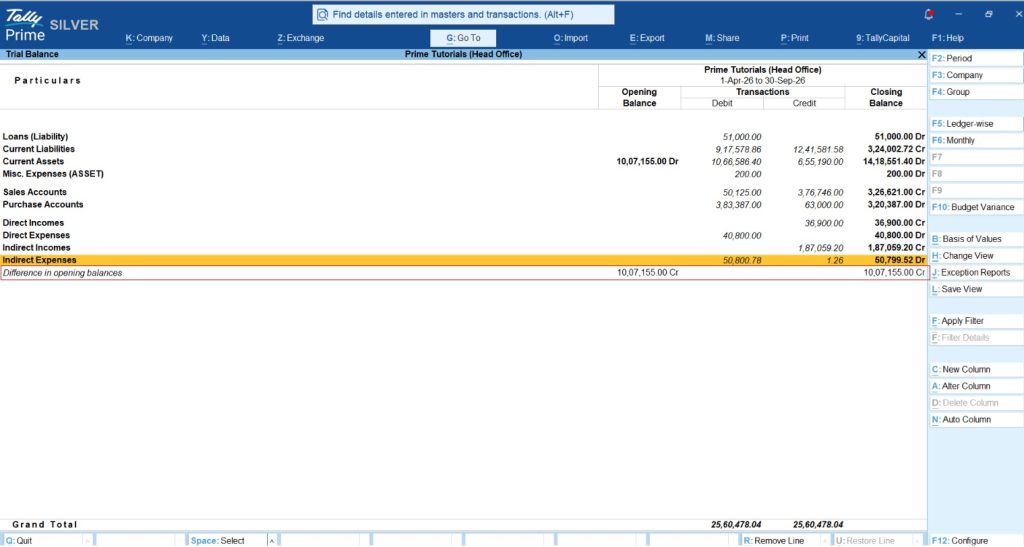
An unbalanced Trial Balance or an unresolved "Difference in opening balances" line indicates that your underlying books are mathematically inconsistent. Processing automated entries on top of an unbalanced ledger distorts financial statements like the Balance Sheet and Profit & Loss account.
Root cause diagnostics show that opening balance imbalances typically arise from three common accounting events:
- Manual Entry Errors: Human mistakes when keying in initial debit or credit values during company setup.
- Data Split Discrepancies: Carried-forward opening balance errors that occur when splitting company data at year-end.
- Import & Sync Overwrites: Importing or synchronizing ledgers from external software or branches that accidentally overwrites established opening balances.
To identify and eliminate opening balance differences, use this simple workflow:
- Access the Trial Balance: Press Alt+G (Go To) > type Trial Balance > press Enter (or go to Gateway of Tally > Display More Reports > Trial Balance).
- Expose Opening Balances: Press F12 (Configure) and set Show Opening Balance to Yes. If an imbalance exists, TallyPrime displays a dedicated Difference in opening balances line.
- Cross-Verify Ledgers: Compare individual opening balances against your prior year's audited Balance Sheet to pinpoint the exact ledger mismatch.
- Update Masters Directly: Correct the imbalance by altering the specific ledger (Alt+G > Alter Master > Ledger > select the ledger > update the Opening Balance field and save).
Once credit and debit opening values balance, the discrepancy line automatically disappears, establishing a mathematically sound foundation for AI automation.
The Payoff: How Clean Masters and Docs by Ira Work Together
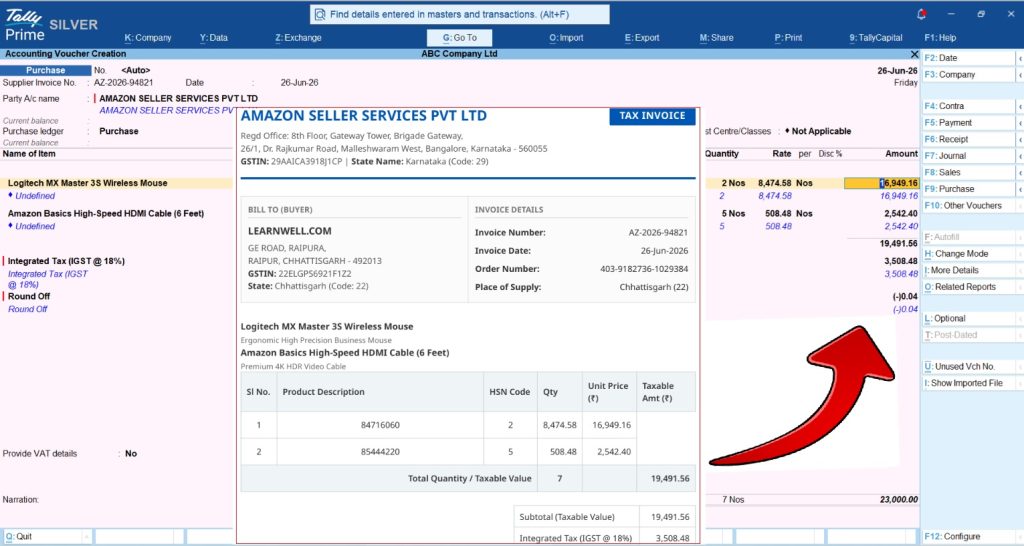
Once your core master data is clean, Docs by Ira, TallyIra's AI-powered capability in TallyPrime, helps simplify invoice processing and supported PDF bank statement import by turning document information into structured data that can move into the accounting workflow.
Docs by Ira supports everyday accounting through the following capabilities:
-
AI-Powered Invoice Processing: Uses AI-powered extraction and processing to turn invoice information into structured data for creating accounting entries, reducing repetitive manual data entry.
-
Supported PDF Bank Statement Import: Enables businesses to import transactions from supported PDF bank statements directly into TallyPrime, reducing the need to enter bank transactions manually.
-
Intelligent Mapping: Helps align extracted information with relevant accounting details, simplifying transaction creation when accounting masters are properly maintained.
-
Exception Highlighting: Highlights information that may require attention, allowing accountants to review and verify details before entries are posted.
-
Bulk Voucher Creation: Helps accountants create multiple vouchers more efficiently, reducing repetitive transaction processing work.
-
Easier Bank Reconciliation: After importing supported PDF bank statements, businesses can use TallyPrime's existing bank reconciliation features to match bank transactions against their books.
-
Human Control at Every Step: Docs by Ira assists with extracting information and preparing accounting entries, but users remain in control of reviewing, verifying, and approving entries before posting them to the books. This combines AI-powered efficiency with human oversight.
Practical Framework: The SME Owner's Pre-Automation Readiness Checklist
| Focus Area | Housekeeping Action Item |
AI Automation Benefit
|
| Party Ledgers | Consolidate duplicate party accounts; verify legal party names. |
Supports intelligent mapping of extracted invoice information to relevant accounting details, reducing repetitive entry and simplifying verification.
|
| GST Details | Validate GSTINs via built-in tools; set correct Type of Supply for HSNs. |
Supports more reliable review of AI-extracted invoice information and helps reduce corrections caused by inconsistent GST details.
|
| Stock Masters | Standardize item names and configure UQC/unit conversion rates. |
Supports intelligent mapping and verification of invoice details against consistently maintained stock masters.
|
| Opening Balances | Eliminate Trial Balance differences via Master Alteration. |
Dependable financial reports and accurate running balance tracking.
|
| Bank Transactions | Keep bank records updated and reconcile existing transactions regularly. |
Supports smoother processing of imported PDF bank statement transactions and easier reconciliation using TallyPrime's existing features.
|
Conclusion & Actionable Takeaways
Preparing your business for artificial intelligence is not a daunting technical leap. It is simply a natural extension of disciplined daily accounting practices. By consolidating duplicate ledgers, verifying GST master details, standardizing stock units, and resolving opening balance differences, you eliminate the underlying friction that causes automation initiatives to fail.
When clean master data is paired with AI-powered capabilities like Docs by Ira in TallyPrime, businesses can simplify invoice processing, import supported PDF bank statements, and reduce repetitive manual data entry. Intelligent mapping, exception highlighting, and bulk voucher creation help streamline everyday accounting, while TallyPrime's existing bank reconciliation features support matching imported bank transactions against the books. Throughout the process, accountants remain in control by reviewing, verifying, and approving entries before posting, helping businesses adopt AI without compromising oversight of their financial records.
"AI doesn't replace the need for clean books, it rewards it. When your master data is structured, AI turns hours of manual entry into a quick review."














