










TallyPrime is built around a simple design principle: every voucher, report, or navigation action has a dedicated keyboard shortcut. These shortcuts stay consistent across every screen and every session. F4 always opens Contra, F8 opens Sales, Alt+G takes you to a report or master — every single time. This consistency is what makes TallyPrime's data entry so fast. Users don't pause to think about where to click or what a button does, because the same key always does the same thing.
For anyone who spends their day posting vouchers like a CA managing multiple client ledgers, a retail accountant closing hundreds of sales entries before end of day, a manufacturing unit logging purchase and stock vouchers back to back, this reliability compounds into real speed. TallyPrime users can routinely post 200+ vouchers per hour, a benchmark that's difficult to match in any tool where core actions depend on locating and clicking through menus.
In this blog, we'll break down how TallyPrime keyboard shortcuts work, why it produces measurably faster daily entry, and why it's valuable for businesses that run on volume.
What makes TallyPrime's design "keyboard-first"?
"Keyboard-first" means the primary, intended way to operate the software is through keyboard input. Although the mouse is supported, no essential function requires it. In TallyPrime, this shows up in three ways:
1. Every voucher type has a dedicated function key
From the Gateway of Tally, function keys map directly to voucher types:
- F4 – Contra
- F5 – Payment
- F6 – Receipt
- F7 – Journal
- F8 – Sales
- F9 – Purchase
- F10 – Reports / Other Vouchers
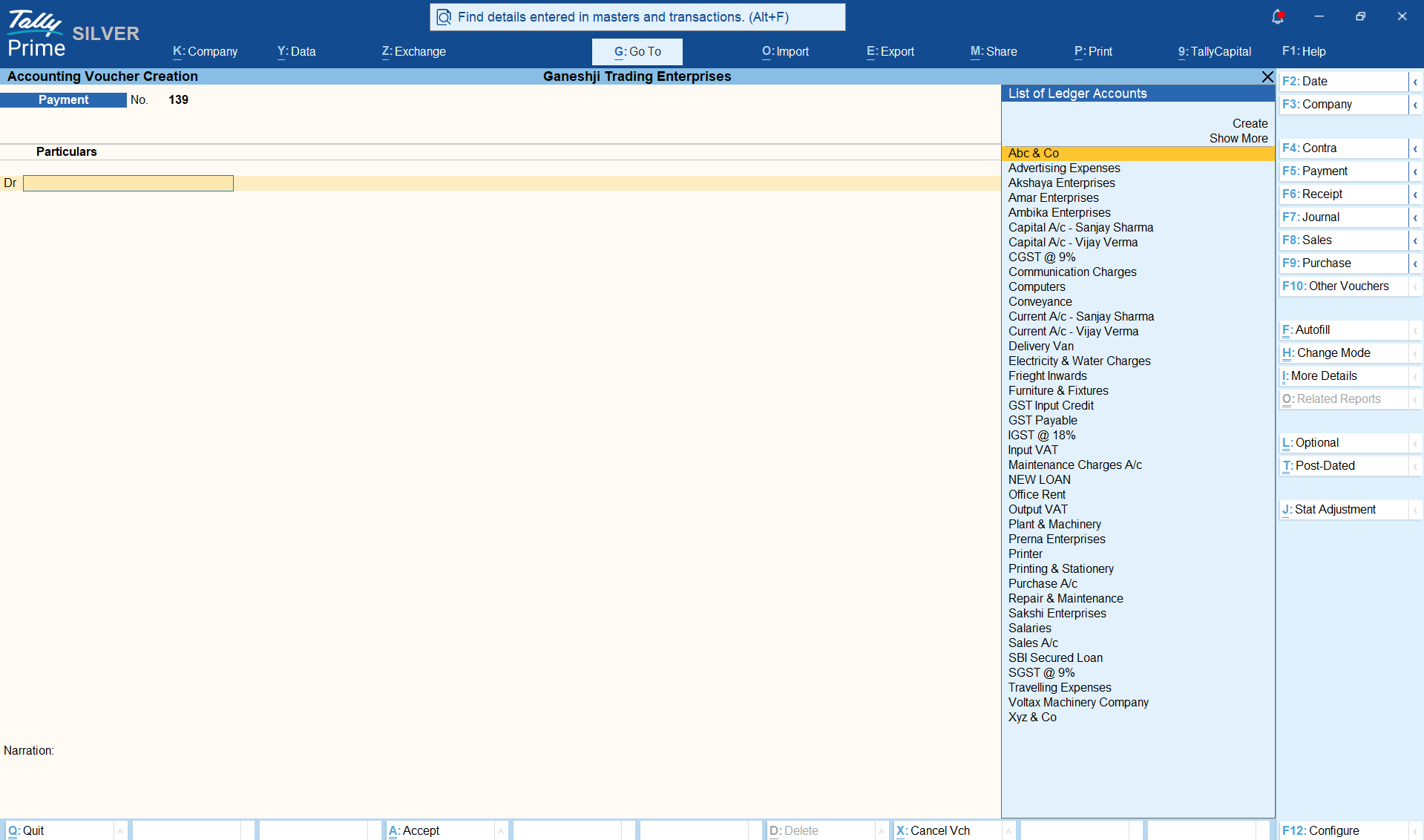
A user doesn't need to click through a "New Transaction" menu, select a category, and then a subtype. They press one key and land directly in the voucher entry screen.
2. Universal navigation without menus
Alt+G (Go To) is TallyPrime's command-based navigation. Instead of navigating through menus for a report or master, users type what they need and jump there directly. Combined with Ctrl+A to accept and save a screen instantly, a user can create a ledger, post a voucher, and pull a report in a single continuous keyboard flow.
3. In-voucher speed features
Within a voucher itself, shortcuts handle everything from adding a new ledger on the go, duplicating a line item, altering narration, or switching between accounting and inventory modes — all without leaving the keyboard. This matters because a single voucher often involves multiple sub-actions (selecting a ledger, entering an amount, adding narration, selecting GST details), and each of those sub-actions has its own shortcut path.
Why this translates to measurable speed: 200+ vouchers/hour
The reason keyboard-first design produces such a concrete speed advantage is simple arithmetic. A mouse-dependent workflow typically requires:
- A click to open a menu
- A scroll or search to find the right option
- A click to select it
- A page load or screen transition
- A click into the first input field
Each of these steps takes time and, more importantly, breaks the user's data-entry rhythm. A keyboard-first workflow collapses this into a single keystroke and keeps the user's hands in position for the next action.
This is why TallyPrime users with high daily transaction volumes, can routinely post 200+ vouchers per hour. This isn't a theoretical maximum; it reflects real, sustained daily entry speed for professionals who've internalised the shortcut system as muscle memory.
There's also a cognitive reason this speed builds over time. Because TallyPrime keyboard shortcuts are consistent, the same key always performs the same function, on every screen. Therefore, users stop having to consciously think about where to click or what a button does. The keystroke aligns directly with the user's train of thought: think "payment," press F5; think "go to a report," press Alt+G.
Over repeated daily use, this consistency trains hand and eye coordination the same way any repeated action does - the shortcut becomes a reflex rather than a decision. This is what allows entry speed to keep improving the more a person uses TallyPrime.
For a business posting hundreds of sales, purchase, and payment entries every day, this speed difference directly affects how many hours of billable or operational time data entry consumes.
Here's more on why TallyPrime is India’s fastest accounting software for keyboard-driven data entry.
Why this matters most for high-volume businesses and CAs
Keyboard-first design may not be a nice-to-have for every user, but for specific segments, it's a core operational requirement:
- Chartered accountants and accounting firms: managing multiple clients need to move between ledgers, vouchers, and reports rapidly and repeatedly through the day. A shortcut-driven workflow means less time per entry and more clients served per hour.
- High-volume retail and distribution businesses: posting large numbers of sales and purchase vouchers daily benefit directly from reduced per-voucher entry time.
- Manufacturing and inventory-heavy businesses: that post stock journals, purchase vouchers, and cost centre allocations throughout the day rely on quick navigation between voucher types, which function-key shortcuts are built for.
For all these users, the keyboard-first design isn't about avoiding the mouse for its own sake — it's about removing the accumulated friction that mouse-dependent tools introduce at scale.
Conclusion
TallyPrime's keyboard-first design is a core architectural choice that directly translates into faster, more consistent daily entry. By keeping every voucher, report, and navigation action tied to a fixed shortcut, TallyPrime lets users build genuine muscle memory. This turns routine data entry into a fast, near-automatic process rather than a series of deliberate clicks.
For high-volume entry businesses and CAs, this design is a practical, measurable advantage, one that shows up as real hours saved.














