










When businesses grow, accounting teams often face one common challenge: entering large amounts of data quickly without making mistakes.
This problem is easily resolved by TallyPrime. Every transaction, report, and navigation action has a keyboard shortcut. Users can post hundreds of vouchers per hour without touching the mouse, making it one of the fastest accounting tools for high-volume Indian businesses.
I've seen businesses save several hours every week simply by improving how they use keyboard-driven workflows inside TallyPrime.
How TallyPrime brings speed during data entry?
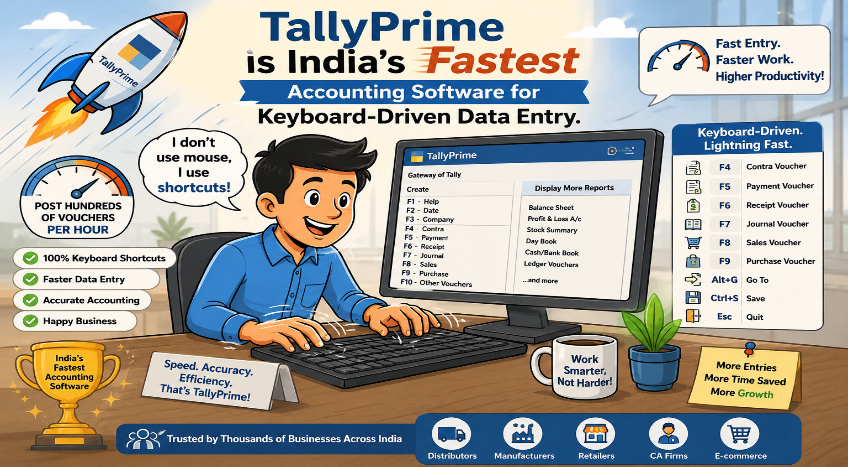
If your accounts team is constantly moving their hands back and forth between the keyboard and the mouse, your business is losing valuable time. TallyPrime eliminates this friction substantially. In my work with fast-growing wholesale and retail businesses, I have seen this single design choice save hours of daily data entry, making it the fastest accounting tool for high-volume Indian enterprises.
What is the real cost of mouse-driven accounting?
When you are managing an active business, billing delays directly impact your customer experience. In my time working with clients, I often notice a common bottleneck: data operators using modern, visually heavy software that forces them to click through dropdown menus, pop-ups, and save buttons.
Every time an accountant lifts their hand to move a mouse, it adds a two-second delay. Multiply that by 300 invoices a day, and you are looking at significant lost productivity every single week. High-volume businesses do not need fancy clicking; they need pure, uninterrupted speed.
How does a keyboard-first design change the game?
TallyPrime is engineered so that your hands never have to leave the home row of your keyboard. Every single transaction type, financial report, and navigation path has a dedicated, intuitive shortcut. The most popular TallyPrime shortcut keys are Alt+C to create masters, and Shift+Enter for editing, Esc to go to previous screen, Enter to Accept or Drill Down, and Ctrl+A to save screen.
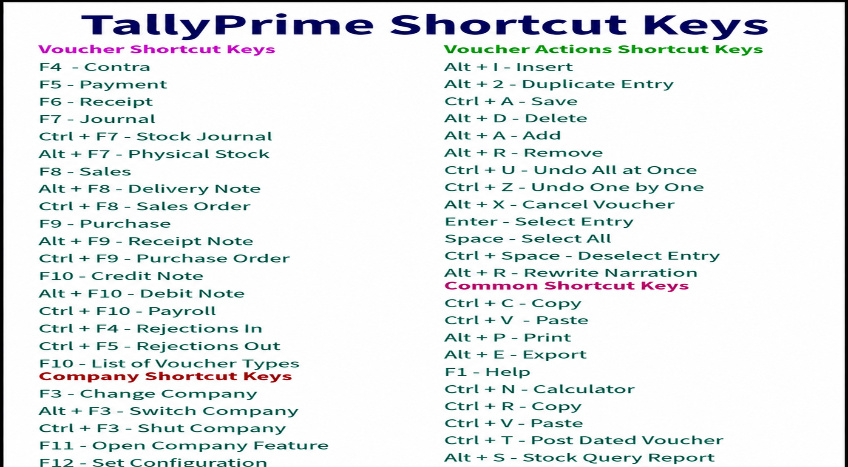
Why does keyboard-based accounting matter?
Many businesses underestimate the time lost when users constantly move between the keyboard and mouse.
Think about a typical accountant's day:
- Creating sales invoices
- Recording purchase bills
- Posting receipts and payments
- Checking outstanding balances
- Verifying stock entries
If every task requires multiple mouse clicks, the time loss becomes significant over hundreds of transactions. Using a mouse is time-consuming, whereas using keyboard shortcuts can save time; keyboard-based accounting allows data entry to be performed at 10x speed.
TallyPrime removes this friction by allowing users to stay focused on the keyboard throughout the process.
Can users really enter over 200 vouchers per hour?
Yes. I've worked with distributors, wholesalers, and retail businesses where the staff processes hundreds of daily transactions.
During my experience working with a wholesale trading business, the staff was heavily reliant on using keyboard and mouse in combination while entering:
- Sales invoices
- Purchase vouchers
- Payment entries
- Receipt vouchers
After training the team on TallyPrime shortcuts, voucher entry speed improved noticeably. The team completed daily accounting work earlier and spent more time reviewing reports rather than entering data.
Watch this video to learn how to record vouchers in TallyPrime:
Does faster data entry mean more errors?
Not necessarily. Working quickly often involves extensive use of the keyboard, which actually helps minimize errors while speeding up the process. For instance, using a keyboard shortcut (like Ctrl + R) to repeatedly enter the same ledger account eliminates the need to select it from the ledger list each time.
In fact, experienced users often make fewer mistakes because:
- They remain focused on the keyboard
- Their workflow is uninterrupted
- Repetitive actions become familiar
- Less time is spent searching menus
TallyPrime also provides immediate visibility of entries, helping users identify errors quickly.
Conclusion
TallyPrime's keyboard-driven design makes accounting faster, simpler, and more efficient. By reducing dependence on mouse clicks and enabling quick navigation through shortcuts, users can enter transactions faster with fewer errors. Whether it's daily bookkeeping, GST compliance, or financial reporting, TallyPrime helps businesses save time, improve productivity, and manage accounts with greater accuracy. This focus on speed and ease of use is one of the key reasons why TallyPrime remains a preferred accounting software for businesses and accountants across India.
Quick checklist for faster TallyPrime usage
✔ Learn daily voucher shortcuts
✔ Use keyboard navigation wherever possible
✔ Reduce dependency on mouse clicks
✔ Train staff on task-specific shortcuts
✔ Practice speed and accuracy together
✔ Review reports regularly to catch errors early
For businesses handling large transaction volumes, these simple habits can save hours every week and improve overall accounting efficiency.














