










Tired of Late-Night Manual Reconciliation? Looking to Auto-Import Bank Statements in TallyPrime?
In my 20 years as a financial consultant and Tally specialist, I’ve seen countless accountants lose their month-ends to the "ticking and tying" nightmare. Before the latest automation features, reconciliation was a massive bottleneck for high-volume sectors like Ecommerce and Dealerships.
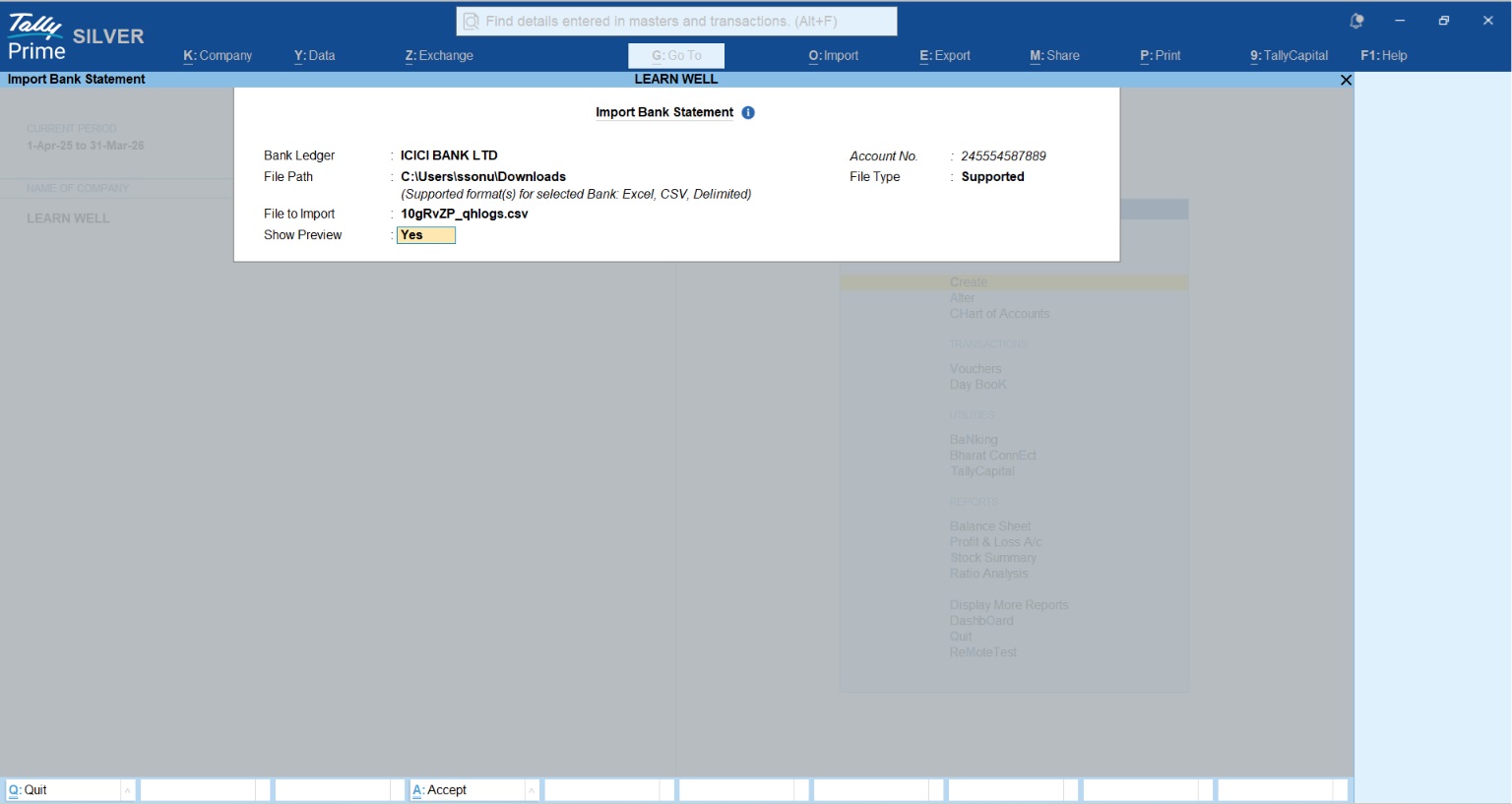
Today, you can settle your books almost instantly. You can reconcile by fetching statements directly via Connected Banking or by using the robust Alt+O import feature. Within seconds, TallyPrime matches your bank data with your internal ledgers, letting you focus on exceptions rather than manual entry. If you are still manually entering bank dates, you are working harder than your software, and in today’s environment, that’s a luxury you can’t afford.
Why is manual reconciliation holding you back?
Manual reconciliation isn't just a time-sink; it's a significant business risk. In my experience, relying on manual entry consistently leads to:
- Numerical entry errors: Transposing digits or missing decimals during manual voucher creation is far more common than most CFOs realize.
- Overlooked bank costs: Hidden bank charges, processing fees, and interest credits often go unrecorded until the year-end audit.
- Operational inefficiency: Toggling between bank portals and Tally windows wastes hours of productive time and increases "context switching" fatigue.
- Fraud vulnerability: Delays in reconciliation mean unauthorized transactions or discrepancies stay hidden for weeks.
Manual import vs Connected banking
TallyPrime offers two primary ways to bring your bank data into your books. For professionals handling thousands of transactions, Excel import is the gold standard for reliability and speed.
|
Feature |
Manual Import (Alt+O) |
Connected Banking |
|
Primary Method |
Import downloaded Excel, CSV, XML, or MT940 files. |
Direct statement fetching from within TallyPrime. |
|
Bank Support |
Supports 450+ banks with 200+ formats. |
Axis, SBI, Kotak, and ICICI Bank. |
|
Key Advantage |
Excel import is recommended for high-volume bulk data. |
Real-time balance checks and instant fetching. |
|
Connected Payments |
N/A |
Recently Supported for Axis, SBI, Kotak, ICICI |
|
Process |
Alt+O > Bank Statement > Select File. |
Direct fetch within the Reconciliation screen. |
How to set up auto bank reconciliation in TallyPrime
Setting up for automation is a one-time configuration. Here is how I recommend my clients get started in TallyPrime:
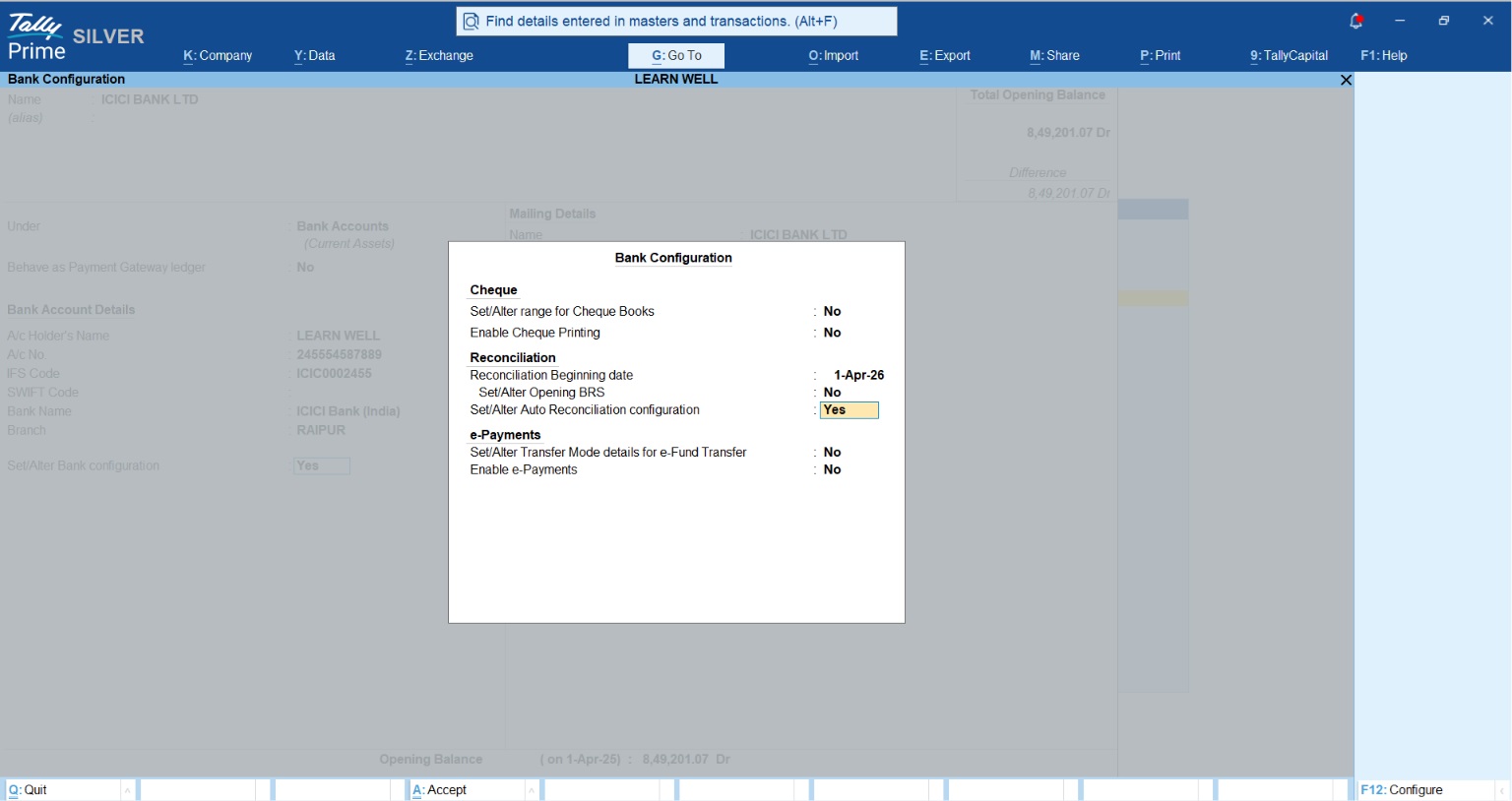
- Configure the Ledger: Open your Bank Ledger in alteration mode.
- In Set Alter Bank Configuration - Yes > Enable Auto-Reconciliation: Set "Enable Auto Bank Reconciliation" to Yes.
- Set the Beginning Date: Specify the Reconciliation Beginning Date.
- Handle Older Entries: If you have unreconciled transactions from before this date, use the Opening BRS report to include them in your current reconciliation workflow.
- Navigation Pro-Tip: For the fastest access, use Alt+G (Go To) and type "Imported Bank Data" to jump straight into your imported statement reports.
The magic feature: What are auto-matching and potential matches?
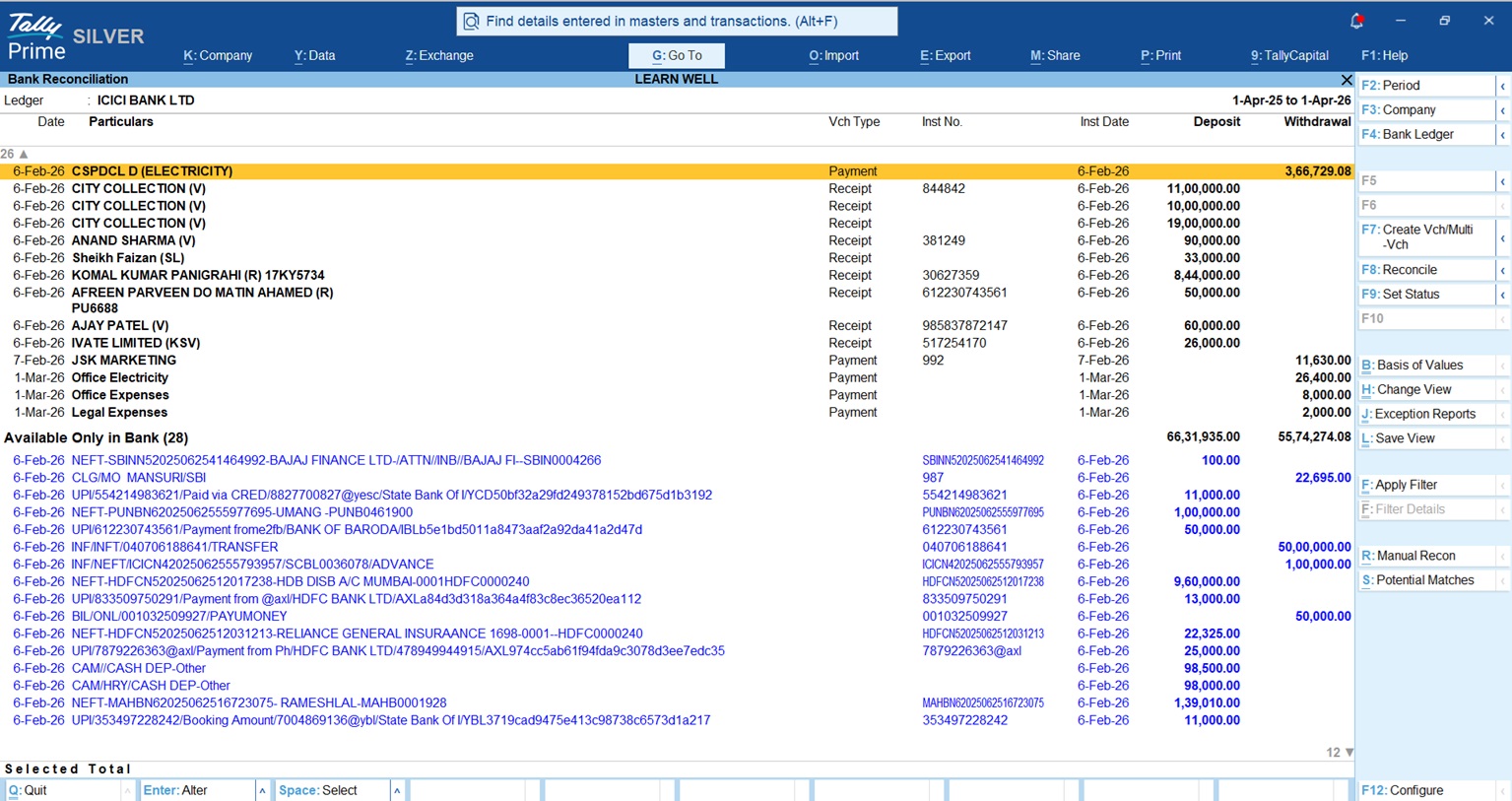
Once the data is inside Tally, the software performs intelligent matching. A major benefit here is that Tally doesn't just match; it can update details like narration, date, and amount from the real-time bank data directly into your book transactions.
- Exact Matches: If the amount, date, and instrument number align, Tally reconciles the entry instantly.
- Potential Matches: If Tally finds a likely match (e.g., matching amounts but different dates), it suggests these for review. Press Alt+S to see these suggestions and confirm them with a single keystroke.
- Duplicate Detection: TallyPrime automatically identifies duplicate entries based on identical amounts and dates, preventing the accidental inflation of your bank books.
Pro-tip: Can you create vouchers directly from the statement?
For entries present in your bank statement but missing in your books, you can create vouchers without leaving the reconciliation screen.
- One-to-one mapping: Select one or more entries and press F7 to create individual payment or receipt vouchers.
- Consolidated entries: If you want to combine multiple bank entries into a single book entry, use Alt+F7 (Create Voucher - Consolidate).
Read More About Enhanced Bank Reconciliation in TallyPrime
Real-world example: The "Ecommerce High-Volume" scenario
I recently worked with an Ecommerce client handling 500+ small UPI and IMPS transactions daily. Their accountant spent three days every month just on manual entry. By moving to Excel import, they now bring in a month's worth of data in seconds. Tally identifies 90% as Exact Matches, and the accountant uses the F7 tool for the remaining bank fees. The Result: Month-end closing was slashed from 3 days to just 2 hours.
Conclusion & actionable checklist
Automation provides the financial integrity and speed required for modern business growth. To start today, follow this professional’s checklist:
- Confirm your bank is among the 450+ supported for auto-reconciliation.
- Enable Connected Banking if you use SBI, ICICI, Axis, or Kotak.
- Move to a daily or weekly reconciliation cycle to maintain cash flow visibility.
- Always review Potential Matches (Alt+S) to catch narration or date discrepancies.
"In 20 years of accounting, I've seen that the most successful businesses aren't the ones working the hardest, they're the ones letting their software do the heavy lifting."














