










How AI Is Changing Invoice Processing
In my 20 years of accounting experience across manufacturing, retail, e-commerce, automobile dealerships, construction, and service industries, I have seen one common challenge: accountants spend a significant amount of time entering invoice details manually. Whether a business processes 20 invoices a day or hundreds at the end of the month, the process often remains the same. Accountants read supplier invoices, select ledgers, enter quantities and amounts, check GST details, and save transactions.
I remember visiting a client's office during month-end closing. The accounting team was surrounded by supplier invoices, PDF attachments, and bills received through WhatsApp. Much of their time was spent entering information rather than reviewing accounts or analysing financial reports. This is where AI-assisted invoice processing can make a difference.
With Docs by Ira in TallyPrime, businesses can extract information from invoices, import pdf bank statements. prepare draft vouchers without entering every detail manually, and highlight exceptions and mismatches. Accountants can then review the extracted information, correct any mismatches, and save the transactions. The result is a more efficient accounting process that combines automation with professional control.
Why do accounting teams spend so much time on data entry?
Traditional invoice processing involves several repetitive steps. For every purchase invoice, accountants generally need to:
- Open the supplier invoice or PDF.
- Select the correct supplier ledger.
- Enter the invoice number and date.
- Select stock items or expense ledgers.
- Enter quantities, rates, and amounts.
- Check GST rates, HSN/SAC details, and invoice totals.
- Verify the information and save the voucher.
For invoices containing multiple items, this process can take several minutes. When businesses receive hundreds of invoices, the total time spent on data entry increases significantly.
Traditional Manual Workflow
Supplier Invoice → Manual Data Entry → Ledger Selection → GST Verification → Voucher Saving.
This approach creates several challenges:
- Manual Entry Errors: Incorrect invoice numbers, amounts, quantities, or ledger selections can affect accounting accuracy.
- GST Mismatches: Incorrect tax amounts, supplier GSTINs, or tax classifications can cause reconciliation problems.
- Time-Consuming Work: Accountants spend valuable working hours on repetitive data entry.
- Delayed Month-End Closing: Pending invoices and corrections can delay financial reporting.
- Higher Workload: As transaction volumes increase, accounting teams need more time to process documents.
These challenges become more noticeable as businesses expand.
A Client Story: How AI-Assisted Invoice Capture Improved Accounting Efficiency
One of my clients, Amit Sharma, who runs an automobile spare parts dealership, was struggling with manual invoice entry in TallyPrime. His accounts team spent considerable time entering supplier invoices, checking GST amounts, and correcting errors, especially during month-end closing.
Before introducing Docs by Ira, processing 100 purchase invoices took the team approximately 10 hours. After adopting AI-assisted invoice capture and pdf bank statement import, the same workload took around 1 hour, including reviewing and correcting draft vouchers. This represented a time saving of approximately 90%.
The team also found it easier to identify missing details and potential GST mismatches before saving vouchers. This helped reduce avoidable data-entry errors and improved the quality of records used for GST reconciliation. However, matching purchase records with GSTR-2B and completing GST compliance checks remained the accountant's responsibility.
The biggest improvement was that the team spent less time on repetitive entry and more time on verification, reconciliation, and reporting. For the business, AI became a practical way to improve accounting efficiency without losing control over the final entries.
How Docs by Ira changes the workflow for accountants
AI creates draft vouchers while accountants stay in control
Docs by Ira is an AI-powered document processing feature available for eligible TallyPrime users. It extracts transaction details from supported PDFs and images and helps create accounting vouchers with exceptions highlighting. Instead of entering every invoice manually, accountants can import documents and review the extracted information.
Supplier Invoice → AI Data Extraction → Draft Voucher → Accountant Review → Voucher Saving
The key difference is that AI handles much of the initial data extraction, while accountants remain responsible for checking and approving the entries.
Reviewing Draft Transactions Before Saving

When documents are imported through Docs by Ira, TallyPrime prepares draft transactions in the Review Imported Transactions (Draft) report.
Accountants can review details such as:
- Supplier name and GSTIN
- Invoice number and date
- Stock items or expense ledgers
- Quantities, rates, and amounts
- Tax details and invoice totals
Transactions that require attention can be identified through exception indicators. For example, if a supplier ledger is missing or a transaction date does not match the current period, the accountant can review and resolve the issue. Once the information is correct, transactions under Ready to Convert can be selected and saved using F10 (Save Vouchers). This helps reduce manual work without allowing unverified transactions to affect the accounting records.
AI in accounting is not about replacing accountants. It is about reducing repetitive tasks so professionals can focus on accuracy, compliance, and financial decision-making.

What about data security and privacy?
Financial information is sensitive, so businesses should understand how their documents are processed before using any AI-based accounting solution.
Docs by Ira requires users to register and sign in using their Tally.NET credentials. Businesses should ensure that only authorised employees can access company data and submit financial documents. They should also review the applicable data handling, privacy, and retention policies before processing sensitive records.
How can businesses import invoices using Docs by Ira?
Docs by Ira provides several options for importing invoices into TallyPrime.
1. Import documents from your computer
Businesses can import individual PDF or image files, or supported ZIP folders, directly into TallyPrime. To import documents, use: Alt+O (Import) → Transactions (PDF & Images) under Docs by Ira. Select the required voucher type, choose the documents, and proceed with the import. This is particularly useful when businesses receive multiple invoices through email or maintain digital invoice folders.
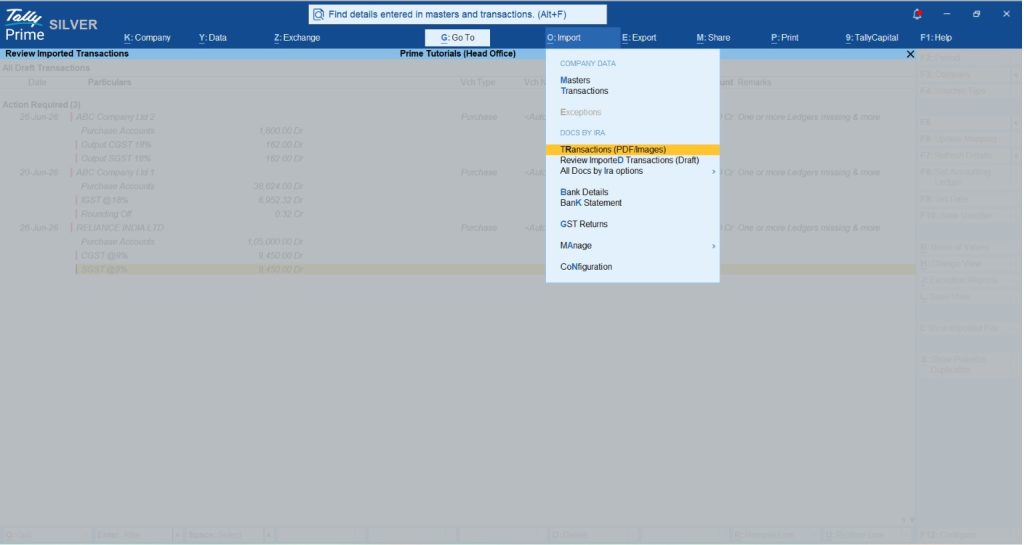
2. Use autofill while creating a voucher
Accountants can also use Docs by Ira while creating a voucher. Press Ctrl+F (Autofill), select Docs by Ira, and choose the relevant document. TallyPrime extracts supported transaction details and fills the voucher fields. The accountant can review the information and save the voucher.

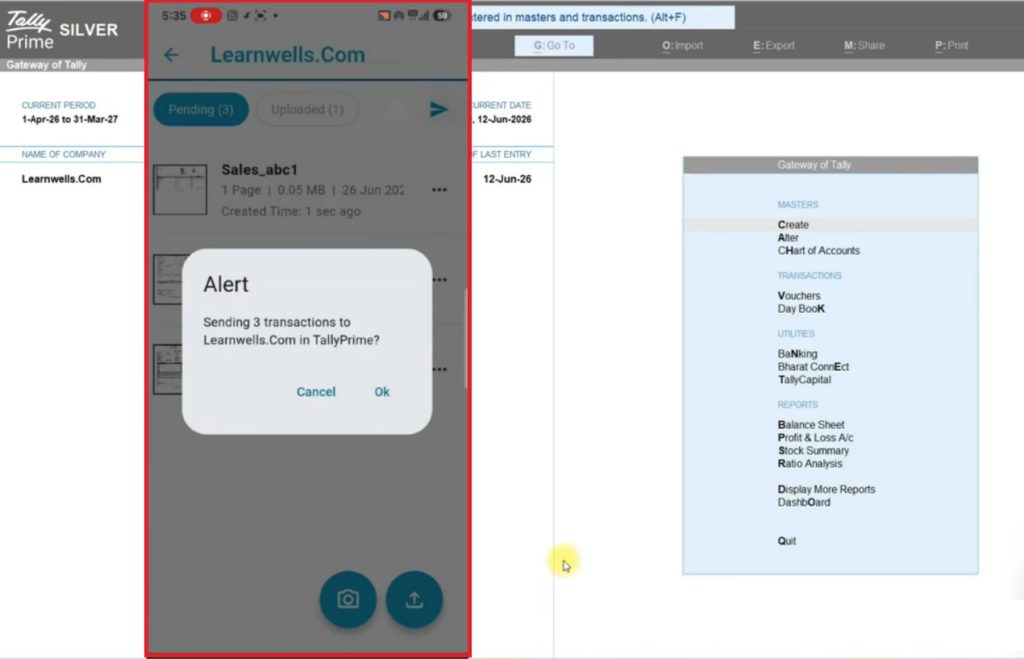
3. Send invoices using the TallyIra mobile app
Employees can use the TallyIra app to capture or upload supported documents and send them to TallyPrime. This is useful for businesses with multiple branches, warehouses, field employees, or service centres. For example, an employee receiving an invoice at a branch can send it through the app instead of physically forwarding the document to the head office.
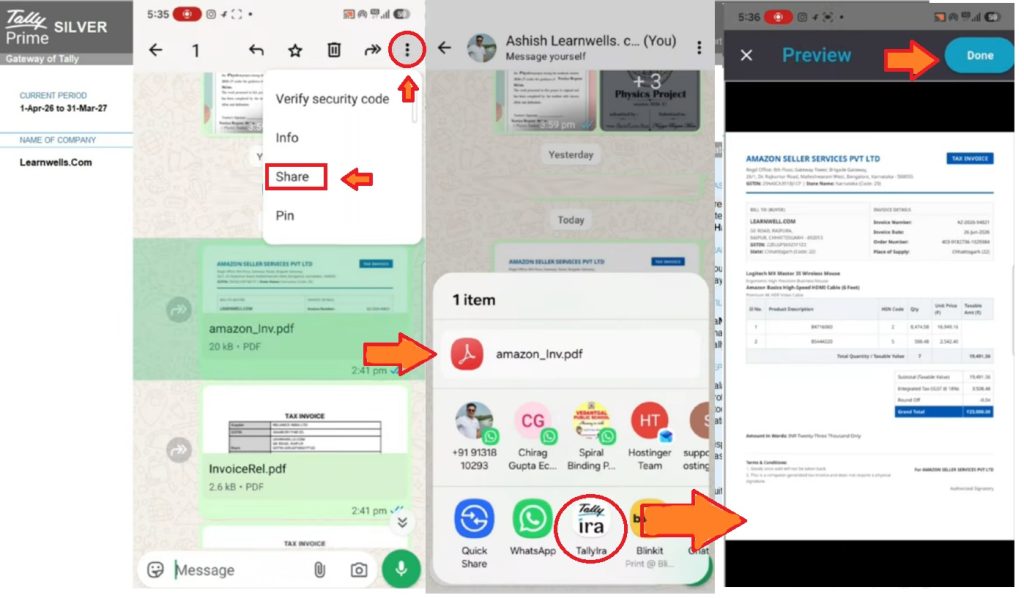
4. Share documents received through WhatsApp
Invoices received through WhatsApp can be shared manually with the TallyIra app using the phone's Share option. The documents can then be submitted to TallyPrime for processing. This does not mean that every WhatsApp invoice is automatically imported into TallyPrime without user action.
Supported file formats and processing limits
Docs by Ira supports several commonly used digital invoice formats. However, businesses should understand the file requirements before importing documents.
|
Feature |
Supported details |
|
Software |
TallyPrime |
|
Subscription |
Valid Indian license with active TSS |
|
File Formats |
PDF, PNG, JPG, JPEG |
|
Bulk Import |
ZIP folders |
|
Desktop File Size |
Up to 3 MB per individual file |
|
ZIP Folder Size |
Up to 15 MB |
|
Mobile File Size |
Up to 5 MB per file |
|
Mobile Upload |
Up to 10 files per batch |
|
Document Content |
One transaction per file |
|
Bulk Processing |
Documents must belong to the same voucher type |
|
Handwritten Invoices |
Supported |
For accurate extraction, invoice documents should be clear, readable, and digitally generated. Blurred images, unclear text, or poorly formatted documents may lead to extraction errors.
Which voucher types are supported?
Docs by Ira supports the following nine voucher types:
- Sales
- Purchase
- Credit Note
- Debit Note
- Delivery Note
- Receipt Note
- Sales Order
- Purchase Order
- Journal
This makes the feature useful beyond purchase invoice processing alone.
Manual invoice entry vs. AI-assisted invoice processing
The biggest difference between traditional invoice processing and Docs by Ira is the amount of manual work required.
|
Process |
Traditional Manual Entry |
Docs by Ira |
|
Invoice Reading |
Accountant reads every detail |
AI extracts supported details |
|
Data Entry |
Details entered manually |
Draft transaction prepared |
|
Ledger Selection |
Accountant selects manually |
Matching and mapping assistance |
|
Stock Details |
Quantities and rates entered manually |
Details extracted by AI |
|
GST Details |
Manually entered and checked |
Extracted tax details available for verification |
|
Missing Masters |
Manual creation required |
Master creation and mapping options |
|
Duplicate Invoices |
Manual checking |
Potential duplicate identification |
|
Bulk Processing |
Entries handled individually |
Multiple documents can be imported |
|
Verification of Details |
Manual checking against invoices |
Review extracted details and correct errors before saving |
|
Final Approval |
Accountant saves vouchers |
Accountant reviews and saves vouchers |
AI-assisted processing can significantly reduce repetitive entry work, particularly when invoice formats are consistent and accounting masters are properly maintained. However, the actual time saved depends on document quality, transaction complexity, and the number of corrections required.
Additional business benefits
Beyond faster invoice processing, Docs by Ira can improve other accounting activities.
- Faster month-end closing: Pending supplier invoices can be processed more efficiently.
- Better accounting accuracy: Extracted values are available for checking before transactions are saved.
- Improved staff productivity: Accountants can spend more time on reconciliations, reports, and analysis.
- Reduced paperwork: Digital document processing reduces dependence on physical invoices.
- Better handling of higher volumes: Businesses can process more documents without increasing repetitive work in the same proportion.
These benefits can be particularly valuable for growing businesses.
How Docs by Ira helps with GST accuracy and compliance
Reduces GST mismatches before filing
GST compliance depends heavily on accurate accounting records. Incorrect supplier GSTINs, tax amounts, invoice numbers, or item information can create problems during reconciliation and return preparation.
Docs by Ira helps reduce data entry errors by extracting relevant invoice details and making them available for review in TallyPrime. For example, when a purchase invoice contains supplier GSTIN, item details, and tax amounts, accountants can review those details against the corresponding masters and accounting records.
If information is missing or incorrectly mapped, the issue can be corrected before saving the transaction. This helps businesses maintain more accurate records and identify potential mismatches before GST filing. However, Docs by Ira does not automatically guarantee GST compliance or Input Tax Credit eligibility. Accountants must still reconcile purchase records with GSTR-2B, verify tax treatment, and complete statutory checks.
Matches invoice details with existing masters
Correct master data is important for successful invoice processing. Docs by Ira provides features that help users map extracted details to existing TallyPrime masters.
- Supplier ledger matching: Extracted supplier information can be mapped to the appropriate party ledger.
- Stock item matching: Item details from invoices can be matched with existing stock items.
- Missing master creation: If the required ledger or stock item does not exist, users can create or map the necessary master during the review process.
- GST information review: Extracted tax amounts and other GST-related details can be verified against the invoice and relevant accounting records.
Clean and properly maintained masters can reduce exceptions and improve processing efficiency.
Identifying exceptions before saving
Not every invoice will be extracted perfectly. Some documents may contain incorrect information, unclear text, missing masters, or mismatched details. The Review Imported Transactions report helps accountants identify issues such as:
- Missing supplier or stock item masters
- Master mapping mismatches
- Invoice dates outside the current period
- Missing or incomplete transaction information
- Potential duplicate invoices
Transactions requiring attention are shown with exception indicators. Users can review the original document, correct the required information, map masters, and proceed with voucher creation. This review process is one of the most important controls in AI-assisted accounting.

Practical applications: Where AI invoice processing helps most
In my accounting experience, repetitive invoice processing affects businesses across several industries. The following examples show how AI-assisted invoice processing can be applied in everyday accounting operations.
1. Automobile dealerships
Automobile dealerships handle purchase invoices for spare parts, accessories, workshop consumables, repairs, and other operating expenses. When a dealership operates multiple showrooms or service centres, invoices are often received at different locations.
Traditionally, employees send these invoices to the accounts department, where they are entered manually. With the TallyIra mobile app, authorised employees can capture supported documents and send them to TallyPrime. The accounting team can then review the draft transactions and save the relevant vouchers.
This can reduce document handling time and help maintain more up-to-date accounting records.
2. Manufacturing businesses
Manufacturing companies often receive large numbers of invoices for raw materials, components, packing materials, and services. Many invoices contain multiple items, quantities, rates, and tax details. Entering this information manually can take considerable time.
With Docs by Ira, businesses can import supported digital invoices and prepare draft transactions for review. Accountants can then verify inventory details, ledger selection, tax amounts, and invoice totals.
This can be especially useful during periods of high purchase activity.
How to start using Docs by Ira in TallyPrime
Businesses can implement Docs by Ira gradually without changing their entire accounting process at once.
Step 1: Check software and subscription requirements
Ensure your business uses an eligible TallyPrime license with active TSS. Register for Docs by Ira, update the TallyPrime license, and complete the required login and consent steps.
Step 2: Review accounting masters
Before importing invoices, check:
- Supplier ledger names and GSTINs
- Stock item names and codes
- Expense and purchase ledgers
- HSN/SAC information
- GST configurations and tax classifications
Properly maintained masters help reduce mapping problems and manual corrections.
Step 3: Import sample invoices
Start with a few clear digital invoices. Use the document import option in TallyPrime and select the appropriate voucher type. Review the extracted details to understand how the feature works with your business documents.
Step 4: Review draft transactions
Open: Alt+O (Import) → Review Imported Transactions (Draft)
Check which transactions are ready to convert and which require action. Resolve missing masters, incorrect mappings, or date discrepancies before saving.
Step 5: Save verified vouchers
After reviewing the transactions, select the entries under Ready to Convert and press F10 (Save Vouchers). The vouchers will then be created in TallyPrime and can be viewed in the relevant accounting reports.
Step 6: Expand to regular processing
Once employees become comfortable with the process, businesses can gradually increase the number of invoices processed. They should continue checking exceptions and reviewing transactions to maintain accounting accuracy.
Docs by Ira pricing and usage credits
Docs by Ira operates on a page-credit-based usage model. Eligible users receive 100 free page credits for two months upon registration. Businesses can purchase additional credit packs according to their document processing needs.
|
Pack |
Page Credits |
Usage |
|
Free Trial |
100 |
Initial testing and evaluation |
|
Regular Pack S |
200 |
Businesses processing fewer invoices |
|
Regular Pack M |
400 |
Small businesses with regular processing needs |
|
Regular Pack L |
600 |
Growing businesses |
|
Pro Pack |
3,000 |
Businesses with higher invoice volumes |
Paid pack prices and applicable validity should be checked on the Tally Customer Portal before purchase. Businesses should select a pack based on their average monthly invoice volume and the number of pages in each document.
Conclusion: AI makes accounting faster, but accountants remain essential
AI-assisted invoice processing can make a meaningful difference for businesses handling regular or high volumes of invoices. With Docs by Ira in TallyPrime, businesses can reduce repetitive data entry, process supported invoices more efficiently, and identify potential errors before saving transactions. The feature also helps accountants spend more time on important activities such as GST reconciliation, financial reporting, outstanding analysis, and business decision-making.
However, automation works best when businesses maintain accurate accounting masters, use clear documents, and follow proper review procedures. The real value of AI in accounting is not removing accountants from the process. It is helping them complete routine tasks faster while maintaining accuracy and control.
5-point readiness checklist
Before getting started with Docs by Ira, businesses should:
- Check TSS Status: Ensure the TallyPrime license has an active TSS subscription.
- Use the Latest TallyPrime Release: Keep the software updated for the latest supported features.
- Review Accounting Masters: Verify supplier GSTINs, stock items, and relevant ledgers.
- Register for Docs by Ira: Complete registration and check the available free page credits.
- Train Accounting Staff: Encourage accountants to review extracted information carefully before saving vouchers.














