GSTR-3B is a mandatory summary Goods and Services Tax (GST) return that regular GST-registered businesses file to report outward supplies, claim input tax credit (ITC) and pay GST liability for a tax period. It is filed online on the GST portal and helps ensure timely tax payments, accurate ITC claims and overall GST compliance.
What is GSTR-3B, and who has to file it?
GSTR-3B is a statutory self-declaration GST return used to report tax liability, outward supplies, eligible ITC and pay GST dues for a tax period. Every GST-registered taxpayer must file it periodically.
The following categories are not required to file GSTR-3B:
- Composition scheme taxpayers file Form CMP-08 instead, under the composition scheme compliance framework.
- Input Service Distributors (ISDs) follow a separate mechanism for distributing Input Tax Credit.
- Non-resident Online Information and Database Access or Retrieval (OIDAR) service providers are subject to separate GST filing provisions applicable to them.
What are the due dates and penalties for GSTR-3B?
The due date for filing GSTR-3B depends on the taxpayer category, and missing it leads to late fees, interest and compliance restrictions.
The standard due date for monthly filers is the 20th of the following month. Businesses under the Quarterly Return Monthly Payment (QRMP) scheme file GSTR-3B by the 22nd or 24th of the month following the quarter, depending on their state or union territory of registration.
Missing the due date leads to the following consequences:
- Late fee: ₹50 per day (₹25 each under CGST and SGST). For nil returns, the late fee is ₹20 per day (₹10 each under CGST and SGST).
- Interest: 18% per annum on the net tax payable, calculated from the due date until the date of payment.
- Filing block: If a previous GSTR-3B is pending, the portal may restrict the filing of subsequent returns since GSTR-3B must be filed in sequence.
- Compliance impact: Continued non-compliance may result in cancellation of the GSTIN and restrictions on generating e-way bills.
What are the key records to keep ready before filing?
Before filing GSTR-3B, businesses must keep all sales, purchase, tax liability and ITC records ready to ensure accurate reporting and avoid errors.
- Outward supply summary: Taxable, zero-rated, nil-rated and exempt sales for the period, matched with your sales register.
- Reverse charge details: Inward supplies on which GST is payable by you as the recipient under reverse charge.
- ITC figures from GSTR-2B: Eligible ITC, blocked credits and reversals. ITC not reflected in GSTR-2B cannot be claimed.
- Adjustments for the period: Credit notes, debit notes, advances received or reversed, and any other entries affecting taxable value.
- Ledger balances: Available balance in the electronic credit ledger and electronic cash ledger to determine GST payment requirements.
How do you file GSTR-3B online step by step?
GSTR-3B is filed online through the GST portal by completing return preparation, reporting outward supplies and ITC, paying tax liability and submitting the return with authentication.
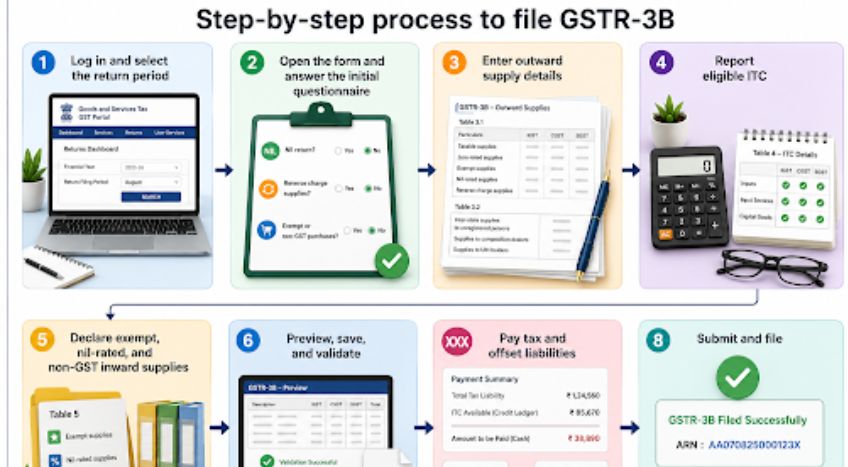
Log in and select the return period
Open the GST portal and sign in using your GSTIN, username and password. Go to Services → Returns → Returns Dashboard. Select the financial year and the relevant month or quarter, then click search to open the GSTR-3B for that period.
Open the form and answer the initial questionnaire
Click on ‘Prepare Online’. The portal displays a short questionnaire covering nil return status, reverse charge supplies and exempt or non-GST purchases. Your responses determine which tables are enabled. If GSTR-1 is already filed, outward supply data may auto-populate.
Enter outward supply details
Fill Tables 3.1 and 3.2, which capture outward supplies.
- Table 3.1: Taxable outward supplies with IGST, CGST and SGST, along with zero-rated, exempt and nil-rated supplies, and reverse charge inward supplies.
- Table 3.2: Inter-state supplies to unregistered persons, composition dealers and UIN holders.
Note: From July 2025, the values in Table 3.1 are locked after GSTR-1 filing. From November 2025, Table 3.2 is non-editable.
Report eligible ITC
In Table 4, enter the eligible ITC based on GSTR-2B. Report ITC separately for inputs, input services and capital goods under IGST, CGST and SGST. Credits blocked under Section 17(5) of the CGST Act, 2017 must be excluded.
Declare exempt, nil-rated and non-GST inward supplies
In Table 5, report exempt, nil-rated and non-GST inward supplies. This field must be filled, even if the values are zero, as it is mandatory for compliance reporting.
Preview, save and validate
Save the form and download the preview PDF. Cross-check all figures with your books, GSTR-1 and GSTR-2B. Mismatches may trigger an Intimation of Difference in Liability (DRC-01B) after filing.
Pay tax and offset liabilities
Check the total liability and offset it using the electronic credit ledger. Pay any remaining amount via challan on the GST portal. From January 2026, saving the Tax Liability Breakup section is mandatory before filing, even when only interest is payable.
Submit and file
Select the declaration, choose the authorised signatory and file the return. Companies and LLPs must use a Digital Signature Certificate (DSC), while others may use an Electronic Verification Code (EVC). After submission, the status changes to Filed and an Acknowledgement Reference Number (ARN) is generated.
Conclusion
Accurate and timely GSTR-3B filing starts long before you log in to the GST portal. Regularly reconciling GSTR-1, GSTR-2B and your books of accounts helps minimise errors, claim eligible ITC correctly and avoid notices, late fees and interest. By maintaining accurate records and automating reconciliation throughout the month, businesses can make return filing faster and more reliable.
Solutions like TallyPrime help streamline GST compliance by keeping your data organised, simplifying reconciliations and ensuring you're always prepared to file with confidence.