









There's an important GST Portal update that every TallyPrime user needs to know about.
GSTN has introduced a new requirement to authorise Tally as your GST Suvidha Provider (GSP) and Application Service Provider (ASP) on the GST Portal. To ensure uninterrupted access to Connected GST Services, you need to complete this authorisation by 30 September 2026.
Here's what has changed, why it matters and how to complete the process in a few simple steps.
What is a GSP, and why does your business need one?
A GST Suvidha Provider (GSP) is an authorised intermediary that enables businesses to exchange GST-related data with the GST Portal through accounting software such as TallyPrime.
An Application Service Provider (ASP), on the other hand, provides the software and services that businesses use to manage their GST activities.
Here's a simple example.
Suppose you run a retail business and use TallyPrime to manage your sales, purchases and GST returns. At the end of the month, you want to upload your GSTR-1 return directly from TallyPrime instead of manually entering the details on the GST Portal.
When you upload GSTR-1 from TallyPrime, your return data is exchanged with the GST Portal through an authorised connection. Tally Solutions Private Limited acts as the ASP, providing the software you use to manage your GST activities, while Tally (India) Private Limited acts as the GSP, facilitating the secure exchange of data with the GST system.
This connection enables you to perform GST-related activities directly from TallyPrime without repeatedly switching between your accounting software and the GST Portal.
What has changed with the new GSP selection requirement?
GSTN has introduced a requirement for businesses to explicitly select and authorise their GSP and ASP on the GST Portal.
For TallyPrime users, this means authorising Tally's API access by selecting the appropriate GSP and ASP.
Although your Connected GST Services may currently continue to work, completing this authorisation is necessary to ensure uninterrupted access.
You need to select the following details on the GST Portal:
|
Field |
Selection |
|
GSP |
Tally (India) Private Limited |
|
ASP |
Tally Solutions Private Limited |
|
Duration |
30 days |
The deadline to complete this authorisation is 30 September 2026.
How to select Tally as your GSP on the GST Portal
You can complete the authorisation directly on the GST Portal in five simple steps.
Step 1: Log in to the GST Portal
Visit www.gst.gov.in and log in using your GST credentials.
Step 2: Navigate to Manage API Access
Once logged in, go to My Profile → Manage API Access.
Step 3: Enable API access
Set Enable API Request to Yes.
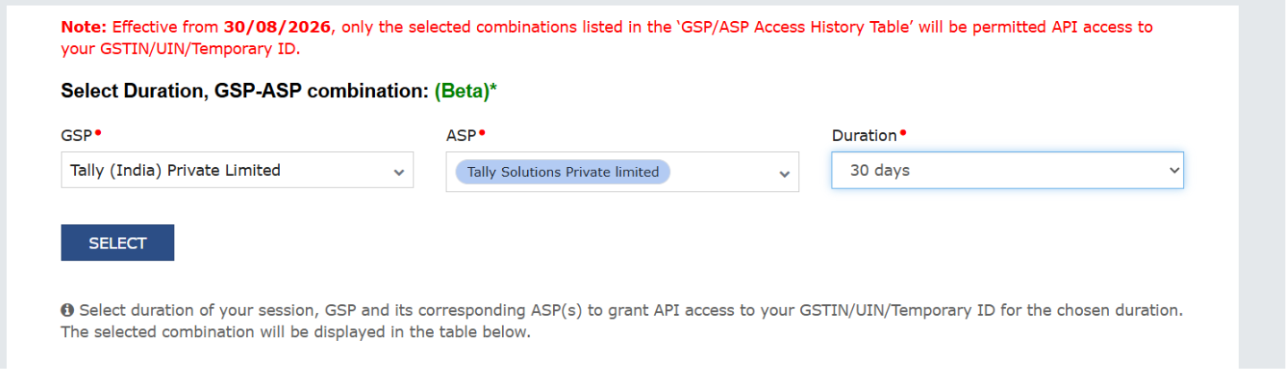
Step 4: Select the GSP-ASP combination
Under Select Duration, GSP-ASP combination, choose GSP: Tally (India) Private Limited; ASP: Tally Solutions Private Limited; Duration: 30 days.
Step 5: Confirm your selection
Click Select and complete the confirmation to authorise Tally's API access.
Important for businesses with multiple GST registrations
If your business has multiple GST registrations, you need to complete this process separately for each applicable GSTIN.
For example, if your business is registered under GST in both Karnataka and Maharashtra, and you use Connected GST Services for both registrations, you must complete the authorisation for each GSTIN.
Why is this authorisation important for TallyPrime users?
TallyPrime's Connected GST Services allow you to perform several GST-related activities directly from your accounting software, reducing the need to switch between TallyPrime and the GST Portal.
Completing the new authorisation is required for continued access to services such as:
GSTIN validation: Verify GSTIN details directly through TallyPrime.
GSTR-1 upload: Upload GSTR-1 returns directly from TallyPrime to the GST Portal.
GST return downloads: Download GST return information through TallyPrime.
GST reconciliation: Reconcile your GST data and identify discrepancies.
Without the required authorisation, you may experience interruptions to these connected services.
Complete your GSP selection before 30 September 2026
The new GSP selection requirement is an important update for TallyPrime users. Completing the authorisation will help ensure uninterrupted access to your Connected GST Services and keep your GST-related workflows running smoothly.
Visit the GST Portal, select Tally as your GSP and ASP, and complete the authorisation by 30 September 2026.














