










Managing a jewellery business is not just about selling beautiful ornaments—it's about accurately tracking gold and silver stock, calculating making charges, maintaining hallmarking records, and generating GST-compliant invoices every single day.
From my experience working with jewellery businesses, I've seen that many owners still rely on manual registers or spreadsheets, which often lead to stock mismatches, billing mistakes, and extra effort during GST filing. Businesses that switched to TallyPrime found it much easier to manage their entire operation from one platform. From weight-based billing and making charges to hallmarking details and GST invoices, everything becomes more organised, accurate, and faster—allowing jewellers to spend more time with customers and less time on paperwork.
How do you track gold stock by weight and pieces simultaneously?
The biggest hurdle I see jewellers face is inventory tracking. You can't just track "5 gold chains." You need to know that those 5 chains weigh exactly 42.350 grams.
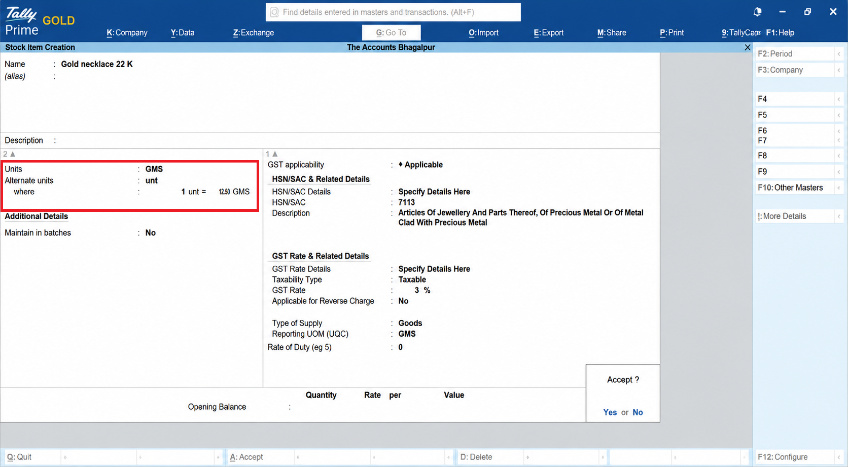
In the TallyPrime jewellery accounting software, you can solve this using Alternative Units. You set your primary unit as Pieces (Pcs) and your alternative unit as Grams (Gms).
- Why it helps: When a customer buys a necklace, TallyPrime lets you enter "1 Pc" and instantly prompt for the exact weight (e.g., "12.500 gms").
- The benefit: Your stock summary will show you exactly how many items you have on the tray, alongside the precise total weight of metal currently sitting in your vault.
Creating alternative units in TallyPrime:
Gateway of Tally → Create → Stock Item
Press F12 to Yes → Use Alternate Unit
Where do making charges and hallmarking fit into the bill?
Making charges can be tricky because they change depending on the design. Sometimes it is a flat fee per piece; other times it is a percentage or a per-gram charge. Similarly, hallmarking is a fixed statutory fee per item.
Instead of doing separate ledger math, you can set these up as Additional Ledgers or use a customized voucher class in TallyPrime.
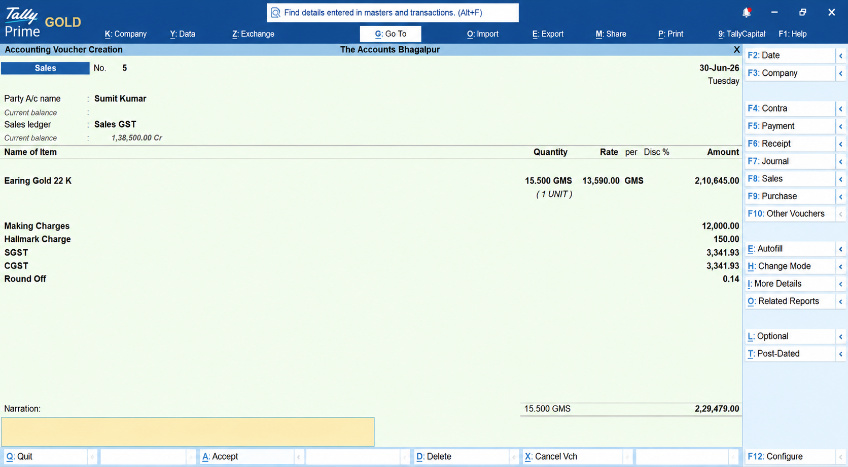
When generating your sales bill, you select the gold item, and immediately below it, TallyPrime calculates the making charges based on the weight automatically (e.g., ₹450 per gram). You can add a dedicated row for Hallmarking Charges right next to it. It keeps the transaction transparent for both your client and your accountant.
How does TallyPrime simplify 3% GST on jewellery?
The Gold Standard Rule: In Indian law, gold ornament sales attract a flat 3% GST (1.5% CGST + 1.5% SGST for intra-state sales). Crucially, this 3% applies to the entire value—the cost of the gold plus the making charges combined.
I’ve seen many stores manually calculate GST on the metal first, then add making charges separately. This is a compliance nightmare. TallyPrime automates this beautifully:
- Set the HSN code and 3% tax rate at the Stock Group level (e.g., "22-Karat Gold Ornaments").
- Configure your making charges ledger to be Includible in Assessable Value for GST calculation.
- TallyPrime automatically bundles the gold value, making fees, and hallmarking charges, and applies the exact 3% GST to the final grand total without you lifting a finger.
Example:-
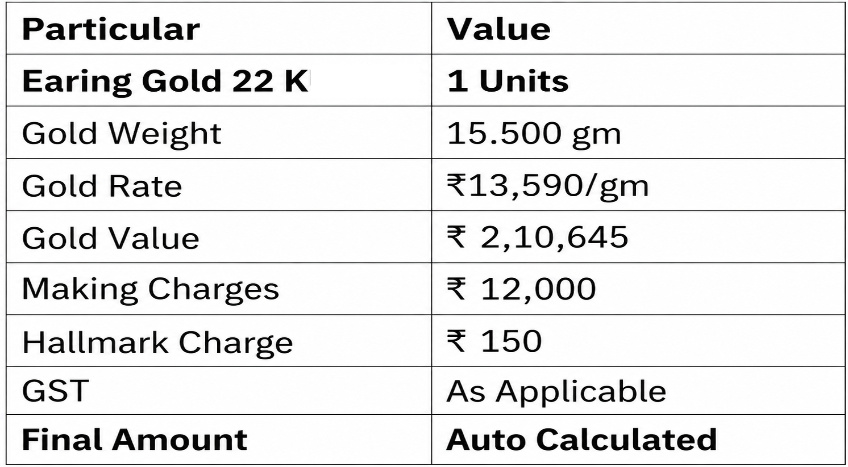
Simply, we can create a sales voucher entry (F8) in TallyPrime.
Gateway of Tally - Vouchers - Sales (F8)
A real-world example: The festive rush
Let's look at an anonymised example from a client of mine based in Bhagalpur. During Dhanteras, they were manually calculating bills for gold bangles, resulting in long customer wait times and a few costly math mistakes.
We automated their setup in TallyPrime. When a customer bought a pair of bangles:
- The Input: The salesperson selected "Kangan", typed "1 Pair", and entered "24.200 gms".
- The Automation: TallyPrime instantly pulled the day's gold rate, calculated the per-gram making charge, added the fixed ₹45 hallmarking fee, and auto-populated the 3% GST blocks cleanly.
A billing process that used to take 7 minutes was reduced to under 45 seconds, turning a chaotic festive rush into a smooth, professional client experience.
How to record hallmarking charges in TallyPrime?
Record Through a Purchase Voucher (Recommended) or we can also create a new separate voucher (Hallmarking) under the purchase in Voucher Type.
This is the most common method when the hallmarking agency issues a GST invoice.
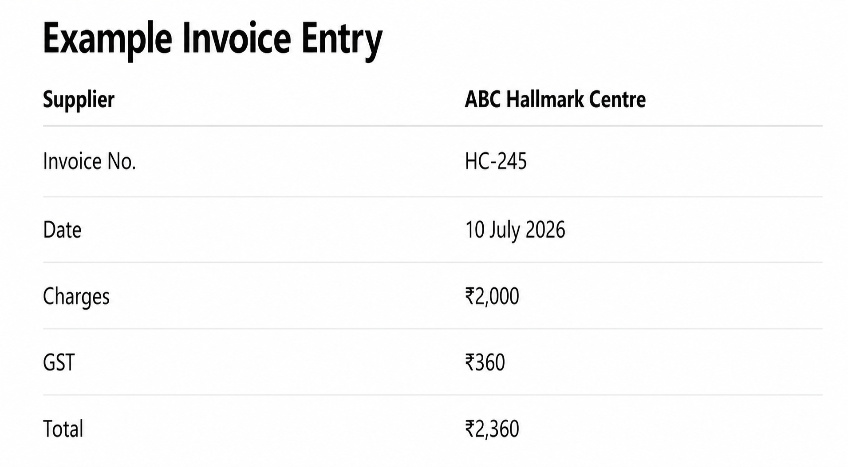
Open purchase voucher or hallmarking voucher
Gateway of Tally → Vouchers → Purchase (F9) → Ctrl+H → Accounting Invoice
Conclusion
Managing a jewellery business involves much more than selling ornaments.
Gold stock, silver inventory, making charges, hallmarking, and GST all need careful attention every day.
In my experience, businesses that keep everything inside TallyPrime spend less time correcting mistakes and more time serving customers. Instead of maintaining multiple registers and spreadsheets, they can manage inventory, billing, taxation, and reporting from one platform.
If you're looking to simplify jewellery accounting, start by organising your inventory, standardising your billing process, and using one system consistently. Small improvements today can save hours of work every month.
Actionable checklist for your store
If you want to streamline your jewellery account books today, follow this simple blueprint:
- Activate Multi-Unit Support: Use Pieces for physical counting and Grams (3 decimal places) for gold weight accuracy.
- Map HSN Correctly: Group items by purity (22K, 18K) and map the correct 3% GST rate directly to the group.
- Link Making Charges to GST: Ensure your making charge configuration is set to contribute to the item's total assessable value.
- Update Daily Gold Rates: Update your standard gold selling rates in TallyPrime every morning before opening doors to avoid manual typing errors.














