



In my 20 years of experience implementing accounting systems across the manufacturing, automobile, ecommerce, and pharmacy sectors, I’ve seen one recurring tragedy: the "gut-feeling" profit. Many Indian SME owners believe they are making money because their bank balance is positive, but they fail to account for fluctuating material prices and floor-shop waste. In high-volume sectors like automobile components, this "gut-feeling" isn't just an error, it’s a silent business killer.
Costing is not just a theoretical concept; as defined in formal costing principles, it is the fundamental process of determining the exact cost of a product or service to set the right prices. If you don't know exactly what a job costs you today, you are likely leaking profit every time a raw material price increases or a machine sits idle.
Let’s see how TallyPrime makes it easy for small manufacturers to analyse job costing and material consumption.
What exactly is job costing (and why your shop floor needs it)
According to the principles of Applied Costing, Job Order Costing is a specific method used to determine the cost of a single job, project, or contract. It is vital to distinguish between "Costing", the technical process and process of ascertaining costs and "Cost Accounting," which is the broader system of recording and analyzing those expenditures to aid managerial decisions.
To truly understand why your factory succeeds or fails, look at the definition provided by the expert Wheldon: Costing involves the "allocation of expenditure for the determination of the costs of products or services; the relation of these costs to sales value; and the ascertainment of profitability." Without this link between cost and sales value, your price fixation is likely broken.
Key objectives of costing for factory owners:
- Price fixation: Ensuring your selling price is scientifically set to cover all costs and yield a reasonable profit.
- Waste reduction: Identifying unnecessary or avoidable expenses in the production line, such as excess scrap or idle labor.
- Efficiency measurement: Evaluating the productivity of your labor, machines, and departments through benchmarking.
- Profitability analysis: Determining which specific jobs or product lines are high-margin and which are actually losing money.
What makes TallyPrime the "Best-ERP" for manufacturing
TallyPrime is far more than a GST tool; it is a robust manufacturing analysis engine that tracks the entire "Materials Issue Pricing" flow. It allows you to move beyond simple bookkeeping into real-time production tracking by handling the "Pricing of Material Issued" (valuing raw materials as they move to the floor).
Tally features for manufacturing analysis:
- Stock journal vouchers: The heart of Job Costing, used to track every material movement.
- Material consumption summary: A report that identifies avoidable or excess costs by comparing what was issued against the final output.
- Job work analysis reports: Detailed breakdowns of how much profit was actually made on a specific contract.
Pro-tip - update for inflation: Because Tally tracks the "Pricing of Material Issued," your reports are only as good as your data. During periods of high inflation, you must update your Standard Rates frequently. If your standard cost for steel is six months old, your "Budget vs. Actual" report will be fiction rather than a management tool.
Expert advice to prevent stock leakage: Use the Material In and Material Out voucher types to track every gram of stock moving between your main store and the production floor. This creates a "paper trail" that makes it nearly impossible for raw materials to go missing without explanation.
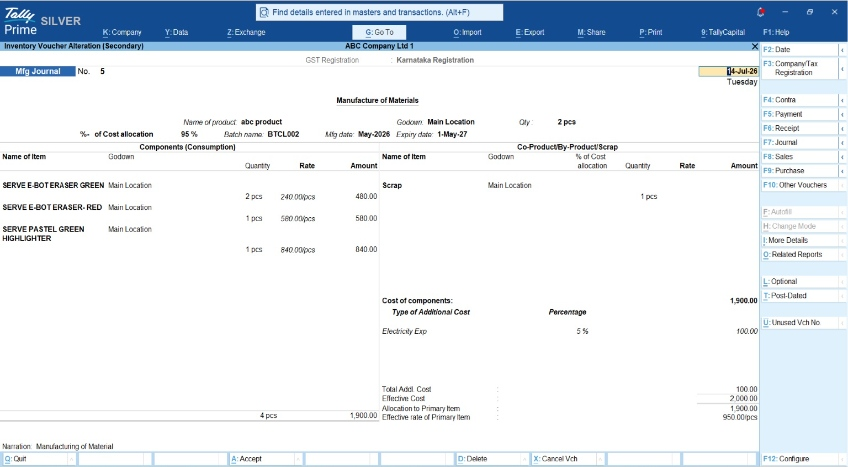
Actual vs. standard: how to spot the gaps?
The secret to factory discipline lies in Variance Analysis. Based on Tally’s budget controls, you set a "Standard" (what the job should cost) and compare it against the "Actual" (what you actually spent).
The formula is: Budget (Standard) - Actual = Variance.
In Tally, a negative variance is a major red flag. It means your actual expenditure has exceeded your budget, your floor-shop is deviating from the plan and your profit is shrinking.
|
Component |
Standard Cost (Budgeted) |
Actual Cost (Spent) |
Variance |
Status |
|
Raw Steel |
₹4,000 |
₹4,500 |
(₹500) |
Red Flag (Overspent) |
|
Labor Hours |
₹1,000 |
₹900 |
₹100 |
Efficient |
|
Total |
₹5,000 |
₹5,400 |
(₹400) |
Loss of Margin |
Example: The "steel cabinet" story
Imagine a small furniture manufacturer making specialized steel cabinets.
- Scenario A (The Guesswork): The owner estimates they spent ₹5,000 on steel. They set the selling price at ₹7,000, expecting a ₹2,000 profit.
- Scenario B (The Tally Reality): After enabling Job Costing, the Tally report reveals the actual cost was ₹5,800.
The Job Work Analysis Report highlighted significant scrap waste and extra welding gas used to fix errors.
I’ve seen this exact same scrap leakage issue in automobile stamping plants; whether you are making a car fender or a cabinet door, the principle remains: if you don't track the scrap, you don't own the profit. By seeing this data, the owner was able to adjust their price fixation and retrain staff to reduce waste.
Is it hard to set up?
Not at all. I have seen many factory owners hesitate to adopt job costing because they fear their storekeepers or billing staff won't understand complex software. The beauty of TallyPrime is that it doesn't require your team to learn a completely new way of working; it simply integrates into what they are already doing.
Here is exactly how smooth the daily workflow looks for a small team:
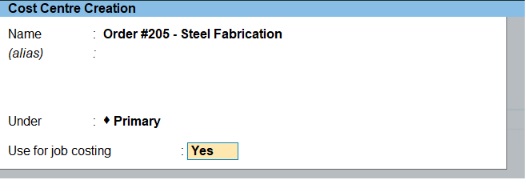
1. Creating the project (the setup)
- You simply go to your F11 features and Set 'Enable Cost Centres' to Yes > Set 'Enable Job Costing' to Yes.".
- Then, you create a name for your project using the 'Cost Centre' feature.
- For example, you can create a tag called "Order #205 - Steel Fabrication". That’s it, the setup is done.
2. The daily store routine (material vouchers)
- When raw materials (like steel sheets or welding rods) are sent to the factory floor, the storekeeper simply passes a Material Out voucher.
- They just pick the item, enter the quantity, and select "Order #205" from a simple dropdown menu. It is as easy as making a basic sales invoice.
- When the finished goods are ready, they record a Material In voucher.
3. The background magic (zero manual calculations)
Your staff just enters the raw data, but TallyPrime does the heavy lifting in the background. It automatically:
- Deducts the consumed raw materials from your main godown inventory.
- Allocates the exact financial cost of those materials to that specific job.
- Tracks any additional expenses, like daily labor wages or electricity, tagged to that Cost Centre.
By the time the manufacturing process is complete, you don’t have to sit with a calculator. You just open the Job Work Analysis Report, and the software presents a ready-made, highly accurate profitability statement showing exactly how much you spent and how much profit you made on that single order.
Read More About Job Costing: Definition, Features, Procedure and Example
Conclusion
Move from guesswork to data-driven growth by following this 5-step checklist:
- Enable features: Go to F11 and enable the Cost Centre and Job Costing feature.
- Define standards: Input "Standard Rates" for your raw materials based on your most recent invoices.
- Record movement: Use "Stock Journals" for every production run to record exactly what was consumed.
- Weekly review: Review the "Material Consumption Summary" every Friday to spot unusual patterns before they become monthly losses.
- Analyze variances: Treat every negative variance as a red flag that requires a visit to the shop floor. Check the Job Work Analysis report the moment the order is completed.
"You can't manage what you don't measure. In a factory, every gram of wasted raw material is a direct hit to your take home profit."














