










Across India, a growing number of small and medium business owners are taking direct control of their bookkeeping and GST compliance. Not because they were trained for it, but because TallyPrime is built to make it genuinely possible. With TallyPrime, business owners or their staff can easily handle bookkeeping and GST returns, without any accounting knowledge.
If someone told you TallyPrime requires a CA or an accounting background to operate, this blog is your honest counter-evidence. Here is what you can learn to handle in TallyPrime, how long it takes to learn, and what it means for the way you run your business.
Is TallyPrime really learnable for a non-accountant?
The simple answer is yes. Instead of starting from journal entries or ledger concepts that require a finance background, TallyPrime starts from what actually happens in your business every day. You do not need to know what debit or credit means to raise a correct GST invoice or file a return on time.
Here is what makes TallyPrime accessible to non-accountants:
- Automatic accounting: When you record a sale or a purchase, TallyPrime creates the accounting entries in the background. Therefore, there are no manual journal entries required
- Workflow-first design: The software is organised around business actions like selling, buying, paying, collecting, instead of accounting concepts
- Plain-language navigation: Sections are labelled clearly. Vouchers for transactions, Reports for business data, Masters for setting up customers, suppliers, and items
- Hindi language support: Full functionality available in Hindi, with no compromise on features, for business owners and staff more comfortable in the language
- Contextual help built in: Press F1 at any point in TallyPrime to access step-by-step guidance relevant to exactly what you are doing
What can you learn in 2 to 3 weeks?
Tally offers a range of free learning resources on its website for all users. These include:
- Instant Demo: a guided, hands-on walkthrough of TallyPrime's key features. Ideal for getting a feel for the software before you commit to learning it in depth
- Smart Moves: content hub for business tools & templates, expert articles and practical insights
- Blogs: scenario-based and informative articles written for business owners, covering GST, inventory, invoicing, and more
- Learning Hub — structured videos that help you get started with TallyPrime's core capabilities such as getting started with TallyPrime, billing, invoicing, business reports and more
- YouTube — Tally's official YouTube channel has a comprehensive library of tutorial videos covering everything from company setup to GST return filing
Here is what a you can achieve in three weeks:
Week 1: Setting up your business in TallyPrime
By the end of the first week, you can:
- Create your company profile: business name, financial year, and GST registration details
- Set up ledgers: the categories that organise your income, expenses, customers, and suppliers
- Enter opening balances: if you are moving from a spreadsheet or a manual register
- Create stock items: with HSN or SAC codes for your products or services
Tally's Insta Demo can walk you through each of these steps with clear demonstrations.
Week 2: Day-to-day transactions
This is where TallyPrime starts to feel genuinely useful for running your business. In the second week, you can learn to:
- Create GST-compliant sales invoices: with automatic CGST, SGST, and IGST calculation based on the buyer's state
- Record purchase entries: from suppliers, including input tax credit details
- Process payments and receipts: both cash and bank
- Automate bank reconciliation: using TallyPrime's bank reconciliation feature
What surprises many business owners at this stage is that every invoice you record in TallyPrime is already being captured for your GSTR-1. The compliance happens as part of your daily workflow. So, you are not doing double the work.
Week 3: GST filing and business reports
By the end of week three, most business owners can:
- Generate and review GSTR-1: your outward supplies report directly from TallyPrime
- Generate and review GSTR-3B: your summary return with tax payable calculations
- Export returns: in the format required by the GST portal
- Read key financial reports: your Profit & Loss statement, Balance Sheet, and outstanding receivables and payables
When you can see your GSTR-1 data in TallyPrime and feel confident it matches your actual sales, you have crossed from learning software to running your own compliance.
Here’s a complete guide for GST Return Filing in India
What can a business owner do independently in TallyPrime?
Beyond the learning path, here is a clear view of the tasks that non-accountant business owners across India are handling themselves in TallyPrime every day:
1. Raise GST-compliant invoices
Invoicing is typically the first task business owners take on in TallyPrime. It is fast, accurate, and requires no accounting knowledge:
- Select the customer, choose items, enter quantity; GST is calculated automatically
- Generates a print-ready, compliant invoice instantly
- Share directly via WhatsApp or email from within TallyPrime
- No dependency on Excel, Word, or external billing tools
2. Track outstanding payments
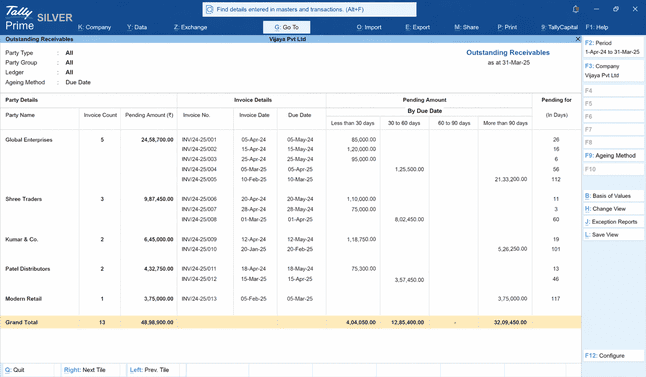
TallyPrime's Outstanding Receivables report gives you a live, clear view of pending payments in one place without a manual tracking:
- See customer-wise outstanding amounts, invoice dates, and days pending
- Filter and sort by party, amount, or ageing
- Track what you owe suppliers to avoid delayed payments
- Eliminate the need for Excel sheets and WhatsApp follow-up messages
3. Monitor stock levels
For businesses with inventory, TallyPrime ensures stock information is always current:
- Every sale and purchase updates stock in real time automatically
- Stock Summary report shows current levels and item-wise insights
- Drill down by item, date range, or movement trends
- Track stock across multiple godowns and transfer between locations
4. View business performance anytime
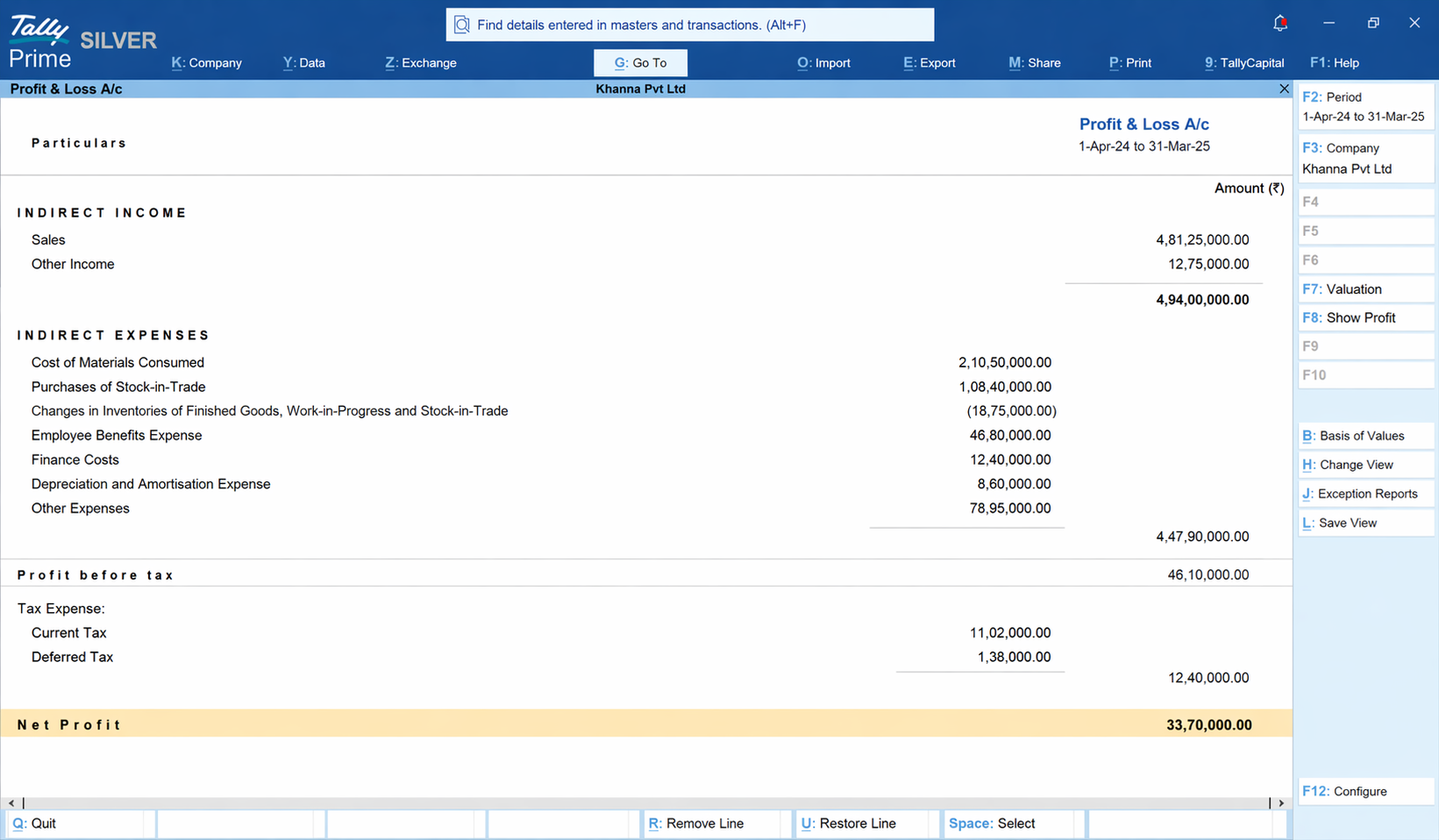
With the real-time Profit & Loss report in TallyPrime you can avoid waiting for your accountant's monthly visit:
- Reports are always up-to-date as every transaction reflects instantly
- View total income, total expenses, and net profit or loss in plain language
- Get the actual numbers you need for conversations with bankers, investors, or partners
A realistic picture: what you will still need a CA for
There are tasks in TallyPrime where you would require professional expertise of a CA.
While you can handle the below tasks yourself in TallyPrime:
- Daily sales and purchase entries
- GST-compliant invoice generation
- Bank reconciliation
- GSTR-1 and GSTR-3B preparation and filing
- Stock management and inventory tracking
- Outstanding receivables and payables monitoring
- Generating and reviewing P&L and Balance Sheet
You will require a CA for tasks like:
- Annual audit and Income Tax Return (ITR) filing
- Complex GST scenarios like e-invoicing thresholds, reverse charge mechanism, export refunds
- Tax planning and financial advisory
- Handling GST notices or assessments
- Setting up your chart of accounts correctly at the start
Managing your own books in TallyPrime dramatically reduces the volume of work you hand to a CA each month. Instead of a CA who spends 20 hours cleaning up entries and filing returns, you need them for annual compliance and the occasional advisory conversation. That shift alone can help a small business save funds every month.
What about staff who are only comfortable in Hindi?
This is a common concern, particularly for businesses outside metropolitan cities. TallyPrime addresses both language and usability effectively:
- Full Hindi interface: Complete feature access in Hindi with no compromise on functionality
- Minimal learning curve: Logical keyboard-based navigation and structured data entry that is familiar to anyone who has used a basic spreadsheet or data entry tool
- Fast onboarding: Most staff can handle core tasks like invoicing, payment tracking, stock checks, and more, within a few days of regular use
Your step-by-step path to using TallyPrime independently
Here is a practical roadmap for a non-accountant business owner starting with TallyPrime:
- Download TallyPrime's free trial version: full functionality, no feature restrictions, no credit card required. You learn on the actual product, not a demo version.
- Start with the Instant Demo on the Tally website: it gives you a guided, hands-on walkthrough of TallyPrime's key features before you dive into your own data. Follow it up with Smart Moves and learning hub for task-specific guidance.
- Create a practice company first: enter dummy invoices, record practice payments, generate a test GSTR-1. Get comfortable making mistakes where there are no consequences.
- Set up your real company: consider a single session with a CA or Tally-certified partner to set up your chart of accounts correctly. This one-time investment creates the right foundation for everything that follows.
- Start entering transactions every day: consistency builds comfort faster than any other approach. Use TallyPrime's cloud capabilities if you are frequently on the move.
- File your first GSTR-1 from TallyPrime: use Tally's Learning Hub and YouTube tutorials to walk through the GST return process step by step. You can also take help from your CA for the first time.
The bottom line
TallyPrime is designed for every business owner, regardless of their educational background or familiarity with finance. A non-accountant business owner can handle daily bookkeeping, generate GST-compliant invoices, manage basic inventory, and file GSTR-1 and GSTR-3B independently, with just 2 to 3 weeks of learning and working in TallyPrime.
Here is a checklist to get started:
- Complete the one-time setup yourself, or with your accountant
- Start raising invoices directly in TallyPrime instead of Word or Excel
- Check Outstanding Receivables at the start of each week to stay on top of pending payments
- Review the Stock Summary at the end of every week
- View the Profit & Loss report at the end of each month. Even a five-minute review makes a difference
- Enable CloudAccess if you want to check business data while away from the office














