










Ask any business owner who uses TallyPrime, and you’ll hear a common statement - it’s not just an accountant’s tool. From day-to-day operations to informed decision-making, the software has proven to be an invaluable asset in running their business.
Whether it is a garment trader managing three godowns, a distributor whose billing staff uses the accounting software, or a service business owner who wants real-time visibility into profitability, TallyPrime fits the way different businesses work.
The reason is simple: TallyPrime is designed around business workflows. You do not need to know what debit or credit means or have a finance background. All you need is to understand your business operations - a sale was made, a payment came in, stock was received - and TallyPrime takes care of the rest.
This blog covers what a non-accountant business owner can independently do in TallyPrime, why the learning curve is shorter than most people believe, and how it puts you in control of your business every single day.
Is TallyPrime really designed for non-accountants?
The simple answer is a ‘Yes’! TallyPrime is designed to mirror how businesses actually operate on a day-to-day basis. It was built with a workflow-first approach. Instead of beginning from a journal entry or ledger, which requires accounting knowledge, TallyPrime starts from what actually happens in a business: a sale was made, a purchase was received, a payment came in or went out.
Here’s how it works for non-accountants:
- Automatic accounting: Everyday actions are automatically converted to accounting entries in the background with no debit/credit knowledge required
- Simple navigation: It’s easy to navigate within the software with clearly labelled sections like:
- Vouchers for transactions
- Reports for viewing business data
- Masters to setup (customers, suppliers, items)
- Familiar interface: Easy to use for anyone comfortable with basic apps or portals
- Hindi support: Full functionality available in Hindi for non-English users
"You do not need to understand debit and credit to know whether your business is profitable. TallyPrime shows you everything, in plain language, in real time."
What can a business owner do in TallyPrime without an accounting background?
Here are the key areas where business owners independently use TallyPrime without needing to understand accounting concepts:
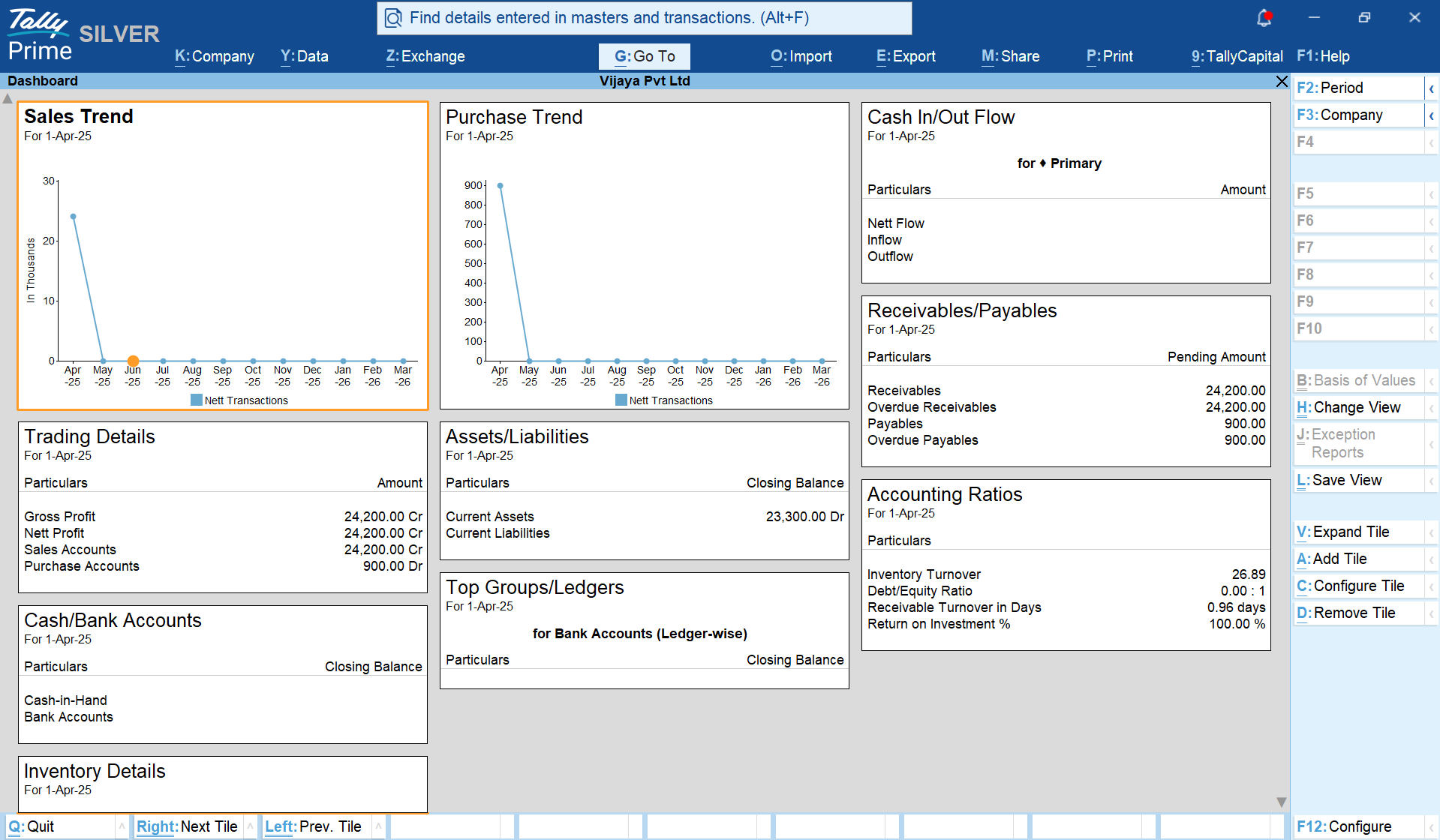
1. Get a quick snapshot of your business from the Dashboard
The dashboard in TallyPrime gives you a bird's-eye view of your business. At a glance, you can see:
- A summary of receivables and payables
- Cash and bank balances
- Key alerts on pending transactions or statutory dues
- Quick access to the reports and areas you use most
For a business owner, this means the most critical information is visible the moment you log in to TallyPrime, without having to open multiple reports or ask your accountant.
2. Track cash flow
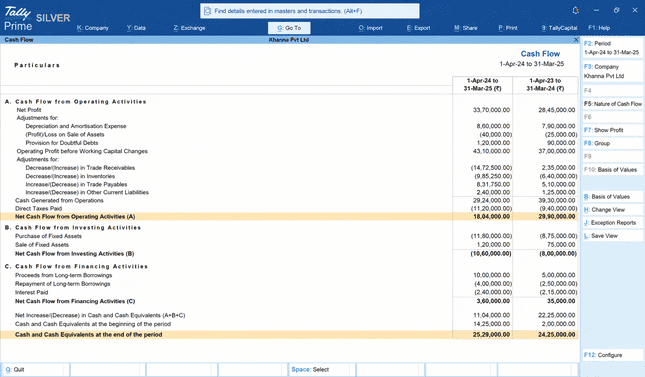
Understanding the cash flow of your business is critical, and TallyPrime gives you a real-time view of it. Through the Cash Flow Statement and Cash/Bank reports, you can:
- See your current cash and bank balances across accounts
- Track inflows and outflows over any period
- Identify which periods had high cash burn or strong collections
- Spot patterns like months where expenses spiked or collections were low
These insights help you plan purchases, manage credit, and avoid cash crunches, without waiting for your accountant to prepare a statement.
3. Understand business profitability beyond revenue
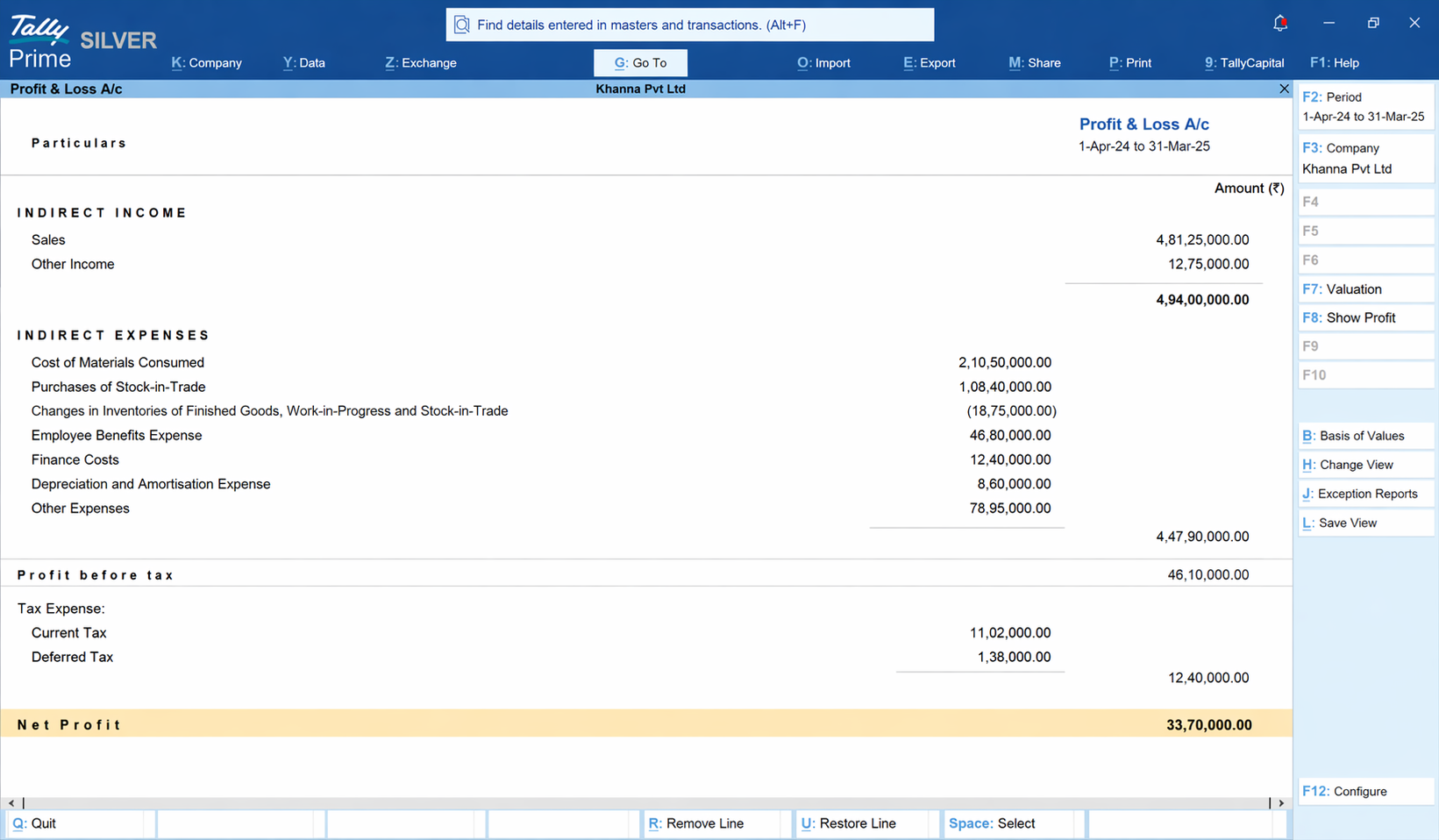
Knowing how much you sold is not the same as knowing the profit you made. TallyPrime's Profit & Loss report makes it easier to differentiate profits from revenue.
- Real-time P&L: The impact of every sale, purchase, and expense reflects instantly in the P&L statement
- Simplified view: See total income, total expenses, and net result in a clean and understandable format
- Comparative analysis: Compare performance across months, quarters, or financial years. Spot trends, identify dips, and measure growth over time
- No waiting: You do not need to wait for month-end or a CA visit to know your net profit
For a business owner, this turns the P&L from a document you receive into a tool you actually use.
4. Analyse stock
TallyPrime's inventory reports go well beyond "how much stock do I have." They give you the kind of inventory intelligence that was previously only possible with a dedicated operations team. The reports help you understand what your stock is doing for your business:
- Stock summary: Up-to-date inventory levels across all items and locations
- Item-wise profitability: See which products are generating the most margin and which are not performing well
- Movement analysis: Understand how quickly each item is selling, identify fast-moving and slow-moving stock, and make smarter purchasing decisions
- Reorder level alerts: Set reorder levels for items so TallyPrime flags when stock is running low
- Multi-godown tracking: Know exactly how much stock is at each location, transfer between godowns with a simple entry, and avoid situations where one location is overstocked while another runs dry
5. Track outstanding payments - receivables and payables
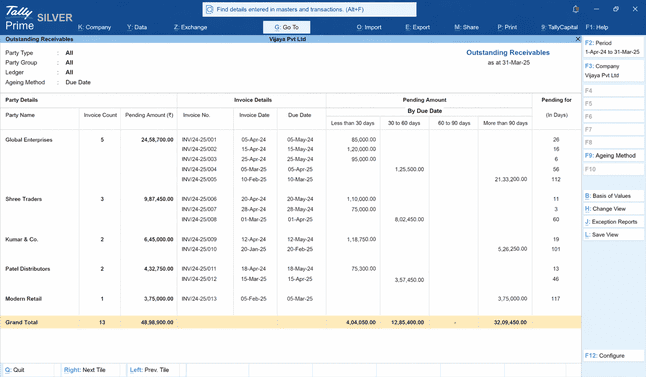
Managing collections manually leads to missed follow-ups and cash gaps. TallyPrime's Outstanding Reports give you a real-time view of all pending payments:
- Outstanding receivables: Customer-wise list of amounts owed, invoice dates, and days pending which is sortable by party, amount, or ageing
- Outstanding payables: See what you owe suppliers, with due dates, so payments are never missed or delayed
- No manual tracking: No Excel sheets, registers, or chasing down information from staff
6. Access all reports anytime, anywhere
TallyPrime's CloudAccess and online reports means your business reports are not locked to a desktop in the office. For business owners who are constantly on the move, this removes the dependency on office staff or the accountant to tell you how things are going. Whether you are at a client meeting, travelling, or working from home, you can:
- View dashboards, P&L, cash flow, and outstanding reports from any browser
- Check stock levels and receivables on the go
- Stay informed without being physically present at the office
What about staff who are only comfortable in Hindi or basic Excel?
This is a common concern, especially for businesses with non-English-speaking staff and those outside metropolitan cities. TallyPrime addresses both language and usability barriers effectively.
- Hindi interface support:
- Full feature access in Hindi
- No compromise on usability
- Minimal learning curve:
- Familiar keyboard-based navigation
- Logical data entry flow
- Excel-like experience:
- Easy field movement
- Structured input format
- Fast onboarding: Most staff can handle basics within a few days
Can TallyPrime be accessed outside the office?
Yes. TallyPrime Cloud Access allows you to access your company data from any device with an internet connection. For business owners who are not always at their desk, CloudAccess removes the dependency on being physically present at the office to check a report, approve a transaction, or review outstanding dues.
TallyPrime’s remote access capability ensures that this does not limit visibility or control. You can:
- Access from anywhere: From your Laptop or Browser
- View real-time data: Always work on latest data in real-time
- Avoid location dependency:
- Check reports while travelling
- Review dues remotely
- Have better control: Stay connected to business without being physically present
If business owners use TallyPrime directly, what happens to the Accountant's role?
Using TallyPrime does not replace the accountant, their role becomes more focused and more valuable.
When day-to-day data entry is handled by the business owner or the office team, the accountant can dedicate their time to higher-order work: GST and TDS filings, year-end finalisation, tax planning, and financial advisory.
Business owners who are more engaged with their own numbers also make for more productive conversations with their accountants. Reviews are faster, decisions are sharper, and there are fewer surprises at the end of the financial year.
The bottom line: TallyPrime is for every business owner
The belief that TallyPrime is only for accountants is actually a myth! TallyPrime is designed for everyone, regardless of their educational background or familiarity with finance. With TallyPrime, every business owner can stay informed, stay in control, and make decisions based on real data rather than estimates.
Here is a checklist to get started:
- Complete the one-time setup, yourself, or with your accountant
- Start raising invoices directly in TallyPrime instead of Word or Excel
- Check Outstanding Receivables at the start of the week to stay on top of pending payments
- Review the Stock Summary at the end of every week
- View the Profit & Loss report at the end of each month - even a five-minute review makes a difference
- Switch the interface to Hindi if your staff is more comfortable in that language
- Enable CloudAccess if you want to check business data while away from the office
TallyPrime does not replace your accountant. It gives you the visibility and control you need to run your business with confidence, every single day.














