



In my 20 years of accounting experience across manufacturing, retail, automobile dealerships, construction, e-commerce, and service industries, I have seen how accounting software has evolved from basic data entry to advanced automation.
Today, AI-powered features can read invoices, extract transaction details, suggest ledger mappings, and help identify accounting errors. These capabilities can save considerable time, especially for businesses handling large transaction volumes.
However, one important question remains: Can businesses trust AI to make accounting decisions without human verification? From my experience, the answer is simple. AI should assist accountants, not replace their judgment.
While modern AI document processing accurately reads structured invoices and highlights exceptions, human judgment remains essential for specific business cases. For example, when handling unclear bills or suppliers with multiple ledgers in your books, the AI flags these for attention in the draft stage. The accountant’s responsibility is to verify these draft entries, confirm the appropriate classification, and ensure accurate financial and GST reporting before saving.
This is why I recommend evaluating AI-powered accounting features based on three essential controls: editable transactions, reliable audit trails, and proper tax verification.
Core Framework: What Are My 3 Non-Negotiable Standards?
1. Is Every AI-Generated Transaction Editable Before Saving?
The first thing I check is whether accountants can review and modify AI-generated entries before they are saved. AI can extract information from invoices and suggest accounting details, but those suggestions may not always be correct.
For example, a supplier invoice may contain several items with different tax rates. The AI might extract the invoice values correctly but suggest an incorrect ledger or stock item. Accountants should be able to correct these details before posting the transaction. A reliable AI-assisted workflow should follow this process: Document Import → AI Data Extraction → Draft Transaction → Accountant Review → Voucher Saving. This approach reduces repetitive data entry while keeping financial control with the accountant.
How TallyPrime Handles AI-Assisted Invoice Processing
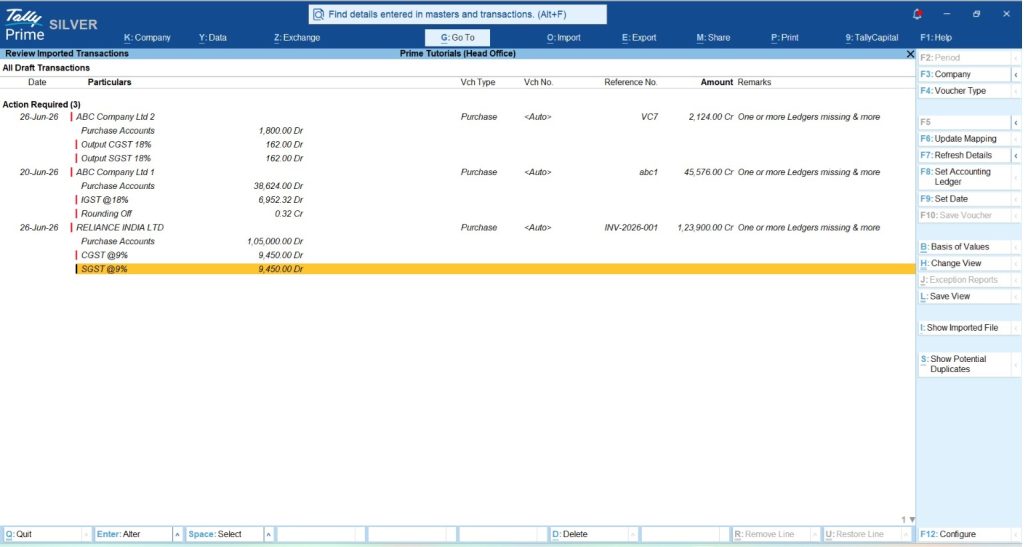
Docs by Ira in TallyPrime follows a review-based workflow for imported documents. It extracts information from supported PDFs and images and prepares draft transactions in the Review Imported Transactions (Draft) report and automatically highlights exceptions. Accountants can review extracted values, review exceptions, resolve missing masters, and correct mapping issues before saving vouchers.
For transactions requiring attention, the report displays exception indicators so users can identify which details need correction. Once the information is verified, transactions under Ready to Convert can be selected and saved. This is particularly useful for businesses that process large numbers of invoices but still need accurate accounting records.
2. Does the Software Maintain a Reliable Audit Trail?
The second important requirement is accountability. Businesses should be able to identify who created, modified, or deleted a transaction and when the activity occurred. This becomes even more important when AI-assisted features are involved because accountants and auditors need to understand how transactions entered the accounting system. A reliable audit trail should record:
- Creation of transactions and masters
- Changes made to existing records
- Deletion of vouchers or masters
- Date and time of recorded activities
- Relevant user information
- Previous versions or changes, where supported
An audit trail helps businesses investigate errors, monitor changes, and improve internal controls.
Why Audit Trails Matter for Indian Businesses
Under Rule 3(1) of the Companies (Accounts) Rules, 2014, companies maintaining books through accounting software must use software with an audit trail feature that records changes and cannot be disabled. This requirement applies from the financial year beginning 1 April 2023. This statutory requirement applies to companies covered by the relevant Companies Act provisions, not automatically to every proprietorship or partnership. The purpose is to improve transparency and maintain a reliable record of accounting changes.
How TallyPrime Edit Log Helps
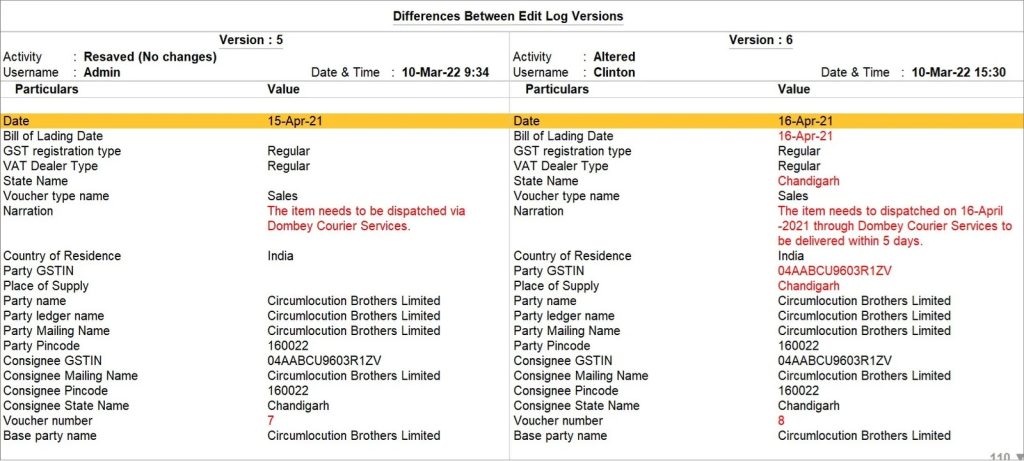
TallyPrime provides Edit Log functionality to track changes made to transactions and masters. The TallyPrime Edit Log product keeps the Edit Log feature permanently enabled, making it suitable for businesses that need to meet applicable MCA audit-trail requirements. Standard TallyPrime also provides Edit Log functionality, but it can be enabled or disabled. In the Edit Log report, users can review information such as:
- Voucher creation
- Voucher alteration
- Deletion activities
- Resaved transactions
- Username
- Date and time
- Changes between recorded versions
For example, if an accountant changes a purchase voucher amount or modifies a supplier ledger, the relevant activity can be reviewed in Edit Log when logging is active. Users can open a voucher or master and press Alt+Q (Edit Log) to view the available history. This helps accountants and auditors understand how accounting records have changed over time.
However, businesses should configure user access correctly. Shared login credentials can weaken individual accountability even when audit logging is available.
3. Does AI Allow Proper GST and Tax Verification?
The third essential control is tax accuracy. GST accounting requires more than simply extracting numbers from invoices. Accountants must check several details, including:
- Supplier GSTIN
- HSN/SAC classification
- Applicable GST rate
- Place of supply
- CGST, SGST, or IGST treatment
- Input Tax Credit eligibility
- Invoice values and tax amounts
AI may help extract or suggest these details, but tax decisions should not be accepted without verification. For example, two products may have similar descriptions but different HSN classifications or applicable tax rates. If an AI system selects an incorrect tax classification and the transaction is saved without checking, the error may affect GST returns and financial reports. This is why accountants should retain control over tax-related information.
How TallyPrime Helps Reduce GST-Related Errors
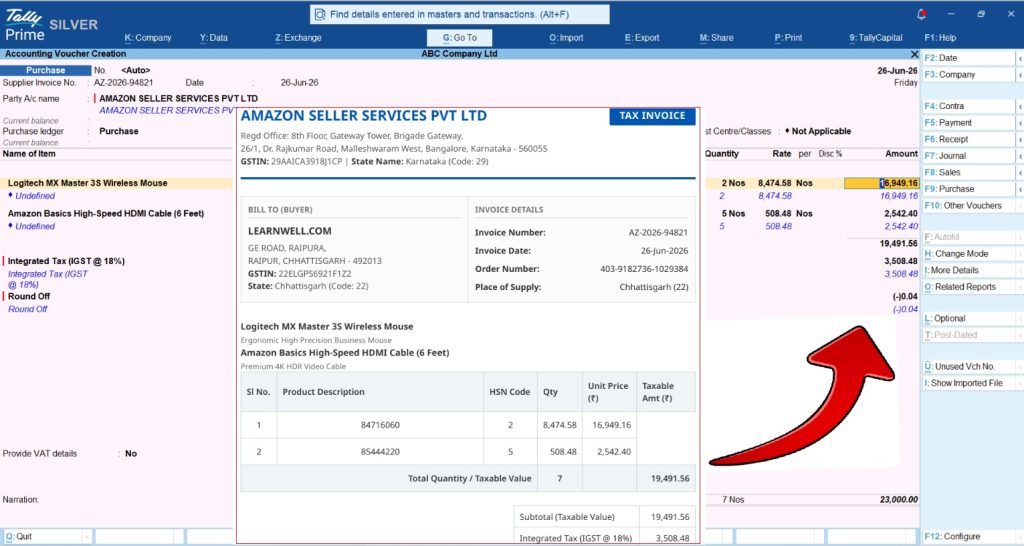
TallyPrime provides GST accounting, tax reporting, and reconciliation features. Docs by Ira adds AI-assisted invoice data extraction to this workflow. Accountants can review extracted supplier information, item details, amounts, and tax values before saving transactions.
If a master is missing or the extracted information does not match existing accounting records, users can review and correct the relevant details. These checks help reduce manual entry errors and support better GST data accuracy. However, Docs by Ira should not be treated as an automatic GST compliance approval system. Final GST classification, Input Tax Credit eligibility, and GSTR-2B reconciliation still require proper verification. This distinction is important because an invoice can be entered correctly while still containing a tax classification or eligibility issue.
By delivering consistently high extraction accuracy, Docs by Ira significantly cuts down the time accountants spend on routine manual checking. Because supplier details, line items, and tax amounts are captured reliably right from the start, accountants only need a fraction of the usual time to cross-verify information before approving vouchers.
Real-World Examples Across Different Industries
Example 1: Automobile Dealerships and High-Volume Accounting
Scenario: An automobile dealership operates multiple showrooms and service centres. Its accounts department regularly receives purchase invoices for spare parts, accessories, workshop expenses, freight, and other services. Employees may also process supplier advances, reimbursements, and bank transactions.
Where AI Can Make Mistakes: AI may correctly identify the amount and supplier name but suggest an incorrect ledger. For example, an advance paid to a supplier should not automatically be treated as a purchase expense. Similarly, freight charges related to inventory purchases may require different accounting treatment from general administrative freight expenses. These decisions depend on the nature of the transaction.
A Better Approach: Businesses can use AI-assisted document processing to extract invoice information and prepare draft transactions. Accountants should then verify the supplier ledger, expense classification, inventory treatment, and GST details before saving the voucher. For bank transactions, reconciliation and proper ledger classification should be completed using the relevant accounting controls. This approach reduces repetitive work without compromising accounting accuracy.
Example 2: Multi-Location Retail Chains and GST Classification
Scenario: A retail business operates stores across different locations and sells a wide range of products. New products are regularly added to inventory, and some items may have similar names but different tax classifications.
Where AI Can Make Mistakes: If an AI system assigns an HSN code or GST rate based only on a product description, it may select an incorrect classification. Such errors can affect invoices, GST reports, and accounting records.
A Better Approach: Before allowing new products to be used in transactions, businesses should verify their stock masters, HSN/SAC codes, and GST classifications. AI can help extract and organise invoice information, but accountants should review unfamiliar or mismatched items.
TallyPrime's inventory and GST features can help businesses maintain consistent records, while Docs by Ira supports invoice data extraction and draft transaction review. This combination is useful for businesses that want faster processing with proper financial control.
The Accounting Control Checklist for AI-Powered Features
Before using an AI-powered accounting feature with a client's books, I recommend checking the following controls.
|
What to Check |
Why It Matters |
|
Editable Transactions |
Accountants should be able to review and correct AI-generated details before saving. |
|
Audit Trail |
Changes to accounting records should be traceable through reliable activity logs. |
|
User Access Control |
Only authorised users should be able to create, modify, or approve transactions. |
|
GST Verification |
Tax classifications, rates, and ITC-related information should be checked before finalisation. |
|
Master Data Accuracy |
Supplier ledgers, stock items, and tax details should be properly maintained. |
|
Error Identification |
The system should help identify missing information, mismatches, or unusual transactions. |
|
Document Verification |
Users should be able to compare extracted data with the original source document during review. |
|
Data Security |
Businesses should understand how their financial information is processed and protected. |
|
Final Approval |
Important accounting decisions should remain under authorised human control. |
Not every accounting application provides these controls in the same way. Businesses should verify which features are available, how they work, and whether additional configuration is required.
Why These Controls Matter
A feature that saves a few minutes of data entry may appear useful, but its real value depends on the accuracy and reliability of the resulting accounting records. For example, automatically creating 100 purchase vouchers is not necessarily beneficial if several contain incorrect ledger mappings or GST details.
A more practical approach is to combine automation with a review process that makes errors easier to identify and correct. This helps businesses improve productivity while maintaining financial discipline. AI should reduce the amount of work accountants need to perform, but it should never remove their ability to review and control financial transactions.
Know more about The AI-Powered Invoice Processor Docs by Ira
Conclusion: Trust AI for Assistance, Not Unchecked Accounting Decisions
AI-powered accounting features are changing how businesses process financial information. From invoice extraction to transaction preparation and error identification, AI can reduce repetitive tasks and help accountants work more efficiently.
However, speed alone should not determine whether a business adopts an AI feature. Before using AI with a client's accounting records, I always look for three important controls:
- Editable Transactions: Can accountants review and correct AI-generated information before saving?
- Reliable Audit Trail: Can the business track changes made to accounting records and identify the relevant activities?
- Proper Tax Verification: Can accountants verify GST and other tax-related details before finalising entries?
Features such as Docs by Ira and Edit Log in TallyPrime demonstrate how automation and accounting controls can work together. Docs by Ira helps reduce manual invoice entry through draft-based processing, while TallyPrime Edit Log provides visibility into recorded changes to accounting transactions and masters.
For businesses adopting AI, the goal should not be fully automated accounting without supervision. The goal should be faster accounting, fewer avoidable errors, better transparency, and greater control over financial records.













