










Your AWS bill grew 40% last quarter. Your engineers are shipping faster than ever. But nobody can explain exactly why costs spiked - or who owns them.
This is the FinOps gap: the space between cloud agility and financial accountability. At scale, especially across multiple payer accounts, cloud cost management is no longer a matter of reviewing monthly invoices. It requires a fundamentally different operating model.
True FinOps maturity combines cost intelligence, automation, and optimisation intelligence into a single, continuously running discipline. This blog walks through the seven pillars that make that possible.
1. The foundation: Cost intelligence dashboard
At the heart of effective FinOps is a centralised cost intelligence dashboard — a single source of truth that spans every payer account, every service, and every team. Without this layer, everything else is reactive.
Think of it as your financial control plane for the cloud.
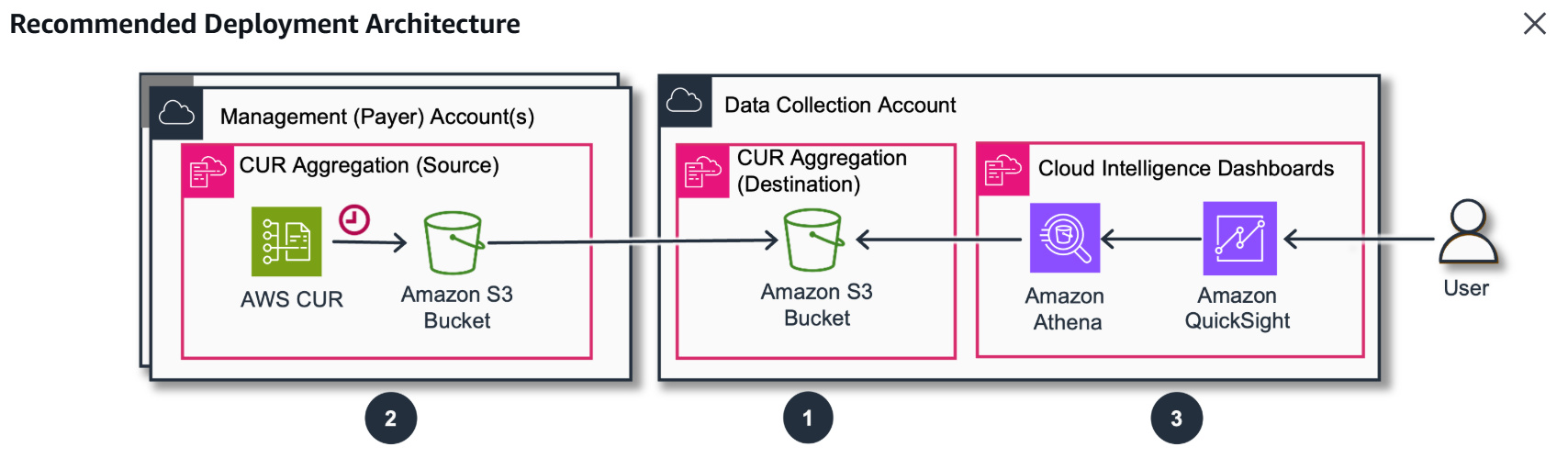
Cost Intelligence Dashboard: multi-payer overview
What it should solve
✔ Unified visibility across all payer accounts and linked accounts
✔ Granular drill-down from service → account → tag → resource
✔ Budget vs. actual tracking with threshold alerts
✔ Savings plan utilisation and coverage monitoring
✔ Automated anomaly detection before month-end surprises
✔ Business-level cost allocation and chargeback models
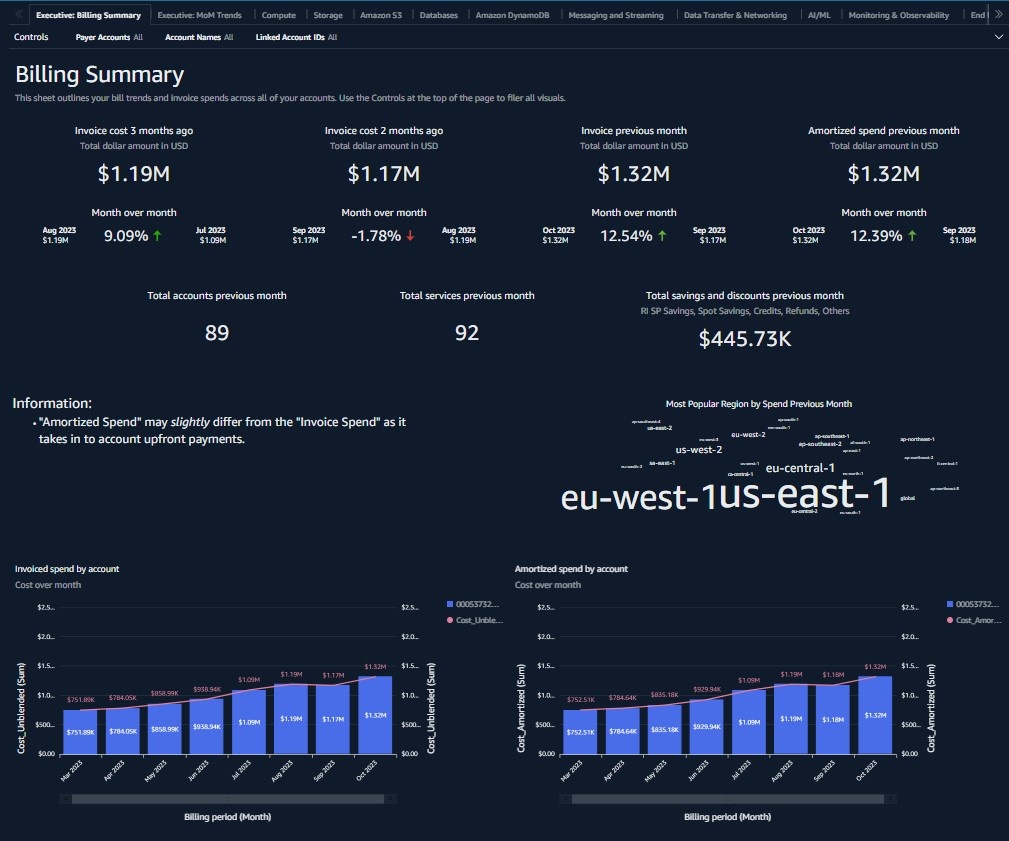
Granular drill-down view-per-service cost breakdown
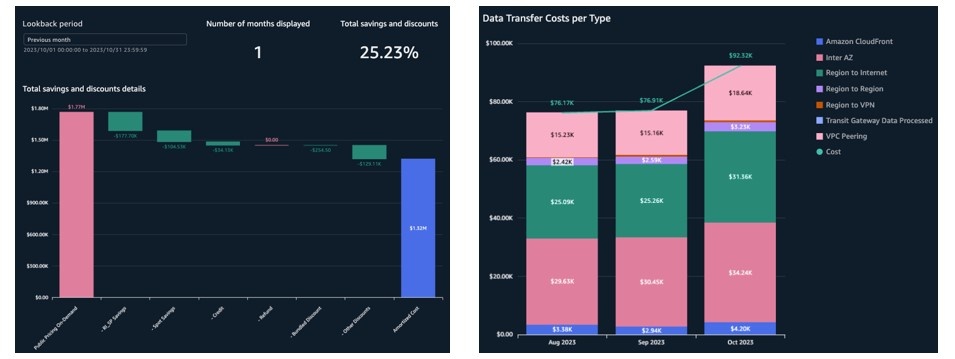
Budget vs. Actual tracking with anomaly flags
Architecture overview
A production-grade cost intelligence platform typically combines:
- AWS Cost & Usage Reports (CUR) exported from every payer account
- Centralised S3 bucket for consolidation
- Amazon Athena for ad-hoc SQL queries on raw CUR data
- QuickSight (or a BI tool of your choice) for dashboards and visualisations
- Cross-account IAM roles to enable secure data ingestion
This architecture enables plan-level cost visibility, per-user cost analytics, service-level costing, and chargeback/showback reporting. A mature dashboard should be able to answer four questions at any time:
|
The four questions a dashboard must answer "Why did cost increase? | Who owns it? | Is it optimised? | Can it be automated?" |
2. Unified cost optimisation intelligence
Visibility is step one. But visibility without action is just an expensive reporting exercise.
Step two is Optimisation Intelligence — taking the scattered recommendations that live across AWS tools and consolidating them into a single, actionable cockpit. Without this, teams end up with siloed insights: Compute Optimizer says one thing, Cost Explorer says another, and nobody has the full picture.
A mature FinOps organisation centralises signals from:
- AWS cost optimisation hub
- CUDOS dashboards (supporting multi-payer environments)
- Compute Optimiser for rightsizing signals
- Savings plans utilisation and gap analysis
- Graviton migration candidates identified automatically
The goal: A single optimisation cockpit where every recommendation has an owner, an estimated savings, and a status.
3. High-impact optimisation levers
Across hundreds of AWS accounts, four categories consistently unlock the largest savings. None of these requires architectural changes - they are operational wins available to any team willing to prioritise them.
Compute optimisation
- EC2 rightsizing via Compute Optimiser — typically yields 15–30% savings on over-provisioned instances
- Intel → AMD instance transitions (e.g., m5 → m6a) for equivalent workloads at lower cost
- x86 → Graviton modernisation — up to 20% better price-performance
- Identification and termination of idle instances running below 5% CPU
- Compute Savings Plans and Database Savings Plans for steady-state workloads
Storage optimisation
- GP2 → GP3 EBS migration — GP3 costs ~20% less and offers better baseline performance
- Automated cleanup of unattached EBS volumes (a silent cost driver in most accounts)
- Aged snapshot policies to remove snapshots older than retention thresholds
- S3 lifecycle policies to transition infrequently accessed data to cheaper storage tiers
Network optimisation
- Audit idle VPC Endpoints and remove unused ones
- Release unassociated Elastic IPs — AWS charges for reserved IPs not in use
- Review inactive VPN connections and NAT gateway utilisation
Logging & observability
- Migrate CloudWatch Logs to Infrequent Access tier where daily query volume is low
- Right-size log retention policies — 90-day default is rarely needed for all log groups
- Remove orphaned log groups from deleted services
4. Automation: The force multiplier
Optimisation without automation is temporary. You identify the waste, you clean it up, and three months later it's back — because the underlying behaviour hasn't changed.
The real transformation in FinOps happens when tagging standards, lifecycle scripts, and governance policies combine into a self-healing system. Instead of monthly cleanup sprints, resources are automatically right-sized, stopped, or terminated based on declared policy.
Smart tagging strategy
Tags are the foundation of automation. Without reliable tags, scripts cannot safely identify what to stop, resize, or delete. A mature tagging strategy captures:
✔ Ownership — Owner, Business Unit, Project, Cost Centre
✔ Environment — Prod, Staging, Dev, POC
✔ Lifecycle — Persistent, Scheduled-Termination, Ephemeral
✔ Criticality — For blast-radius assessment before automation acts
Automation use cases in practice
Once tagging is standardised, the following automations become safe to run at scale:
✔ Stop all non-prod EC2 and RDS instances outside business hours — saving up to 65% on non-production compute costs
✔ Auto-terminate POC and sandbox resources after a defined TTL (e.g., 14 days)
✔ Delete unattached EBS volumes after X days of being in 'available' state
✔ Resize Auto Scaling Group minimum capacity overnight during low-traffic windows
✔ Clean up aged AMIs and their backing snapshots on a rolling 90-day schedule
✔ Alert on unassociated Elastic IPs before the billing cycle closes
5. Savings strategy: Reserved commitments done right
One of the most common FinOps mistakes is treating Savings Plans and Reserved Instances as a procurement exercise — something the finance team "buys" once a year. That approach leaves money on the table.
Commitment strategies must be analytics-backed, modelled against actual usage patterns, and purchased in tranches to maintain flexibility.
Compute Savings Plans
- Track coverage across EC2, Fargate, and Lambda continuously — not just at renewal
- Monitor utilisation: an unused Savings Plan is a liability, not a saving
- Model break-even before committing — especially for variable or seasonal workloads
Database Savings Plans
- Analyse RDS and Aurora usage for consistency before committing
- Use usage consistency modelling to identify workloads suitable for 1-year vs. 3-year terms
|
The FinOps commitment rule You don't "buy" Savings Plans. You model them, simulate break-even scenarios, validate utilisation trends — and then purchase strategically. Every commitment should be traceable to a utilisation forecast. |
6. Multi-cloud FinOps: The FOCUS dashboard
Most enterprises today operate across AWS, Azure, and GCP — often as a result of acquisitions, team preferences, or strategic redundancy. This creates a fragmentation problem: each cloud has its own billing model, its own cost categories, and its own tagging conventions.
The result is that FinOps teams end up building three separate dashboards, three separate governance frameworks, and three separate anomaly detection pipelines. Cloud silos become cost silos.
The solution is FOCUS — the FinOps Open Cost and Usage Specification — an open standard that normalises cost data across cloud providers into a single schema.
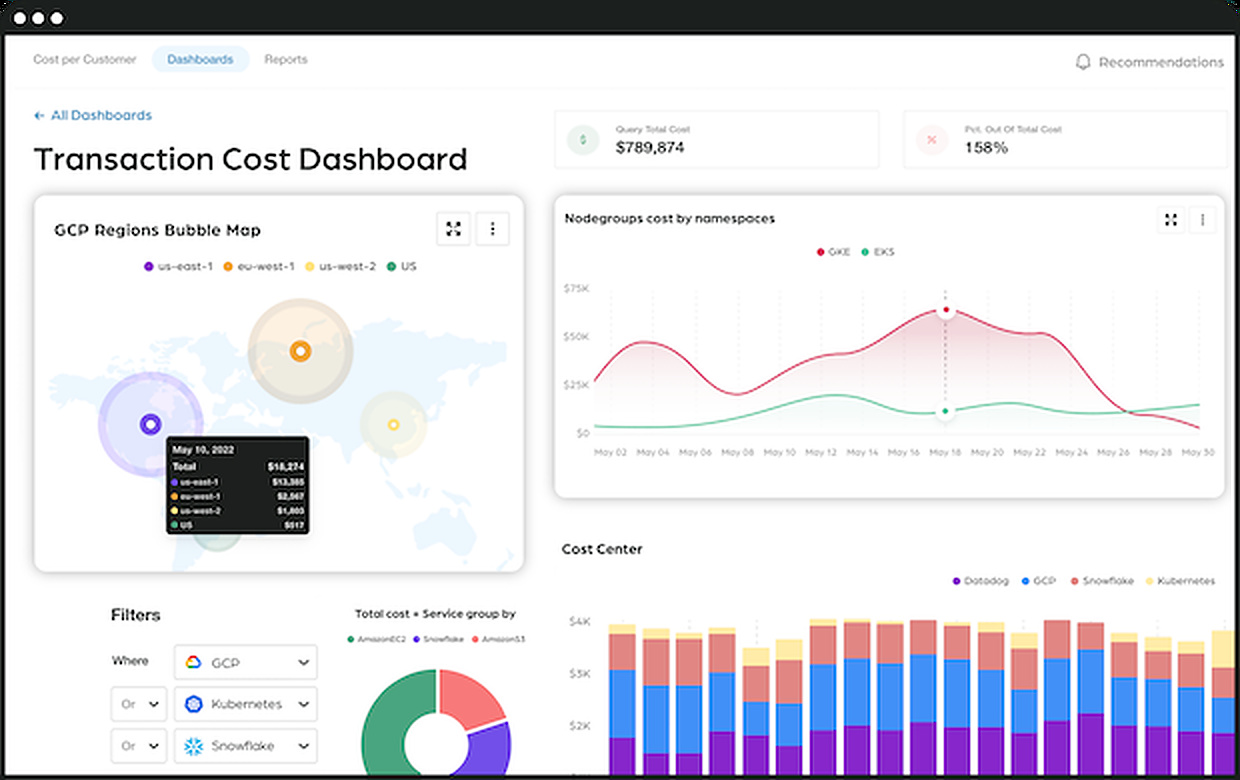
Multi-cloud tagging strategy aligned to FOCUS schema
What FOCUS enables
✔ Standardised cost datasets with consistent field names and semantics across providers
✔ Cross-cloud cost normalisation — compare apples to apples across AWS, Azure, and GCP
✔ Unified tagging strategy that maps to a common taxonomy
✔ Single-pane analytics with one dashboard, one query layer, one governance model
✔ Cross-cloud benchmarking to identify which provider delivers better unit economics
7. Operationalising FinOps: From dashboard to action
Tools and dashboards are necessary but not sufficient. The organisations that achieve lasting cost efficiency treat FinOps as an operating model — not a project. That means embedding cost accountability into the engineering culture, not delegating it to a central team.
A complete FinOps operating model has five layers working in concert:
| Layer | Function |
| Intelligence | CUR + Multi-payer dashboards |
| Optimisation | Centralised recommendation engine |
| Automation | Tag-driven lifecycle scripts |
| Governance | Budget alerts + anomaly detection |
| Strategy | Savings Plans & cloud modernisation |
Each layer feeds the next. Intelligence reveals the waste. Optimisation prioritises it. Automation eliminates it. Governance prevents it from returning. Strategy positions the organisation for the next wave of growth.
Final thoughts
Cloud cost mastery is not a destination — it is an operating discipline that compounds over time. The organisations that get it right share one trait: they treat cost as a first-class engineering concern, not an afterthought reviewed at month-end.
Ensuring the reliability and performance of your cloud applications without overspending is critical, and FinOps plays a key role in achieving this balance.
When visibility becomes granular,
recommendations become centralised,
automation becomes the default,
and optimisation becomes cultural — FinOps stops being a function and becomes the way your engineering organisation thinks about infrastructure.
|
Key Takeaway FinOps is not a finance function. It is a cloud engineering discipline with financial intelligence embedded — and the teams that treat it that way consistently outperform those that don't. |














