










TallyPrime links GST compliance with profitability reports by generating both from the same set of vouchers, in real time. Every transaction recorded for GST purposes, be it a sale, purchase, credit note, or expense, automatically carries its tax treatment, cost, and customer or product detail into the Profit & Loss, Ratio Analysis, and cost centre reports.
There's no separate export, no manual reconciliation between the "compliance" numbers and the "management" numbers, because they were never two different data sets to begin with.
This is what allows a business to move from "what GST do we owe this month" to "which products, customers, or branches are actually profitable after tax", using the same report.
Why GST compliance and profitability shouldn't live in separate systems
For most growing businesses in India, GST compliance has become a monthly ritual: reconcile purchases, match GSTR-2B, file GSTR-1 and GSTR-3B, and move on. Profitability review like margins, cost centre performance,and product-wise contribution, happens separately, often in Excel. Many businesses do it weeks later, using numbers pulled and re-formatted from the accounting system.
The problem with this split is that GST data is profitability data. Every invoice that carries GST also carries a sale value, a cost, a customer, and a tax treatment, all of which affect the real margin on that transaction. When compliance reporting and profitability reporting are built on different data pipelines, businesses lose the ability to answer a very ordinary question:
"After input tax credit and output liability, which part of the business is actually profitable?"
In TallyPrime, every voucher entered for GST purposes - sales, purchases, debit notes, credit notes, e-way bills - automatically flows into the Profit & Loss account, Balance Sheet, and management reports. There is no need to export and import data or use a separate GST module. This integrated setup connects GST compliance directly with your business finances, so you can see both compliance and profitability in one place.
Here’s How TallyPrime Helps Small Businesses Stay GST Compliant
How does one voucher become both a GST return and a profitability report in TallyPrime?
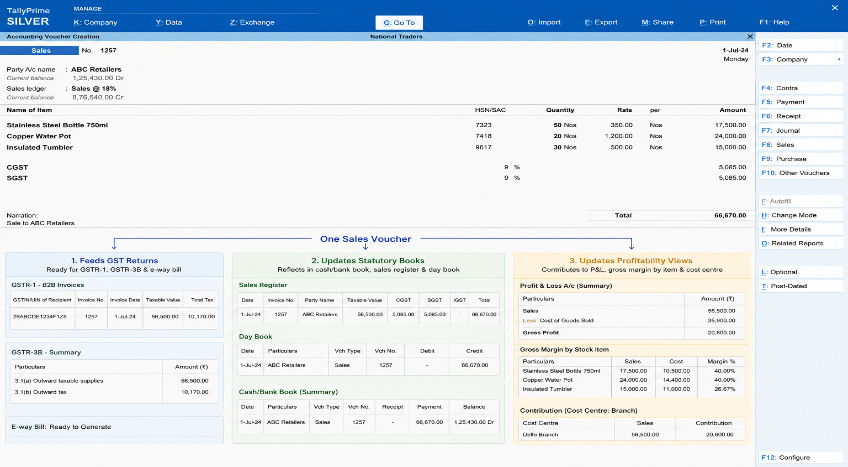
In TallyPrime, a single sales voucher does three jobs simultaneously:
- Feeds GST returns: the transaction is automatically classified by tax rate, HSN/SAC code, and place of supply, ready for GSTR-1, GSTR-3B, and e-way bill generation
- Updates statutory books: the entry reflects in the cash/bank book, sales register, and day book with full GST break-up
- Updates profitability views: the same transaction contributes to Profit & Loss, gross margin by stock item, and (if cost centres are used) contribution by department, branch, or project
Because there's no re-entry or reconciliation between these three outputs, a business owner reviewing this month's GST liability can pivot directly into a profitability report built from the exact same numbers.
GST-compliant reports built into TallyPrime
TallyPrime generates the statutory reports businesses need to stay compliant. It generates GSTR-1, GSTR-3B, GSTR-9 support, e-way bill details, and GST reconciliation against GSTR-2A/2B, with built-in error detection that flags mismatches (wrong GSTIN, incorrect tax rate, missing HSN code). This happens before filing rather than after a notice arrives.
Watch this video for some Advanced Techniques for GST Reporting in TallyPrime
Profitability reports built on the same Ledger
Alongside these, TallyPrime's management reports such as Profit & Loss, Ratio Analysis, Cost Centre reports, and stock item-wise profitability draw on the identical voucher data. A business can see gross profit by product, branch-wise contribution, or customer-wise margin, all computed net of the same GST treatment applied during filing.
What "linking" means in practice
Connecting GST compliance to profitability changes the kind of decisions a business can make. Here’s what this looks like in TallyPrime:
- Margin visibility after tax treatment: Input tax credit and output GST are recorded at the transaction level. Therefore, Profit & Loss and cost-centre reports reflect real post-GST economics, not gross figures that need manual tax adjustment later.
- Customer and product-level profitability, GST-aware: A business can view which GST-registered customers or product categories contribute the most margin. This is informed by the same tax data used for GSTR-1, instead of treating compliance and margin analysis as separate spreadsheets.
- Faster month-end close: Since GST reconciliation and profitability reporting pull from the same books, closing the month for filing purposes and closing it for management review happen together, not as two separate cycles.
- Multi-GSTIN businesses get a consolidated view: For businesses operating across states with multiple GST registrations, TallyPrime can consolidate compliance and profitability reporting across GSTINs. So leadership can see overall margin trends without checking each branch separately.
- Audit-ready and decision-ready at the same time: Reports used to satisfy a GST auditor and reports used to brief a business owner or investor are generated from the same source. This reduces the risk of numbers not matching across the two.
A Practical Example
Consider a distribution business selling across three states with three GST registrations.
At month-end, the accounts team uses TallyPrime to reconcile purchases against GSTR-2B and file GSTR-1/3B for each GSTIN. Because the same vouchers are tagged to cost centres for each state branch, the owner can immediately pull a Cost Centre-wise Profit & Loss report and see that one branch, despite generating strong revenue, has thin margins once GST-related costs and input credit timing are accounted for.
That insight is available the same day compliance is completed, using the same numbers. This is only possible when the two report types share one data source.
What are TallyPrime’s capabilities that connect compliance to profitability
GST reconciliation and error detection before filing
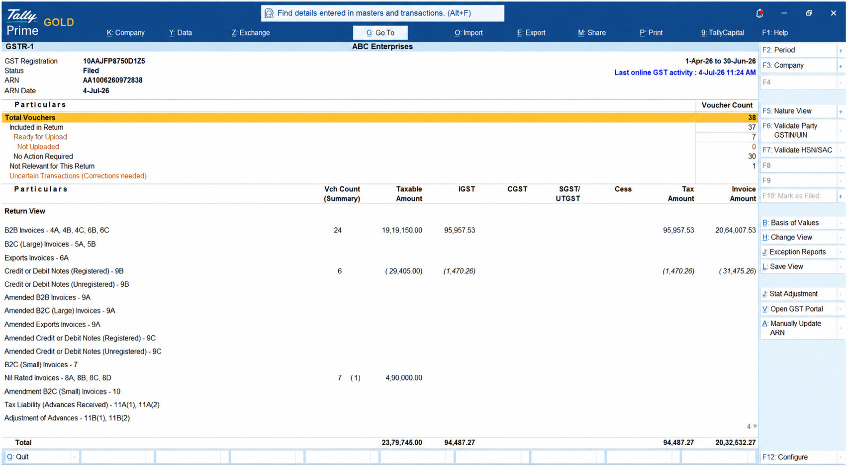
Profitability numbers are only as reliable as the compliance data behind them. TallyPrime reconciles purchase entries against GSTR-2A/2B and flags mismatches like incorrect GSTIN, wrong tax rate, missing HSN/SAC code, or duplicate entries, before a return is filed. This matters for profitability reporting too: an unreconciled input tax credit overstates cost and understates margin. By catching these errors early, TallyPrime ensures the Profit & Loss figures built on the same vouchers are also accurate, along with the GST return.
Input Tax Credit and its effect on margins
Input Tax Credit (ITC) is recorded at the transaction level in TallyPrime. This means the true cost of a purchase, net of eligible ITC, is what flows into cost of goods sold and, in turn, into gross margin. Businesses get a Profit & Loss view that already accounts for ITC, rather than a pre-tax figure that needs manual correction to be decision-useful.
HSN/SAC-Wise Reporting and Product-Level Profitability
Every stock item and service is tagged with its HSN/SAC code for GST classification. The same tagging enables product-wise and category-wise profitability reporting. A business can see which SKUs or service lines are both correctly classified for tax purposes and genuinely profitable, using one data set. It doesn’t need to cross-reference a tax classification sheet against a separate margin report.
Cost Centre and Cost Category Tracking
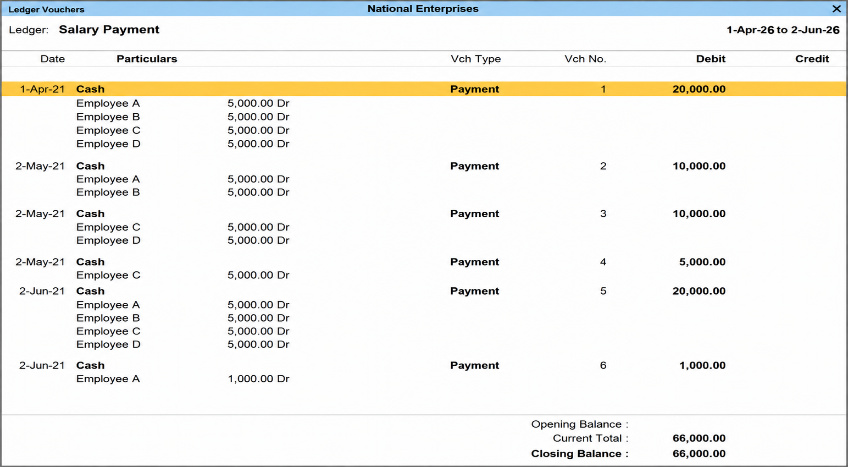
For businesses that track performance by department, branch, or project, TallyPrime's cost centres and cost categories apply to the same vouchers used for GST filing. This allows a Cost Centre-wise Profit & Loss report to reflect GST-adjusted figures automatically. This is useful for multi-branch or multi-department businesses that need to know which unit is actually profitable after tax.
Ratio Analysis Built on GST-Adjusted Data
TallyPrime's Ratio Analysis report, covering gross profit ratio, net profit ratio, current ratio, and other standard financial ratios, is computed from the live books. The analysis reflects the same GST-adjusted revenue and cost figures used in compliance reporting. This gives business owners a real-time read on financial health without waiting for a separate month-end consolidation exercise.
Multi-GSTIN Consolidation for Multi-State Businesses
Businesses operating across states typically hold more than one GST registration. TallyPrime can consolidate both compliance reporting and profitability reporting across GSTINs, or present them GSTIN-wise. So, a business with branches in multiple states can compare filing status and margin performance side by side instead of managing each registration as a separate exercise.
Read more on How TallyPrime Manages Multi-Branch GST Filing and Books for Businesses Across Different States
Remote Access to Compliance and Profitability Reports
Business owners, CAs, and finance teams can view GST reports and profitability reports remotely on their mobile or desktop browsers, without being on the machine where TallyPrime is installed. This proves to be useful when GST filing deadlines and margin reviews need sign-off from someone who isn't on-site.
Conclusion
GST compliance and profitability are often treated as two different jobs done by two different people, on two different timelines. But at the transaction level, they're the same data. Every invoice that determines a GST liability also determines a margin.
TallyPrime lets a business close its books once and get two answers: are we compliant, and are we profitable. The business management software generates GSTR-1, GSTR-3B, and reconciliation reports from the same vouchers that feed Profit & Loss, Ratio Analysis, and cost centre reporting. For business owners, CAs, and finance teams juggling multi-GSTIN operations, multiple branches, or a growing product catalogue, that single data trail is what turns GST filing from a monthly chore into a source of real-time business insight.














