An invoice is often one of the last interactions a customer has with your business after a sale, but it’s also one of the most visible. Besides communicating transaction details, a well-designed invoice also reinforces your professionalism, builds trust, and leaves a lasting impression.
Businesses today want invoices that go beyond standard formats. They want documents that reflect their brand identity while meeting compliance requirements and adapting to different customer needs.
With TallyPrime’s enhanced custom invoice templates, businesses can now create professional, branded invoices quickly and easily, without relying on technical customisations or complex development.
Why invoice customisation matters?
Every business is unique. A distributor may want warehouse details and transporter information prominently displayed, while a service provider may prefer a cleaner layout with project references and payment terms. Some businesses need multiple logos for different divisions, while others want watermarks or digital signatures for added authenticity.
The ability to customise invoices helps businesses:
- Present a professional and consistent brand image.
- Share information in a format that customers can easily understand.
- Accommodate different operational and industry-specific requirements.
- Save time by using layouts designed specifically for their workflow.
Types of invoice templates in TallyPrime
TallyPrime offers a variety of invoice templates to suit different business needs. Whether you want a minimalist design for quick billing or a detailed layout for complex transactions, these templates help you balance branding, compliance, and operational efficiency. By choosing the right template, businesses can ensure invoices reflect their identity while meeting customer and statutory requirements.
Template Overview
|
Template |
Key Features |
Best Use Cases |
|
Template 1 |
Minimal company and party information, clean and simple layout. |
Service providers, freelancers, consultants. |
|
Template 2 |
Similar to Template 1, focused on simplicity and clarity. |
Small businesses, startups. |
|
Template 3 |
Structured layout accommodating extensive company and party details. |
Manufacturers, production firms. |
|
Template 4 |
Comprehensive format balancing clarity with detailed information. |
Wholesale distributors, logistics companies. |
|
Template 5 |
Multi-logo layout for enhanced branding and identity. |
Multi-division organisations, conglomerates. |
|
Template 6 |
Multi-address layout supporting branches and warehouses. |
Retail chains, logistics firms, multi-location enterprises. |
|
Template 7 |
Familiar Tally-style layout with personalisation flexibility. |
Traditional businesses preferring classic look with modern branding. |
Template 1 – Minimalist Layout
This template keeps company and party information to a minimum, focusing on a clean and uncluttered design.
Best for: Service providers, freelancers, and consultants.
Scenario: A freelance designer billing for a project can use Template 1 to highlight only the client’s name, invoice amount, and payment terms, keeping the document simple and professional.
Template 2 – Simple & Clear
Similar to Template 1, this layout emphasizes clarity and simplicity, ensuring invoices are easy to read.
Best for: Small businesses or startups.
Scenario: A boutique marketing agency issuing invoices for monthly retainers can use Template 2 to keep communication crisp and avoid unnecessary clutter.
Template 3 – Structured & Detailed
This template accommodates extensive company and party details while maintaining a well-organised structure.
Best for: Manufacturers and production firms.
Scenario: A manufacturing company can use Template 3 to display plant details, dispatch instructions, quality references, and multiple authorised signatories.
Template 4 – Comprehensive Layout
Another detailed option, Template 4 balances clarity with comprehensive information, making it suitable for complex transactions.
Best for: Wholesale distributors and logistics companies.
Scenario: A distributor can highlight transporter details, delivery notes, and branch-specific information, ensuring smooth coordination across supply chains.
Template 5 – Multi-Logo Branding
This layout supports multiple company logos, enhancing brand identity while accommodating detailed information.
Best for: Multi-division organisations or businesses with diverse product lines.
Scenario: A conglomerate with separate divisions (e.g., electronics and apparel) can use Template 5 to showcase different logos while maintaining a unified invoice format.
Template 6 – Multi-Address Support
Designed for businesses with multiple branches, warehouses, or locations, this template allows inclusion of various addresses.
Best for: Retail chains, logistics firms, and multi-location enterprises.
Scenario: A retail chain issuing invoices from different outlets can use Template 6 to automatically display the relevant branch address, improving accuracy and customer trust.
Template 7 – Classic Tally Style
This familiar Tally-style layout offers maximum detail while allowing personalisation for modern branding needs.
Best for: Traditional businesses that prefer the classic look but want flexibility.
Scenario: A long-established trading firm can retain the recognisable Tally format while adding watermarks, digital signatures, or promotional messages for a modern touch.
Quick guide to choosing the right invoice template
- Use minimalist templates (1 & 2) for quick, clean invoices.
- Opt for structured templates (3 & 4) when detailed operational data is required.
- Select multi-logo templates (5) to reinforce branding across divisions.
- Choose multi-address templates (6) for multi-location businesses.
- Stick with the classic TallyPrime template (7) if you want familiarity with added flexibility.
What can you personalise in TallyPrime?
Businesses can personalise their invoice creation experience in TallyPrime by:
- Customising dashboards to view relevant business information.
- Importing data in formats that suit their operations.
- Saving report views for future use and quicker access.
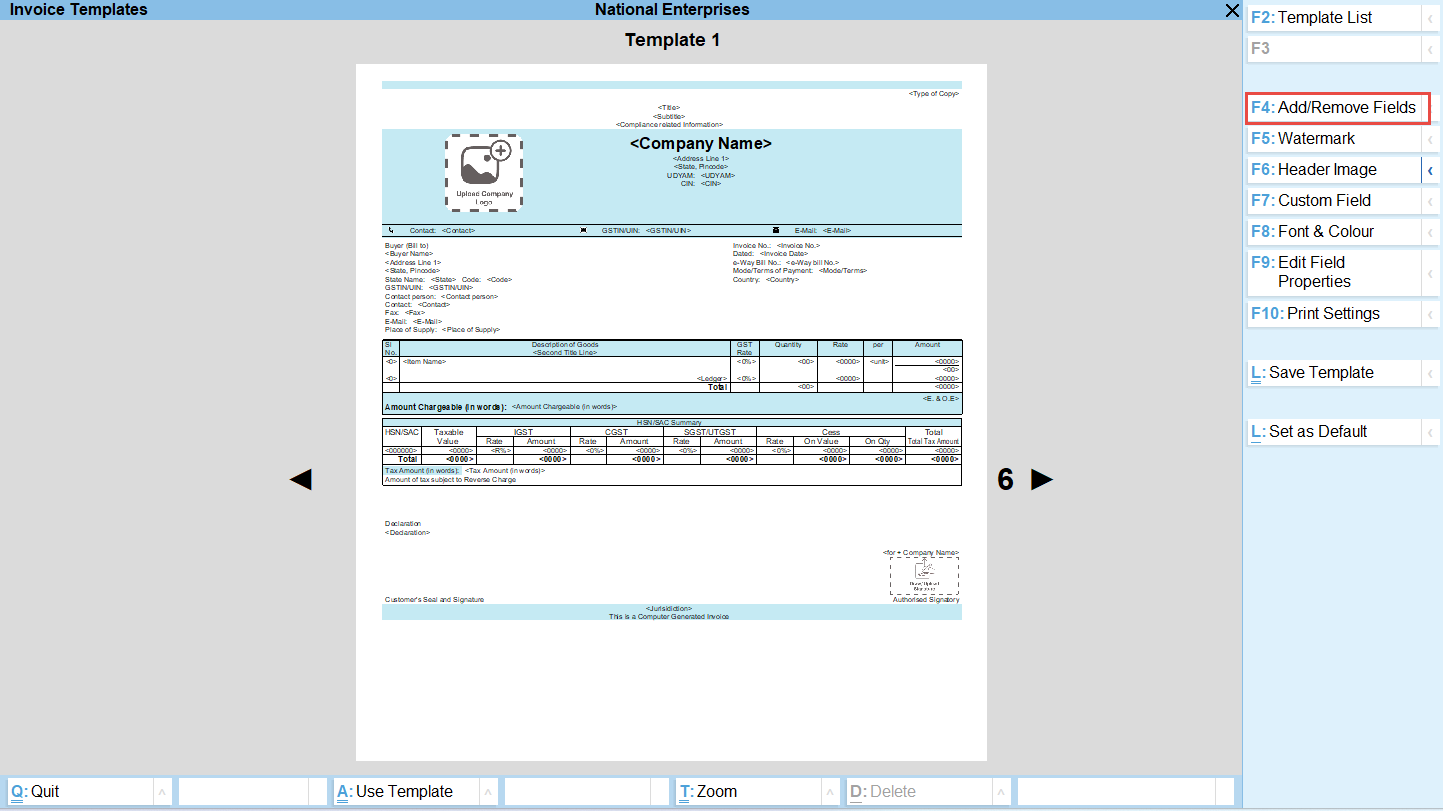
Building on this flexibility, TallyPrime now enables businesses to personalise invoice templates with ease.
Some of the available customisation options include:
- Choosing from a range of modern invoice layouts.
- Adding multiple company logos, addresses, and authorized signatures.
- Inserting watermarks to strengthen branding or indicate document status.
- Replacing standard headers with custom images.
- Creating custom fields and mapping them to existing Tally data fields.
- Designing invoices that make efficient use of paper while maintaining a polished appearance.
The result is an invoice that reflects your business identity without requiring specialised TDL customisation.
Scenario-based invoicing customisations
Different businesses have different invoicing requirements. Here are a few examples of how customisation can help:
Manufacturers can include plant details, dispatch instructions, quality references, and multiple authorized signatories.
Wholesale distributors can display branch-specific logos and addresses while highlighting transporter and delivery details.
Retail businesses can create customer-friendly invoices with prominent branding, promotional messages, and clean layouts.
Professional service firms can emphasize project names, billing milestones, and payment instructions while maintaining a minimalist design.
Multi-location organisations can use different branding elements or addresses depending on the business unit issuing the invoice.
By tailoring invoices to operational needs, businesses improve both internal efficiency and the customer experience.
GST-ready formats that support compliance
While businesses want visually appealing invoices, compliance remains essential.
Custom invoice templates in TallyPrime continue to support GST-compliant invoicing requirements, allowing businesses to maintain necessary statutory information while personalising the presentation. This means you can enhance the look and feel of your invoices without compromising on mandatory GST details.
The flexibility to combine branding with compliance ensures that invoices remain both professional and regulation friendly.
Sample customisations you can implement
Need inspiration? Here are a few practical ways businesses can personalise their invoices:
- Add your company logo at the top along with branch-specific addresses.
- Place an authorized signature alongside a digital stamp.
- Include a “Thank You” message or customer support details in the footer.
- Use a subtle watermark to reinforce branding.
- Replace the default header with a professionally designed banner image.
- Add business-specific fields such as internal reference numbers or customer-specific codes by mapping custom fields to existing Tally information.
- Optimise spacing to reduce paper consumption while maintaining readability.
These small changes can make invoices look significantly more polished and aligned with your brand.
Getting started: customising your invoice
Customising invoice templates is designed to be simple and accessible for businesses without technical expertise. The typical process involves:
- Selecting the invoice template that best suits your business.
- Personalising it with your preferred logos, addresses, signatures, and images.
- Adding or mapping custom fields where required.
- Previewing the layout to ensure it matches your expectations.
- Printing or sharing the invoice with customers.
As TallyPrime continues to evolve, businesses can also expect new template options to become available, providing even greater flexibility over time.
Benefits of using personlised invoices for growing businesses
Choosing customised invoice templates offers several advantages:
- Stronger brand identity: Every invoice becomes an extension of your business.
- Professional presentation: Well-designed documents create a positive impression with customers and partners.
- No dependency on complex customisation: Businesses can personalise invoices without requiring TDL-based modifications.
- Future-ready experience: Since templates are part of the product ecosystem, upgrading to newer releases is hassle-free and avoids compatibility concerns.
- Operational flexibility: Businesses can adapt invoice layouts to match changing requirements without disrupting day-to-day operations.
- Efficient document design: Optimised templates help reduce paper usage while maintaining clarity and professionalism.
Put your business identity front and center
An invoice may seem like a routine business document, but it’s also a powerful branding opportunity. By combining flexibility, ease of customisation, and compliance support, TallyPrime enables businesses to create invoices that not only record transactions but also reflect who they are.
Whether you want to showcase your logo, tailor layouts for different business scenarios, or add meaningful custom fields, the latest invoice template capabilities make it easier than ever to print and share invoices your way, keeping your business identity at the center of every transaction.