Choosing suitable e-invoicing software is important for Saudi businesses that need to meet ZATCA requirements while managing invoicing efficiently.
Saudi Arabia’s e-invoicing framework requires businesses within scope to use electronic invoicing solutions that meet applicable requirements. Phase 1 introduced electronic invoice generation from December 4, 2021, while Phase 2 introduced integration with ZATCA’s systems in waves starting January 1, 2023.
When evaluating e-invoicing software, businesses should therefore look beyond basic invoice generation and consider compliance capabilities, transaction support, validation, security and integration with other business functions.
The following five factors can be used as a practical checklist when comparing e-invoicing solutions for your business in Saudi Arabia.
1. ZATCA-Compliant e-Invoice Generation and Printing
A scanned paper invoice or a standard PDF created from a manual invoice is not considered an electronic invoice under ZATCA’s definition. An e-invoice must be generated electronically in the required structured format through an electronic invoicing solution.
The software you choose should therefore support the generation of e-invoices in line with the ZATCA requirements applicable to your business and e-invoicing phase.
Depending on the applicable requirements, important capabilities can include:
- Generating tax and simplified tax invoices with the required information
- Generating and displaying applicable QR codes
- Creating invoices in the prescribed electronic format
- Storing and archiving invoice data electronically
- Supporting applicable Phase 2 integration requirements
For Phase 2, ZATCA specifies XML or PDF/A-3 with embedded XML for relevant e-invoice formats.
However, having individual features such as QR-code printing does not by itself guarantee compliance. Businesses should assess the complete solution against the ZATCA requirements applicable to them.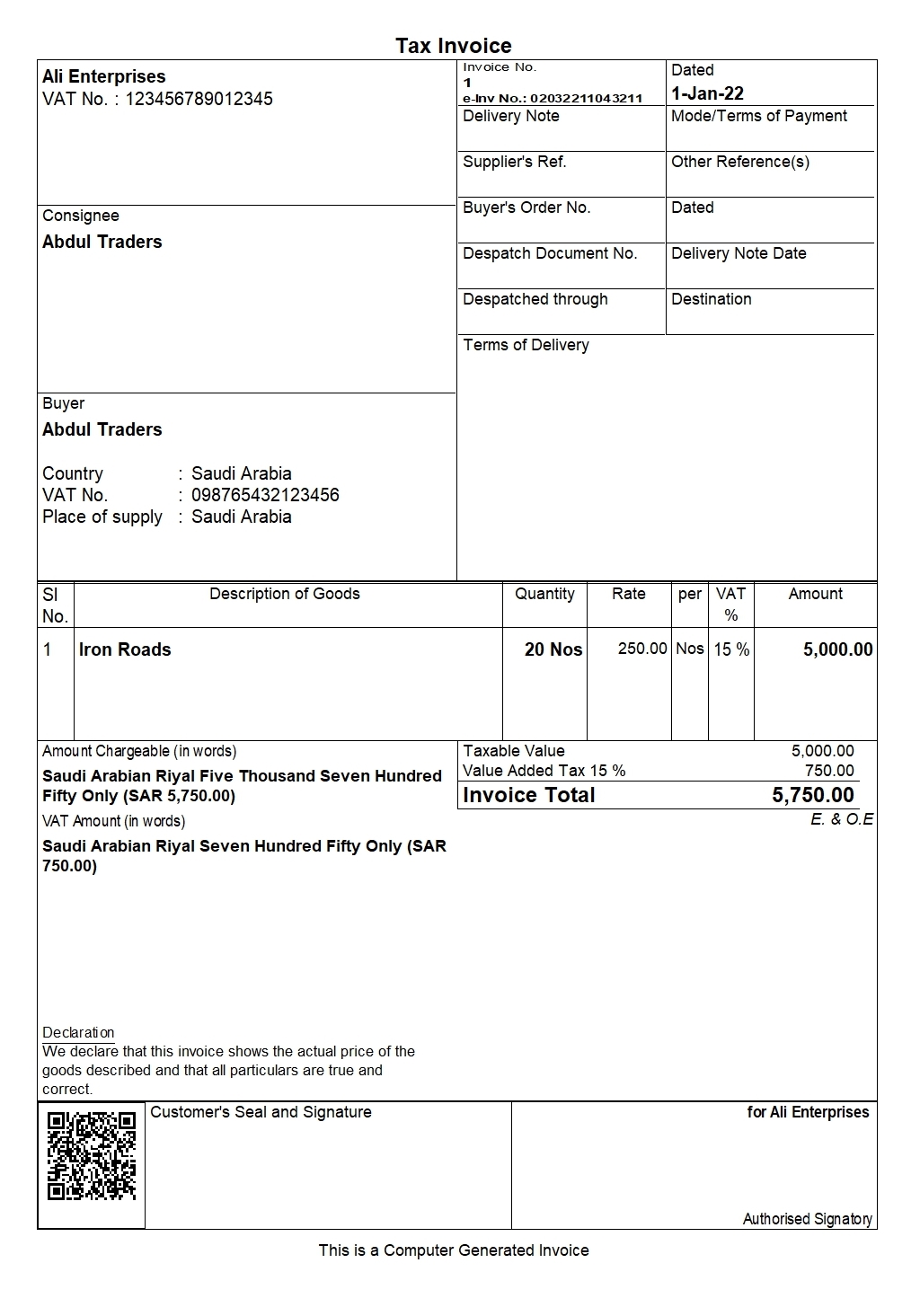
e-Invoice generated from TallyPrime
| Best e-Invoicing (Fatoora) Software in Saudi | How to Generate e-invoices Instantly with TallyPrime in Saudi Arabia |
2. Support for Different Invoice and Supply Types
Your e-invoicing requirements can vary depending on the type of customer and transaction.
For example, a tax invoice is typically issued for business-to-business transactions, while a simplified tax invoice is generally used for business-to-consumer transactions. ZATCA’s e-invoicing framework also covers associated credit and debit notes.
When selecting software, consider whether it supports the transaction types relevant to your operations, such as:
- Tax invoices
- Simplified tax invoices
- Credit notes
- Debit notes
- POS-related invoices
- Receipts or other applicable transaction types
This becomes particularly important when a business manages a mix of cash sales, credit sales, product returns and other transaction scenarios. An integrated solution can help teams manage these activities within the same invoicing and accounting workflow.
3. Invoice Validation and Error Management
Errors or missing information in an invoice can create additional work during the e-invoicing process.
Look for software that includes validation mechanisms to identify issues before an invoice is issued or submitted through the applicable workflow. Useful capabilities may include checks for required information, exception identification and mechanisms for correcting issues before processing continues.
The aim is not to assume that software can eliminate every error, but to give users tools that can help identify and resolve exceptions efficiently.
4. User Access Control, Activity Logs and Data Security
E-invoicing software can contain sensitive financial and transaction information, so businesses should also evaluate how access and changes are controlled.
Important capabilities to consider include:
- User authentication
- Role-based or controlled user access
- User session management
- Activity and transaction logs
- Controls over changes to transactions and master data
- Protection against unauthorised alteration of invoice records or logs
ZATCA’s e-invoicing requirements specifically identify uncontrolled access and tampering with invoices or logs among prohibited functionalities for compliant invoicing solutions.
These controls can also improve internal accountability by helping businesses understand who accessed the system and what changes were made.
 5. Integration with VAT, Accounting and Other Business Functions
E-invoicing is closely connected with other financial processes rather than being an isolated activity.
An integrated solution can connect invoicing with functions such as:
- Accounting
- VAT management
- Inventory
- Payroll
- Banking
For example, when a sales invoice is recorded, the same transaction may also affect revenue, VAT, customer balances and inventory.
Connecting these processes can reduce duplicate data entry and provide a more consistent financial workflow compared with managing invoicing separately from other business records.
E-invoicing Software Evaluation Checklist
Use this checklist when comparing different e-invoicing solutions:
| Evaluation area | What to check | Why it matters |
|---|---|---|
| ZATCA requirements | Support for applicable invoice formats, QR codes, electronic storage and integration requirements | Helps the business address the e-invoicing requirements applicable to it |
| Invoice and transaction types | Tax invoices, simplified invoices, credit notes, debit notes, POS and other relevant transactions | Ensures the software can support the business's actual transaction scenarios |
| Validation and exceptions | Required-field checks, validation mechanisms and exception handling | Helps users identify issues during the invoicing process |
| Access and security | User authentication, permissions, session controls and activity logs | Supports controlled access and better auditability |
| Business integration | Integration with VAT, accounting, inventory, payroll and banking | Helps reduce duplicate work and maintain connected financial records |
How TallyPrime Supports e-Invoicing in Saudi Arabia
TallyPrime is a business management solution that combines e-invoicing with accounting and other business processes.
Its current Saudi e-invoicing functionality supports both the generation and integration phases of e-invoicing, including tax and simplified invoices, QR codes, relevant electronic formats and e-invoicing reports.
1. e-Invoice Generation and Invoice Types
TallyPrime supports the generation of e-invoices for different transaction types, including:
- Tax invoices
- Simplified tax invoices
- Debit notes
- Credit notes
- POS invoices
This allows businesses managing different customer and transaction scenarios to handle relevant e-invoicing activities within the same business system.
2. QR Code, XML and e-Invoice Reporting
TallyPrime supports QR-code generation and electronic invoice formats used for Saudi e-invoicing. Current functionality includes support for XML and PDF/A-3 with embedded XML for applicable Phase 2 processes.
The e-Invoice Overview report also allows businesses to view e-invoicing statuses for B2B and B2C transactions, including reporting and clearance information where applicable.
These capabilities give businesses a central view of their e-invoicing activities instead of requiring them to track individual invoices separately.
3. Validation and Exception Handling
TallyPrime includes prevention, detection and correction mechanisms designed to help users identify and manage exceptions during the e-invoicing process.
This can help users identify issues that need attention before or during invoice processing rather than assuming every transaction will proceed without exceptions.
4. User Access and Activity Logs
TallyPrime includes security controls and user login management along with session and activity logging capabilities.
Its user session log can help businesses review the history of transactions and master-data activities, supporting controlled access and auditability.
Conclusion
Choosing e-invoicing software in Saudi Arabia requires more than checking whether the system can generate an invoice.
Businesses should evaluate whether a solution addresses the ZATCA requirements applicable to them, supports the transaction types they use, helps identify invoice errors and exceptions, provides suitable access and activity controls, and integrates effectively with accounting, VAT and other business processes.
The right choice will also depend on factors such as transaction volume, business processes, internal controls and the e-invoicing phase or requirements applicable to the business.
Assessing these areas before selecting software can help businesses choose a solution that supports both regulatory requirements and their day-to-day financial operations.