










Scale Right – Govern, Operate & Evolve Solutions with Confidence
Solutions need to be actively managed and continuously evolved—through ongoing improvement, technology and functional evolution, and sustained customer success—to remain relevant, exceed customer expectations, deliver lasting value, and drive sustainable growth.
Introduction
In Volume 1 – Strategic Foundation, we focused on Think Right — understanding the problem, identifying the right opportunities, and making informed decisions before building a solution.
In Volume 2 – Engineering Excellence, we focused on Build Right — applying sound engineering practices to build solutions that are reliable, maintainable, scalable, and ready for real-world use.
Volume 3 – Lifecycle Governance takes the next step: Scale Right. It focuses on managing the solution throughout its lifecycle — from production readiness and customer adoption to operations, support, continuous improvement, renewals, and growth.
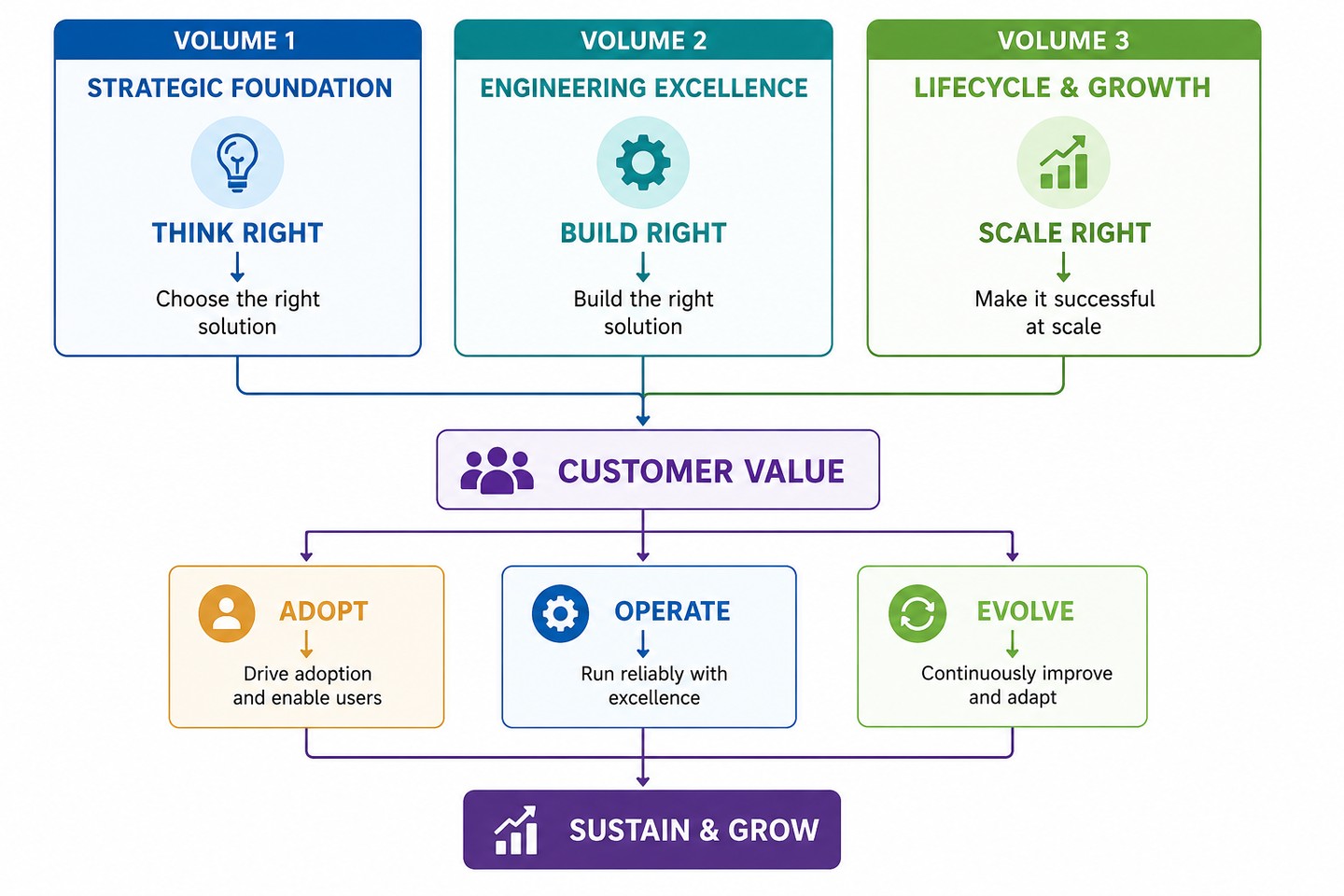
Choose the right solution → Build it right → Govern, evolve and scale it right
The goal is to ensure that solutions do not simply get delivered, but continue to create value for customers and the business throughout their lifecycle.
Who Should Read This Volume
This volume is for everyone involved in taking a solution from development to production and beyond:
-
Developers & Architects: extending, deploying, and maintaining the solution.
-
Solution Owners: responsible for its direction, quality, and long-term value.
-
Delivery Teams: handling deployment, customer onboarding, and go-live.
-
Support Teams: operating, troubleshooting, and sustaining the solution.
-
Business Stakeholders: overseeing governance, renewals, and growth outcomes.
How to Use This Volume
Use this playbook as a practical guide to manage your solution throughout its lifecycle. Apply the practices that are relevant to your solution, use them to make informed decisions, and revisit them as your solution moves from production to operations, improvement, and growth.
-
Production readiness: Validate deployment, packaging, environment readiness, and customer acceptance before going live.
-
Operations: Monitor the live solution, support customers, manage changes, and maintain service reliability.
-
Periodic reviews: Review solution quality, security, compatibility, maintainability, and technical debt, and address areas that need attention.
-
Improvement and growth: Act on customer feedback, improve adoption and value, strengthen the solution, and plan for renewals and long-term growth.
-
Use the governance checks: Use the checks at the end of each part to validate whether the key practices have been addressed, and identify any gaps that need to be addressed before moving forward.
-
Balance speed with completeness: Delivery timelines are important, but skipping critical practices to save time can create greater risks and costs later.
-
Apply what is relevant: This playbook covers the key practices across the solution lifecycle. Use your judgement to determine what applies to your solution and skip anything that is clearly not relevant.
Expected Outcomes
By the end of this volume, you will be able to:
-
Prepare and deploy solutions with confidence.
-
Drive customer acceptance, adoption, and value.
-
Operate, support, and govern solutions effectively.
-
Continuously improve and evolve solutions.
-
Build sustainable customer relationships and growth opportunities.
Part 1 – Production Readiness
Preparing Solutions for Successful Deployment
This section focuses on ensuring a solution is fully validated, packaged, and ready for production before it reaches customers. A solution is successful only when it moves smoothly from development to production and is ready for customers to use, adopt, and support. This part focuses on preparing the solution, release, and customer experience for a successful deployment.
1.1 Getting the Solution Ready
Moving a solution to production requires more than completing development; the solution, environment, deployment process, and recovery plan must all be ready.
-
Understanding Production Readiness: Make sure the solution is tested, the required environment and dependencies are available, and the teams are ready to support it; for example, verify that the solution works with the supported TallyPrime version and required integrations.
-
Environment Readiness: Make sure the production environment has everything the solution needs, including the right versions, access, security, and services; for example, verify network access and required permissions before deployment.
1.2 Planning Deployment and Data Migration
-
Configuration & Deployment Planning: Define clear steps for installing, configuring, and validating the solution, with ownership for each activity; for example, document who will deploy the solution, apply the configuration, and perform the final checks.
-
Centralized Deployment & Solution Management: Wherever applicable, use centralized mechanisms such as Account TDL to simplify deployment, version control, updates, and ongoing maintenance across customer environments.
-
Data & Migration Readiness: Before deployment or upgrade, identify whether existing data, configurations, mappings, UDFs, or dependencies require migration. Define backup, reconciliation, exception handling, and customer validation so the transition can occur safely without disrupting operations.
-
Go-Live Strategy: Choose the rollout approach and define clear go/no-go conditions based on solution readiness, risk, and customer impact; for example, delay a release if a critical workflow or production dependency is not ready.
-
Rollback & Contingency Planning: Decide how to recover if the deployment does not work as expected; for example, take a backup before an upgrade and define how to restore the previous version if a critical issue occurs.
-
Post-Deployment Validation: After deployment, validate critical workflows, integrations, configurations, data, and dependencies in the actual production environment before considering the implementation complete.
-
Post-Go-Live Stabilization: Provide focused support immediately after go-live, closely monitor critical workflows, resolve early issues quickly, confirm customer usage, and move to regular support only after the agreed stabilization criteria are met.
-
Support & Operational Handover: Before implementation is considered complete, formally transfer support ownership, escalation paths, known issues, configuration details, deployment information, troubleshooting guidance, and operational knowledge to the responsible team.
1.3 Testing and Approving the Release
A release should contain everything needed to install, configure, use, and support the solution.
-
Release Validation: Check the final release to make sure the intended features, fixes, and key workflows work correctly based on the test cases created earlier; for example, test the exact build that will be given to customers rather than an earlier development build.
-
Pilot, Alpha & Beta Validation: Where appropriate, validate the solution through controlled alpha, beta, pilot, or early-customer stages before wider release. Capture Voice of Customer feedback, resolve critical issues, and define clear readiness criteria for progressing to the next stage.
-
Functional & Non-Functional Sign-off: Obtain confirmation from the relevant teams and the customer that the solution meets the agreed business and functional requirements as well as key non-functional expectations, including performance, reliability, security, scalability, compatibility, and operational readiness; for example, approve a release only after critical workflows and agreed workload, recovery, and security expectations have been validated.
1.4 Preparing the Package, License, & Upgrade
-
Packaging Standards: Use consistent naming and versioning so the released package can be clearly identified and traced back to the approved release; for example, use the same version number across the solution package, release notes, user manuals, system specification, FAQs, and TallyShop listing.
-
Licensing & Dependencies: Check that all required licenses, product versions, third-party components, and integrations are available and compatible; for example, confirm that the customer's license and TallyPrime version support the solution.
-
Transparent Solution Validity & Usage Conditions: Avoid unnecessary technical restrictions that could unexpectedly stop a legitimately licensed solution. Clearly communicate and agree on any expiry, license, subscription, TSS, or other validity dependency before deployment and whenever those conditions change.
-
Installation & Upgrade Experience: Make installation and upgrades simple, clear, and reliable for customers; for example, test both a fresh installation and an upgrade from the previous supported version.
-
Release Artifacts & Documentation: Provide all the information needed to install, configure, understand, and support the release; for example, include release notes, installation steps, configuration details, upgrade instructions, and known issues.
1.5 Confirming Customer Needs and Agreements
A solution should be ready not only to deploy, but also to help customers understand, adopt, and use it successfully.
-
Customer Readiness: Confirm that prerequisites, licensing, installation, training, support, and communication are ready before deployment; for example, share system and access requirements with the customer before the installation date.
-
Customer Acceptance & Sign-off: Confirm that the customer has validated the agreed solution and is satisfied with the delivered outcome; for example, obtain customer sign-off after the key business workflows are successfully completed.
-
Solution Agreement & Responsibilities: Clearly document and agree the scope, deliverables, roles, support commitments, maintenance expectations, commercials, upgrade responsibilities, acceptance conditions, and other lifecycle obligations between the customer and solution provider.
-
IP, Copyright & Source-Code Ownership: Clearly establish ownership of the solution, source code, and copyright or IP, together with usage, modification, maintenance, and access rights required throughout the solution lifecycle.
-
Solution Positioning & Customer Fit: Clearly communicate the target customer, business value, intended use cases, limitations, prerequisites, and differentiators. Do not force-fit the solution where customer requirements are not straightforwardly addressed; recommend it only when there is a clear and sustainable fit.
-
Trial & Evaluation Experience: Where commercially and technically appropriate, provide a controlled trial or evaluation period, such as 3 to 15 days, so customers can experience the solution using agreed business scenarios before purchase. Clearly communicate the trial scope, limitations, support, data handling, expiry, and conversion conditions.
-
Commercial & Policy Transparency: Clearly publish or communicate applicable pricing, licensing, renewal, support, cancellation, upgrade, validity, and other relevant policies through the TallyShop listing, proposal, agreement, or solution provider's website.
1.6 Preparing Guides and Training
-
Documentation Standards: Create simple, clear, and up-to-date documentation that helps customers complete their tasks; for example, explain how to configure an integration to achieve a business outcome instead of only listing technical settings.
-
User Guides & Knowledge Base: Provide easy-to-find guidance for getting started, common questions, and troubleshooting; for example, publish an article showing customers how to resolve a common configuration set-up error.
-
Customer-Centric Training & Enablement: Plan role-based training only after understanding the customer's business processes, user roles, use cases, and expected outcomes. Structure training around the customer's actual workflows rather than Tally features or menu flows, use relevant scenarios and data wherever practical, and provide hands-on practice so users perform the critical activities themselves.
-
Demo Assets & Training Material: Keep demos, sample data, videos, and training material aligned with the current release; for example, update the demo when a workflow changes in the latest version.
-
Training Completion & Acceptance: Confirm that the agreed users have completed the required training, understand the key workflows, and are ready to use the solution. Record customer acknowledgement or sign-off, including identified knowledge gaps and agreed follow-up actions.
Governance Check
Before moving into operations, ask:
-
Is the solution tested, packaged, and ready for the production environment?
-
Are deployment, go-live, and rollback plans clearly defined and owned?
-
Has the release been validated, signed off, and correctly licensed?
-
Are customer acceptance, training, and publishing readiness confirmed?
-
Have you documented IP, ownership, and solution agreements?
-
Have alpha, beta, or pilot validations been completed where appropriate?
Key Takeaway: A solution is only truly ready when the release, the environment, and the customer are all prepared together — not just the code.
Part 2 – Operations & Support
Running Solutions with Reliability and Confidence
Once your solution is in production, your responsibility does not end with deployment. You need to monitor it, support your customers, manage changes, and ensure that it continues to deliver value. This part provides the practices you should follow to operate your solution reliably throughout its lifecycle.
2.1 Monitoring the Live Solution
Operational excellence means keeping solutions stable, reliable, and ready to support customers as they use them in real-world environments.
-
Production Monitoring & Health: Monitor the solution regularly to identify performance, availability, or usage issues early; for example, track integration failures so they can be addressed before they affect more customers.
-
Performance & Reliability: Ensure the solution continues to perform reliably as usage, data, and customer numbers increase; for example, review response times when the number of transactions or connected users grows.
2.2 Managing Incidents and Recurring Problems
-
Incident Management: Define how issues are identified, prioritised, communicated, escalated, and resolved based on their customer impact; for example, prioritise a solution outage affecting multiple customers over a minor individual issue.
-
Root Cause & Problem Management: Investigate recurring or significant issues to identify and address their underlying causes instead of repeatedly fixing the same symptoms; for example, analyse repeated synchronisation failures and fix the underlying integration issue.
-
Resolution & Follow-up: Track issues through resolution and confirm that the solution is working as expected after the fix; for example, monitor a resolved integration issue to ensure it does not recur.
2.3 Planning Backups, Recovery & Continuity
-
Operational Documentation: Keep deployment, configuration, troubleshooting, and support information available for the teams operating the solution; for example, document the steps to restart an integration service after a failure.
-
Solution Continuity: Maintain appropriate source-code and access arrangements, ownership records, technical and operational documentation, deployment information, and transition mechanisms so the solution can continue to be supported if the original developer or provider becomes unavailable.
-
Backup, Recovery & Business Continuity: Ensure that important data and configurations can be recovered when an unexpected failure occurs; for example, maintain regular backups and test the recovery process for critical customer data.
2.4 Managing Changes in Production
-
Change Assessment: Assess the impact of a proposed production change before implementation, including customer impact, dependencies, risks, and required downtime; for example, evaluate how a configuration or integration change may affect existing customers.
-
Change Planning & Approval: Plan, document, and obtain the required approval for production changes before implementation; for example, define the change steps, owner, implementation window, validation steps, and rollback plan.
-
Testing & Validation: Test the change in a suitable environment before applying it to production and validate the solution after implementation; for example, verify that key workflows continue to work after a configuration or integration change.
-
Customer Communication: Communicate changes that may affect customers, including expected impact, downtime, or actions required; for example, inform customers in advance about a planned maintenance window.
-
Change Tracking: Maintain a record of production changes, their outcomes, and any issues observed; for example, document the change, implementation date, owner, and post-change validation results.
2.5 Onboarding and Supporting Customers
Customer success goes beyond resolving issues; it means helping customers adopt the solution, get value from it, and continue to have a positive experience.
-
Customer Onboarding, Adoption & Value: Help customers move from installation to regular and meaningful use of the solution; for example, guide a new customer through the key workflows instead of stopping after installation.
-
Customer Support Experience: Make support simple, responsive, and focused on resolving the customer's actual problem; for example, provide clear troubleshooting steps instead of asking the customer to repeat information already provided.
-
Support Model & Service Levels: Clearly define support channels, operating hours, issue severity levels, response and resolution expectations, escalation paths, and ownership so customers understand how support will be provided and teams can meet agreed commitments consistently.
-
Issue Resolution & Escalation: Define clear paths for resolving issues that cannot be handled at the first level; for example, escalate a product defect to the solution team with the required logs, steps, and customer impact.
2.6 Tracking Customer Usage and Satisfaction
-
Training & Continuous Enablement: Continue to educate customers as the solution and their needs evolve; for example, provide training when a major new capability changes an existing customer workflow.
-
Customer Health & Satisfaction: Track customer usage, issues, feedback, and satisfaction to identify customers who may need attention; for example, reach out when usage drops significantly or repeated support issues are reported.
-
Customer Feedback & Engagement: Maintain regular engagement with customers to understand what is working and what needs improvement; for example, use support conversations and customer reviews to identify recurring improvement opportunities.
2.7 Managing Versions, Upgrades & Compatibility
Effective release and version management helps customers adopt changes safely while keeping solutions compatible and supportable.
-
Version Management: Maintain a clear version of the solution for all the TallyPrime versions by managing this in the TDL code itself. Define the supported TallyPrime release for the solution.
-
Compatibility & Dependency Management: Check that changes remain compatible with the products, platforms, and integrations the solution depends on; for example, validate an integration against a new TallyPrime release before recommending the upgrade to customers.
-
Mandatory Upgrade & Compatibility Management: Explicitly assess and manage upgrades triggered by statutory or compliance changes, TallyPrime or product changes, platform or API changes, security requirements, dependency changes, or conflicts with another customisation or solution. Communicate the required action, timeline, risk, commercial impact, and customer responsibilities.
-
Solution Coexistence & Conflict Management: Where multiple TDL customisations, integrations, or third-party solutions operate in the same environment, validate that they coexist without functional, performance, data, configuration, or technical conflicts, and define ownership and a method for diagnosing and resolving conflicts.
-
Upgrade Planning: Plan upgrades so customers can move to newer versions with minimum disruption; for example, provide upgrade steps and identify any configuration changes required before moving to the latest release.
-
Release Communication: Tell customers and internal teams what is changing and what action, if any, is required; for example, highlight a new configuration requirement in the release notes before the upgrade.
-
Customer Impact Management: Assess the effect of releases and changes on existing customers before making them available; for example, identify customers using a changed API before releasing a breaking integration change.
-
Solution Recall & Withdrawal: Define how to recall, disable, withdraw, or roll back a release when a critical defect, security issue, data risk, or serious malfunction could materially affect customers. Restore the solution only after correction, validation, and controlled release approval.
Governance Check
Before treating operations as business-as-usual, ask:
-
Is the solution being monitored for performance, availability, and usage issues?
-
Are incidents managed by customer impact, with clear escalation and resolution paths?
-
Is customer onboarding, adoption, and satisfaction actively tracked?
-
Are support service levels and escalation paths clearly defined?
-
Are version compatibility, upgrades, and end-of-life communicated proactively?
-
Can the solution be recalled or rolled back safely if a critical issue emerges?
Key Takeaway: A solution is not successful because it works at launch; it is successful when it continues to work reliably, customers continue to use it, and the team can manage change without disrupting customer value.
Part 3 – Governance & Sustainability
Ensuring Long-Term Quality, Security and Maintainability
As your solution grows, you need clear ownership, consistent decision-making, and practices that protect its quality, security, and maintainability. This part provides the governance practices you should follow to keep your solution under control and sustainable throughout its lifecycle.
3.1 Defining Ownership and Responsibilities
Good governance ensures that the solution has clear ownership, decisions are made consistently, and changes remain aligned with customer and business needs.
-
Solution Ownership: Define clear ownership for the solution throughout its lifecycle; for example, assign a solution owner who is responsible for decisions, priorities, and long-term direction.
-
Roles & Responsibilities: Make sure everyone involved understands their role in maintaining and evolving the solution; for example, define who owns development, support, customer communication, and release decisions.
-
Provider Continuity & Transition: Define who can assume maintenance and support responsibilities if the original developer or organization is unavailable, and ensure the agreed source, access, documentation, ownership, and customer-transition arrangements can be activated when required.
3.2 Making Decisions and Managing Risks
-
Decision Governance: Use a clear process to make and record important solution decisions; for example, document why a particular integration approach was selected and who approved it.
-
Standards & Compliance: Follow applicable product, technical, security, and business standards when developing and maintaining the solution; for example, verify that a solution follows the required development and publishing guidelines before release.
-
Risk Management: Identify and manage risks that could affect the solution, customer, or business; for example, identify a dependency on an external service and define an alternative if that service becomes unavailable.
-
Lifecycle Governance: Review the solution regularly and make decisions based on its current value, health, and future needs; for example, decide whether to enhance, modernise, replace, or retire a solution based on usage and customer needs.
3.3 Maintaining Solution Quality
Quality and security must remain part of the solution lifecycle rather than being checked only before the first release.
-
Quality Management: Maintain consistent quality standards across development, testing, release, and support; for example, track recurring defects and address their root causes instead of repeatedly fixing the same symptoms.
-
Quality Metrics: Use meaningful measures to understand solution quality and identify areas that need attention; for example, track defect trends, support issues, failed deployments, and customer-reported problems.
3.4 Protecting Security, Privacy & Access
-
Security & Privacy: Protect customer data and ensure that security and privacy requirements are considered throughout the solution lifecycle; for example, restrict access to sensitive customer information to only the users who need it.
-
Access & Credential Governance: Securely provision and manage user access, privileged permissions, API keys, tokens, and other credentials using least-privilege principles. Review access periodically and revoke it promptly when it is no longer required.
-
Vulnerability Management: Identify, assess, and address security vulnerabilities in the solution and its dependencies; for example, update a third-party component when a known security vulnerability affects the version being used.
-
Compliance & Certification: Maintain the certifications, approvals, and compliance requirements relevant to the solution; for example, revalidate the solution when a significant change affects an existing certification.
-
Continuous Risk Assessment: Reassess quality and security risks as the solution, technology, and customer environment change; for example, review security risks when introducing a new external integration.
3.5 Managing Code Quality and Technical Debt
A solution that works today should also remain manageable and adaptable tomorrow.
-
Maintainability & Sustainable Code Evolution: Keep the solution simple enough to understand, support, and change over time. Incorporate fixes and improvements into the base design and code wherever appropriate instead of accumulating patches or workarounds, and validate that each change does not introduce performance degradation, instability, or unintended impact on existing processes.
-
Technical Debt Identification: Regularly identify shortcuts or design decisions that could create future maintenance problems; for example, record a temporary workaround that will need to be replaced with a permanent solution.
-
Technical Debt Prioritization: Address technical debt based on its impact, risk, and business value rather than trying to fix everything at once; for example, prioritise debt that causes repeated customer issues over a minor code-quality improvement.
3.6 Updating or Retiring the Solution
-
Dependency & Platform Evolution: Keep the solution aligned with changes in the platforms, products, and technologies it depends on; for example, validate the solution when a new TallyPrime version or dependent platform is introduced.
-
Modernization & Refactoring: Improve parts of the solution when the existing design makes it difficult to maintain or extend; for example, simplify an old integration component that requires repeated fixes for every new release.
-
Lifecycle & Sunset Planning: Plan the retirement of a solution or component in advance and give customers enough time and guidance to move to the supported alternative; for example, communicate the support end date and provide clear migration steps for an older integration.
-
Customer Exit & Solution Decommissioning: When a solution or customer engagement ends, complete a controlled closure covering customer communication, data handover or retention, access revocation, dependency removal, final documentation, and confirmation of closure.
Governance Check
Before considering the solution under control, ask:
-
Is ownership of the solution clearly defined and understood?
-
Are quality, security, and compliance requirements actively maintained, not just checked once?
-
Is access to data and credentials governed on a least-privilege basis?
-
Is technical debt identified, prioritised, and addressed rather than allowed to accumulate?
-
Can the solution continue to be supported if the original developer becomes unavailable?
-
Is there a plan for modernisation, sunset, or decommissioning when it is needed?
Key Takeaway: Good governance keeps a solution controlled today, while sustainability ensures that it remains valuable, secure, and maintainable tomorrow.
Part 4 – Continuous Improvement & Ecosystem Growth
Driving Adoption, Innovation and Long-Term Success
A solution should not remain unchanged after deployment. You should continuously listen to customers, evaluate what you learn, improve the solution, measure the value it creates, and look for opportunities to grow its adoption. This part provides the practices you should follow to turn customer learning into continuous improvement and sustainable growth.
4.1 Listening to Customers
Customer feedback helps us understand what is working, what is not, and what the solution needs next.
-
Customer Feedback: Collect feedback from customers through support interactions, reviews, discussions, and regular engagement; for example, identify a recurring request raised by multiple customers and assess whether it should be addressed in the product.
-
Customer Satisfaction & Value: Go beyond reactive issue resolution by continually improving the customer's experience and the value delivered. Use satisfaction, usage, support history, and business outcomes to identify improvements that can exceed expectations and strengthen long-term trust.
4.2 Managing New Requirements and Changes
-
Additional Requirements: Capture new customer requirements and evaluate them based on customer value, business need, and reuse potential; for example, convert a requirement requested by several customers into a common solution instead of building separate customisations.
-
Change Request Governance: Classify each request as a defect, support need, enhancement, or new requirement, then assess business value, impact, effort, risk, reuse potential, commercial implications, and approval before committing to implementation.
-
Customer-Validated Solution Roadmap: Identify enhancement opportunities from customer feedback, usage, support trends, market needs, and technology changes. Validate the roadmap, expected customer value, adoption potential, feasibility, and commercial worth with relevant customers before making major investments.
-
Requirement Prioritization: Prioritise improvements based on customer impact, business value, effort, and scalability; for example, address a frequently used workflow improvement before a feature requested by only one customer with limited impact.
4.3 Planning and Improving the Solution
-
Product Evolution: Continuously improve the solution based on customer needs, usage, technology changes, and business priorities; for example, simplify a frequently used workflow after observing where customers face difficulties.
-
Innovation Opportunities: Identify new ways to improve the solution or solve customer problems using existing capabilities and new technologies; for example, automate a manual process that customers repeatedly perform.
4.4 Capturing and Sharing Knowledge
Good knowledge helps customers and teams use, support, and improve solutions more effectively.
-
Knowledge Capture: Capture important solution knowledge throughout development, deployment, support, and improvement; for example, document the important decisions, learnings, configurations, known issues, solutions, and lessons learned throughout the solution lifecycle.
-
Knowledge Sharing: Make relevant knowledge available to the teams and customers who need it; for example, publish a troubleshooting article instead of keeping the solution with one support engineer.
-
Documentation Lifecycle: Keep documentation updated as the solution changes; for example, update the user guide whenever a new configuration step is introduced.
4.5 Working with Partners and Enabling Teams
-
Partner Collaboration & Ecosystem Feedback: Engage with developers and solution partners to exchange implementation experience, recurring requirements, compatibility challenges, solution feedback, and emerging opportunities. Use these insights to improve solutions and ecosystem practices while protecting customer confidentiality and solution or IP boundaries.
-
Customer Enablement: Help customers build the knowledge and confidence required to use the solution effectively; for example, provide a short training session when a major new feature is introduced.
-
Internal Enablement: Keep development, support, delivery, and sales teams informed about the solution and its changes; for example, brief the support team on known issues and new features before a major release.
-
Reusable Assets: Create reusable guides, demos, training material, FAQs, and troubleshooting content; for example, use a standard onboarding guide for customers with similar implementation needs.
4.6 Improving Adoption and Customer Value
The value of a solution increases when more customers adopt it, use more of its capabilities, and recommend or extend it.
-
Adoption Tracking: Track how customers are using the solution and identify areas where adoption can improve; for example, identify customers who have installed an integration but are not using one of its key capabilities.
-
Usage & Value Realization: Understand whether customers are using the solution in ways that deliver the intended business value; for example, measure whether customers are actually using an automated workflow after implementation.
-
Success & Value Measures: Agree measurable indicators for the outcomes the solution is expected to deliver and review them periodically; for example, reduced manual effort, faster processing, fewer errors, stronger controls, improved compliance, or higher workflow adoption.
-
Adoption Improvement: Address barriers that prevent customers from using the solution effectively; for example, simplify configuration or provide additional training when low adoption is caused by user complexity.
4.7 Reusing Solutions and Growing the Ecosystem
-
Solution Reuse: Identify opportunities to reuse successful solutions across similar customer scenarios; for example, convert a successful customer-specific integration into a reusable implementation pattern.
-
Ecosystem Expansion: Look for opportunities to extend the solution through partners, integrations, marketplaces, or complementary capabilities; for example, enable a successful integration pattern for additional business applications.
-
Commercial Growth: Identify opportunities to create additional value through expansion, new use cases, or broader adoption; for example, introduce an additional capability to existing customers when it addresses a common business need.
4.8 Managing Renewals, Retention & Advocacy
Long-term success means continuing to create value for customers and building relationships that go beyond the initial implementation.
-
Customer Lifecycle Management: Track the customer's journey from implementation and adoption through support, renewal, and growth; for example, review customer usage and satisfaction before the renewal period begins.
-
Periodic Solution & Customer Review: Conduct periodic reviews covering usage, value realized, service performance, support history, unresolved issues, new requirements, upcoming product or statutory changes, improvement priorities, and AMC or renewal readiness.
-
AMC & Renewal: Demonstrate ongoing value and address customer concerns before AMC or renewal discussions; for example, review support history, usage, improvements, and pending requirements with the customer before renewal.
-
Customer Retention: Identify and address factors that could cause customers to reduce usage or leave; for example, act on repeated unresolved issues before they become a reason for non-renewal.
-
Expansion Opportunities: Identify additional requirements and use cases that can provide more value to existing customers; for example, extend a solution to another department when the initial implementation has been successful.
-
Customer Advocacy: Build relationships that encourage satisfied customers to recommend or showcase the solution. Treat advocacy as an outcome of sustained value, dependable support, and continuous improvement, and use it to identify appropriate reference, adoption, and expansion opportunities with the customer's consent.
-
Long-Term Value: Balance customer needs, solution sustainability, and business opportunities to create value over time; for example, invest in a reusable capability when it can benefit multiple customers rather than building another one-off solution.
Governance Check
Before considering growth complete, ask:
-
Is customer feedback being captured and translated into prioritised improvements?
-
Is knowledge being captured and shared rather than held by one person?
-
Is adoption being tracked and actively improved, not just assumed?
-
Are ecosystem and partner opportunities being explored for reuse and expansion?
-
Is the customer lifecycle managed through renewal, retention, and advocacy?
-
Are we creating long-term value, not just completing the initial delivery?
Key Takeaway: A solution reaches its full potential when customers adopt it, continue to benefit from it, and help create opportunities for its improvement, renewal, and growth.
Conclusion – From Solution to Lasting Value
A solution does not end when it is built or deployed. Its real success is measured by the value it continues to create for customers and the business.
Across the three volumes, we have followed the complete journey of a solution:
Think Right – Understand the customer need and choose the right approach.
Build Right – Build a solution that is simple, reliable, maintainable, and scalable.
Scale Right – Deploy, operate, govern, improve, and grow the solution throughout its lifecycle.
The journey does not stop at go-live. A successful solution is one that customers accept, adopt, trust, renew, and continue to find valuable. It evolves with their needs while remaining sustainable for the teams that build and support it.
Ultimately, the goal of the Solution Strategy Playbook is simple:
Choose wisely. Build responsibly. Scale sustainably. Create lasting customer value.
Appendix A: Lifecycle Governance Checklist
Use this checklist during solution readiness, customer reviews, operational reviews, and lifecycle planning.
READY
-
Is the solution functionally and technically ready for production?
-
Is the production environment ready with all required dependencies and access?
-
Are installation, configuration, and upgrade steps documented and tested?
-
Are licensing and compatibility requirements validated?
-
Are deployment, go-live, and rollback plans defined?
-
Are release artifacts and documentation complete?
-
Are customer acceptance, training, and support readiness confirmed?
-
Are training completion, identified gaps, and customer acknowledgement recorded?
-
Are data migration, production validation, stabilization, and operational handover plans complete?
-
Are solution agreements, validity conditions, IP ownership, and lifecycle responsibilities clearly agreed?
-
Have the solution's positioning, customer fit, trial conditions, pricing, and applicable policies been communicated transparently?
-
Have appropriate alpha, beta, pilot, or early-customer validations been completed before wider release?
-
Are publishing and certification requirements completed, where applicable?
A solution is ready when it can be deployed confidently and used successfully by the customer.
OPERATE
After deployment, ask:
-
Is the solution operating reliably in the customer's environment?
-
Are critical processes, integrations, and failures being monitored?
-
Can issues be identified, diagnosed, and resolved efficiently?
-
Are backup, recovery, and escalation processes available?
-
Is the support team equipped to handle customer issues?
-
Are users trained and able to use the solution effectively?
-
Are customer adoption, usage, and satisfaction being reviewed?
-
Are recurring issues being addressed at their root cause?
-
Are support service levels, escalation paths, and post-deployment validation being met?
A solution is healthy when it continues to work reliably and customers can use it with confidence.
GOVERN
Throughout the solution lifecycle, ask:
-
Is solution ownership clearly defined?
-
Are quality, security, and compliance requirements being maintained?
-
Are dependencies and supported versions regularly reviewed?
-
Are mandatory upgrade triggers, coexistence conflicts, access and credential risks, and recall procedures actively managed?
-
Can the solution continue to be supported if the original developer or provider becomes unavailable?
-
Are important solution decisions and changes properly governed?
-
Are risks identified and addressed early?
-
Is technical debt being identified and prioritised?
-
Is the solution still maintainable, scalable, and supportable?
-
Are lifecycle and end-of-support risks being managed?
Good governance keeps the solution controlled, secure, and sustainable as it changes.
EVOLVE & GROW
During periodic solution and customer reviews, ask:
-
Are we listening to customer feedback and recurring requirements?
-
Are partner and ecosystem insights being used appropriately while protecting confidentiality and IP?
-
Has the solution roadmap been validated for customer value, adoption potential, feasibility, and commercial worth?
-
Is the solution delivering the expected value to customers?
-
Are agreed success measures and periodic solution reviews confirming measurable customer outcomes?
-
Are adoption gaps and customer satisfaction concerns being addressed?
-
Are additional requirements being evaluated for wider reuse?
-
Are improvement opportunities being prioritised based on customer and business value?
-
Are AMC and renewal opportunities being actively managed?
-
Are there opportunities for reuse, expansion, or ecosystem growth?
-
Are we identifying opportunities for sustainable commercial growth?
A solution reaches its full potential when customer value, continuous improvement, and growth move together.
FINAL CHECK
Before closing a lifecycle review, ask:
-
Is the solution still delivering value to customers?
-
Is it being actively used and supported?
-
Is it healthy, secure, and maintainable?
-
Are customers satisfied and likely to continue with the solution?
-
Are we learning from customer feedback and using it to improve?
-
Are change requests governed, improvements incorporated sustainably into the base solution, and exit or decommissioning obligations understood?
-
Are there clear opportunities to renew, expand, reuse, or scale the solution?
-
If we continue with this solution for the next three years, are we confident that it will remain valuable, sustainable, and scalable?
Scale Right means ensuring that a solution continues to create customer and business value throughout its lifecycle.
The Journey Continues
Building a successful solution is not a one-time project. It is a journey—from an idea to lasting value.
From shaping the right strategy and engineering the solution, to taking it to production, supporting customers, and continuously evolving it, every stage brings new opportunities to learn, improve, and create greater value.
And the journey does not end with this playbook.
You have the strategy. You have the practices. Now, it’s time to build what’s next.
Whether you want to learn TDL, explore APIs, build integrations, discover developer tools, or find practical resources for your next solution, the Tally Developer Hub is your starting point.
Learn. Build. Connect. Grow.
Keep exploring. Keep building. Keep evolving.
Turn your next idea into a solution that creates lasting value.
Ready to build what’s next? Explore Tally Developer Hub ->














