










In my 20 years of consulting for manufacturers and retailers, the primary cause of a "reconciliation nightmare" is recording physical stock movements independently of tax accounting ledgers. This disconnect leads to scenarios where your warehouse manager reports a full godown, while your GSTR-3B shows zero available Input Tax Credit (ITC).
TallyPrime resolves this by deploying an integrated architecture. When you receive a shipment or finalize a sale, the system doesn't just "record a note", it simultaneously allocates tax, updates stock valuation, and calculates your GST liability. From a Chartered Accountant's perspective, this is the only way to ensure your books are truly "audit-ready."
Is your TallyPrime ready? Setting up the "GST Engine"
Before processing transactions, you must configure the "GST Engine" to follow the correct statutory logic.
F11 Configuration process
- Navigate to Gateway of Tally > F11 (Features).
- Set Enable Goods and Services Tax (GST) to Yes.
- Fill in the essential fields: State, Registration Type (Regular or Composition), and your 15-digit GSTIN.
- Set the Periodicity of GSTR-1 (Monthly or Quarterly) based on your turnover.
HSN requirements
- Turnover < ₹5 Cr: 4-digit HSN required for B2B.
- Turnover > ₹5 Cr: 6-digit HSN mandatory for all supplies.
- Mandatory dropdown: As of January 2025, HSN codes must be selected from the portal's dropdown menu; manual entry is no longer permitted for compliance.
Perfecting your ledger configurations
- State: Mandatory (Tally uses this to automatically decide between CGST/SGST and IGST).
- Statutory details: Select the correct Registration Type and enter the 15-digit GSTIN if applicable.
The purchase cycle: bringing stock in correctly
How do I track a purchase from order to invoice?
Efficient procurement requires a documented chain to ensure you only pay for what you receive.
- Purchase Order (Ctrl+F9): This is a contract with no financial impact. It raises a demand but does not affect ledgers or stock.
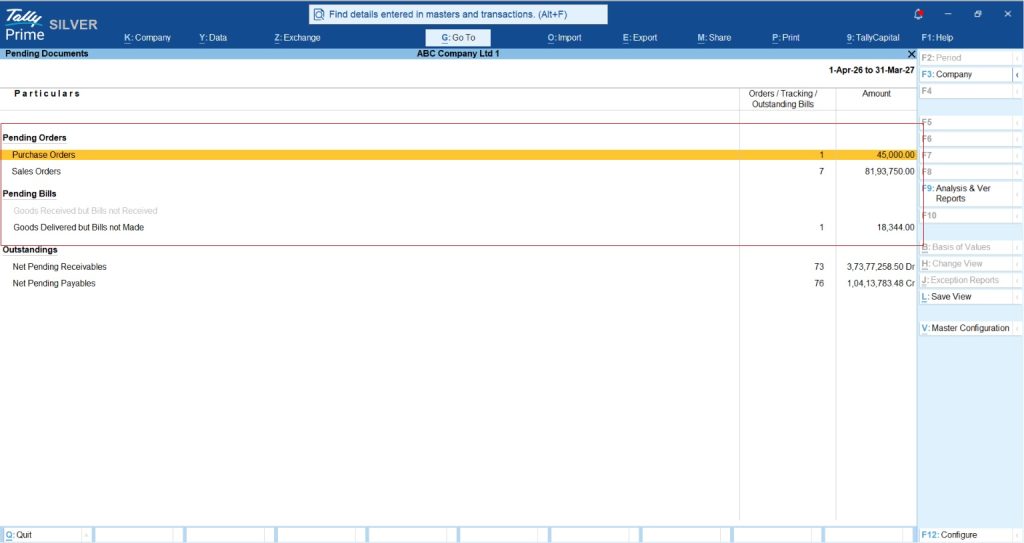
- Receipt Note (Alt+F9): This increases physical stock but creates a "Purchase Bills Pending" provisional liability.
- Rejections Out (Ctrl+F5): Use this for damaged goods discovered before the bill is booked. It reduces stock and the provisional liability simultaneously.
- Purchase Invoice (F9): Critical Step: You must link the Tracking Number from your Receipt Note here. Failure to link tracking numbers is the #1 cause of bookkeeping clutter, it leaves the "Purchase Bills Pending" ledger ballooning even after you have paid the vendor.
Example: A pharmacy receives 500 units of medicine. They record a Receipt Note (Alt+F9). After finding 50 expired units, they record a Rejection Out (Ctrl+F5). They then book the Purchase Invoice (F9) for 450 units. By linking the tracking number, the "Purchase Bills Pending" account is cleared, and the final ITC is accurately booked.
How does TallyPrime handle advanced inventory? Batches, expiry, and manufacturing
TallyPrime easily handles production and expiry dates. For pharma or FMCG, tracking by dates and components is a business necessity.
- Batch & expiry: Enable "Maintain in Batches" and "Use Expiry Dates" in the Stock Item master. Use FEFO (First Expiry, First Out) so the system prioritizes older stock during sales.
- Manufacturing (BOM): Link raw materials to finished goods.
- Manufacturing journal: To record production, go to Alt+F7 (Stock Journal), then press Ctrl+H (Change Mode) and select Manufacturing Journal. This is the only way to properly consume raw materials and produce finished goods in a single entry.
- Stock journals (Alt+F7): Use "Transfer" mode to move stock between Godowns without triggering a tax event.
The sales cycle: turning stock into GST invoices
How does Tally calculate GST automatically during a sale?
- Delivery note (Alt+F8): Ship goods before the bill. This creates a "Sales Bills Pending" record.
- Sales invoice (F8): Link the Delivery Note. Tally classifies sales as B2B or B2C.
- B2C large (B2CL): Only applies to Interstate sales to unregistered persons exceeding ₹1 Lakh (Threshold updated August 2024). Intra-state sales remain B2C Small regardless of value.
- Direct API integration: For turnover-eligible businesses, TallyPrime transmits data to the IRP instantly for e-Invoicing and generates e-Way Bills for shipments over ₹50,000.
Also Read Industry-Specific Invoice Formats in TallyPrime 7.1 | Personalise Invoice Templates
Handling returns: credit and debit notes
Returns must be documented to keep your tax liability and stock valuations aligned.
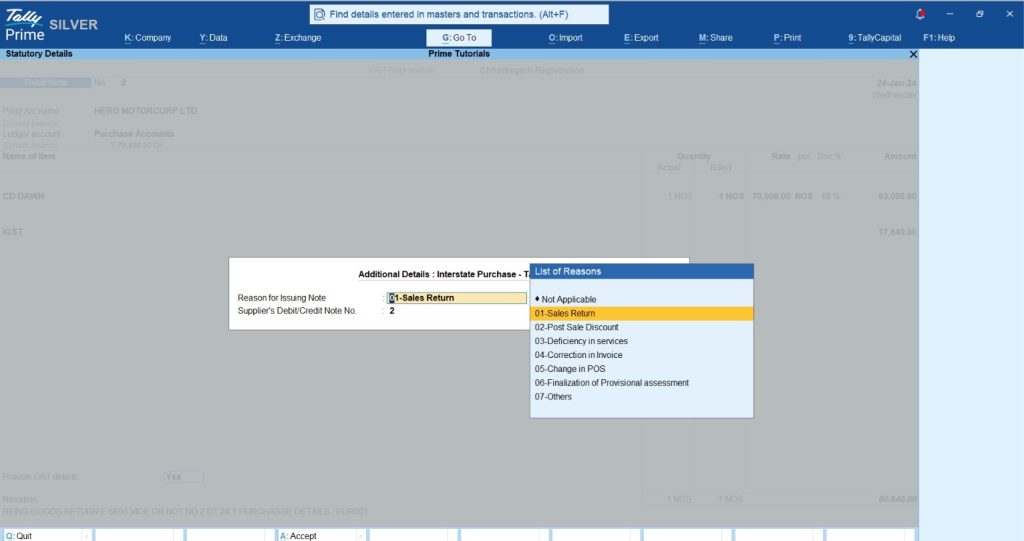
- Credit note (Alt+F6): Used for sales returns. You must select the "Statutory Reason" (e.g., Sales Return) to ensure GSTR-1 updates correctly and reduces your output tax liability.
- Debit note (Alt+F5): Used to return goods to suppliers, effectively reversing the ITC you previously claimed.
Bill-wise details: managing cash flow and credit
Using the Bill-wise feature (F11) allows you to track outstanding balances at the individual invoice level rather than just a total ledger balance.
|
Reference Type |
Purpose |
|
New Ref |
Initiating a new invoice tracking loop. |
|
Agst Ref |
Linking a payment/receipt to a specific invoice. |
|
Advance |
Handling prepayments before an invoice is issued. |
|
On Account |
Payments made without specific bill linking (avoid this for clean books). |
Use the "Ageing Analysis" report to identify debtors who have exceeded their credit period. This is your primary tool for protecting your company's cash flow.
Troubleshooting and compliance: GSTR-1A
Why is my transaction "Uncertain" in GSTR-1?
This indicates a data mismatch (e.g., Missing GSTIN, Incorrect Place of Supply, or Tax Ledger Mismatch).
The GSTR-1A Facility: As of November 2025, Table 3.2 in GSTR-3B is "hard-locked" to your GSTR-1 data and cannot be edited during filing. If you find an error after filing GSTR-1, you must use the GSTR-1A facility to make corrections before filing GSTR-3B. This is your final opportunity for an audit-ready correction in the current tax period.
Also Read TallyPrime for Small Manufacturers | GST, Payroll & Production Stock Guide
Your Integrated Checklist
- Enable GST and select HSN codes from the mandatory dropdown.
- Ensure every Receipt/Delivery Note is linked via Tracking Numbers.
- Use Ctrl+H for Manufacturing Journals to maintain production costs.
- File GSTR-1A for last-minute corrections to keep GSTR-3B accurate.
- Monthly reconciliation: Reconcile your books with GSTR-2B to ensure valid ITC claims.
"Integrated accounting isn't just about tax, it's about knowing your exact stock value at any second."














