



- What is bank reconciliation statement (BRS)?
- Why bank reconciliation statements are prepared?
- When does a business prepare bank reconciliation Statement?
- How to prepare a bank reconciliation statement?
- Bank reconciliation statement (BRS) format
- Benefits of using accounting software for preparing BRS
- How Tally can help you in preparing bank reconciliation statement
A bank reconciliation statement (BRS) is a crucial accounting report that matches the cash balance in your books with the balance shown on your bank statement. By identifying and correcting differences, a BRS ensures that your financial records are accurate, helps prevent fraud, and keeps cash‑flow forecasts reliable.
What is bank reconciliation statement (BRS)?
A bank reconciliation statement is a report prepared by a business to compare the transactions recorded in its cash book (or ledger) with those shown on the bank statement, highlighting any discrepancies and adjusting the book balance to reflect the true cash position.
Why bank reconciliation statements are prepared
With the definition of a bank reconciliation statement, you might be wondering why bank transactions recorded in the books of accounts do not match with the bank statement? There are plenty of reasons and some the common ones are listed below:
- Detect errors– both bank and bookkeeping mistakes.
- Identify outstanding items– such as cheques not yet cleared or deposits in transit.
- Prevent fraud – unrecorded withdrawals become visible.
- Maintain accurate cash‑flow statements – essential for budgeting and audits.
Due to the reasons listed above, the closing bank balance in your books of accounts and actual bank balance as per bank will not match. This means, the bank balance what you think you have it your bank is not the one available in the bank. Deciding basis the book balance will put you in an uncomfortable situation.
To avoid those situations, bank reconciliation statements are prepared. This statements simply matches the bank transactions as per company books with bank statement so that you always have accurate bank balance reflecting in the books of accounts.
When does a business prepare bank reconciliation Statement?
Depending on the volume and value of bank transactions, the reconciliation activities are carried out daily, weekly, fortnightly etc. If the volume or value of transactions is higher, the reconciliation activities are carried on daily to mitigate the risk of payment/cheque bounce.
Step‑by‑Step guide to preparing bank reconciliation statement?
To prepare a bank reconciliation statement, follow these steps:
- Gather Documents: Collect your company’s cash book or ledger and the bank statement for the same period, typically a month.
- Compare Opening Balances: Verify if the opening balance in the cash book matches the bank statement. If not, investigate and adjust accordingly.
- Match Deposits: Check each deposit recorded in the cash book against the bank statement to identify any outstanding deposits (deposits in transit) not yet processed by the bank.
- Match Withdrawals and Payments: Reconcile withdrawals, including cheques issued but not yet cleared, standing orders, and electronic payments, with the bank statement.
- Identify Differences: List all discrepancies such as outstanding cheques (issued but not presented for payment), deposits in transit, bank charges, direct debits, and errors either by the bank or in the books.
- Adjust Book Records: Record any bank charges, interest credits, or missing transactions in the cash book as journal entries.
- Calculate Adjusted Balances: Adjust the bank statement and cash book balances by adding outstanding deposits and subtracting outstanding cheques/errors to arrive at reconciled balances.
- Confirm Balances Match: The adjusted bank balance and adjusted cash book balance should match. If not, repeat the process until they do.
- Document the Reconciliation: Prepare a formal bank reconciliation statement summarizing adjustments, which serves as an audit trail and helps ensure accuracy in your financial records.
Regular bank reconciliations prevent errors, detect fraud, and maintain accurate cash records for reliable financial reporting
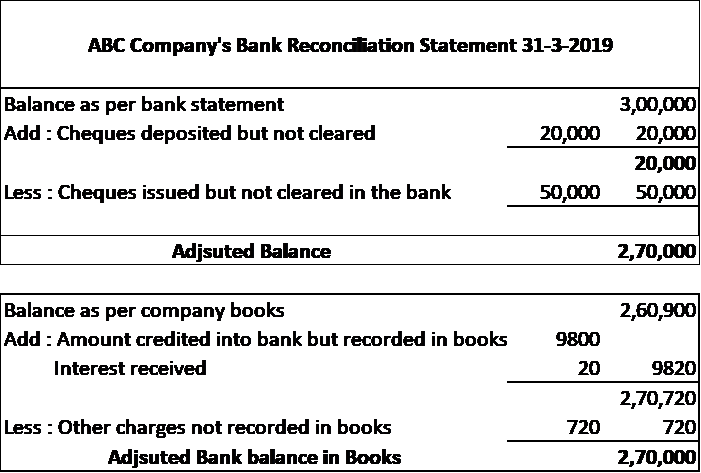
Bank reconciliation statement (BRS) format
Benefits of using accounting software for preparing BRS
Comparing the two statements with a long list of transactions is stressful and error-prone using the manual and conventional method of bank reconciliation.
The only way to overcome this is to ‘automate’ the bank reconciliation process using accounting software. It saves time and effort in day-to-day operations. More importantly, you get accurate and near real-time information on bank balance in books of accounts.
Here, automating bank reconciliation is nothing but using accounting software to record the business transactions including the bank transactions such that the bank reconciliation statements are automatically prepared. Also, accounting software will help you automatically reconcile the bank statements with minimum efforts.
The following are benefits of automating the bank reconciliation process using accounting software.
- Easy to reconcile: Using an accounting software will help you to prepare a bank reconciliation statement automatically and reconcile with minimum efforts.
- Saves time and efforts: No matter whether there are 50 or 500 transactions, the efforts and time to reconcile is the same. Since it is reconciled automatically, you will save a lot of time and efforts involved reconciling the bank transactions.
- Detecting unaccounted transactions is easier: Get to know the new transactions(unaccounted) like bank charges or bank interests etc. and easily account and reconcile.
How Tally can help you in preparing bank reconciliation statement
Tally’s auto bank reconciliation is designed to perform the bank reconciliation exactly in the same way you use to do it manually. To manually reconcile, you need to match the transaction amount and instrument number with the bank statement. TallyPrime, an business management software exactly mimics the way you used to manually reconcile but the only change is, it is automated for you.
TallyPrime‘s auto bank reconciliation will minimize the time spent and the risk of errors during bank reconciliation. Auto bank reconciliation in TallyPrime provides a simple and no-frills method of reconciling your company bank books with the bank statement.
Using this option, you just need to import the e-statement you received from the bank to TallyPrime (in Excel, delimited, CSV format) and hit the reconcile button. You are done.
TallyPrime also shows you complete detail of any unaccounted transactions, like bank charges or bank interests etc. and help you easily account those transactions from the same screen.
It's quick, simple, accurate and stress-free. It saves your time, manpower and money.
How Tally helps in preparing bank reconciliation statement
1. Import Bank Statement– Use Gateway of Tally → Display → Statement of Accounts → Bank Reconciliation to upload the statement.
2. Auto‑Match Transactions– Tally flags unmatched items (outstanding cheques, deposits in transit).
3. Post Adjustments – Directly create journal entries for bank charges or interest from the reconciliation screen.
4. Generate BRS Report– Export the reconciled statement as PDF or Excel for audit purposes.
Common Reconciliation Issues & How to Resolve Them
Outstanding Cheques – Verify if the cheque was presented; if not, keep it as an outstanding item until cleared.
Deposits in Transit – Record the deposit in the cash book; once the bank reflects it, remove the transit entry.
Bank Errors – Contact the bank with the discrepancy details and adjust the cash book after confirmation.
Incorrect Dates– Align transaction dates; Tally allows date adjustments before finalizing.
Conclusion
A well‑maintained bank reconciliation statement is the backbone of reliable financial reporting. Whether you reconcile manually or leverage Tally’s automation, the goal remains the same: a true, error‑free view of your cash position. Regular reconciliation protects your business from fraud, improves cash‑flow planning, and simplifies audits.
Watch this Video to Know How to do Auto Bank Reconciliation in TallyPrime
https://www.youtube.com/watch?v=C4ekxa2INjQ
Explore More Products














