
Rituparna sells Assam tea online from a small office near Six Mile in Guwahati. Last quarter she pushed her card statement across the table and asked me to look at the subscriptions. There were four AI tools on it: a writing assistant, a chatbot for the website, a meeting-notes app and an image tool. Together they came to about ₹11,500 a month.
I asked which one had changed anything in the business. She thought about it for a while and named one.
That is the usual pattern with small businesses and AI. The tools get bought because they are cheap enough not to need a decision, and nobody goes back to check what they replaced. The better starting point is the work itself: where people spend hours reading documents, retyping figures, answering the same question or building the same report every week. A tool earns its fee there or nowhere.
The subscription is the smallest number
A ₹2,000 tool that nobody opens is expensive. A ₹6,000 tool that takes ten hours of typing off the accounts desk every month may be cheap. In the businesses I work with, an AI tool pays for itself in one of four ways: it cuts repetitive work, it cuts rework and avoidable mistakes, it makes some process noticeably faster, or it lets the business take on more orders without the paperwork growing at the same rate. That last one matters most for a growing startup, where going from 200 to 400 orders a month shouldn't automatically mean a second person on the accounts desk. These are different benefits, and only some of them turn into money.
Hours saved show up in the accounts only when they replace something the business was paying for, such as overtime, an outside bookkeeper or the person you were about to hire. If the same accountant stays on the same salary, the business has bought time for other work. That can still be worth a lot, but it should be counted as time, and the owner should decide in advance what the time is for.
Paper is where most SMEs should look first
Purchase invoices, expense bills, bank statements, orders, credit notes, agreements, supporting papers: in most small businesses someone reads each of these and types the same fields into another system. Document AI can read those fields and prepare them for review, which removes typing without removing anyone's judgement.
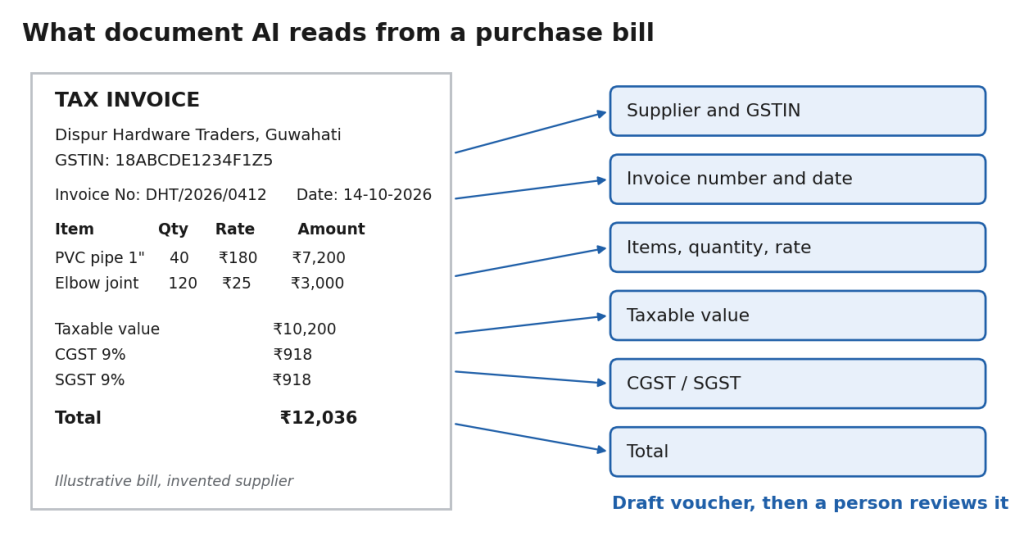
It makes sense when the volume is meaningful, the documents follow reasonably consistent layouts, staff are spending real time on the same fields, and there is already someone who checks entries before they are saved. A trader receiving twenty bills a month doesn't need another system for them. The problem is too small to pay for the setup.
The reminder and the dispute
A lot of small-office time goes into near-identical messages: payment reminders, order confirmations, internal follow-ups, meeting summaries, customer acknowledgements, a short weekly update for the owner. AI drafts these quickly and reasonably well.
The control that matters is who presses send. A reminder for ₹12,500 that is 15 days past due can follow a standard template and go out once someone glances at it. A reply to your largest customer about a disputed shipment should not go out because the AI wrote a confident paragraph. Let the tool write the first draft and have someone read it before it goes out; that keeps the speed and leaves the responsibility where it was.
Count the questions before buying a chatbot
Rituparna's website chatbot was the subscription she was least sure about. So for one month her team logged every customer query that came in by WhatsApp, e-mail and the website. A little over half were the same five questions: where is my order, how long does delivery take to my pincode, how do I download my invoice, what is the return process, do you ship outside India. The rest needed a person, usually because a parcel had been damaged or a corporate order needed a custom quote.
That split is what a chatbot can and can't do. For the repeated questions, a well-configured bot saves real time. For a business getting ten queries a day that mostly need judgement, it adds a layer without solving much.
|
CA Tip: Before paying for customer-service AI, classify one month of real queries. The share that is genuinely repetitive tells you more than any vendor demo. |
What the price on the website leaves out
Setup, cleaning the data so the tool can read it, training staff, changing the process around it, the time spent checking its output, integration with existing software, ongoing maintenance, and deciding who can see what. Most AI projects that disappoint were costed on the subscription alone.
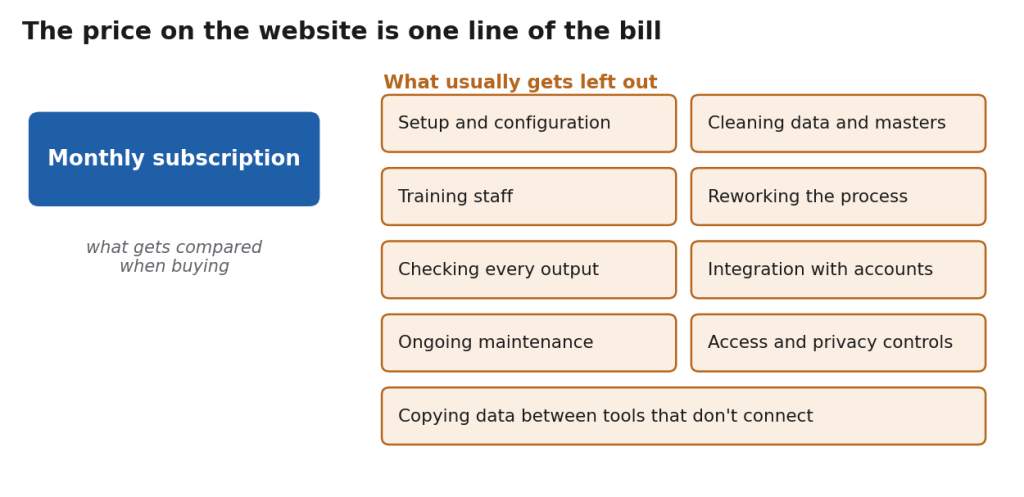
Then there is the cost of tools that don't talk to each other. One app reads invoices, another handles e-mail, a third makes reports, and none of them feeds the accounting system. Now someone downloads from one, reformats in Excel and uploads to the next. That is a new manual job created by automation, and it was exactly what had happened with two of Rituparna's four subscriptions.
400 bills a month, worked through
An illustration, not a benchmark. A trading business receives about 400 supplier invoices a month, and reading and entering each takes around two and a half minutes, so roughly 1,000 minutes or 16.7 hours of work. With document AI preparing drafts, the accountant mostly checks and fixes exceptions; if that takes about a minute per bill, around 6.7 hours remain. About ten hours a month come back.
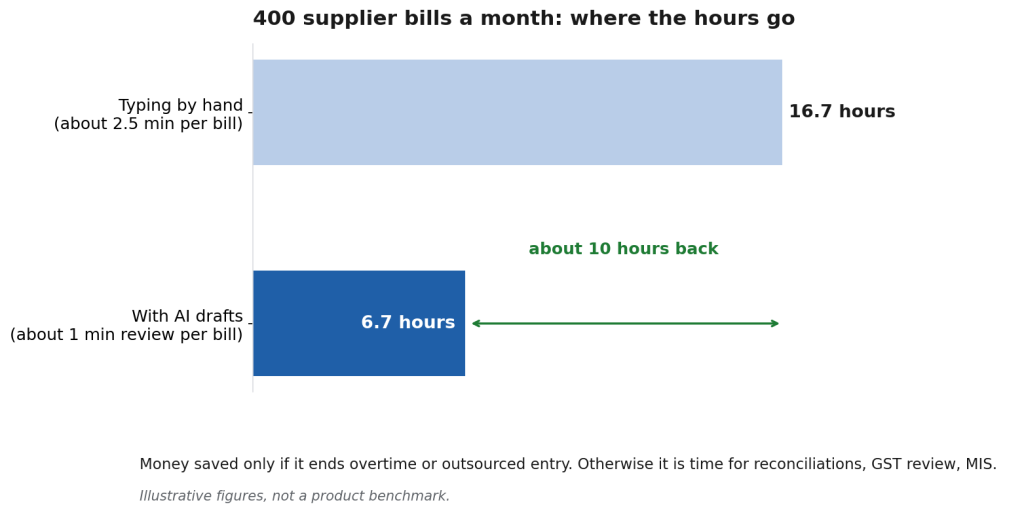
Whether that is a saving depends on what happens next. If it ends an outsourced data-entry arrangement or the overtime in the last week of the month, it is money. If not, it is ten hours that can go to receivable follow-up, bank and vendor reconciliation, GST review or the monthly MIS that keeps slipping. Both are reasonable outcomes; they just shouldn't be reported as the same thing.
Where Docs by Ira fits, if you already use TallyPrime

For a business whose bottleneck is supplier invoices and whose books are already in TallyPrime, Docs by Ira is the obvious one to test. It reads supported PDF and image transaction documents, extracts the details and creates draft vouchers in TallyPrime, and documents can also be sent in from a phone through the TallyIra app. It needs TallyPrime Release 7.1 or later with an active Tally Software Subscription.
The draft stage is the useful part. Imported documents wait in Review Imported Transactions, where the accountant can open the source document and sort out missing masters, master mismatches, dates outside the current period and potential duplicates before anything is saved. Each file has to contain one transaction, handwritten bills aren't supported, only English-language documents are read for now, and a clear scan matters. If a large share of your bills are handwritten, that part stays manual.
It drafts the entries. The accounting, and the responsibility for it, stays with your team.
When waiting is the better buy
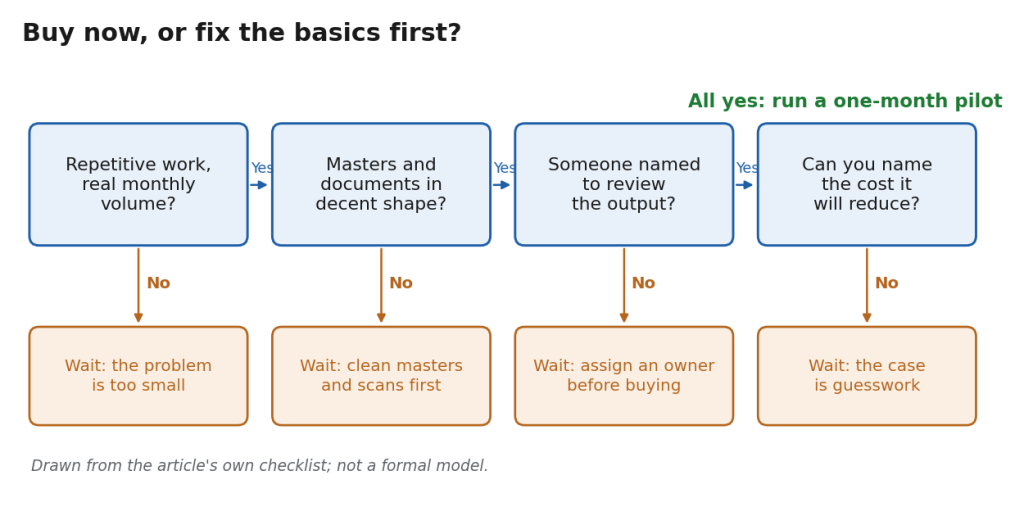
Sometimes the right AI budget for this year is zero. Volumes are too low to matter. The process changes every few weeks. Customer and supplier masters are a mess, or most documents are faded thermal-paper bills nobody can read. Nobody has been given the job of checking what the tool produces. Or nobody can say which current cost the tool is meant to reduce. In each of those cases, fixing the process first will return more than adding software on top of it.
Rituparna kept the writing assistant and the chatbot, cancelled the other two, and put the ₹6,000 a month she saved towards a part-time person to clean up her product and customer masters. Her accountant has started a trial of Docs by Ira for the purchase bills next month.