











A software vendor came to demo an AI invoice tool to a pharma distributor I work with in Guwahati. Ten minutes in, everyone at the table was impressed. A clean, typed invoice went in, the fields filled themselves, and a purchase voucher appeared.
Then the owner's accountant opened her drawer.
She handed over a slightly blurred bill from a Tezpur supplier, a credit note, an invoice from a party whose name on paper didn't match the ledger, and a bill that had already been entered the week before. The room got quieter. The tool read some of it well, guessed at some of it, and on the duplicate it said nothing at all.
That second half of the demo is the only part worth judging. Any tool looks good on the vendor's sample invoice. What matters for an SME is whether it cuts repetitive work without loosening control of the books, and that shows up when the AI is wrong. These are the seven questions I put to any AI accounting tool before recommending it.
1. Is there a real problem for it to solve?
Don't buy AI because the software has AI in it. Start with the work that eats time today. A team keying in 500 purchase invoices a month, re-matching the same supplier names, chasing bills that arrive on WhatsApp from the branch and then get forwarded again to the accountant, cleaning up duplicate entries: that is a genuine document-processing problem, and this kind of tool is aimed squarely at it.
A trader with 25 invoices a month is a different case. The owner saves very little, and a new system, a subscription and a review routine can easily add more work than they take away.
|
CA Tip: Measure the current workload for one month before you evaluate any software. Count documents, hours spent, corrections and exceptions. Without that baseline, every vendor's time-saving claim is impossible to check. |
2. How accurate is it on your documents?
Never judge accuracy on the vendor's sample. Test it on your own pile: different supplier formats, multi-line invoices, discounts and freight added at the bottom, GST details, credit notes, poor scans, suppliers with similar names, and a deliberate duplicate or two.
And be careful with a headline like "95% accurate". It depends entirely on what is being counted. A tool can read nine fields on an invoice correctly and get the invoice value wrong, and in accounting that is not a 90% result. Invoice number, date, party, taxable value, GST and total matter far more than the supplier's address line. The useful measure is how much checking each transaction still needs before you are willing to post it.
3. When it gets something wrong, can you see it and fix it?
No AI accounting tool will be perfect, and occasional exceptions are fine. Errors you can't see, or can't correct without a support ticket, are the problem.
Take a supplier who prints "Brahmaputra Industrial Components Private Limited" on the bill while your ledger says "Brahmaputra Industrial Components Pvt. Ltd." A good system asks you to map the extracted name to the existing ledger once. A poor one quietly creates a new supplier master every time it meets a small spelling difference, and six months later the party list is full of near-duplicates and the payables ageing means nothing.
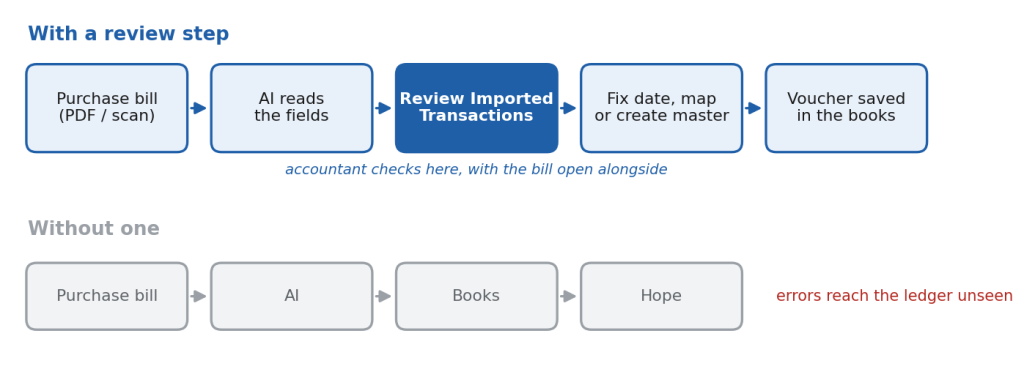
Docs by Ira in TallyPrime handles this the way I would want. Imported documents land in Review Imported Transactions, split into Action Required and Ready to Convert. The report flags missing masters, master mismatches, dates outside the company's current period and potential duplicates, and Alt+I shows the imported file next to the entry so the accountant can check it against the bill itself. Nothing is posted until someone converts it, so the accountant can change an extracted value, map the right master or create a missing one before the voucher is saved. That review screen matters more to me than any extraction animation in a demo.
Where to draw the line between a limitation you can live with and one that should stop the purchase:
|
Acceptable limitation |
Warning sign |
|
Needs a correction now and then, and shows you where |
Posts entries with no sign of what it was unsure about |
|
Asks you to map a new supplier name once |
Creates a fresh master for every spelling variation |
|
Doesn't read some document types, and says so |
Vendor can't or won't tell you what it doesn't support |
|
Corrections are remembered next month |
The same error comes back every month |
|
Lets you view the source bill beside the entry |
No way to trace an entry back to the document |
4. What happens to the invoices once they're uploaded?
This question gets skipped in almost every demo I have sat through. Invoices carry customer details, supplier GSTINs, bank account numbers, negotiated prices, addresses and, read together, a fair picture of who you buy from and at what margin. Before adopting any AI accounting product, ask the provider in writing where documents are processed, what exactly is uploaded, how long it is kept, who can access it, what security controls apply, whether users can be restricted, and what happens to your data if you stop using the service.
For Docs by Ira, some of those answers are published. Users accept Tally's terms and privacy policy, a one-time consent, before processing starts. Tally's terms of use for its AI features say inputs are processed using Google's generative AI models and may be retained temporarily, and the Docs by Ira help pages say imported files are kept for seven days or until the voucher is converted. Read those terms yourself rather than relying on a summary, mine included.
There is a legal side now as well. The Digital Personal Data Protection Rules were notified on 14 November 2025 with an eighteen-month window for phased compliance, and the Act provides for penalties of up to ₹250 crore where a data fiduciary fails to keep reasonable security safeguards. Where your invoices carry personal data, such as a proprietor's name, mobile number and address, the question of where they go is no longer only about prudence.
5. Does it fit the system your team already uses?
A tool can be excellent on its own and still wrong for your business. If every extracted transaction has to be downloaded to Excel, reformatted, uploaded somewhere else and checked again, you have removed one manual step and added three.
For SMEs already on TallyPrime, this is where TallyIra makes invoice processing genuinely simpler. The branch manager in Tezpur or the person receiving goods at the godown scans the bill on the TallyIra phone app, or shares it straight from WhatsApp, and it arrives in Draft Transactions inside TallyPrime. No more photos forwarded to the accountant, saved to a desktop folder and typed in two days later. The accountant reviews and converts in the same software the books are already kept in, with no new screens to learn and no import files to shuffle. The admin decides who gets access by enabling TallyIra for a user and registering their mobile number. It needs TallyPrime Release 7.1 or later with an active Tally Software Subscription.
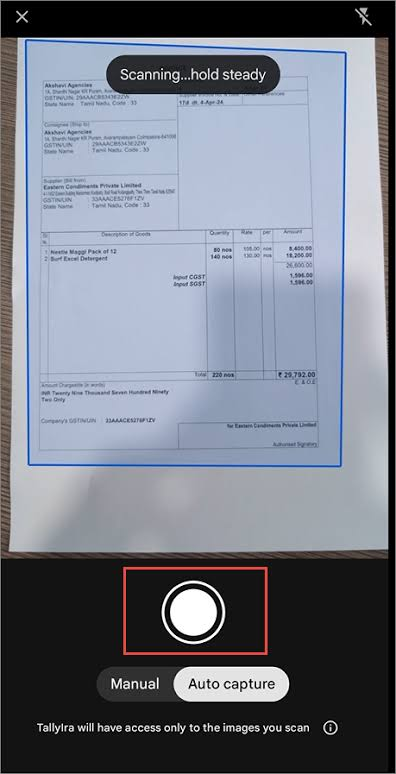
The limitations are published, and worth testing against your actual document mix. Each file must contain one transaction. Handwritten documents aren't supported, and only English-language invoices are currently read. If a fair share of your purchase bills still come handwritten from small local suppliers, that part of the pile stays manual.
6. Will your team actually use it?
Plenty of good software dies in the second month. The demo is run by the vendor's best person; the daily work is done by your accounts executive between GST returns and bank queries.
So ask who will capture the documents, who will review them, and how long it takes that person to get comfortable. Watch whether corrections carry forward. With Docs by Ira, once an item is mapped correctly, Tally's documentation says it is recognised automatically in future invoices from the same supplier, so the second month should need noticeably less fixing than the first. If it doesn't, the team will quietly go back to typing. And agree a simple routine before go-live: bills captured the day they arrive, Review Imported Transactions cleared every evening, nothing left in Action Required at month-end.
7. What does it really cost?
The monthly price is only one line. Add setup, training, preparing documents in a readable form, the time spent checking AI output, correction time, integration, ongoing support and any usage charges.
A rough illustration, not a benchmark: a trading business processes 600 purchase documents a month, and manual entry averages about three minutes each, so around 30 hours of work. With bills captured on TallyIra and the accountant mostly reviewing drafts instead of retyping them, handling might drop to about a minute per document. That leaves roughly 10 hours, so about 20 hours are released.
Be careful what you call those 20 hours. If the same person stays on the same salary, the business has gained capacity, not cash. It becomes a cash saving only if it avoids overtime, outsourcing, a new hire or some other measurable cost. The capacity can still be worth a lot if it goes into receivable follow-up, vendor and bank reconciliation, GST review or monthly MIS that never got done before. Just count it honestly when you work out the return.
What the distributor decided
The Guwahati distributor didn't sign up on the day of the demo. We ran a month first, on purchase bills only, with the accountant reviewing every draft before conversion.
Two things built confidence. In the first week, Review Imported Transactions caught a bill the branch had sent twice, once by WhatsApp and once as a scan, and flagged it as a potential duplicate before anything was posted. And by the third week most supplier names were already mapped, so the evening review had shrunk to a handful of entries. The accountant, who had been the most sceptical person at that first meeting, was the one who asked to extend it to sales returns.
The same month, I advised a smaller client, a hardware trader with around 25 bills a month, not to bother yet. The tool would have worked. It just wouldn't have saved him enough to justify another routine.
Neither decision came down to how clever the software was. What won the distributor over was watching the tool admit doubt: a duplicate flagged before posting, a mismatch waiting in Action Required, a mapping that held the following week. That is the behaviour I look for now, a tool willing to say "I'm not sure about this field, please check" rather than posting a wrong entry with full confidence and leaving no trace.
So before signing anything, put a month of your own bills through it and count. That month will tell you more than any demo.







