









The price on the quote is not the cost
When a business compares accounting software, the first number it usually sees is the price: a monthly subscription, an annual fee, or a one-time licence payment.
But that number does not always tell the full story.
Consider two hypothetical options. One costs ₹12,000 a year as a subscription. Another costs ₹30,000 upfront as a one-time licence, followed by ₹3,000 a year for support from Year 2 onward.
Which one costs less?
The answer depends on how long the business uses the software, what the quoted price includes, and what happens as the business grows.
A one-year comparison shows the entry cost. A five-year view shows how recurring costs accumulate and how changing business requirements can alter the picture.
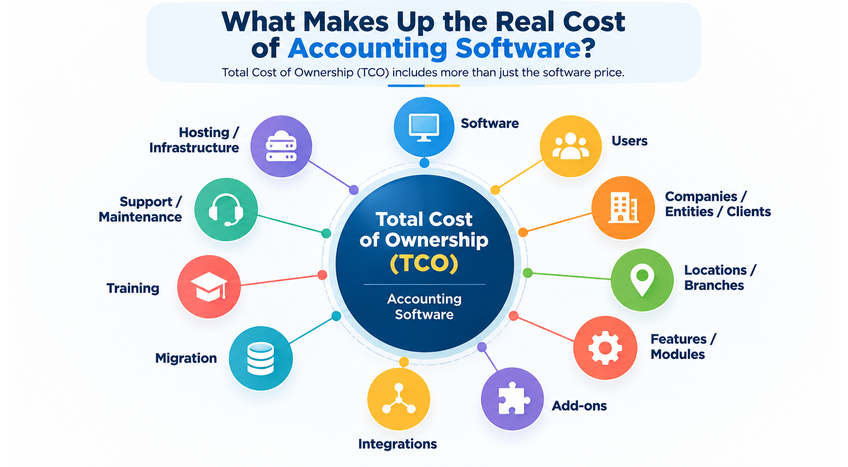
This is why a proper comparison needs to go beyond the initial quotation. Implementation, data migration, training, support, integrations, add-ons, additional users or companies, and other operating requirements may all affect the overall cost of ownership.
The useful question is not simply:
“Which software is cheaper?”
It is:
“What will this software actually cost my business over the period I expect to use it?”
That is where a five-year cost comparison becomes useful.
What should be included in the cost?
The price shown in a quotation is only one part of the calculation. Before comparing two accounting software options, a business should first identify what that price actually covers.
A useful way to approach this is through Total Cost of Ownership (TCO). TCO goes beyond the headline software price and considers the costs that may arise from implementing, operating and expanding the solution over time.
|
Cost Dimension |
What to Check |
|
Software |
Subscription or licence fee |
|
Users |
Number of users included and cost of additional users |
|
Companies / Entities / Clients |
Limits and additional charges, if applicable |
|
Locations / Branches |
Whether additional locations are included |
|
Features / Modules |
Which functions are included in the base price |
|
Add-ons |
Cost of additional functionality |
|
Integrations |
Charges for connecting other systems or services |
|
Migration |
Cost and effort involved in moving existing data |
|
Training |
Initial and ongoing staff training |
|
Support / Maintenance |
Recurring support or maintenance charges |
|
Hosting / Infrastructure |
Cloud, hosting or related infrastructure costs, where applicable |
Not every business will incur every cost in this list. The purpose is to identify the components that actually apply to the business before making a long-term comparison.
For example, a licence that appears cheaper at the outset may have limits on users, companies, locations or features. Similarly, a subscription that looks inexpensive in Year 1 may become more significant as the number of users or required add-ons increases.
There is also an important distinction between the calculations used in this article:
Five-Year Software Cost refers to the costs included in the illustrative comparisons that follow.
Total Cost of Ownership is broader. It can include implementation, migration, training, hosting, integrations and other costs that vary from one business to another.
So, the first question when comparing accounting software should be:
“What exactly does this price cover?”
Once that is clear, the next step is to calculate how the cost accumulates year by year.
A simple five-year comparison
Consider a small business with two accounting users, one entity and basic accounting requirements. It is comparing two hypothetical pricing models.
The assumptions are:
- Subscription model: ₹12,000 per year
- One-time licence: ₹30,000 upfront
- Support/maintenance: ₹3,000 per year from Year 2
- GST is excluded
- The subscription price remains unchanged throughout the five-year period
Five-Year Cost Comparison
|
Year |
Subscription – Annual Cost |
Subscription – Cumulative |
One-Time Licence – Annual Cost |
One-Time Licence – Cumulative |
|
Year 1 |
₹12,000 |
₹12,000 |
₹30,000 |
₹30,000 |
|
Year 2 |
₹12,000 |
₹24,000 |
₹3,000 |
₹33,000 |
|
Year 3 |
₹12,000 |
₹36,000 |
₹3,000 |
₹36,000 |
|
Year 4 |
₹12,000 |
₹48,000 |
₹3,000 |
₹39,000 |
|
Year 5 |
₹12,000 |
₹60,000 |
₹3,000 |
₹42,000 |
|
5-Year Total |
₹60,000 |
₹60,000 |
₹42,000 |
₹42,000 |
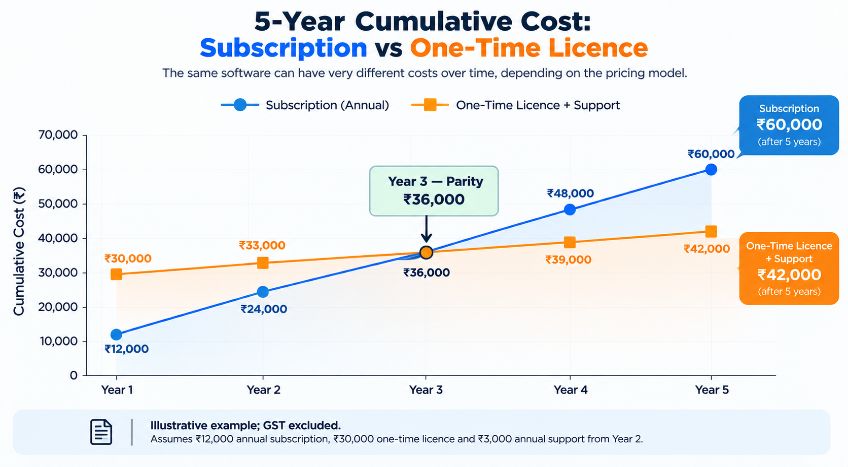
At the end of five years, the subscription model has cost ₹60,000, while the one-time licence plus support has cost ₹42,000.
That is a difference of ₹18,000.
But the final total is only part of the story.
The subscription model requires a lower payment in Year 1, while the one-time model requires a larger initial investment. Looking only at the first year's payment could therefore lead to a different conclusion from looking at the full five-year cost.
The cumulative column is what makes the longer-term picture visible.
It also leads to a more useful question:
At what point does the cumulative subscription cost overtake the one-time option?
The crossover point: When does subscription become more expensive?
The five-year total tells us which option costs less over the full period, but a business may also want to know when the difference begins to matter.
In our example, the cumulative subscription cost reaches ₹36,000 at the end of Year 3.
The one-time licence model also reaches ₹36,000 at the end of Year 3, because it includes:
- ₹30,000 initial licence cost
- ₹3,000 support in Year 2
- ₹3,000 support in Year 3
So, there are two ways to describe the crossover.
Compared with the initial licence price
The cumulative subscription cost exceeds the original ₹30,000 licence price during Year 3.
Compared with the complete one-time model
When the recurring support cost is included, both models reach ₹36,000 at the end of
Year 3.
From Year 4 onward, the subscription model becomes more expensive under these assumptions.
This distinction matters because the crossover point depends on which costs are included in the comparison.
It also shows why a simple statement such as “one-time licensing becomes cheaper after three years” can be incomplete. The answer depends on the pricing structure, recurring support charges and other costs attached to each option.
For a business making a long-term software decision, calculating the cumulative cost for each year gives a much clearer picture than comparing only the initial quotation.
But there is another variable that can change the calculation significantly:
What happens when the business itself grows?
Scenario: What happens when the business grows?
A five-year comparison becomes more meaningful when we consider a simple reality: businesses do not always remain the same size for five years.
The same small business that starts with two accounting users and basic requirements may need additional functionality as it expands.
Now consider the same hypothetical business, but assume that from Year 3 it needs:
- One additional user at an illustrative cost of ₹2,000 per year
- One additional add-on at an illustrative cost of ₹4,000 per year
Together, these requirements add ₹6,000 per year from Year 3 onward.
Five-Year Cost with Business Growth
|
Year |
Subscription – Annual Cost |
Subscription – Cumulative |
One-Time Licence – Annual Cost |
One-Time Licence – Cumulative |
|
Year 1 |
₹12,000 |
₹12,000 |
₹30,000 |
₹30,000 |
|
Year 2 |
₹12,000 |
₹24,000 |
₹3,000 |
₹33,000 |
|
Year 3 |
₹18,000 |
₹42,000 |
₹9,000 |
₹42,000 |
|
Year 4 |
₹18,000 |
₹60,000 |
₹9,000 |
₹51,000 |
|
Year 5 |
₹18,000 |
₹78,000 |
₹9,000 |
₹60,000 |
|
5-Year Total |
₹78,000 |
₹78,000 |
₹60,000 |
₹60,000 |
Under these assumptions, the five-year subscription cost increases to ₹78,000, while the one-time licence model reaches ₹60,000.
The difference is again ₹18,000.
Notice what happens in Year 3: both models reach ₹42,000 cumulatively. From Year 4 onward, the subscription model becomes more expensive in this example.
The important lesson is not that one pricing model is always better. It is that growth changes the calculation.
A software comparison based entirely on today's requirements may not reflect what the business will actually need three or four years from now.
For this reason, a five-year comparison should consider not only the current number of users and features, but also the requirements the business is reasonably likely to add during that period.
And growth is not limited to adding users.
Look beyond users: Companies, clients, locations and features
When comparing accounting software, businesses often focus on one question:
How many users are included?
That is important, but it may not be the only factor that affects the cost.
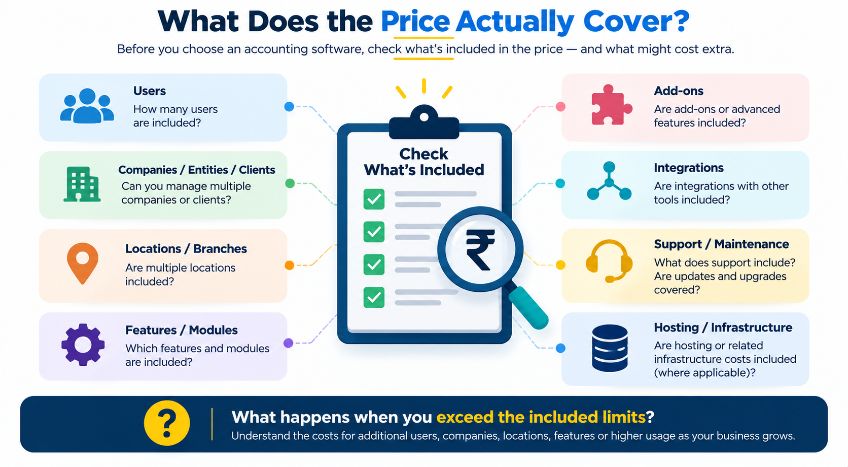
Different software products can structure their pricing around different elements. Depending on the solution, the cost may also change with the number of companies or entities, clients, branches or locations, features, modules, add-ons or integrations required by the business.
Consider two different situations.
An accounting practice may need to manage multiple client companies. A growing business may expand into additional branches or entities. In either case, user count alone may not tell the complete story.
Before accepting a quoted price, it is useful to ask:
- How many users are included?
- How many companies, entities or clients can be managed?
- Are additional branches or locations included?
- Which features or modules are part of the base plan?
- Which add-ons may be required as the business grows?
- Are integrations included, or charged separately?
- What happens when any of these limits are exceeded?
This is particularly important when comparing software with different pricing structures.
Two products with similar headline prices may provide different levels of functionality or capacity. Conversely, a product with a higher initial price may include capabilities that would require additional spending with another option.
The objective is therefore not simply to find the lowest quoted price. It is to determine whether the quoted plan will continue to meet the business's requirements over the period being considered—and what additional costs may arise when those requirements change.
Costs often missing from the initial quote
The software licence or subscription is usually the easiest cost to identify. Other costs may become visible only when the software is implemented, used by the team, or expanded to meet changing business requirements.
These costs are not necessarily “hidden costs.” In many cases, they are legitimate services or requirements that are simply quoted separately from the headline software price.
|
Cost Area |
What It Can Include |
|
Data Migration |
Moving existing accounting data, masters and opening balances into the new system |
|
Implementation |
Configuration, setup and adapting the software to business processes |
|
Training |
Time and cost required to train accountants and other users |
|
Support / Maintenance |
Annual support, maintenance or assistance beyond the base licence |
|
Hosting / Infrastructure |
Cloud hosting, servers or other infrastructure, depending on the deployment model |
|
Integrations |
Connecting banking, payroll, e-commerce, CRM or other business systems |
|
Add-ons |
Additional functionality required beyond the base package |
There can also be an internal cost that is easy to overlook: employee time.
Staff may need time to learn a new system, verify migrated data, change existing processes or resolve issues during implementation. That time has a business value even when there is no separate invoice for it.
For a small business with straightforward requirements, some of these costs may be minimal or may not apply at all. For a larger or growing business, however, they can become significant.
This is why a proper five-year analysis should distinguish between the software cost shown in a pricing comparison and the broader Total Cost of Ownership.
The numerical examples in this article deliberately keep implementation, migration, training, hosting and similar variable costs outside the base calculation. These costs can differ significantly between businesses and cannot be assumed to be the same for every software purchase.
For an actual purchase decision, these items should be identified and estimated separately before calculating the business's final five-year TCO.
A practical five-year checklist
The methodology becomes useful when a business applies it to its own situation.
Before choosing accounting software, put the expected costs and requirements into a simple five-year worksheet.
- Identify the initial cost
Record the subscription, licence or setup cost that applies at the beginning.
- List recurring costs
Include annual or periodic software charges, support or maintenance renewals, and any other recurring payments.
- Identify what is included
Check the limits for:
- Users
- Companies, entities or clients
- Locations or branches
- Features and modules
- Add-ons
- Integrations
- Estimate likely growth
Think about what the business may reasonably need during the five-year period.
Will there be:
- More users?
- More companies or clients?
- More locations?
- Additional features?
- New integrations?
The objective is not to predict the future perfectly. It is to make reasonable assumptions visible.
- Identify applicable implementation costs
Consider:
- Data migration
- Implementation
- Training
- Hosting or infrastructure
- Integration
- Other applicable operating costs
- Calculate the cost year by year
Instead of looking only at the quotation received today, calculate:
Year 1 → Year 2 → Year 3 → Year 4 → Year 5
Then calculate the cumulative cost.
- Identify the crossover or parity point
Finally, determine when the cumulative cost of one option reaches or exceeds the other under the assumptions being used.
This process turns a software quotation into a long-term decision model.
The worksheet can also be updated when the business's requirements change. If the business adds users, locations, features or integrations, the five-year calculation can be revised accordingly.
Conclusion — The cheapest quote may not be the cheapest five-ear choice
Choosing accounting software is often treated as a simple price comparison: one option costs less upfront, so it appears to be the better choice.
A longer view can tell a different story. A subscription may require a smaller initial commitment but accumulate over time. A one-time licence may require a larger upfront payment but have a different pattern of recurring costs. As the business grows, additional users, companies, locations, features, add-ons or integrations can change either calculation.
The right question is therefore not simply:
“Which option has the lower price?”
It is:
“What will this option cost my business over the period I expect to use it, what does that cost include, and how might it change as the business grows?”
A five-year comparison does not predict the future with certainty. It provides a structured way to make assumptions visible, compare alternatives consistently and identify where costs may change. The cheapest quotation today may not be the cheapest choice over five years.
Compare the price, compare what is included, and model how your requirements are likely to change. That is a more reliable way to understand the real cost of accounting software.







