










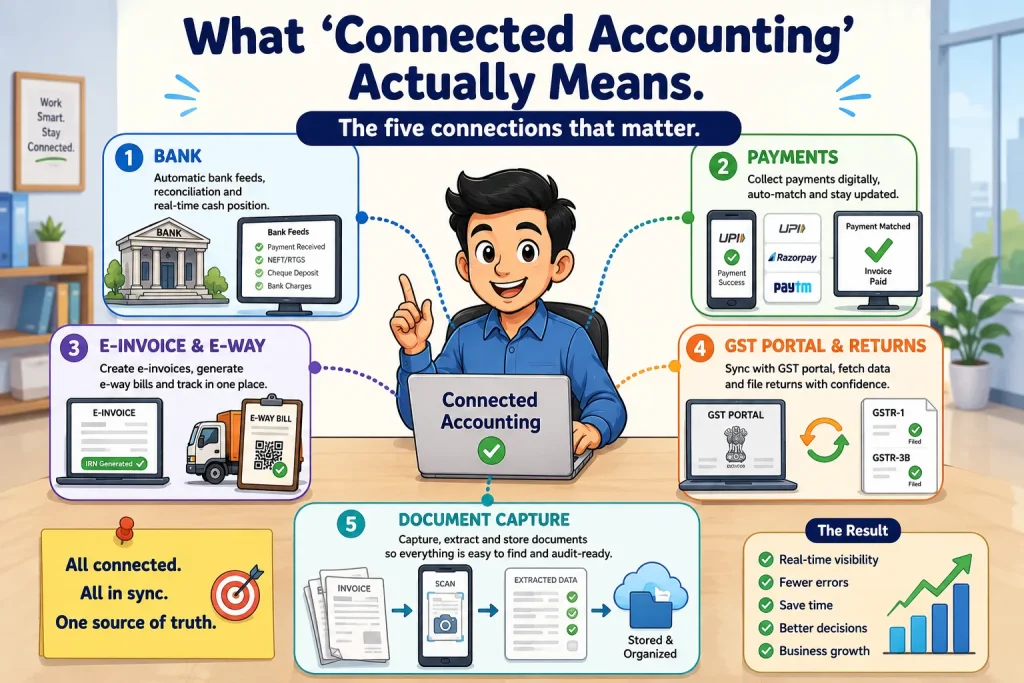
Connected Accounting in TallyPrime means an accounting system where financial records are directly connected with the key business processes and external systems that generate, verify, or report financial data. Instead of treating accounting, banking, payments, GST compliance, invoicing, and documents as separate activities, TallyPrime brings these connections into a more integrated workflow. In other words, Connected accounting in TallyPrime is an ecosystem where financial data flows seamlessly between your books of accounts, banking institutions, government compliance portals, and digital document repositories without manual intervention or data re-entry.
Why is your accounting software still making you do double work?
I’ve spent years working with growing businesses, and the complaint I hear most often sounds remarkably similar: "Why am I spending half my week downloading bank statements, logging into government portals, and re-typing invoices when I already have accounting software?"
It is a fair question. For a long time, businesses settled for software that acted as a digital ledger, a place where you manually type in what happened yesterday. But in a fast-moving market, static ledgers create bottlenecks.
Connected accounting fixes this by bridging the gap between your books and the outside world. Let’s look at what this actually looks like on the ground.
What are the five connections that actually matter?
When software companies talk about integration, it can easily sound like marketing buzzwords. In practice, TallyPrime focuses on five distinct connections that directly impact your daily workload:
1. Automated bank feeds
Instead of logging into your net banking, downloading Excel files, and matching entries line by line, your bank statements sync directly into TallyPrime for instant, automated reconciliation. Follow the step to connect your bank.
Gateway of Tally → Exchange (Alt+Z) → All Banking Options → Login & Logout, put your Tally.Net ID & Password and complete the process to Login or Register
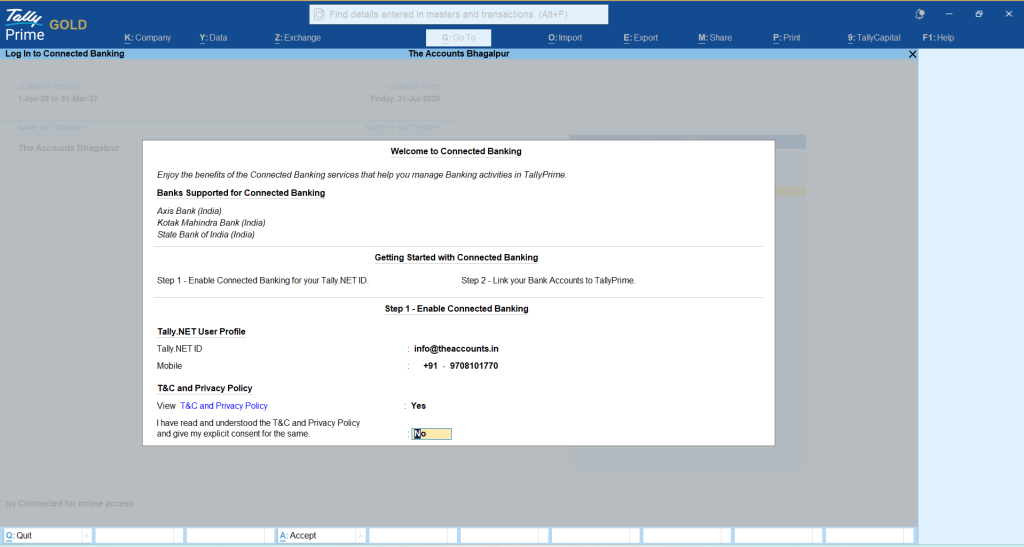
After completing the registration Click on new connection (F6) and select your bank and connect respectively.
2. Integrated payments
You can embed payment links directly into your invoices, allowing customers to pay via UPI, credit card, or net banking, with receipt entries automatically updating in your books.
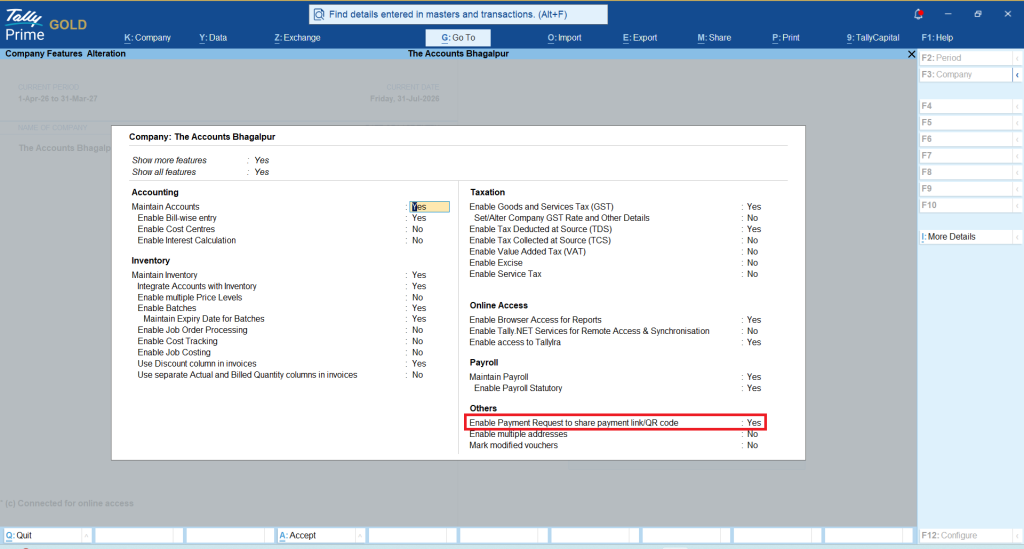
You can use payment link/QR code option in TallyPrime
Gateway of Tally → F11, Set ‘Yes’ Enable payment request to share payment link/QR code
3. Instant e-invoicing and e-way bills
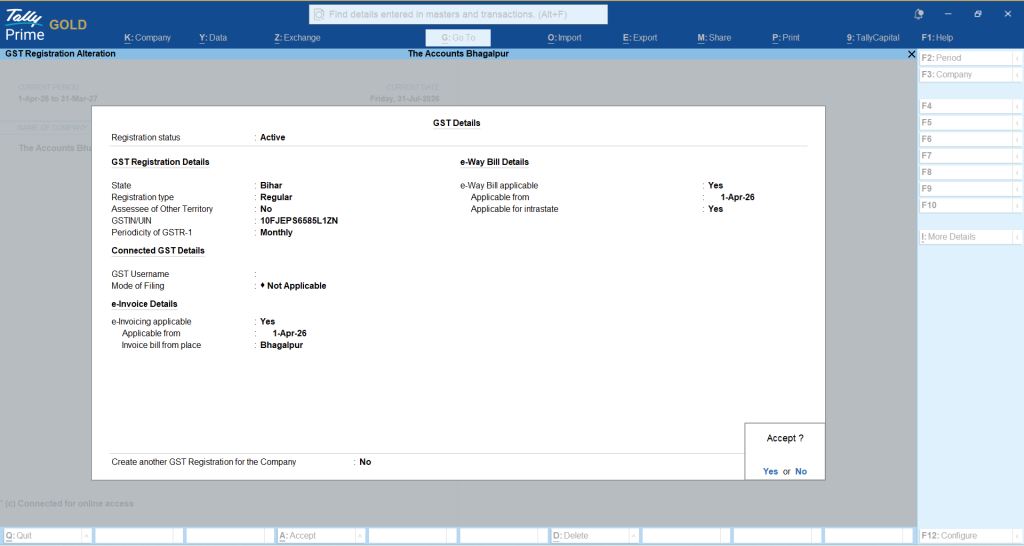
Generate government-compliant e-invoices and e-way bills with a single click right from your voucher creation screen, eliminating errors from double-entry. There is no need to make separate entries for this; you simply need to enable the feature in TallyPrime, and both the E-Way Bill and E-Invoice will be generated along with the bill.
Gateway of Tally → F11, Set ‘Yes’ Enable GST, Set ‘Yes’ e-invoicing & e-Way Bill
4. GST portal and return sync
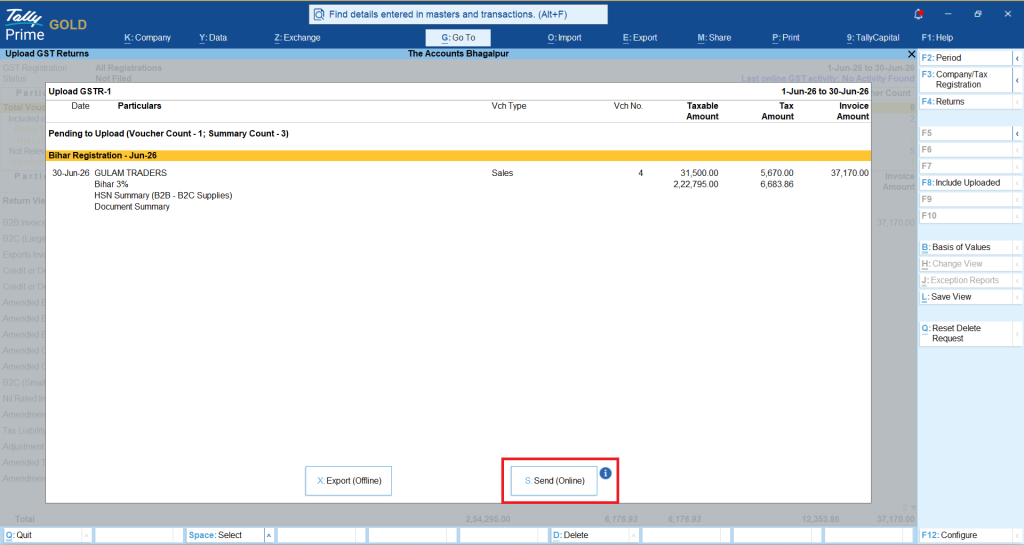
Pull your GSTR-2B data directly into TallyPrime, reconcile it with your purchase registers automatically, and push your GSTR-1 returns without exporting clumsy JSON files. You can now upload GSTR-1 returns directly from TallyPrime without visiting the GST portal.
Follow the step:
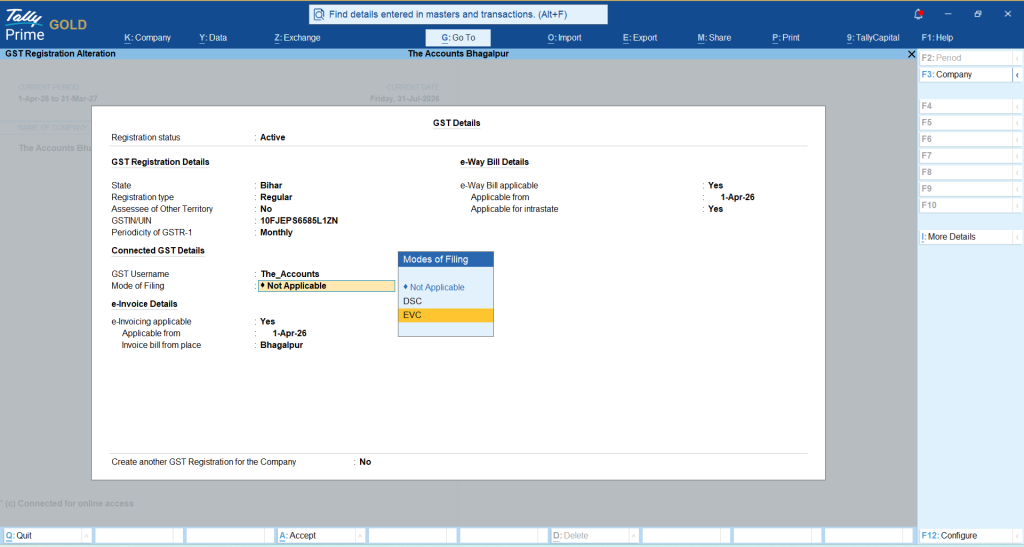
Step-1: Gateway of Tally → F11, Set ‘Yes’ Enable GST → Connected GST Details, put your user name and select mode of filing
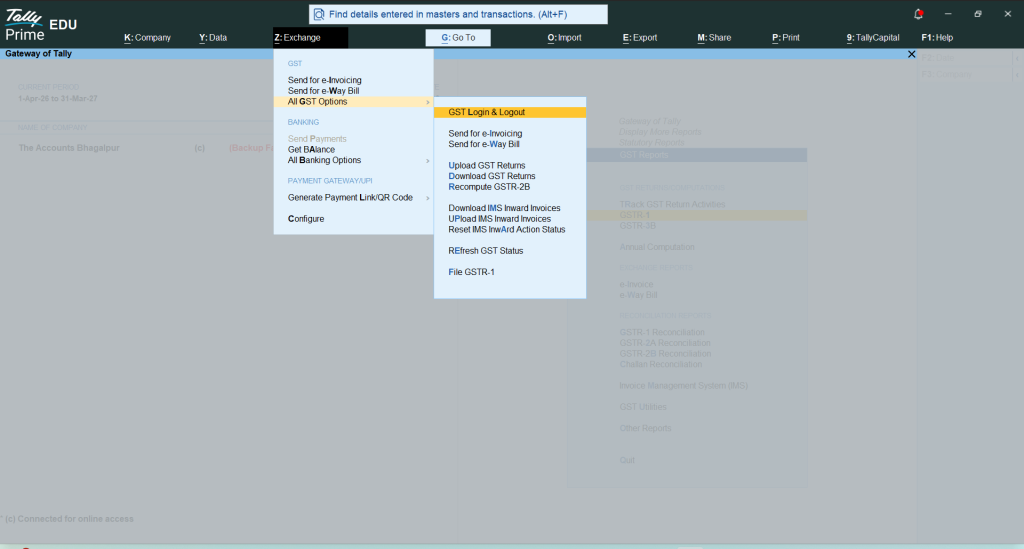
Step-2: Gateway of Tally → Exchange (Alt+Z) → All GST Options → GST Login & Logout
Step-3: Gateway of Tally → Display → Statutory Reports → GST Reports → GSTR-1 → Export (Alt+E) → click on Send (Online)
5. Digital document capture
Attach original vendor bills, delivery challans, or customer purchase orders directly to the corresponding transaction in TallyPrime so you never hunt through physical folders again. Digital Document Capture in TallyPrime Version 7.1 can be done using Docs by Ira.
What does "continuous" flow really mean for your business?
True connection is continuous. In my experience, business owners often confuse "integration" with "data transfer." Integration usually means clicking a button to export a file from System A and import it into System B. Continuous flow means the data lives everywhere it needs to the moment it is created.
When you record a sale in TallyPrime, the inventory updates, the ledger adjusts, the e-invoice registers with the government, the e-way bill generates, and the payment link goes out to the customer. You entered the data once. It flowed everywhere.
"Connected accounting isn't about connecting apps; it's about disconnecting from repetitive, manual busywork."
Take Ramesh, who runs a mid-sized hardware distribution business in Patna. Before switching to a connected workflow, he had two data entry operators spending three hours every morning matching bank deposits against customer ledgers. By setting up direct bank feeds and payment gateways within TallyPrime, that reconciliation process shrank to ten minutes. His team redirected those hours toward inventory management and customer service.

How to bring connected accounting into your daily operations
Transitioning to a connected workflow doesn’t have to happen overnight. You can phase it in to avoid overwhelming your team:
- Step 1: Link your primary current account for automated bank feeds this week.
- Step 2: Enable direct e-invoicing generation straight from your sales vouchers by next month.
- Step 3: Introduce integrated payment links on your outbound invoices to accelerate cash collection.
By letting software handle the repetitive movement of data, you free up mental space to focus on what actually grows your business: margins, customer relationships, and strategic planning.
Frequently asked questions
Do I need a separate subscription for bank feeds in TallyPrime?
Bank integration is built directly into your active TallyPrime subscription, though availability depends on your specific banking partner's digital services.
Can I still work offline if my internet connection drops?
Yes. TallyPrime operates locally on your system, meaning your core accounting and data entry remain uninterrupted even during internet outages.
How does automated GST reconciliation save time?
It automatically cross-references your purchase register with the government portal's GSTR-2B data, instantly highlighting mismatched or missing invoices to protect your input tax credit.
Is technical expertise required to set up these connections?
Basic setup is straightforward, and your local Tally partner can typically configure bank feeds, portals, and payment gateways for you in under an hour.
Will my existing historical data be lost when I switch?
Not at all. All your past ledgers, vouchers, and financial reports migrate cleanly into the connected environment so you maintain complete continuity.







