










Most conversations about mobile accounting begin with the wrong question. People ask whether they can run the whole system off a phone. Almost no owner actually needs that.
Say you're driving to a customer meeting, Delhi to Jaipur, and at half past ten the sales manager calls. The customer is asking for another four lakh of credit, yes or no. You don't need to pass a sales voucher from the passenger seat. You need one number before you answer: what this customer already owes you.
By afternoon the purchase team has forwarded a supplier invoice on WhatsApp. You don't need to account for it yourself either. It just has to reach the accounting process before it vanishes into the chat history.
The useful version of TallyPrime on a phone is that narrow. Check the reports that matter through a phone browser, and push transaction documents into TallyPrime through TallyIra. What follows is what that covers, and where it stops.
Your reports can travel even if the accounting computer can't
TallyPrime has a feature called Reports in Browser, usually shortened to TRiB. Once it's set up, authorised users open supported reports in a web browser on a phone, tablet, or another computer. The company data never leaves the business computer. When a report is opened online, TallyPrime fetches only what that report needs.
So nobody's books get copied onto a phone. What's shared is selected information, controlled per user.
Setup is three things: browser access enabled for the company under F11, the company connected for online access through the Company menu, and a valid Tally.NET ID with the right permissions for whoever logs in. You also choose which reports each person can open. A sales manager needs outstandings. An accountant needs the wider financial reports. The owner usually wants most of it. Give all three the same access because it's quicker, and that's how access sprawl starts.
|
CA Tip: Don't hand out full report access just because it's the easy option. Look at what each person's role actually needs, and grant to that. |
So what can you actually check from the phone?
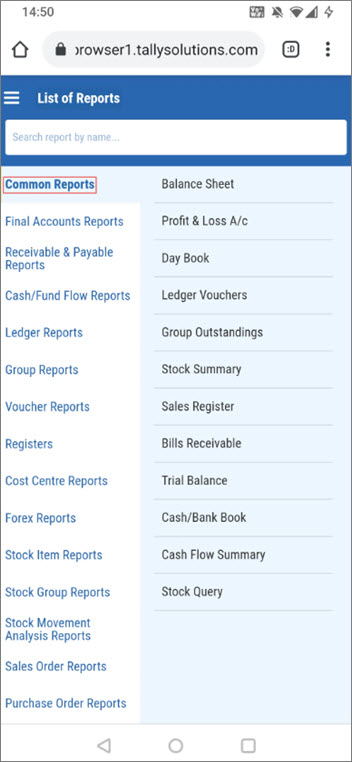
With access enabled, the browser-supported reports cover most of what an owner asks about in a week: Balance Sheet and P&L, Bills Receivable and Payable, Group and Ledger Outstanding, the Cash and Bank books, Cash Flow, the Sales and Purchase registers, Stock Summary and Stock Query, Ratio Analysis, and the Trial Balance.
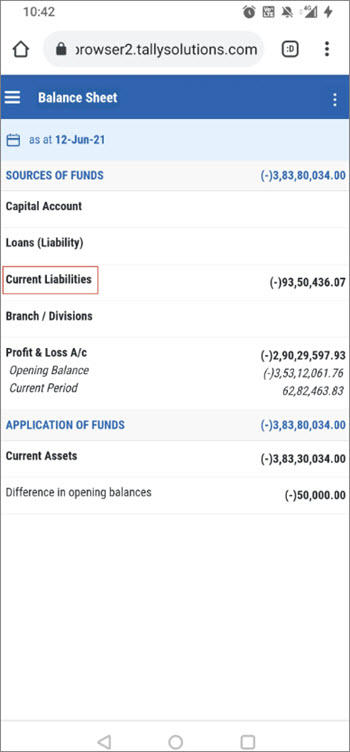
Waiting outside a client's office, that means you stop phoning the accountant for every figure. What does this customer owe, open the outstanding. Stock left on a fast-mover, Stock Summary or Stock Query. Cash position, the Cash or Bank books. Sales this month, the Sales Register with the period changed. The supported reports drill down for detail as well.
It isn't a full accounting dashboard and shouldn't be pitched as one. It's a management view of your reports on a phone, and for a lot of owners that covers the road well enough.
The five-lakh call you shouldn't make from memory
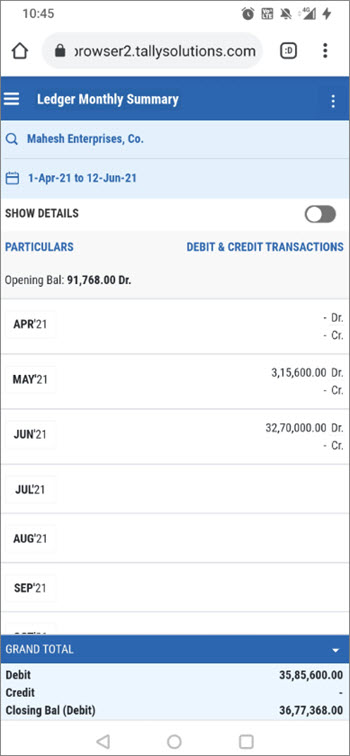
A customer wants another five lakh of supply. The salesperson vouches for them, says they always pay, and you half-remember that being true. Memory isn't a credit-control system.
Pull the outstanding up on the phone: eleven-point-eight lakh total, six-point-two of it already past 60 days, five more now on the table. That is usually enough to move the answer from "okay, dispatch" to "collect four lakh first, then we release the order."
The phone's only job there was getting the number in front of you while the decision was still open.
The phone can also start the invoice off

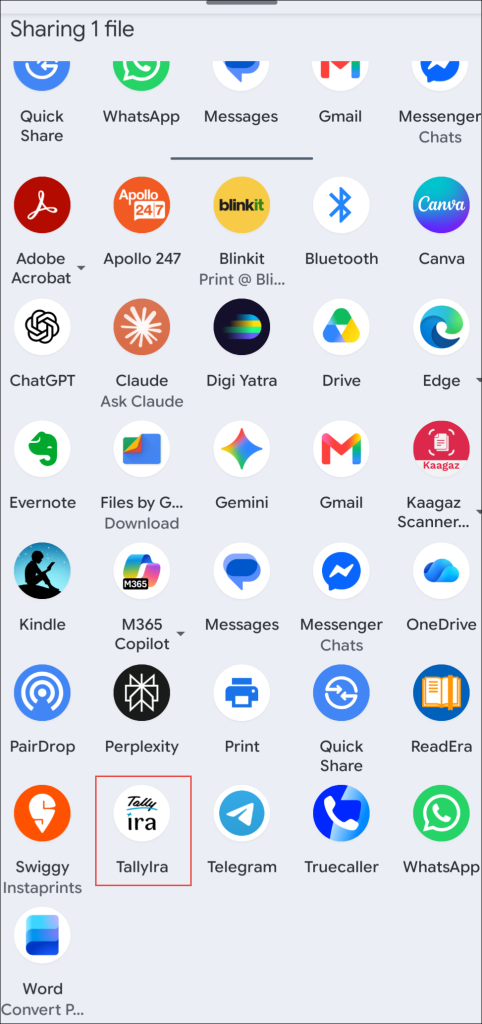
Sending documents is a separate job from reading reports. Docs by Ira, TallyPrime's AI feature, works with the TallyIra app. An authorised user scans a document or uploads a PDF or image, picks the company, the voucher type and mode, and sends it into TallyPrime, where it lands in Draft Transactions.
It earns its keep when the paperwork turns up away from the accounting desk. A site engineer gets handed a supplier invoice on location. Left to itself that becomes a photo, a WhatsApp forward to someone, a ten-day gap, and a second forward when it finally gets remembered. Sent through TallyIra, the same invoice enters a defined workflow while it's still in his hand. A vendor's PDF that reaches your inbox while you're travelling works the same way.
At month-end, the accountant isn't rebuilding the whole month out of twenty WhatsApp threads.
What happens after you scan it
Sending an invoice from the phone does not post a voucher. It arrives in Draft Transactions and waits for review. Depending on the document and the configuration, Docs by Ira helps with the extracted details, master mapping, missing masters, ledger allocation, date issues, and possible duplicates. The voucher is saved from TallyPrime only after someone has checked it.
On a purchase invoice showing 84,000, the phone moved the document quickly. The supplier, the invoice date, the GST treatment, the purchase ledger, the stock item, the amount, and whether it was already entered last week still need a human eye. The document arrives faster. The checking still has to happen.
None of it runs itself without settling a few things first: who uploads, which company and voucher types they can send to, and who reviews the drafts and saves the voucher. Leave those vague and all the speed does is make a mess arrive sooner.
What stays on the desktop

Browser access is report access, not a phone edition of TallyPrime, so high-volume accounting through a mobile browser was never the idea.
The heavy work stays in the application: bulk voucher entry, complex purchase accounting, detailed master maintenance, corrections and alterations, the final review of imported drafts, voucher posting, large reconciliations, and detailed compliance work. Anyone who genuinely needs full remote transaction capability from another location is looking at Remote Access, a separate feature that runs TallyPrime on the remote computer, not a report opened in a browser.
That boundary isn't a shortcoming to apologise for. Every extra person who can change financial data is one more set of controls to maintain, and an owner on the road is better off seeing a number than editing the books from a moving car.
A realistic phone day
Used the way it's meant to be, a day might run like this. Before leaving home, Bills Receivable shows two customers past their expected payment dates, so the sales head hears about it before the first dispatch. Late morning, a large customer asks for more credit and the Ledger Outstanding settles the answer before it goes out. At lunch, Stock Summary flags a fast-mover running low and purchase gets a call. Mid-afternoon, a supplier's invoice PDF goes into TallyIra for the accounts team to review later. Leaving the customer site in the evening, the Sales Register and the cash position show where the day landed, with nobody asked for a screenshot.
No vouchers entered anywhere in that day. The reports and the uploads carried their bit, and the accounting stayed where it should.
Owners don't need the accounting desk in their pocket. They need the right number when a decision can't wait, and browser reports plus TallyIra cover that while the accounting itself stays with the finance team.
It doesn't replace the accountant. Most days it just means walking into the decision already knowing the number.







