










Every software vendor is rushing to add "AI" to their product, but shiny features often hide poor utility. To avoid wasting money on expensive hype, evaluate tools through a grounded lens: demand proof of real accuracy, check who owns your data, ensure you can override mistakes, and verify that you can trace how decisions are made.
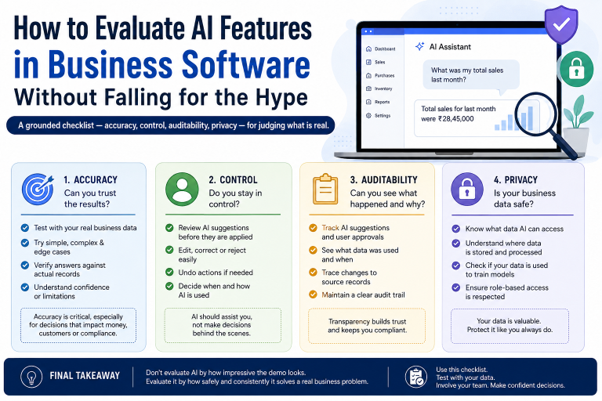
Is your software's new AI feature actually useful, or just expensive hype?
AI is currently stamped onto almost every business tool you can buy, from your accounting platform to your customer support inbox. Vendors promise that artificial intelligence will instantly slash workloads and solve complex operational hurdles.
In my experience working with growing businesses, I’ve learned a hard truth: most AI add-ons are solutions looking for problems. They look incredible in a 10-minute vendor demo, but fall flat when faced with messy, real-world company data. Buying into the marketing buzz without a proper evaluation framework leads to wasted budgets, frustrated teams, and security risks.
Evaluating business AI requires looking past flashy interfaces and testing what actually matters to your bottom line.
Can it prove its accuracy, or is it just guessing?

Every AI model hallucinates, which is a polite industry term for making things up. When a vendor claims their tool has high accuracy, ask to see how it performs on data specific to your industry, not just generic benchmark tests.
I recently worked with a mid-sized logistics firm that adopted an AI email summarizer. The tool looked magical during testing, but once deployed, it regularly confused delivery dates and misread cancellation requests as new orders. The team spent more time double-checking the AI's work than it would have taken to read the emails manually.
Practical tip: Run a pilot test using your company's actual historical data. If the error rate is higher than 5 percent, the tool creates more work than it saves.
Do we keep control, or are we locked out?
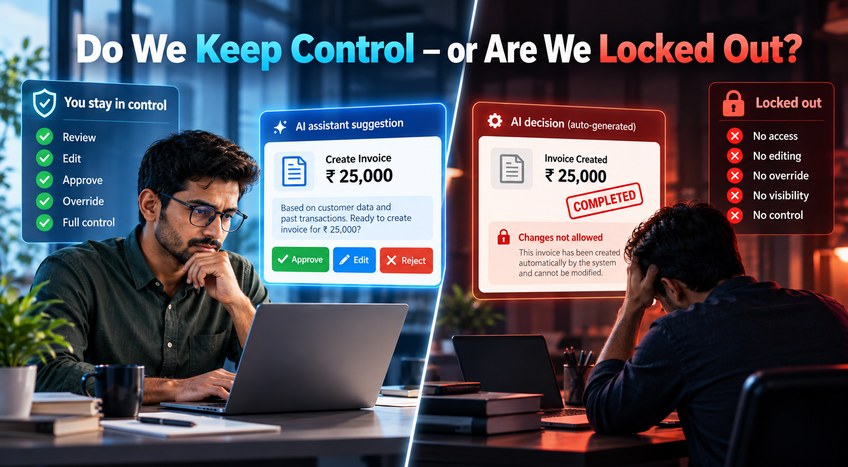
AI should act like an assistant, not an autonomous manager. If a software feature makes changes, approves invoices, or replies to clients without human approval, you are inviting operational chaos.
When reviewing any AI tool, look for the "human-in-the-loop" setting. You need granular controls that let you adjust how aggressive the AI is, set hard boundaries on what it can touch, and easily override its suggestions with a single click. If the software makes decisions in a black box with no manual override, walk away.
Where does your business data actually go?
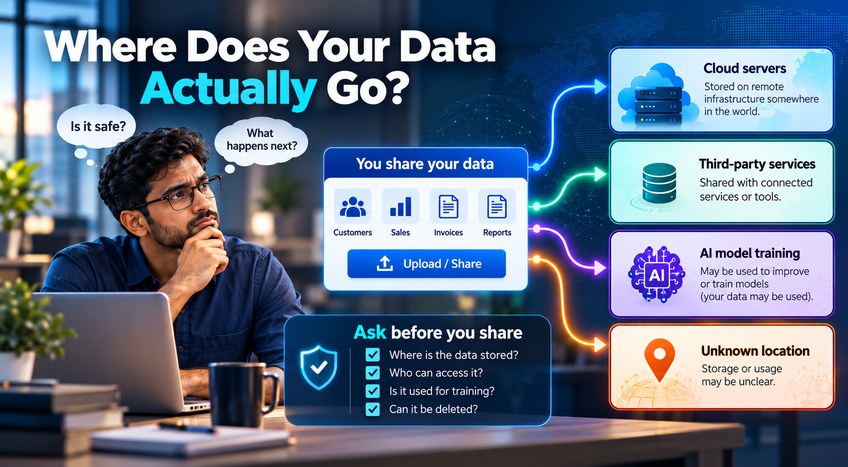
Privacy is where most businesses get burned by rushed AI adoption. Many cloud-based AI tools use your company inputs to train their underlying public models unless you explicitly opt out.
I once audited a client's software stack and discovered their new AI note-taker was sending confidential client strategy transcripts to a third-party server. Before turning on any AI feature, get clear, written answers to three questions:
- Is our data used to train public models?
- Where are our prompts and outputs stored?
- Is the data encrypted both in transit and at rest?
Can you audit how it reached a decision?
If an AI tool flags a transaction as fraudulent, rejects a loan application, or drafts a legal response, you need to know why. Regulatory compliance and basic accountability require an audit trail.
If your software provider cannot show you the logic path or source documents the AI used to generate an output, you cannot defend that decision to a client, auditor, or board member. Look for tools that cite their sources or provide a clear history log for every automated action.
"If an AI tool cannot explain its work, you are not saving time—you are just transferring the risk."
How to cut through the noise and choose wisely
Separating valuable automation from expensive marketing gimmicks comes down to disciplined testing. Use this simple four-point checklist before signing any software contract upgrade:
- The Test Drive: Insist on a two-week trial using your team's everyday data, not the vendor's pre-cleared demo files.
- The Override Check: Verify that a human employee can easily review, edit, or reject every single AI-generated output before it goes live.
- The Privacy Audit: Confirm in writing that your proprietary business data remains private and is never fed into public training sets.
- The ROI Reality Check: Calculate the actual time saved versus the cost of the AI add-on license. If the math does not yield a clear positive return within 90 days, skip it.
Frequently Asked Questions
1. What is the biggest mistake businesses make when buying AI software?
Purchasing software based on a vendor's scripted demo rather than testing it against messy, real-world company data and daily operational workflows.
2. How do I know if an AI tool is secure for sensitive data?
Always request the vendor’s security whitepaper, check for SOC 2 compliance, and ensure a strict data-privacy agreement stating your inputs won't train public models.
3. Should I wait for AI technology to mature before buying?
No, but you should focus on narrow, proven automation use cases—like data entry or basic categorization—rather than broad, unproven autonomous agents.
4. What does human-in-the-loop mean in simple terms?
It means an employee must review and approve every action or suggestion the AI makes before it is finalized or sent outside the company.
5. How can I calculate the true cost of an AI feature?
Factor in subscription price upgrades, employee training time, and the hidden cost of staff members having to double-check and fix AI errors.







