










Small HSN errors can create big GST problems
After more than 15 years of experience in accounting and GST compliance for various businesses, I have seen how a small mistake in accounting data can create a large amount of work later.
I remember reviewing GST filing data with my colleague for a business that was preparing its GST return. At first, everything was normal. Sales entries were recorded correctly, GST amounts were calculated correctly, and the return data was almost ready. But while reviewing the details, I noticed that a few products had incorrect HSN codes.
The invoices had already been created, so the mistake was not immediately obvious. However, the incorrect HSN information meant that the GST data needed to be checked again and corrected before filing. What looked like a small data-entry mistake quickly turned into additional reconciliation and review work.
This is a common challenge for every business dealing with a large number of products. When HSN codes are entered manually, it becomes difficult to verify every product every time. An incorrect or missing HSN code may go unnoticed until the GST data is being reviewed for filing.
This is why HSN codes deserve attention during day-to-day accounting.
With the recent release of TallyPrime 7.1, HSN-related capabilities have also been introduced to help businesses validate product classification and maintain more accurate GST data.
This is where built-in HSN validation in TallyPrime can make the process easier. Instead of waiting until the GST filing stage to identify classification issues, businesses can validate HSN information earlier and correct potential errors in their accounting data.
Importance of accurate HSN codes
HSN (Harmonised System of Nomenclature) codes are used to classify goods under the GST framework. Every product should be mapped to the correct HSN code so that GST is calculated and reported accurately.
Using the correct HSN code helps businesses:
- Classify products correctly
- Apply the appropriate GST rates
- Prepare accurate GST returns
- Improve consistency across inventory records
- Reduce reconciliation issues during return filing
On the other hand, incorrect or incomplete HSN information can create unnecessary challenges. Businesses may have to spend additional time reviewing item masters, correcting voucher entries, and resolving discrepancies before filing GST returns.
For organisations managing hundreds or even thousands of stock items, these small mistakes can quickly become difficult to track manually.
How TallyPrime's built-in HSN validation helps businesses
As businesses grow, maintaining accurate product information becomes more challenging. New stock items are created regularly, employees update inventory records, and product classifications may change over time.
TallyPrime helps simplify this process by providing built-in HSN validation features that enable businesses to identify and correct HSN-related issues before preparing GST returns.
Let's look at how this works.
Select valid HSN codes while creating stock items
The accuracy of GST reporting starts with the stock item master.
Whenever a new product is created, assigning the correct HSN code is one of the most important steps. Searching for HSN codes manually or relying on memory increases the possibility of selecting an incorrect classification.
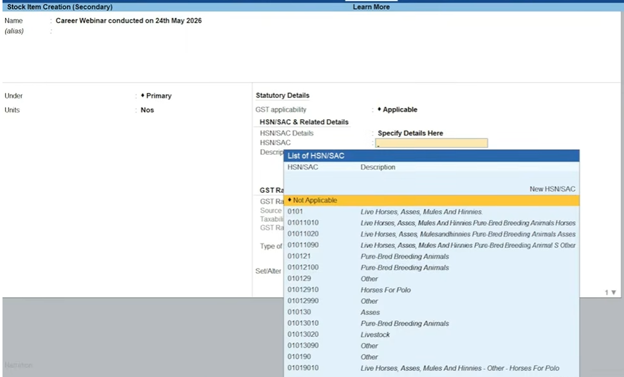
TallyPrime simplifies this process by providing an HSN code list while creating or altering stock items. Users can select the correct HSN code directly from the available list, and the corresponding description is displayed automatically.
This makes product classification faster and helps reduce manual entry errors at the source.
How to enter HSN/SAC details in TallyPrime
- Go to the Gateway of Tally.
- Select Create.
- Choose a Stock Item.
- Select or create the required stock item.
- Go to the HSN/SAC field.
- Enter the applicable HSN/SAC code.
- Save the stock item details.
Identify HSN issues before preparing GST returns
Many businesses discover HSN-related errors only when reviewing GST returns at the end of the month. By then, correcting the issue often means revisiting stock items or transaction entries, which takes additional time.
TallyPrime helps businesses identify such issues before GST returns are finalised through its built-in HSN validation process.

The validation checks help identify situations such as:
- Invalid HSN codes
- Missing HSN information
- Incomplete classifications
- Other HSN-related exceptions that may affect GST reporting
Instead of manually reviewing every stock item, businesses can focus only on the exceptions highlighted by the system and take corrective action before filing returns.
This makes the GST review process more efficient while reducing the chances of reporting inconsistencies.
Maintain consistent product classification across your business
As businesses expand, inventory is often managed by multiple users across different departments or locations.
Without a structured validation process, the same category of products may be classified differently over time, especially when new items are created frequently.
Built-in HSN validation helps businesses maintain greater consistency by encouraging the use of valid HSN classifications throughout the inventory.
Whether your business manages fifty products or several thousand, maintaining consistent product classification improves the overall quality of GST data and makes future reporting easier.
Reduce manual verification during GST compliance
Before the availability of automated validation, finance teams often relied on spreadsheets, manual reviews, or external references to verify HSN information.
While these methods work, they consume valuable time during month end GST activities.
With built-in HSN validation, businesses can review highlighted exceptions instead of manually checking every stock item or transaction.
This allows finance teams to spend less time searching for errors and more time completing GST compliance activities accurately and on schedule.
Review HSN validation before filing GST returns
Correct HSN codes are important not only when creating stock items but also before filing GST returns. As businesses add new products or update inventory throughout the month, there is always a possibility of missing or incorrect HSN information.
Reviewing HSN validation before filing returns gives businesses an opportunity to identify such exceptions early instead of discovering them after GST returns are prepared.
TallyPrime provides an HSN Validation report that highlights exceptions requiring attention. Rather than manually checking every stock item, businesses can focus on the records flagged by the system, review them, and make the necessary corrections before proceeding with GST filing.
How to access the HSN Validation report
- Go to GSTR-1 Reports.
- Open the HSN Validation Report.
- Review the HSN/SAC details shown in the report.
- Identify any missing, incorrect, or invalid HSN/SAC codes.
- Go back to the relevant stock item and make the necessary corrections.
- Recheck the report to ensure the HSN details are updated correctly.

How different businesses benefit from HSN validation
Although HSN validation is a common requirement under GST, the way businesses benefit from it depends on the nature of their operations.
Retail businesses
Retailers are constantly adding new products, replacing seasonal stock, and updating their product lists. With so many items to manage, HSN details can easily be missed.
- Enter the HSN code when a new stock item is created.
- Keep HSN details consistent as the product list grows.
- Spot missing or incorrect HSN details before GST filing.
- Spend less time checking product details manually.
Manufacturing businesses
A manufacturer may have hundreds of raw materials, semi-finished goods, and finished products. Keeping the HSN details right for all these items can become a regular accounting challenge.
- Maintain the right HSN details for different types of inventory.
- Check the classification when new items are added.
- Catch errors before they affect GST reporting.
- Make the review process easier when preparing returns.
Wholesale and distribution businesses
For wholesalers and distributors, the sheer number of products and transactions can make HSN verification difficult. A small error in one item can easily go unnoticed when there are thousands of transactions to review.
- Check HSN details across a large product catalogue.
- Identify missing or incorrect codes earlier.
- Keep GST data more consistent across transactions.
- Reduce the last-minute effort involved in GST reconciliation.
Best practices for managing HSN codes in TallyPrime
TallyPrime’s built-in HSN validation is most effective when combined with good inventory management practices.
Here are a few recommendations that businesses can follow:
- Select the appropriate HSN code while creating new stock items instead of leaving it for later.
- Review the HSN Validation report before preparing GST returns.
- Correct highlighted exceptions promptly to maintain clean inventory data.
- Periodically review item masters, especially after introducing new products.
- Ensure users responsible for inventory creation understand the importance of accurate product classification.
These simple practices can significantly reduce the effort involved in GST compliance and improve the quality of business records.
An accountant’s view: Validate HSN codes before they become a GST problem
Accurate HSN classification is an important part of GST compliance. Even small mistakes in product classification can lead to additional review work while preparing GST returns.
TallyPrime's built-in HSN validation helps businesses identify and correct HSN-related exceptions before filing returns. By validating stock items, reviewing highlighted exceptions, and maintaining consistent product classifications, businesses can improve the quality of their GST data while reducing manual verification.
Whether you manage a small product catalogue or thousands of inventory items, using built-in HSN validation can make your GST review process simpler, more organised, and more reliable.
Frequently asked questions (FAQs)
1. What is HSN validation in TallyPrime?
HSN validation helps businesses identify missing, invalid, or incomplete HSN information so they can review and correct it before preparing GST returns.
2. How can I check HSN validation in TallyPrime?
Go to Display More Reports → GSTR 1 Reports → HSN Validation. Review the exceptions shown in the report, correct the highlighted HSN details, and refresh the report before filing your GST returns.
3. Does HSN validation automatically correct incorrect HSN codes?
No. TallyPrime identifies HSN-related exceptions, but users need to review and update the stock item or transaction details wherever required.
4. Why is HSN validation important for GST compliance?
Using valid HSN codes improves product classification, supports accurate GST reporting, reduces review effort, and helps businesses prepare cleaner GST returns.
5. Can small businesses also benefit from HSN validation?
Yes. Even businesses with a smaller product catalogue can use HSN validation to maintain accurate inventory records and reduce GST reporting errors.
6. Does HSN validation affect existing accounting entries?
No. HSN validation only identifies issues related to product classification. It does not modify accounting transactions automatically.
7. When should businesses review the HSN Validation report?
It is a good practice to review the HSN Validation report before preparing or filing GST returns so that any exceptions can be corrected in time.
8. Can multiple users maintain HSN information in TallyPrime?
Yes. Multiple authorised users can create and manage stock items, while HSN validation helps maintain consistent product classification across the business.







