










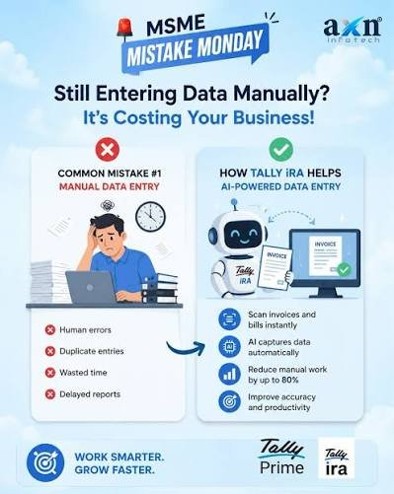
The accounts head of a trading business told me something a few weeks ago that stuck with me. His team takes in around 300 purchase invoices a month, and none of them are complicated. Supplier name, invoice number, GSTIN, item, rate, GST, total. Ordinary stuff. But somebody on his team still has to sit and read every single one and retype all of it into TallyPrime.
And then the second problem shows up, which is the one that actually costs him. One supplier had ended up under two slightly different ledger names. One invoice got entered twice. Another had an item description that didn't match the stock master, so now the reports don't tie out. His people were genuinely busy all month, but when he looked at what they were busy with, a lot of it was just reading, typing, matching, and then fixing what got typed wrong.
That is the pile of work Docs by Ira is built to shrink. It uses AI to read supported PDF and image documents, pull out the transaction details, and help create vouchers in TallyPrime, and it can also create or map masters and flag exceptions before anything hits the books.
The bookkeeping-assistant part is fine. The part I actually care about is that last bit, the exceptions before posting, because good automation should cut the typing without quietly taking away your control over the entry.
The invoice already has the data on it
Look at how a normal purchase entry goes. The invoice arrives, and then a person keys in the supplier, the invoice number and date, the item, quantity, rate, GST details, ledger, and total. Every one of those numbers is already printed on the document in their hand. The accountant isn't deciding anything at that stage. They're just moving data from paper to screen.
With Docs by Ira you bring the document in instead of retyping it. You can import PDFs or supported images from the computer, pull them in through Autofill while creating a voucher, or push them to TallyPrime from the TallyIra mobile app. Tally reads the document and prepares it for voucher creation.
So the shape of the job changes. It used to be read, type, check, and save. Now it's more like import, review, fix if needed, and save. The accountant is still checking the entry the same as before. It's the typing that mostly goes away.
Where the time actually adds up
Take that distributor with 300 invoices a month. If manual entry runs about three minutes an invoice, you're looking at somewhere around fifteen hours in a month just on data entry, before anyone has reviewed anything for accounting sense.
If the extraction does most of the typing and the accountant spends closer to a minute glancing over each clean draft, that same pile is more like five hours. I want to be honest that these are back-of-envelope figures from one conversation, not a Tally benchmark. But the point holds. Three minutes saved once is nothing. Three minutes saved a few hundred times is most of a working week back.
Cleaner books start before the voucher is posted
This is the part of the feature I like most, and it's easy to miss because it isn't the flashy bit.
Imported transactions don't just drop into your books. They land first in the Draft Transactions report, and your company data only changes when you review a draft and save it as a real voucher. That gap is the whole point. The report sorts what came in: Ready to Convert, Action Required, potential duplicates, missing masters, master mismatches, date mismatches. You can put the original document next to the draft and sort out whatever's off before it becomes an entry.
That matters more than it sounds, because the failure mode with AI in accounting is that it makes a call silently and moves on. Here it has to show you what needs a human before anything is committed.
CA Tip: "AI extracted it" is not the same as "accounting approved it," and the reviewer still owns the party selection, GST treatment, ledger classification, the amount, the date, and the final approval. Let the automation shorten the review. Don't let it replace it.
Master mapping stops the same mess repeating
Here's where it gets more useful. Say an invoice reads "ABC Industrial Supplies Pvt Ltd" but your ledger is just "ABC Industrial Supplies." You do not want a brand new supplier ledger every time the wording drifts a little.
Docs by Ira can search your existing masters and map the extracted value onto the right one. For party ledgers it checks GSTIN or UIN first and then the name; for stock items it can check the part number and the item name. Once you save a mapping, it gets reused automatically the next time that same value turns up.
Anyone who has maintained a master list knows the disease this treats:
ABC Industries. ABC Industry. ABC Industries Pvt Ltd. ABC Industries Pvt. Ltd. Four names, one supplier, and a master list that's twice the size it should be because nobody caught it early.
It won't retroactively clean up the mess you already have. But used properly, the mapping keeps you from adding to it, which is the point where less entry quietly turns into cleaner data.
When the master doesn't exist yet
Sometimes it's the reverse: the invoice has a supplier or item that simply isn't in your books yet. Docs by Ira lets you create the missing master during voucher creation, either from the extracted value or while saving the voucher.
I'd go slowly here, though. Creating a master is easy. Creating the right one is still your job. Before you make a new one, it's worth five seconds to check whether it already exists under a different spelling, whether the GSTIN is right, whether the ledger group and HSN or SAC are correct, and whether that stock item is genuinely new. Five seconds now against years of duplicate data later is not a hard trade.
Ledger selection is getting smarter too
The newer release added smart accounting-ledger allocation. Tally says it can use things like the GST rate, the HSN or SAC code, and the nature of the transaction to pick the ledger. On a purchase invoice with items taxed at different rates, that's normally a manual decision each time, and with well-set-up masters and tax info the feature can take a fair bit of that off your plate.
There's a catch buried in that benefit, and it's worth being blunt about: it only works if your masters are clean. Point good AI at badly maintained masters and you'll still be correcting everything by hand. So before you expect much from the automation, it's worth going through your supplier masters, GSTINs, stock items, HSN/SAC codes, GST rates, and your purchase and sales ledgers. The tool rewards a tidy foundation and punishes a messy one.
Catching the duplicate everyone eventually enters
Duplicate invoices are not some rare edge case. The supplier emails the invoice, then sends it again on WhatsApp, then the purchase manager forwards it once more, and two different people key it in. Now your expense and your creditor are both overstated, and you find out during reconciliation.
Docs by Ira flags potential duplicates in the Draft Transactions report, looking at things like party name, reference number, total amount, and date. It's not claiming every flag is a real duplicate; you still decide. But a warning before posting beats the discovery three weeks later during recon.
It's not just purchase invoices
The feature handles document-based voucher creation across a fair range of transaction types, well beyond accounts payable. Tally's current documentation lists sales, purchase, credit note, debit note, delivery note, receipt note, sales order, purchase order, and journal voucher.
My advice would be not to automate everything on the first day. Find the corner of the business where the same kind of document lands over and over, usually the cleanest, most repetitive invoices, start there, watch where the exceptions crop up, and expand once you trust it.
What it won't do, and what to set up first
AI doesn't mean every document sails through. Tally needs PDFs or supported images and says handwritten documents aren't supported for accurate voucher creation. Poor scans, blurred text, stamps or watermarks sitting over the print, odd layouts, and unclear printing all hurt the extraction. For multi-file imports, each file should hold one transaction, and everything imported together has to be the same voucher type.
There's some setup to know about as well. Docs by Ira needs registration and an eligible TallyPrime setup, which as of Tally's current guidance means Release 7.1 or later, a valid licence, and an active Tally Software Subscription. New users get an initial allowance of 100 pages over two months before they need to upgrade the plan. And one thing worth not skipping: Tally recommends taking a company-data backup before you import documents for voucher creation.
Manual entry is draining mostly because the attention gets burned on work that never needed judgement in the first place. By the time the accountant gets to the part that actually matters, the review, half the day has gone into typing supplier names, dates, amounts, and item lines.
Docs by Ira shifts that balance. It hands the first-level document reading to the AI and keeps the accountant in the loop before anything reaches the books. If you use it, the habits that make it pay off are simple enough: start with clean digital invoices, review every draft before you convert it, map to existing masters instead of spawning duplicates, check the GST and ledger treatment properly, take the duplicate warnings seriously, and keep your backups and maker-checker controls running.
The goal here was never accounting without accountants. It's accounting where the accountant spends less time typing and more time on the entries that actually need a second look.







