










Different customers expect different invoices. TallyPrime helps you meet those expectations.
After working with businesses for many years, I have realised that invoice related queries are rarely about pricing or tax calculations. In most cases, customers ask for additional information that helps them process the invoice more efficiently.
Some customers may request a Purchase Order (PO) number on the invoice, while others may need transport details, payment terms, or a detailed product description. These requests are common, especially when you work with different customer segments such as retailers, distributors, manufacturers, service providers, or corporate buyers.
Many businesses handle these requests by creating multiple invoice formats or manually editing invoices before sharing them. While this may work for a small number of transactions, it becomes difficult to manage as the business grows.
TallyPrime simplifies this process by allowing businesses to personalise invoice templates according to different customer and transaction requirements. Instead of maintaining separate invoice files, businesses can configure invoice layouts that display the right information while keeping accounting records accurate and consistent.
Why one invoice format may not work for every customer
An invoice is more than a document used for billing. It is often the final communication customers receive after a sale, and it plays an important role in approvals, payment processing, and record keeping.
However, not every customer requires the same information.
For example:
- A retail customer may only need product details, GST information, and payment details.
- A distributor may require batch numbers, quantity break-up, and dispatch references.
- A service customer may expect project names or contract references.
- A corporate organisation may need a PO number, vendor code, or payment terms before approving the invoice.
Using the same invoice format for every customer often results in repeated modification requests, delayed approvals, and additional work for the finance team.
Personalising invoices allows businesses to present only the information that is relevant for a particular customer or transaction, making invoices clearer, more professional, and easier to process.
How TallyPrime helps you personalise invoices
One of the biggest advantages of TallyPrime is its flexibility. Businesses can customise invoice templates to match their branding, customer requirements, and business processes without affecting their accounting data.
Rather than creating separate invoice formats outside the accounting system, TallyPrime enables businesses to configure invoices directly within the software. This helps maintain consistency while reducing manual effort.
Let's look at some of the ways TallyPrime helps businesses personalise invoices.
Create invoice templates that match your business requirements
Different businesses often need different invoice layouts. A manufacturer may want detailed inventory information, while a service provider may prefer a clean invoice focused on project details.
TallyPrime allows businesses to configure invoice templates that display relevant information based on the type of business and customer requirements.
This means you don't have to edit invoices manually every time. Once the template is configured, you can use it repeatedly while maintaining consistency across all transactions.
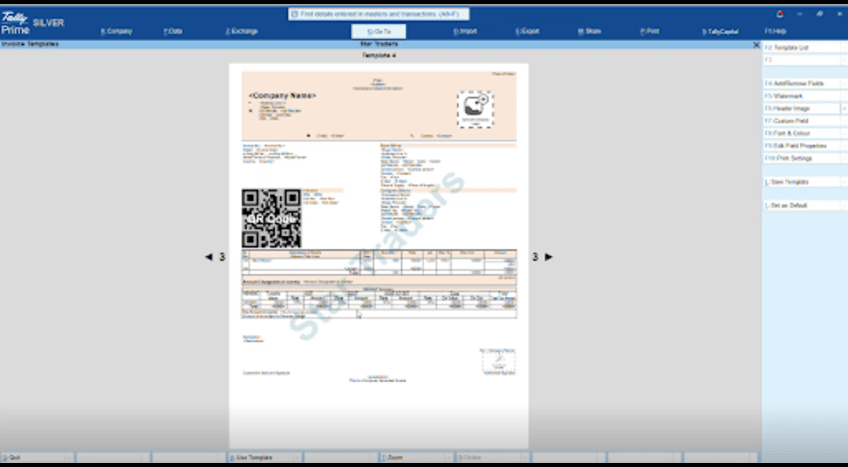
Configure invoice templates in TallyPrime to display information based on your business requirements.
Personalise your invoice with company branding
Your invoice represents your business. A professionally designed invoice creates a better impression and builds trust with customers.
TallyPrime allows businesses to personalise invoices by adding:
- Company logo
- Business name
- Address and contact details
- Header and footer
- Terms & Conditions
- Declaration messages
These branding elements help maintain a consistent identity across every invoice while giving customers confidence that they are dealing with an organised business.
Display customer-specific information
Not every customer expects the same details on an invoice.
For example, one customer may ask for a Purchase Order number, while another may need transport details or delivery references. Some customers may require their internal reference number, whereas others may simply want a clean invoice with only the essential details.
Instead of creating multiple invoice versions, TallyPrime allows businesses to configure invoice templates that display customer-specific information whenever required.
Depending on your business needs, invoices can include details such as:
- Purchase Order Number
- Customer Reference
- GSTIN
- Shipping and Billing Address
- Transport Details
- Delivery Notes
- Item-wise Narration
- Additional Remarks
Displaying the right information on the invoice helps customers process it faster and reduces unnecessary follow-up communication.
Add payment information for faster collections
A well-designed invoice should not only tell customers how much they need to pay but also make it easy for them to complete the payment.
TallyPrime allows businesses to include payment-related information such as:
- Bank Account Details
- UPI or QR Code (where applicable)
- Payment Terms
- Due Date
- Outstanding Amount
- Payment Instructions
Including these details directly on the invoice reduces customer queries and makes the payment process more convenient.
Choose what information appears on your invoice
Different businesses have different invoicing preferences. Some prefer detailed invoices, while others want a simple layout that focuses only on the essentials.
TallyPrime gives businesses the flexibility to decide what information should appear on the invoice.
For example, businesses can choose whether to display:
- HSN/SAC Codes
- Item Descriptions
- Batch Details
- Discount Columns
- Tax Break-up
- Quantity and Rate
- Company Declaration
- Terms & Conditions
- Additional Notes
This flexibility helps businesses create invoices that are relevant, easy to read, and suitable for different business scenarios.
Configure different layouts for different transactions
Invoice requirements can also vary depending on the type of transaction.
For example, a sales invoice, a service invoice, or an export invoice may require different information to be displayed.
Instead of following a one-size-fits-all approach, TallyPrime allows businesses to configure invoice layouts that suit different transaction types while keeping the accounting process simple and consistent.
Whether you're selling products, offering services, or managing specialised business transactions, personalised invoice layouts help ensure customers receive all the information they need in a single document.
Personalise invoices for different business scenarios
Every business has its own invoicing requirements. While the purpose of an invoice remains the same, the information displayed often changes based on the type of customer or transaction.
Instead of maintaining multiple invoice formats outside the accounting system, TallyPrime lets businesses configure invoice templates that suit different business needs. This helps present relevant information without changing the accounting records.
Here are a few common scenarios where invoice personalisation proves useful.
Retail businesses
Retail invoices are generally simple and focus on helping customers quickly understand what they have purchased. These invoices typically include product details, GST information, discounts (if applicable), and payment information.
Keeping the layout clean makes it easier for customers to verify the transaction and complete payments.
Manufacturing and distribution businesses
Manufacturers and distributors often deal with larger orders where customers expect more detailed information.
For such transactions, invoices may include:
- Batch or Lot Numbers
- Item Specifications
- HSN Codes
- Quantity Break-up
- Discount Details
- Delivery or Dispatch References
Displaying these details on the invoice reduces customer queries and helps businesses maintain better transaction records.
Service businesses
Service invoices usually focus on the work completed rather than physical products.
Businesses can personalise these invoices by displaying:
- Project Name
- Service Period
- Contract Reference
- Billing Description
- Milestone Details
This provides better clarity to customers and simplifies invoice approvals.
Corporate customers
Large organisations often follow structured procurement processes. Their finance teams usually verify documents before releasing payments.
Including details such as Purchase Order Number, Vendor Code, Customer Reference, and Payment Terms helps reduce back-and-forth communication and speeds up payment processing.
Make invoice sharing more professional
Creating a personalised invoice is only part of the process. Sharing it in a professional format is equally important.
Once an invoice template is configured in TallyPrime, businesses can preview it before printing or sharing. This helps verify that all required information appears correctly.
Invoices can then be:
- Printed for physical documentation
- Exported as PDF for digital sharing
- Shared with customers while maintaining the same professional layout
This ensures customers receive invoices in a consistent format every time.
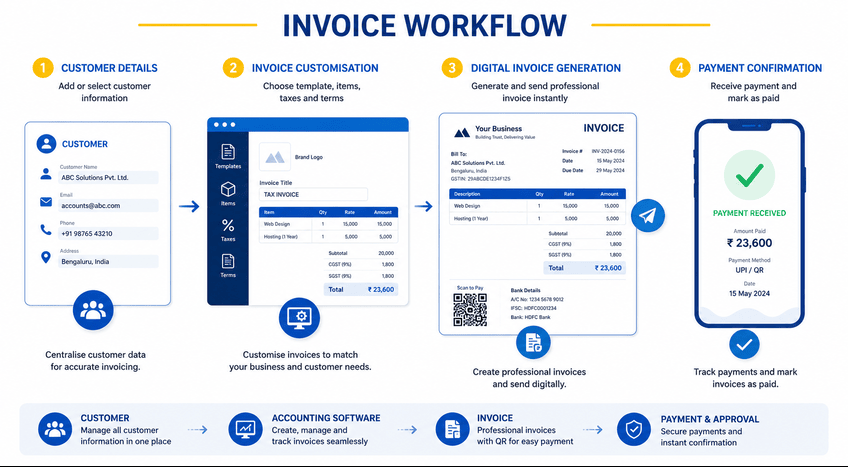
Benefits of personalising invoices in TallyPrime
Invoice personalisation is not just about improving the appearance of an invoice. It also helps businesses improve efficiency and customer communication.
Reduce manual work
Once invoice templates are configured, businesses don't have to make the same changes repeatedly for different customers.
Improve customer experience
Customers receive invoices with the information they actually need, reducing confusion and unnecessary clarification requests.
Speed up invoice approvals
Providing references such as PO numbers, payment terms, and customer-specific information helps customers complete their internal approval process faster.
Strengthen business branding
Invoices with a company logo, business information, and consistent formatting create a more professional impression.
Simplify payment collection
Displaying payment instructions, due dates, bank details, or QR codes makes it easier for customers to complete payments on time.
Maintain accurate accounting records
Invoice personalisation changes only the presentation of the invoice. All accounting, inventory, and taxation records continue to remain accurate within TallyPrime.
Best practices for creating personalised invoices
A well-designed invoice should be informative without becoming cluttered. Following a few simple practices can make invoice personalisation more effective.
- Keep customer master information updated before creating invoices.
- Create invoice templates based on business requirements rather than individual customer requests.
- Display only information that is relevant to the transaction.
- Use consistent branding across all invoice templates.
- Review invoice layouts periodically to ensure they meet changing business or compliance requirements.
- Preview invoices before printing or sharing them with customers.
These small practices help businesses maintain consistency while improving the overall invoicing process.
From an accountant's desk: Keep invoices flexible and controlled
As businesses grow, so do their invoicing requirements. Different customers expect different information, and using a single invoice format for every transaction often leads to manual changes, delayed approvals, and inconsistent communication.
TallyPrime helps businesses overcome these challenges by providing flexible invoice personalisation options. Whether it's adding company branding, displaying customer-specific details, configuring different invoice layouts, or including payment information, businesses can create invoices that are both professional and practical.
The best part is that all these customisations happen without affecting the underlying accounting records. This allows businesses to maintain accuracy while delivering a better invoicing experience for every customer.
Frequently asked questions (FAQs)
1. Why should businesses personalise their invoices?
Personalised invoices display relevant information for different customers, making approvals easier, reducing manual revisions, and presenting a more professional business image.
2. Can I customise invoice templates in TallyPrime?
Yes. Open a Sales Voucher in TallyPrime and press Alt+P (Print) > Change Template. From there, you can customise the invoice by choosing the fields to display, adding your company logo, adjusting the layout, and configuring payment or business information before printing or sharing the invoice.
3. Can I add my company logo to invoices?
Yes. You can personalise invoices by adding your company logo, business details, headers, footers, and other branding elements.
4. Can I include customer-specific details on invoices?
Yes. TallyPrime allows businesses to display details such as Purchase Order numbers, customer references, transport details, and payment terms where required.
5. Can I customise invoices for different transaction types?
Yes. Businesses can configure invoice layouts for sales, services, exports, and other transaction types to display relevant information.
6. Does invoice personalisation change my accounting records?
No. Invoice personalisation only changes how information is displayed on the invoice. The accounting entries remain unchanged.
7. Can I include payment QR codes on invoices?
Yes. TallyPrime supports displaying payment QR codes, bank details, and payment instructions where applicable for easier collections.
8. Is invoice personalisation suitable for small businesses?
Yes. Small businesses can also benefit from personalised invoices by improving professionalism, reducing manual work, and creating a better customer experience.







