









Faster data entry is only part of the story
For many small businesses, bookkeeping begins with a familiar routine: invoices arrive by email or messaging applications, someone reads the details, identifies the supplier and items, enters the transaction into accounting software, and checks the figures before finalising the books.
Each task may appear straightforward. Reading one invoice may take only a few minutes. But when invoices keep arriving throughout the day, the time spent reading line items, finding the right ledgers, entering figures and checking the totals can add up quickly.
AI-assisted accounting can reduce some of this repetitive work. It can help extract information from supported documents and prepare transaction details for review. But a prepared transaction is not necessarily a correct or finalised accounting entry.
AI does not simply remove work from bookkeeping; it changes where that work happens. Less effort may be required for manual data entry, while more attention shifts towards checking extracted information, resolving exceptions, and confirming the appropriate accounting treatment.
To understand the real benefit, businesses need to look beyond the speed of individual tasks and examine the complete journey from receiving an invoice to recording a reliable accounting transaction.
Where does the time go in manual bookkeeping?
Consider the journey of a supplier invoice through a typical bookkeeping workflow.
|
Stage |
Work involved |
What can create delays? |
|
Document receipt |
Collecting and organising invoices |
Scattered or missing documents |
|
Information extraction |
Reading supplier details, dates, line items, quantities, rates and taxes |
Unclear documents and complex layouts |
|
Master identification |
Finding the appropriate supplier ledger, stock item or expense ledger |
Inconsistent names or missing masters |
|
Transaction preparation |
Entering details into accounting software |
Repetitive typing and multiple line items |
|
Verification |
Comparing the prepared entry with the source invoice |
Incorrect or incomplete information |
|
Exception resolution |
Investigating mismatches and making corrections |
Missing details, duplicate documents or classification issues |
|
Finalisation |
Reviewing and recording the transaction |
Unresolved differences or incomplete checks |
AI can assist with selected stages, especially document reading and transaction preparation. However, it cannot eliminate every source of delay.
For example, extracting a supplier's name does not automatically establish which ledger should be used. Recognising a tax amount does not, by itself, confirm that the tax treatment is appropriate.
Entering the details is only one part of the job. The accountant still needs to confirm that the information matches the invoice and has been recorded under the correct accounting masters.
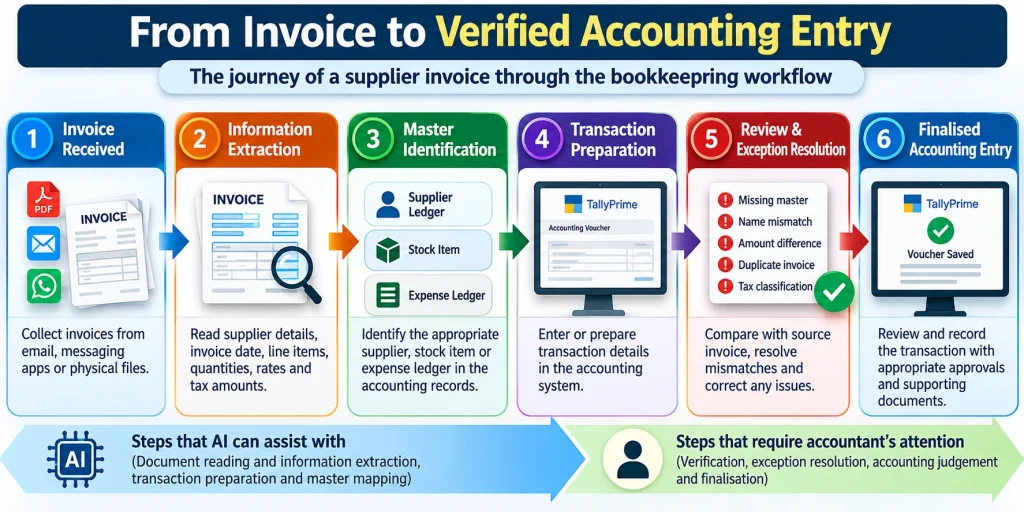
The journey from receiving a supplier invoice to recording a verified accounting transaction.
What actually gets faster with AI?
To see where AI can make a difference, it helps to separate the work it can reduce from the work the accountant still needs to do.
Work that can be reduced
For supported documents, AI-assisted extraction can identify relevant invoice fields and help prepare transaction details. This can reduce repetitive reading and typing, particularly when an invoice contains multiple line items.
Master-mapping facilities can also reduce repeated searching when extracted names differ from the names maintained in accounting records.
Work that shifts to review and correction
Automated preparation does not remove the need to check the result. Instead, the accountant may spend less time entering every field manually and more time checking whether the extracted values and selected masters are correct.
If an invoice contains an unclear amount, an unfamiliar supplier name or an item that does not exist in the accounting masters, the work shifts towards investigating and resolving that issue.
Work that remains the accountant's responsibility
Accounting classification, appropriate tax treatment, approval, reconciliation and the decision to finalise a transaction still require suitable controls and human judgement.
|
Activity |
Potential effect of AI assistance |
What still needs attention? |
|
Reading invoice details |
Less repetitive manual extraction |
Accuracy against the source document |
|
Preparing transaction details |
Less typing and re-entry |
Completeness and correctness |
|
Identifying accounting masters |
Less repeated searching |
Correct supplier, ledger or stock item |
|
Handling inconsistencies |
More structured identification and resolution |
Investigation and correction |
|
Finalising entries |
A more prepared transaction may be available for review |
Accounting judgement and approval |
A transaction may be prepared faster, but if the accountant then spends considerable time correcting it, the overall saving will be smaller than the entry-stage improvement suggests.
Practical example: Following one supplier invoice
Consider an illustrative invoice received by a small business for an eligible intra-state purchase. The figures below are hypothetical and demonstrate the checking process.
|
Particulars |
Quantity |
Rate |
Amount |
|
Keyboard |
10 |
₹500 |
₹5,000 |
|
Mouse |
5 |
₹1,000 |
₹5,000 |
|
Taxable value |
₹10,000 |
||
|
CGST at 9% |
₹900 |
||
|
SGST at 9% |
₹900 |
||
|
Invoice total |
₹11,800 |
Manual preparation
In a manual workflow, the accountant reads the invoice, identifies the supplier and items, enters the quantities and rates, records the relevant tax details, and checks the total.
If the invoice contains several line items, this process involves repeated entry and verification.
AI-assisted preparation
With a suitable AI-assisted workflow, information from a supported invoice may be extracted and used to prepare transaction details for review. This can reduce the need to type every field individually.
The accountant must still verify the supplier, invoice reference, date, line items, taxable value, tax amounts and total.
For this invoice, the two-line items add up to ₹10,000. The stated CGST and SGST total ₹1,800, producing an invoice total of ₹11,800. These calculations provide useful checks, but they do not establish that every other field has been captured correctly.
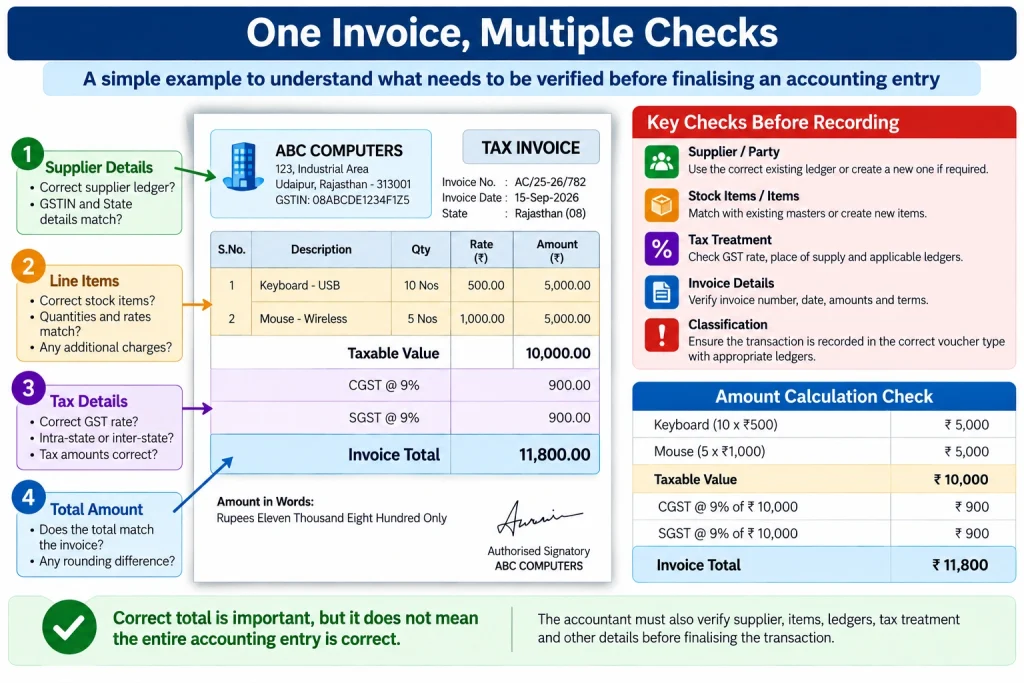
An illustrative supplier invoice showing why verifying the total alone is not enough to establish that an accounting entry is correct.
When an exception appears
Suppose the invoice shows a supplier name that differs from the existing Party Ledger. The accountant must establish whether the names refer to the same supplier before selecting the appropriate master.
Alternatively, suppose the invoice contains a stock item that is not available in the existing masters. The accountant must determine whether an appropriate master already exists or whether a new one is required.
In either situation, automated extraction may reduce the initial entry effort, but it does not resolve the underlying accounting question by itself.
What does the comparison tell us?
A fair comparison between the manual and AI-assisted workflow must include the time spent preparing the entry, checking it, correcting mistakes and completing the transaction—not just the time spent entering invoice details.
Without actual measurements from comparable transactions, it would be misleading to claim a particular percentage of time saved. The likely benefit depends on document quality, transaction complexity, master-data quality and the number of exceptions requiring attention.
How can businesses measure the real improvement?
A business may find that invoices are prepared more quickly after introducing AI assistance, yet still have a substantial backlog of pending bookkeeping work.
This can happen when the initial preparation becomes faster but review and correction work remains high. It can also happen when the business receives more documents than the team can process, even after improving individual tasks.
Five measures provide a more useful assessment.
- Preparation time: How much effort is required to move an invoice from receipt to a prepared transaction?
- Review and correction time: How much additional effort is needed to verify the transaction and correct mistakes?
- Unresolved exceptions: How many transactions remain blocked by missing masters, inconsistent information or other issues?
- Pending transactions: How many invoices remain unreviewed or unfinalised at the end of the working day or reporting period?
- Post-finalisation corrections: How often must entries be corrected after they have been recorded?
Businesses should compare similar transaction types over a consistent period. They should also consider transaction volume, document complexity and error rates before concluding that a new workflow has improved productivity.
Suppose invoice preparation becomes faster, but several entries still need corrections. The business should look at why those corrections are happening. On the other hand, if invoices can be prepared and checked more efficiently, with fewer unresolved transactions at the end of the day, the workflow is delivering a more useful improvement.
Docs by Ira in TallyPrime: From document to voucher
Docs by Ira brings document processing into the accounting workflow in TallyPrime. Instead of manually entering every detail from a supported invoice, the accountant can work with extracted information, map it to accounting masters, review exceptions and prepare a voucher. The important question is how much of the repetitive work this process removes—and what still needs to be checked before the voucher is created.
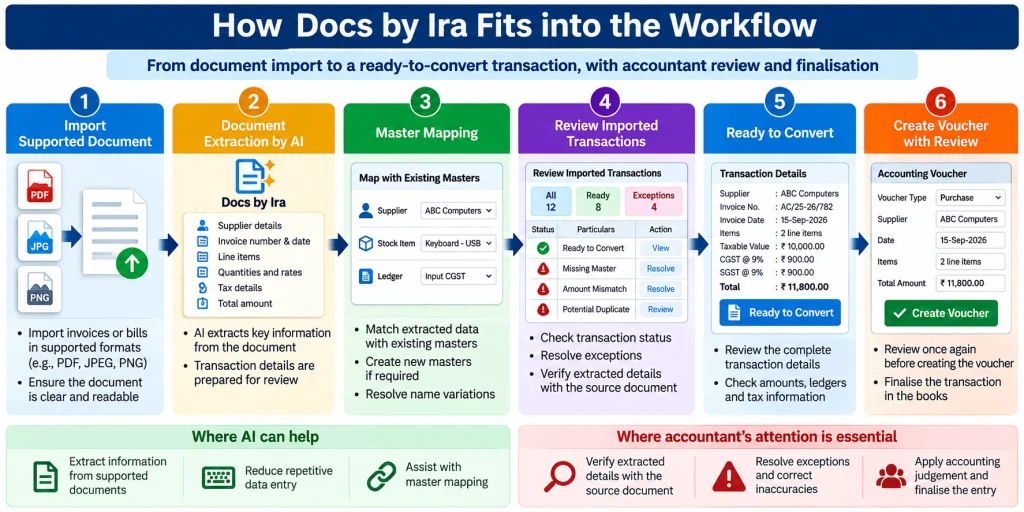
How Docs by Ira supports the workflow from document extraction to voucher preparation, with accountant review before finalisation.
Using Docs by Ira in a practical accounting workflow gave me a clear sense of how much repetitive work document processing can reduce. Tasks that involve manually reading and entering invoice details can be handled very differently when the document information is extracted and prepared for review. The time saved will depend on the document, the quality of the accounting masters and the corrections required, but the potential to move from hours of repetitive work to a much shorter preparation process is significant.
Document extraction: Reduce repetitive entry
After a supported invoice or bill is imported, the system processes the document and extracts relevant transaction information.
This can reduce manual typing of fields such as supplier details, invoice references, dates, item descriptions and amounts. The accountant must still compare the extracted information with the original document, particularly where values are unclear or inconsistent.
A readable source document helps, but extraction should never be treated as a guarantee of accuracy.
Master mapping: Connect information to the correct records
Extracted supplier names and item descriptions may differ from the names maintained in TallyPrime.
Master mapping helps connect an extracted value with an appropriate existing accounting master. Where the supplier or item is genuinely new, the accountant must determine whether a new master should be created rather than incorrectly mapping it to an unrelated record.
Correct mapping can reduce repeated identification work in subsequent transactions. Incorrect mapping, however, can introduce accounting errors, making verification essential.
Exception resolution: Identify what needs attention
Imported transactions may require action before they are ready to convert into vouchers. TallyPrime provides a Review Imported Transactions workflow for reviewing transaction status and resolving applicable exceptions.
Consider three examples:
- Missing master: An invoice refers to a stock item that does not exist in the current masters.
- Date or amount discrepancy: A transaction date or extracted amount requires investigation before the entry can be completed.
- Potential duplicate: An invoice appears to have been imported previously and must be checked against existing records.
Available resolution facilities can help address certain mapping and transaction-detail issues. Nevertheless, the accountant must investigate discrepancies, correct inaccurate information, and decide how the transaction should be recorded.
The distinction is important: identifying an exception is not the same as resolving it correctly.
Voucher preparation: Review before finalisation
Once the required information has been addressed, a transaction may progress to the Ready to Convert stage. The accountant should review the prepared details and supporting document before creating the voucher.
The review should cover the supplier or party, invoice reference and date, line items, relevant ledgers, taxable value, tax amounts and total, as applicable to the transaction.
This is where the workflow connects automation with accounting control. Docs by Ira assists with preparation; the business remains responsible for ensuring that the final accounting entry is accurate, appropriate and supported by evidence.
Practical limitations and preparation tips
The usefulness of document processing depends on supported file formats, source-document quality, transaction requirements and the availability of suitable accounting masters. Product eligibility, subscription conditions and usage limits should also be checked against current requirements.
Businesses can improve their workflow by using clear, legible documents, maintaining accurate masters, following the applicable import requirements, and reviewing extracted information before conversion.
The current product requirements should be checked before relying on a particular document type or format. Unsupported documents or incomplete information may require a different preparation process.
AI-assisted processing is easier to use effectively when invoices are legible and accounting masters are maintained properly. If supplier names, stock items or ledgers are inconsistent, the accountant may still need to spend time resolving those issues before completing the entry.
Conclusion: Measure reliable work, not just faster entry
AI-assisted bookkeeping can reduce repetitive document reading and data entry, but its overall value depends on what happens after information has been extracted.
For small businesses, the meaningful change is the distribution of effort across the complete workflow. Preparation may become faster, while review, exception resolution and accounting judgement continue to require attention.
Docs by Ira in TallyPrime illustrates how document extraction, master mapping, exception handling and voucher preparation can support this process. Its practical value should be evaluated alongside the quality of source documents, the reliability of accounting masters, the effort required for corrections, and the number of transactions successfully finalised.
Measuring entry preparation alone can give an incomplete picture. Businesses also need to look at correction time, unresolved exceptions and the number of transactions left pending. These measures show whether the time saved during preparation is translating into a smoother bookkeeping process.
AI does not eliminate the accountant; it changes where the accountant spends time. The aim is to spend less time on repetitive entry and more time ensuring that the books are accurate and complete.







